ആമുഖം
This manual provides detailed instructions for the setup, operation, maintenance, and troubleshooting of your Creative Stage 2.1 Channel Under-Monitor Soundbar with Subwoofer. Please read this manual thoroughly before using the product to ensure proper and safe operation.
ബോക്സിൽ എന്താണുള്ളത്
അൺബോക്സിംഗ് ചെയ്യുമ്പോൾ, ഇനിപ്പറയുന്ന എല്ലാ ഘടകങ്ങളും ഉൾപ്പെടുത്തിയിട്ടുണ്ടെന്ന് ദയവായി ഉറപ്പാക്കുക:
- ക്രിയേറ്റീവ് എസ്tagഇ സൗണ്ട്ബാർ
- ക്രിയേറ്റീവ് എസ്tage Subwoofer
- റിമോട്ട് കൺട്രോൾ
- 3.5mm Stereo to Stereo Cable
- ദ്രുത ആരംഭ ഗൈഡ്
- Wall Mounting Kit (screws and wall plugs)
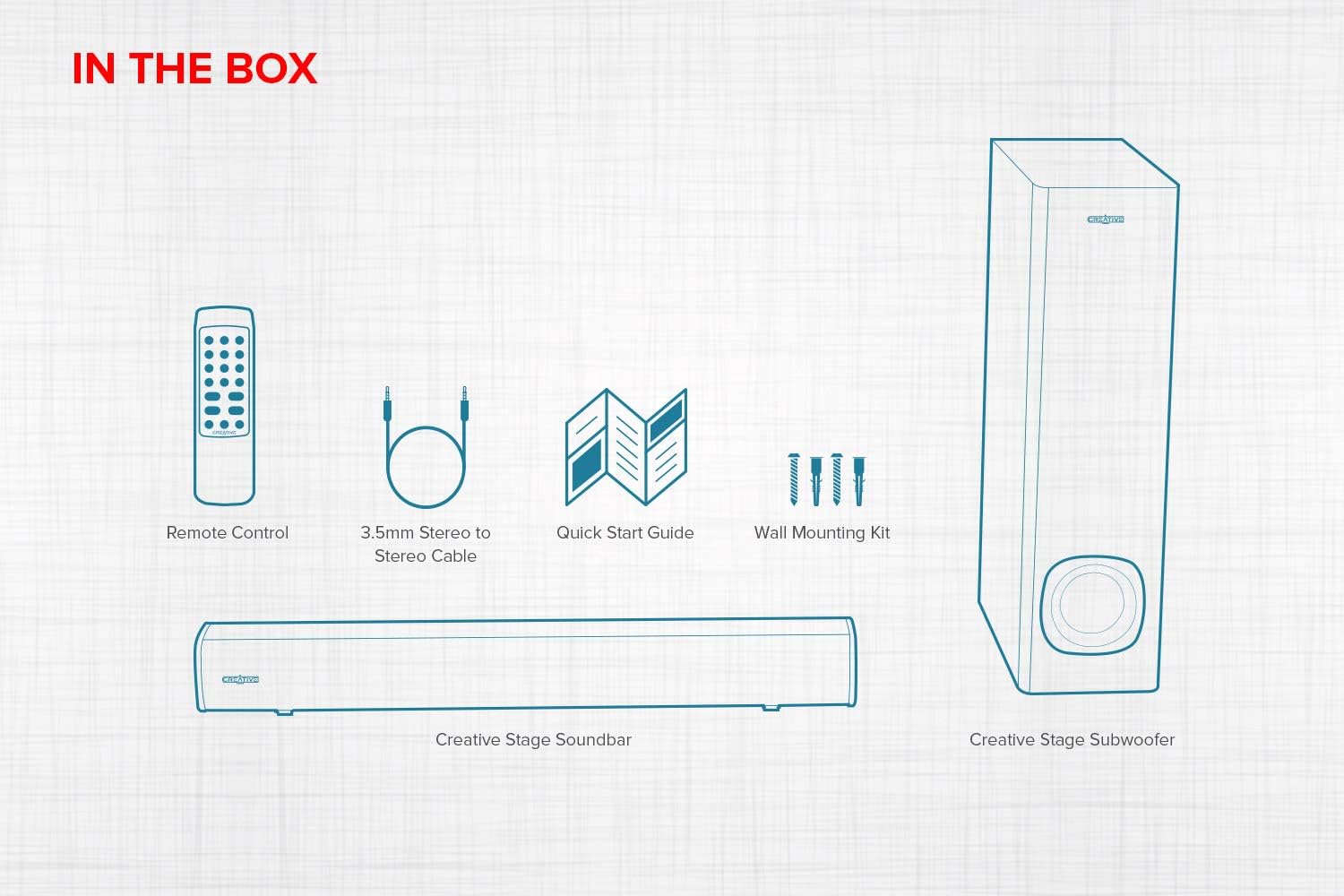
Figure 1: Contents of the Creative Stage 2.1 Soundbar System package.
This image displays all the items you should find inside the product packaging: the main soundbar unit, the separate subwoofer, a remote control, a 3.5mm audio cable, a quick start guide, and a wall mounting kit.
സജ്ജമാക്കുക
1. പ്ലേസ്മെന്റ്
ക്രിയേറ്റീവ് എസ്tage soundbar is designed to fit neatly under a PC monitor or TV. The subwoofer can be placed on the floor near the soundbar for optimal bass performance. Alternatively, the soundbar can be wall-mounted using the included kit.

Figure 2: Recommended placement options for the Creative Stage soundbar.
This image illustrates two common setups: the soundbar positioned directly beneath a computer monitor on a desk, and the soundbar mounted on a wall below a television, demonstrating its versatility for different environments.
2. കണക്ഷനുകൾ
Connect the subwoofer to the soundbar. The subwoofer connects wirelessly to the soundbar. Ensure both units are powered on and within range for automatic pairing.
ക്രിയേറ്റീവ് എസ്tage offers multiple connectivity options:
- ടിവി (ARC): Connect an HDMI cable from the soundbar's HDMI ARC port to your TV's HDMI ARC port. This allows audio from your TV to play through the soundbar and enables control of the soundbar volume using your TV remote.
- ഒപ്റ്റിക്കൽ ഇൻപുട്ട്: Use an optical cable to connect the soundbar to your TV or other audio source for high-quality digital audio.
- ബ്ലൂടൂത്ത്: Pair your mobile device, computer, or other Bluetooth-enabled device wirelessly with the soundbar.
- 3.5mm AUX-in: Connect devices with a 3.5mm audio output using the provided stereo cable.
- USB MP3: Insert a USB flash drive (up to 32GB, FAT32 format) with MP3 audio files into the USB port on the soundbar for direct playback.

ചിത്രം 3: ഓവർview of compatible devices and connectivity options.
This diagram visually represents the broad compatibility of the Creative Stage soundbar, showing it can connect to televisions, desktop and laptop computers, and various mobile devices such as smartphones and tablets.
3. പവർ ഓൺ
Connect the soundbar's power cable to a wall outlet. The soundbar is powered by a single built-in power plug. The subwoofer will automatically connect to the soundbar once both are powered.
പ്രവർത്തന നിർദ്ദേശങ്ങൾ
റിമോട്ട് കൺട്രോൾ ഉപയോഗിക്കുന്നു
The included remote control provides full command over the soundbar's functions. Ensure batteries are inserted correctly (batteries not included).

Figure 4: Remote control in use for the Creative Stage soundbar.
This image shows the convenience of the remote control for operating the soundbar from a distance, highlighting its ease of use in a living room setting. A detailed view of the remote control is also provided.
- പവർ ബട്ടൺ: സൗണ്ട്ബാർ ഓണാക്കുകയോ ഓഫാക്കുകയോ ചെയ്യുന്നു.
- വോളിയം നിയന്ത്രണം: മൊത്തത്തിലുള്ള വോളിയം ലെവൽ ക്രമീകരിക്കുന്നു.
- ഉറവിട തിരഞ്ഞെടുപ്പ്: Cycles through input modes (Bluetooth, Optical, TV ARC, AUX-in, USB MP3).
- EQ പ്രീസെറ്റുകൾ: Select from optimized audio modes such as സിനിമകൾ, സംഗീതം, കച്ചേരി, ഒപ്പം ഗെയിമിംഗ്.
- Treble/Bass Adjustment: Fine-tune the high and low frequencies to your preference.
- പ്ലേബാക്ക് നിയന്ത്രണങ്ങൾ: For USB MP3 mode, controls include Play/Pause, Skip Forward, and Skip Backward.
USB MP3 പ്ലേബാക്ക്
The soundbar supports direct playback of MP3 fileഒരു യുഎസ്ബി ഫ്ലാഷ് ഡ്രൈവിൽ നിന്ന്.
- Insert a USB flash drive (formatted to FAT32, up to 32GB) containing MP3 files into the USB port on the side of the soundbar.
- Select the USB input source using the remote control.
- Use the remote's playback controls to manage your music.

Figure 5: USB MP3 playback functionality.
ഈ ചിത്രം ഒരു ക്ലോസ്-അപ്പ് നൽകുന്നു view of the soundbar's USB port, demonstrating how a USB flash drive can be inserted for direct MP3 audio playback without needing an external music device.
മെയിൻ്റനൻസ്
To ensure the longevity and optimal performance of your Creative Stage soundbar system, follow these maintenance guidelines:
- വൃത്തിയാക്കൽ: Use a soft, dry cloth to wipe down the soundbar and subwoofer. Do not use liquid cleaners or aerosol sprays directly on the units.
- വെൻ്റിലേഷൻ: സൗണ്ട്ബാറിലും സബ് വൂഫറിലും ആവശ്യത്തിന് വായുസഞ്ചാരം ഉണ്ടെന്ന് ഉറപ്പാക്കുക. ഒരു വെന്റും തടയരുത്.
- പരിസ്ഥിതി: Avoid placing the units in direct sunlight, near heat sources, or in areas with high humidity or extreme temperatures.
- കേബിളുകൾ: Periodically check all cables for any signs of damage. Replace damaged cables immediately.
ട്രബിൾഷൂട്ടിംഗ്
If you encounter any issues with your Creative Stage soundbar system, refer to the following common problems and solutions:
| പ്രശ്നം | സാധ്യമായ കാരണം | പരിഹാരം |
|---|---|---|
| ശക്തിയില്ല | പവർ കേബിൾ ബന്ധിപ്പിച്ചിട്ടില്ല അല്ലെങ്കിൽ പവർ ഔട്ട്ലെറ്റ് സജീവമല്ല. | Ensure the power cable is securely plugged into the soundbar and a working wall outlet. Try a different outlet. |
| ശബ്ദമില്ല | Incorrect input source selected, volume too low, or cables not connected properly. |
|
| ബാസ് ശബ്ദം പുറപ്പെടുവിക്കാത്ത സബ്വൂഫർ | Subwoofer not paired or volume too low. |
|
| റിമോട്ട് കൺട്രോൾ പ്രവർത്തിക്കുന്നില്ല | Dead batteries, obstructed signal, or incorrect aiming. |
|
| ബ്ലൂടൂത്ത് ജോടിയാക്കൽ പ്രശ്നങ്ങൾ | Device too far, soundbar not in pairing mode, or previous connection interference. |
|
സ്പെസിഫിക്കേഷനുകൾ
| ഫീച്ചർ | വിശദാംശങ്ങൾ |
|---|---|
| മോഡലിൻ്റെ പേര് | ക്രിയേറ്റീവ് എസ്tage |
| മോഡൽ നമ്പർ | MF8360 |
| സ്പീക്കർ തരം | 2.1 Channel Soundbar System with Subwoofer |
| സ്പീക്കർ പരമാവധി ഔട്ട്പുട്ട് പവർ | 160 വാട്ട്സ് പീക്ക് പവർ |
| കണക്റ്റിവിറ്റി ടെക്നോളജി | Bluetooth, Optical, TV (ARC), 3.5mm AUX-in, USB MP3 |
| വയർലെസ് കമ്മ്യൂണിക്കേഷൻ ടെക്നോളജി | ബ്ലൂടൂത്ത് |
| ബ്ലൂടൂത്ത് ശ്രേണി | 10 മീറ്റർ വരെ (33 അടി) |
| സബ്വൂഫർ കണക്റ്റിവിറ്റി | വയർലെസ് |
| കൺട്രോളർ തരം | റിമോട്ട് കൺട്രോൾ |
| ശുപാർശ ചെയ്യുന്ന ഉപയോഗങ്ങൾ | For Computers, For Gaming Consoles, For Televisions |
| ഉൽപ്പന്ന അളവുകൾ (സൗണ്ട്ബാർ) | Approx. 23.7" W x 2.95" D x 2.75" H (602mm x 75mm x 70mm) |
| ഉൽപ്പന്ന അളവുകൾ (സബ്വൂഫർ) | Approx. 6.69" D x 6.69" W x 16.06" H (170mm x 170mm x 408mm) |
| ഇനത്തിൻ്റെ ഭാരം | 2.6 Pounds (total system weight) |
| പവർ ഉറവിടം | കോർഡഡ് ഇലക്ട്രിക് |
| യു.പി.സി | 054651192379 |
Note: Dimensions for soundbar and subwoofer are estimated based on the combined product dimensions provided (6.69"D x 23.7"W x 16.06"H) and typical component sizes. Actual individual dimensions may vary slightly.
വാറൻ്റി വിവരങ്ങൾ
ക്രിയേറ്റീവ് എസ്tage 2.1 Soundbar System comes with a പരിമിത വാറൻ്റി. For specific terms and conditions, including warranty period and coverage details, please refer to the warranty card included in your product packaging or visit the official Creative webസൈറ്റ്. വാറന്റി ക്ലെയിമുകൾക്കായി നിങ്ങളുടെ വാങ്ങലിന്റെ തെളിവ് സൂക്ഷിക്കുക.
പിന്തുണ
For further assistance, technical support, or to download the latest drivers and firmware updates, please visit the official Creative support webസൈറ്റ്:
ക്രിയേറ്റീവ് സപ്പോർട്ട് Webസൈറ്റ്
You may also find helpful resources and FAQs on the product's Amazon page or by contacting Creative customer service directly.


