ആമുഖം
The TP-Link TL-PoE4824G is a passive Power over Ethernet (PoE) adapter designed to supply power and transmit data simultaneously to compatible passive PoE devices. This includes devices such as TP-Link's EAP245 3.0, EAP225 3.0, and CPE610. Its design incorporates convenient wall-mounting brackets for easy installation.
പ്രധാന സവിശേഷതകൾ:
- 48V passive PoE support for compatible devices.
- Automatic determination of necessary power requirements.
- Convenient wall-mounting design for flexible placement.
- Gigabit speed support for high-speed data transmission.
- Plug-and-Play functionality, requiring no complex configuration.
- Ethernet connectivity technology.
പാക്കേജ് ഉള്ളടക്കം
നിങ്ങളുടെ പാക്കേജിൽ ഇനിപ്പറയുന്ന ഇനങ്ങൾ അടങ്ങിയിട്ടുണ്ടെന്ന് പരിശോധിക്കുക:
- 48V 24W Passive PoE Adapter (TL-PoE4824G)
- പവർ കോർഡ്
- വാൾ മൗണ്ടിംഗ് കിറ്റുകൾ
ഉൽപ്പന്നം കഴിഞ്ഞുview
The TL-PoE4824G PoE Injector features a compact design with essential ports and indicators for easy operation.

ചിത്രം 1: മുകളിൽ നിന്ന് താഴേക്ക് view of the TP-Link TL-PoE4824G Passive PoE Injector.
തുറമുഖങ്ങളും സൂചകങ്ങളും:
- PoE പോർട്ട്: Connects to the passive PoE device to deliver both power and data.
- LAN പോർട്ട്: Connects to your network device (e.g., router, switch) for data input.
- പവർ ഇൻപുട്ട്: Connects to the provided power cord for electrical supply.
- LED സൂചകം: Provides status information (e.g., power, connection activity).
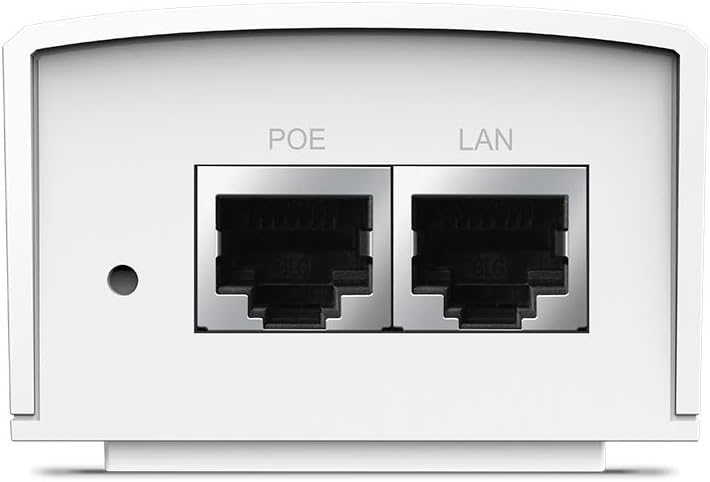
ചിത്രം 2: ക്ലോസപ്പ് view of the PoE and LAN data ports.

ചിത്രം 3: ക്ലോസപ്പ് view of the power input port.

ചിത്രം 4: വശം view showing the LED indicator for device status.
സജ്ജമാക്കുക
The TL-PoE4824G is designed for simple plug-and-play installation. Follow these steps to set up your PoE injector:
- പവറിലേക്ക് ബന്ധിപ്പിക്കുക: Plug the provided power cord into the power input port of the TL-PoE4824G and then into a standard electrical outlet.
- നെറ്റ്വർക്കിലേക്ക് കണക്റ്റ് ചെയ്യുക: Connect an Ethernet cable from your network device (e.g., router, switch) to the ലാൻ port on the TL-PoE4824G.
- Connect to PoE Device: എന്നതിൽ നിന്ന് മറ്റൊരു ഇതർനെറ്റ് കേബിൾ ബന്ധിപ്പിക്കുക പി.ഒ.ഇ port on the TL-PoE4824G to your passive PoE-compatible device (e.g., access point, IP camera).
- കണക്ഷൻ സ്ഥിരീകരിക്കുക: Check the LED indicator on the TL-PoE4824G. A solid light typically indicates a successful power and data connection.

Figure 5: Connection diagram for the TL-PoE4824G, illustrating data and power flow to a passive PoE device.
മതിൽ മൗണ്ടിംഗ്:
The TL-PoE4824G includes wall-mounting kits for secure installation. Refer to the diagram below for the mounting process:

Figure 6: Wall-mounting steps for the TL-PoE4824G using the provided brackets.
പ്രവർത്തിക്കുന്നു
Once properly connected, the TL-PoE4824G operates automatically. It provides 48V DC passive PoE to the connected device, eliminating the need for a separate power adapter for the PoE device. Data transmission occurs at Gigabit speeds through the Ethernet connection.
The injector is designed to auto-determine the necessary power requirements for the connected passive PoE device, ensuring efficient and safe operation.
മെയിൻ്റനൻസ്
- വൃത്തിയാക്കൽ: ഉപകരണം വൃത്തിയാക്കാൻ മൃദുവായതും ഉണങ്ങിയതുമായ തുണി ഉപയോഗിക്കുക. ലിക്വിഡ് അല്ലെങ്കിൽ എയറോസോൾ ക്ലീനറുകൾ ഉപയോഗിക്കരുത്.
- പ്ലേസ്മെൻ്റ്: Ensure the device is placed in a well-ventilated area, away from direct sunlight, heat sources, and moisture.
- കേബിൾ മാനേജുമെന്റ്: Keep all cables neatly organized to prevent damage and ensure proper airflow.
- ഫേംവെയർ അപ്ഡേറ്റുകൾ: ഇടയ്ക്കിടെ ടിപി-ലിങ്ക് ഉദ്യോഗസ്ഥനെ പരിശോധിക്കുക webഒപ്റ്റിമൽ പ്രകടനവും സുരക്ഷയും ഉറപ്പാക്കാൻ ലഭ്യമായ ഏതെങ്കിലും ഫേംവെയർ അപ്ഡേറ്റുകൾക്കായി സൈറ്റ്.
ട്രബിൾഷൂട്ടിംഗ്
No Power/LED Indicator Off:
- Ensure the power cord is securely connected to both the injector and a working electrical outlet.
- വൈദ്യുതി വിതരണം ചെയ്യുന്നുണ്ടെന്ന് ഉറപ്പാക്കാൻ മറ്റൊരു ഉപകരണം ഉപയോഗിച്ച് ഇലക്ട്രിക്കൽ ഔട്ട്ലെറ്റ് പരിശോധിക്കുക.
No Data Connection:
- Verify that the Ethernet cables are securely connected to the LAN port (from your network) and the PoE port (to your device).
- Ensure the connected passive PoE device is functioning correctly and is compatible with 48V passive PoE.
- Check the status of your network device (router/switch) to ensure it is providing an active network connection.
- Try using different Ethernet cables to rule out cable defects.
ഉപകരണത്തിന് പവർ ലഭിക്കുന്നില്ല:
- Confirm that your end device is a passive PoE device and supports 48V DC input. This injector is not compatible with 802.3af/at active PoE standards.
- Ensure the cable length does not exceed 100 meters (325 feet) for optimal power and data delivery.
സ്പെസിഫിക്കേഷനുകൾ
| മോഡൽ | TL-PoE4824G |
| ബ്രാൻഡ് | ടിപി-ലിങ്ക് |
| PoE സ്റ്റാൻഡേർഡ് | 48V DC Passive PoE |
| ഡാറ്റ കൈമാറ്റ നിരക്ക് | 1000 Mbps (ഗിഗാബിറ്റ് ഇതർനെറ്റ്) |
| കണക്റ്റിവിറ്റി ടെക്നോളജി | ഇഥർനെറ്റ് |
| തുറമുഖങ്ങൾ | 1x LAN (Data In), 1x PoE (Data & Power Out) |
| പരമാവധി കേബിൾ ദൈർഘ്യം | 100 മീറ്റർ വരെ (325 അടി) |
| അളവുകൾ (LxWxH) | 4.33 x 2.24 x 1.41 ഇഞ്ച് |
| ഭാരം | 5.6 ഔൺസ് |
വാറൻ്റിയും പിന്തുണയും
വാറന്റി വിവരങ്ങൾ, സാങ്കേതിക പിന്തുണ, ഉൽപ്പന്ന രജിസ്ട്രേഷൻ എന്നിവയ്ക്കായി, ദയവായി ഔദ്യോഗിക ടിപി-ലിങ്ക് സന്ദർശിക്കുക. webസൈറ്റിൽ ബന്ധപ്പെടുക അല്ലെങ്കിൽ അവരുടെ ഉപഭോക്തൃ സേവനവുമായി ബന്ധപ്പെടുക. വാറന്റി ക്ലെയിമുകൾക്കായി നിങ്ങളുടെ വാങ്ങൽ രസീത് സൂക്ഷിക്കുക.
- ടിപി-ലിങ്ക് പിന്തുണ Webസൈറ്റ്: www.tp-link.com/us/support/ എന്ന വിലാസത്തിൽ ലിങ്ക് ചെയ്തിരിക്കുന്നു.
- ബന്ധപ്പെടുക: Refer to the TP-Link webപ്രാദേശിക ബന്ധപ്പെടാനുള്ള വിവരങ്ങൾക്കായുള്ള സൈറ്റ്.


