1. ആമുഖം
ദി ViewSonic VP2458 is a professional-grade 24-inch (23.8-inch viewable) Full HD monitor designed for enterprise professionals and home office users. It features 100% sRGB color coverage and Delta E <2 color accuracy, ensuring precise color performance. SuperClear IPS panel technology provides wide-angle viewing and vivid colors, while the 4-sided frameless design offers a seamless viewing experience, ideal for multi-monitor setups. Advanced ergonomic features, including tilt, swivel, pivot, and height adjustment, ensure a comfortable viewing experience from any vantage point. Extensive connectivity options such as VGA, HDMI, and DisplayPort allow for versatile connections to various HD and analog devices. Additionally, Flicker-Free technology and a Blue Light Filter are integrated to minimize eyestrain during extended viewകാലഘട്ടങ്ങൾ.
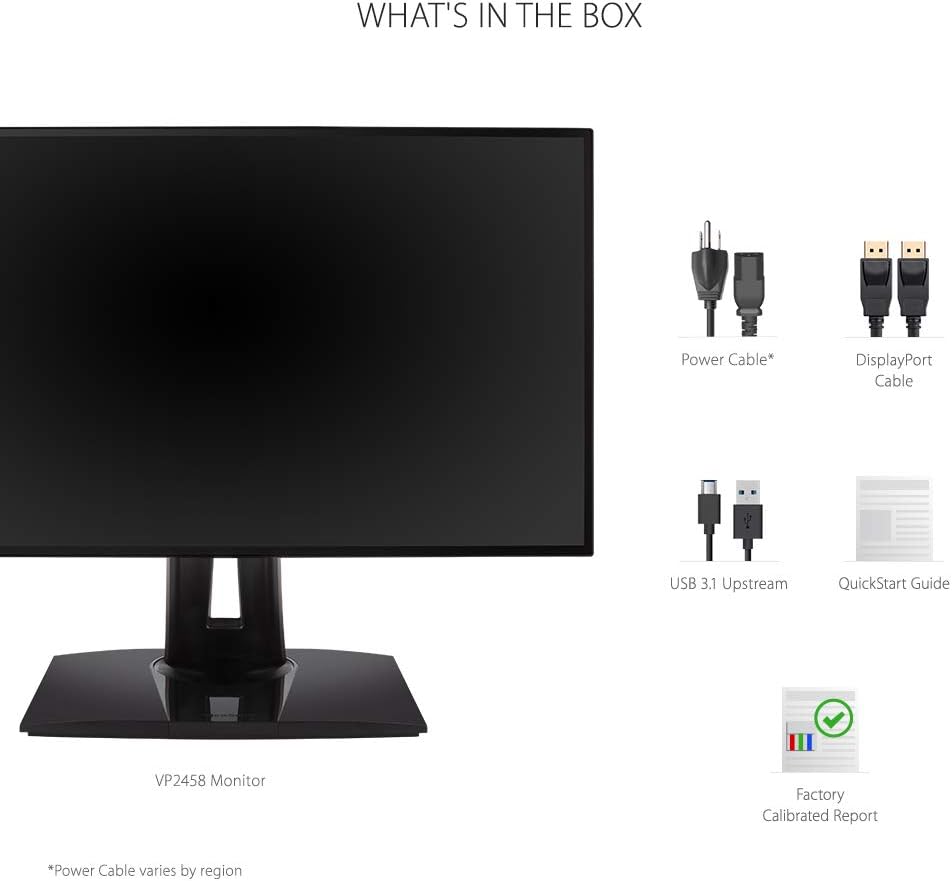
2. ബോക്സിൽ എന്താണുള്ളത്?
Upon unpacking your ViewSonic VP2458 monitor, please ensure all the following items are present:
- LCD Display (ViewSonic VP2458 Monitor)
- പവർ കേബിൾ
- ഡിപി മുതൽ ഡിപി കേബിൾ വരെ
- USB 3.1 അപ്സ്ട്രീം കേബിൾ
- ദ്രുത ആരംഭ ഗൈഡ്
- ഫാക്ടറി കാലിബ്രേറ്റഡ് റിപ്പോർട്ട്
3. സജ്ജീകരണം
3.1 മോണിറ്റർ അസംബ്ലി
ദി ViewSonic VP2458 monitor is designed for easy assembly. The stand typically attaches without the need for tools, often using a simple click-and-lock mechanism. For detailed instructions, refer to the included Quick Start Guide.

3.2 നിങ്ങളുടെ ഉപകരണത്തിലേക്ക് കണക്റ്റുചെയ്യുന്നു
Connect the monitor to your computer or other devices using the appropriate cables. The VP2458 offers a variety of input options:
- എച്ച്ഡിഎംഐ: Use the provided HDMI cable for high-definition video and audio.
- ഡിസ്പ്ലേ പോർട്ട്: Use the provided DisplayPort cable for high-resolution video and audio.
- വി.ജി.എ: Connect older devices using a VGA cable (not included).
- യുഎസ്ബി 3.1 അപ്സ്ട്രീം: Connect the USB 3.1 upstream cable from your computer to the monitor to enable the monitor's USB downstream ports.
After connecting the cables, plug the power cable into the monitor and a power outlet. Press the power button to turn on the monitor.
4. പ്രവർത്തന നിർദ്ദേശങ്ങൾ
4.1 എർഗണോമിക് ക്രമീകരണങ്ങൾ
ദി ViewSonic VP2458 offers advanced ergonomic adjustments to optimize your viewആശ്വാസം:
- ഉയരം ക്രമീകരിക്കൽ: Raise or lower the monitor to align the top of the screen with your eye level.
- ടിൽറ്റ്: Adjust the screen's vertical angle (forward or backward) to reduce glare and improve viewing.
- സ്വിവൽ: നിങ്ങളുടെ സ്ക്രീൻ പങ്കിടാൻ മോണിറ്റർ തിരശ്ചീനമായി തിരിക്കുക അല്ലെങ്കിൽ നിങ്ങളുടെ viewing angle without moving the base.
- പിവറ്റ്: Rotate the screen 90 degrees to switch between landscape and portrait orientation, ideal for document viewing അല്ലെങ്കിൽ കോഡിംഗ്.


4.2 ഡിസ്പ്ലേ ക്രമീകരണങ്ങളും സവിശേഷതകളും
The VP2458 monitor offers several features to enhance your visual experience and reduce eye fatigue:
- 100% sRGB & Delta E <2 Color Accuracy: Ensures accurate and consistent color reproduction, crucial for graphic design and photography.
- SuperClear IPS Panel: Provides wide 178-degree viewing angles, maintaining consistent image quality from various positions.
- ഫ്ലിക്കർ-ഫ്രീ ടെക്നോളജി: Eliminates screen flickering, which can cause eyestrain and discomfort.
- ബ്ലൂ ലൈറ്റ് ഫിൽട്ടർ: Reduces harmful blue light emissions, helping to alleviate eye fatigue during prolonged use.


4.3 ഓൺ-സ്ക്രീൻ ഡിസ്പ്ലേ (OSD) മെനു
The OSD menu allows you to adjust various monitor settings. Typically, buttons located on the bottom or rear of the monitor provide access to the OSD. Use these buttons to navigate through options such as brightness, contrast, color modes, input selection, and more. Refer to the Quick Start Guide for specific button functions and menu navigation.
5. പരിപാലനം
നിങ്ങളുടെ ദീർഘായുസ്സും ഒപ്റ്റിമൽ പ്രകടനവും ഉറപ്പാക്കാൻ ViewSonic VP2458 monitor, follow these maintenance guidelines:
- സ്ക്രീൻ വൃത്തിയാക്കൽ: മൃദുവായ, ലിന്റ് രഹിത തുണി ഉപയോഗിച്ച് സ്ക്രീൻ സൌമ്യമായി തുടയ്ക്കുക. കഠിനമായ പാടുകൾക്ക്, നേരിയ തോതിൽ dampen the cloth with water or a mild, non-abrasive screen cleaner. Avoid using alcohol-based cleaners or harsh chemicals.
- സി വൃത്തിയാക്കൽasing: മോണിറ്ററിന്റെ സി വൃത്തിയാക്കാൻ മൃദുവായതും ഉണങ്ങിയതുമായ തുണി ഉപയോഗിക്കുക.asing.
- വെൻ്റിലേഷൻ: അമിതമായി ചൂടാകുന്നത് തടയാൻ മോണിറ്ററിലെ വെന്റിലേഷൻ ദ്വാരങ്ങൾ അടഞ്ഞിട്ടില്ലെന്ന് ഉറപ്പാക്കുക.
- പവർ ഓഫ്: ദീർഘനേരം ഉപയോഗിക്കാത്തപ്പോൾ മോണിറ്റർ ഓഫ് ചെയ്യുക.
6. പ്രശ്നപരിഹാരം
നിങ്ങളുടെ ഉപകരണത്തിൽ പ്രശ്നങ്ങൾ നേരിടുകയാണെങ്കിൽ ViewSonic VP2458 monitor, try the following troubleshooting steps:
- ശക്തിയില്ല: മോണിറ്ററിലേക്കും പ്രവർത്തിക്കുന്ന ഒരു പവർ ഔട്ട്ലെറ്റിലേക്കും പവർ കേബിൾ സുരക്ഷിതമായി ബന്ധിപ്പിച്ചിട്ടുണ്ടെന്ന് ഉറപ്പാക്കുക. പവർ ഇൻഡിക്കേറ്റർ ലൈറ്റ് ഓണാണോ എന്ന് പരിശോധിക്കുക.
- ചിത്രം/സിഗ്നൽ ഇല്ല: Verify that the video cable (HDMI, DisplayPort, or VGA) is correctly connected to both the monitor and your computer. Ensure the correct input source is selected via the OSD menu.
- Fuzzy or Unclear Image: മോണിറ്ററിന്റെ നേറ്റീവ് റെസല്യൂഷനുമായി (1920x1080) പൊരുത്തപ്പെടുന്നുണ്ടെന്ന് ഉറപ്പാക്കാൻ നിങ്ങളുടെ കമ്പ്യൂട്ടറിലെ ഡിസ്പ്ലേ റെസല്യൂഷൻ ക്രമീകരണങ്ങൾ പരിശോധിക്കുക.
- Color Problems: Reset the monitor's color settings to factory defaults via the OSD menu. Ensure your graphics card drivers are up to date.
- ശബ്ദ പ്രശ്നങ്ങൾ (ബാധകമെങ്കിൽ): Check the volume settings on both the monitor and your computer. Ensure the audio cable (if separate) is connected or that audio is being transmitted via HDMI/DisplayPort.
For further assistance, consult the detailed troubleshooting section in the Quick Start Guide or visit the ViewSonic support webസൈറ്റ്.
7 സ്പെസിഫിക്കേഷനുകൾ
പ്രധാന സാങ്കേതിക സവിശേഷതകൾ ViewSonic VP2458 monitor:
| ഫീച്ചർ | സ്പെസിഫിക്കേഷൻ |
|---|---|
| മോഡൽ നമ്പർ | VP2458 |
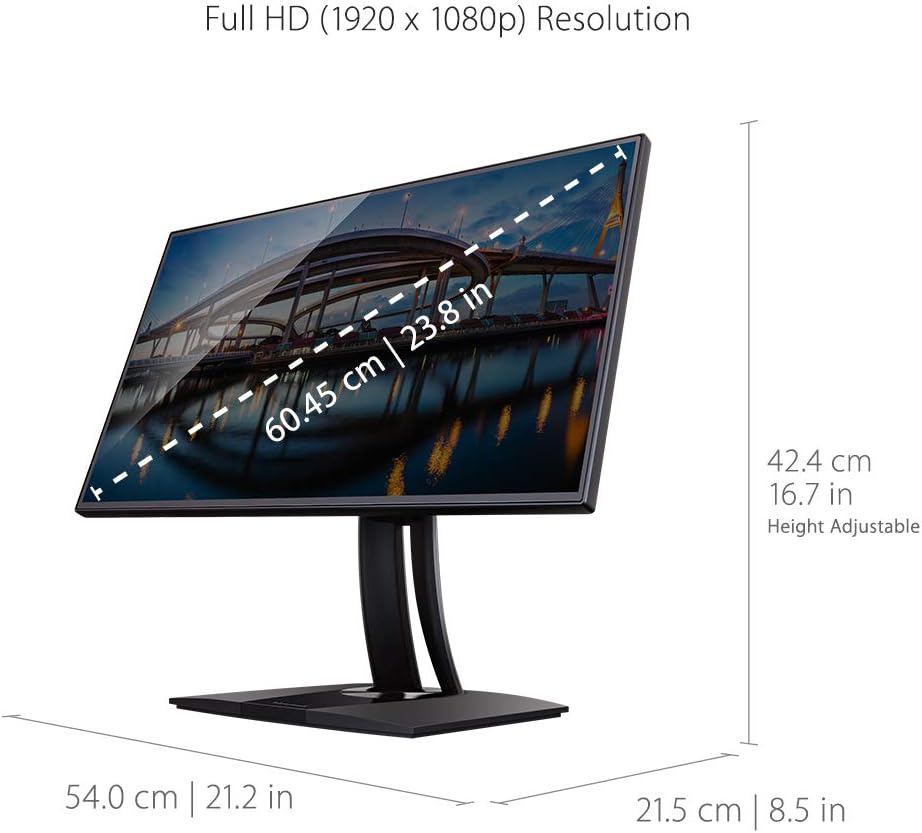
| സ്ക്രീൻ വലിപ്പം | 24 ഇഞ്ച് (23.8") viewകഴിയും) |
| പാനൽ തരം | ഐ.പി.എസ് |
| നേറ്റീവ് റെസല്യൂഷൻ | ഫുൾ HD (1920 x 1080) |
| വീക്ഷണാനുപാതം | 16:9 |
| പുതുക്കിയ നിരക്ക് | 60Hz |
| വർണ്ണ ഗാമറ്റ് | 100% sRGB |
| വർണ്ണ കൃത്യത | ഡെൽറ്റ ഇ <2 |
| കണക്റ്റിവിറ്റി | 1x HDMI 1.4, 1x VGA, 1x DisplayPort In, 3x USB 3.1 (2 up/1 down), 5x USB (4 up/1 down) |
| എർഗണോമിക്സ് | Tilt, Swivel, Pivot, Height Adjust |
| VESA മൗണ്ട് അനുയോജ്യമാണ് | അതെ |
| അളവുകൾ (LxWxH) | 8.5 x 21.2 x 16.7 ഇഞ്ച് |
| ഇനത്തിൻ്റെ ഭാരം | 12.1 പൗണ്ട് |
8. വാറൻ്റിയും പിന്തുണയും
For warranty information, please refer to the warranty card included in your product packaging or visit the official Viewസോണിക് website. For technical support, driver downloads, and additional user guides, please visit the ViewSonic support page for your specific model.
You can also find helpful resources and contact information on the ViewSonic Store on Amazon.


