1. ആമുഖം
This manual provides essential information for setting up, operating, maintaining, and troubleshooting your HP LaserJet 600 M603N M603 monochrome laser printer. Please read this manual thoroughly before using the printer to ensure proper operation and to prevent damage.
The HP LaserJet M603n is designed for high-volume monochrome printing in office environments, offering fast print speeds and professional-quality output.
2 സുരക്ഷാ വിവരങ്ങൾ
- പ്രിന്റർ എപ്പോഴും ഒരു ഗ്രൗണ്ടഡ് പവർ ഔട്ട്ലെറ്റിലേക്ക് ബന്ധിപ്പിക്കുക.
- വെന്റിലേഷൻ തുറക്കൽ തടയരുത്.
- പ്രിന്റർ വെള്ളത്തിൽ നിന്നോ അമിതമായ ഈർപ്പത്തിൽ നിന്നോ അകറ്റി നിർത്തുക.
- Use only the specified power cord and toner cartridges.
- Avoid touching the fuser area, as it can be hot.
- Unplug the printer before cleaning or servicing.
3. പാക്കേജ് ഉള്ളടക്കം
പാക്കേജിൽ എല്ലാ ഇനങ്ങളും ഉണ്ടെന്ന് ഉറപ്പാക്കുക:
- HP LaserJet 600 M603N M603 Printer
- Toner Cartridge (CE390A compatible)
- പവർ കേബിൾ
- Network/USB Cable (where applicable)

ചിത്രം 1: മുൻഭാഗം view of the HP LaserJet 600 M603N M603 printer, showing the control panel on the right side and the HP logo on the front panel.
4. സജ്ജീകരണ നിർദ്ദേശങ്ങൾ
4.1 പ്രിൻ്റർ അൺപാക്ക് ചെയ്യുന്നു
- പ്രിന്റർ അതിന്റെ പാക്കേജിംഗിൽ നിന്ന് ശ്രദ്ധാപൂർവ്വം നീക്കം ചെയ്യുക.
- Remove all packing materials, tapes, and protective films from the printer's exterior and interior.
- പ്രിന്റർ മതിയായ വായുസഞ്ചാരമുള്ള ഒരു സ്ഥിരതയുള്ള, നിരപ്പായ പ്രതലത്തിൽ സ്ഥാപിക്കുക.
4.2 ബന്ധിപ്പിക്കുന്ന പവർ
- പവർ കേബിൾ പ്രിന്ററിന്റെ പവർ ഇൻപുട്ടിലേക്ക് ബന്ധിപ്പിക്കുക.
- പവർ കേബിളിന്റെ മറ്റേ അറ്റം ഒരു ഗ്രൗണ്ടഡ് ഇലക്ട്രിക്കൽ ഔട്ട്ലെറ്റിലേക്ക് പ്ലഗ് ചെയ്യുക.
- പ്രിന്റർ ഓണാക്കാൻ പവർ ബട്ടൺ അമർത്തുക.
4.3 Connecting to a Computer or Network
- USB കണക്ഷൻ: ഒരു USB 2.0 കേബിളിന്റെ ഒരു അറ്റം പ്രിന്ററിന്റെ USB പോർട്ടിലേക്കും മറ്റേ അറ്റം നിങ്ങളുടെ കമ്പ്യൂട്ടറിലേക്കും ബന്ധിപ്പിക്കുക.
- നെറ്റ്വർക്ക് കണക്ഷൻ (ഇഥർനെറ്റ്): Connect an Ethernet cable to the printer's Gigabit Ethernet port and the other end to your network router or switch.
4.4 ടോണർ കാട്രിഡ്ജ് ഇൻസ്റ്റാൾ ചെയ്യൽ
- പ്രിന്ററിന്റെ മുൻവശത്തെ ആക്സസ് വാതിൽ തുറക്കുക.
- Remove the new toner cartridge from its packaging and gently shake it to distribute the toner.
- ടോണർ കാട്രിഡ്ജ് അതിന്റെ സ്ഥാനത്ത് ക്ലിക്കുചെയ്യുന്നതുവരെ നിയുക്ത സ്ലോട്ടിലേക്ക് തിരുകുക.
- മുൻവശത്തെ പ്രവേശന വാതിൽ അടയ്ക്കുക.
4.5 പേപ്പർ ലോഡ് ചെയ്യുന്നു
- Pull out the paper tray (Tray 2 is standard).
- Adjust the paper guides to the correct paper size.
- പേപ്പർ സ്റ്റാക്ക് ട്രേയിലേക്ക് ലോഡ് ചെയ്യുക, അത് പരന്നതാണെന്നും പരമാവധി ഫിൽ ലൈനിന് താഴെയാണെന്നും ഉറപ്പാക്കുക.
- പേപ്പർ ട്രേ പ്രിന്ററിലേക്ക് തിരികെ തിരുകുക.
- Confirm paper type and size on the printer's control panel if prompted.
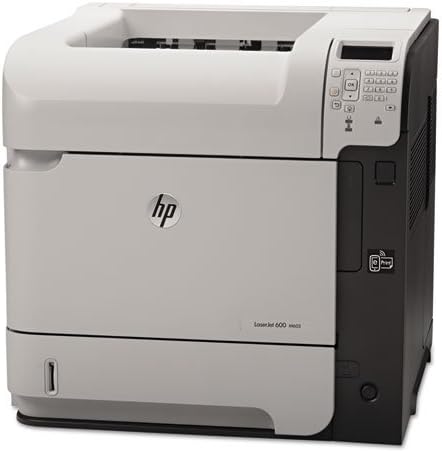
ചിത്രം 2: ആംഗിൾഡ് view of the HP LaserJet 600 M603N M603 printer, highlighting its compact design and connectivity ports on the side.
5. പ്രവർത്തന നിർദ്ദേശങ്ങൾ
5.1 അടിസ്ഥാന പ്രിന്റിംഗ്
- പ്രിന്റർ ഓണാക്കിയിട്ടുണ്ടെന്നും നിങ്ങളുടെ കമ്പ്യൂട്ടറിലേക്കോ നെറ്റ്വർക്കിലേക്കോ ബന്ധിപ്പിച്ചിട്ടുണ്ടെന്നും ഉറപ്പാക്കുക.
- നിങ്ങളുടെ കമ്പ്യൂട്ടറിൽ പ്രിന്റ് ചെയ്യാൻ ആഗ്രഹിക്കുന്ന പ്രമാണം തുറക്കുക.
- തിരഞ്ഞെടുക്കുക അച്ചടിക്കുക ആപ്ലിക്കേഷന്റെ മെനുവിൽ നിന്ന് (ഉദാ. File > പ്രിന്റ് ചെയ്യുക).
- Choose the "HP LaserJet 600 M603N" from the list of available printers.
- ആവശ്യാനുസരണം പ്രിന്റ് ക്രമീകരണങ്ങൾ (ഉദാ: പകർപ്പുകളുടെ എണ്ണം, പേപ്പർ ഉറവിടം) ക്രമീകരിക്കുക.
- ക്ലിക്ക് ചെയ്യുക അച്ചടിക്കുക.
5.2 Printer Control Panel
The control panel on the printer allows you to monitor printer status, configure settings, and perform various tasks. Refer to the on-screen menus for navigation and options such as:
- Viewing printer status and error messages.
- Configuring network settings.
- Managing paper trays.
- Accessing maintenance options.
5.3 ഡ്രൈവർ ഇൻസ്റ്റലേഷൻ
For optimal performance, install the latest printer drivers. Drivers can typically be downloaded from the official HP support website by searching for your specific printer model (HP LaserJet 600 M603N).
6. പരിപാലനം
6.1 ടോണർ കാട്രിഡ്ജ് മാറ്റിസ്ഥാപിക്കൽ
When the toner level is low or the print quality degrades, replace the toner cartridge:
- Open the front access door.
- Remove the old toner cartridge by pulling it straight out.
- Unpack the new CE390A compatible toner cartridge and shake it gently.
- Insert the new cartridge until it locks into place.
- മുൻവശത്തെ പ്രവേശന വാതിൽ അടയ്ക്കുക.
6.2 പ്രിന്റർ വൃത്തിയാക്കുന്നു
- പുറം: മൃദുവായ, ലിന്റ് രഹിത തുണി ഉപയോഗിച്ച് പുറം പ്രതലങ്ങൾ തുടയ്ക്കുക d.ampവെള്ളത്തിൽ ലയിപ്പിച്ചത്. അബ്രാസീവ് ക്ലീനറുകൾ ഉപയോഗിക്കരുത്.
- ഇൻ്റീരിയർ: Periodically open the front access door and gently remove any loose paper dust or debris using a dry, lint-free cloth. Avoid touching sensitive components.
7. പ്രശ്നപരിഹാരം
| പ്രശ്നം | സാധ്യമായ കാരണം | പരിഹാരം |
|---|---|---|
| പ്രിന്റർ ഓണാക്കുന്നില്ല | Power cable disconnected, power outlet issue | Check power cable connections, try a different outlet. |
| പ്രിന്റ് ഔട്ട്പുട്ട് ഇല്ല | Printer offline, incorrect driver, empty toner, paper jam | Ensure printer is online, check toner level, clear paper path, reinstall drivers. |
| മോശം പ്രിന്റ് നിലവാരം | Low toner, fuser issue, dirty printer components | Replace toner, clean printer, contact support if fuser issue suspected. |
| പേപ്പർ കുടുങ്ങി | Incorrect paper loading, damaged paper, foreign objects | Remove jammed paper carefully, ensure paper is loaded correctly, check for obstructions. |
8 സ്പെസിഫിക്കേഷനുകൾ
| ഫീച്ചർ | വിശദാംശങ്ങൾ |
|---|---|
| മോഡലിൻ്റെ പേര് | HP LaserJet Enterprise 600 M603n |
| പ്രിന്റർ തരം | മോണോക്രോം ലേസർ പ്രിന്റർ |
| പ്രിന്റ് വേഗത (മോണോക്രോം) | മിനിറ്റിൽ 62 പേജുകൾ വരെ (ppm) |
| പ്രിൻ്റ് റെസല്യൂഷൻ | 1200 x 1200 dpi വരെ |
| കണക്റ്റിവിറ്റി | യുഎസ്ബി 2.0, ജിഗാബിറ്റ് ഇഥർനെറ്റ് |
| ഡ്യൂപ്ലക്സ് പ്രിൻ്റിംഗ് | Simplex (No automatic dual-sided printing) |
| പരമാവധി ഇൻപുട്ട് ഷീറ്റ് ശേഷി | 600 ഷീറ്റുകൾ (സ്റ്റാൻഡേർഡ്) |
| അനുയോജ്യമായ കാട്രിഡ്ജ് | CE390A |
| ഇനത്തിൻ്റെ ഭാരം | ഏകദേശം 80 പൗണ്ട് (36.3 കി.ഗ്രാം) |
| ഉൽപ്പന്ന അളവുകൾ (W x D x H) | 19.65 x 21.26 x 23.15 ഇഞ്ച് (49.9 x 54 x 58.8 സെ.മീ) |
| വൈദ്യുതി ഉപഭോഗം | (Typical values, refer to HP documentation for specifics) |
9. വാറൻ്റിയും പിന്തുണയും
This HP LaserJet 600 M603N M603 printer comes with a 90 ദിവസത്തെ പരിമിത വാറൻ്റിവാറന്റി ക്ലെയിമുകൾക്കായി നിങ്ങളുടെ വാങ്ങിയതിന്റെ തെളിവ് സൂക്ഷിക്കുക.
For technical support, driver downloads, or further assistance, please visit the official HP support website and search for your specific printer model.
HP പിന്തുണ Webസൈറ്റ്: www.hp.com/support