1. ആമുഖം
This user manual provides detailed instructions for the operation and maintenance of your LOTUS Mini Portable Projector YG-300. Please read this manual thoroughly before using the projector to ensure proper functionality and to prevent damage.
The YG-300 is a compact and versatile video projection system designed for various applications, including presentations, conferences, training, and home theater setups. It projects light beams to display images and videos from compatible sources.
2. പാക്കേജ് ഉള്ളടക്കം
അൺബോക്സ് ചെയ്യുമ്പോൾ, താഴെ ലിസ്റ്റ് ചെയ്തിരിക്കുന്ന എല്ലാ ഇനങ്ങളും നിങ്ങളുടെ പാക്കേജിൽ ഉൾപ്പെടുത്തിയിട്ടുണ്ടെന്ന് ദയവായി പരിശോധിക്കുക:
- YG-300 Projector Unit
- Power Adapter (AC/DC 12V, 1.5A)
- റിമോട്ട് കൺട്രോൾ
- Three-in-one AV Cable
- ഇംഗ്ലീഷ് ഉപയോക്തൃ മാനുവൽ

Figure 2.1: Included accessories with the YG-300 Mini Portable Projector.
3. ഉൽപ്പന്നം കഴിഞ്ഞുview
3.1. Projector Front and Side View

ചിത്രം 3.1: മുൻഭാഗം view of the YG-300 projector, highlighting the projection lens and side ventilation.
3.2. Projector Top Panel Controls
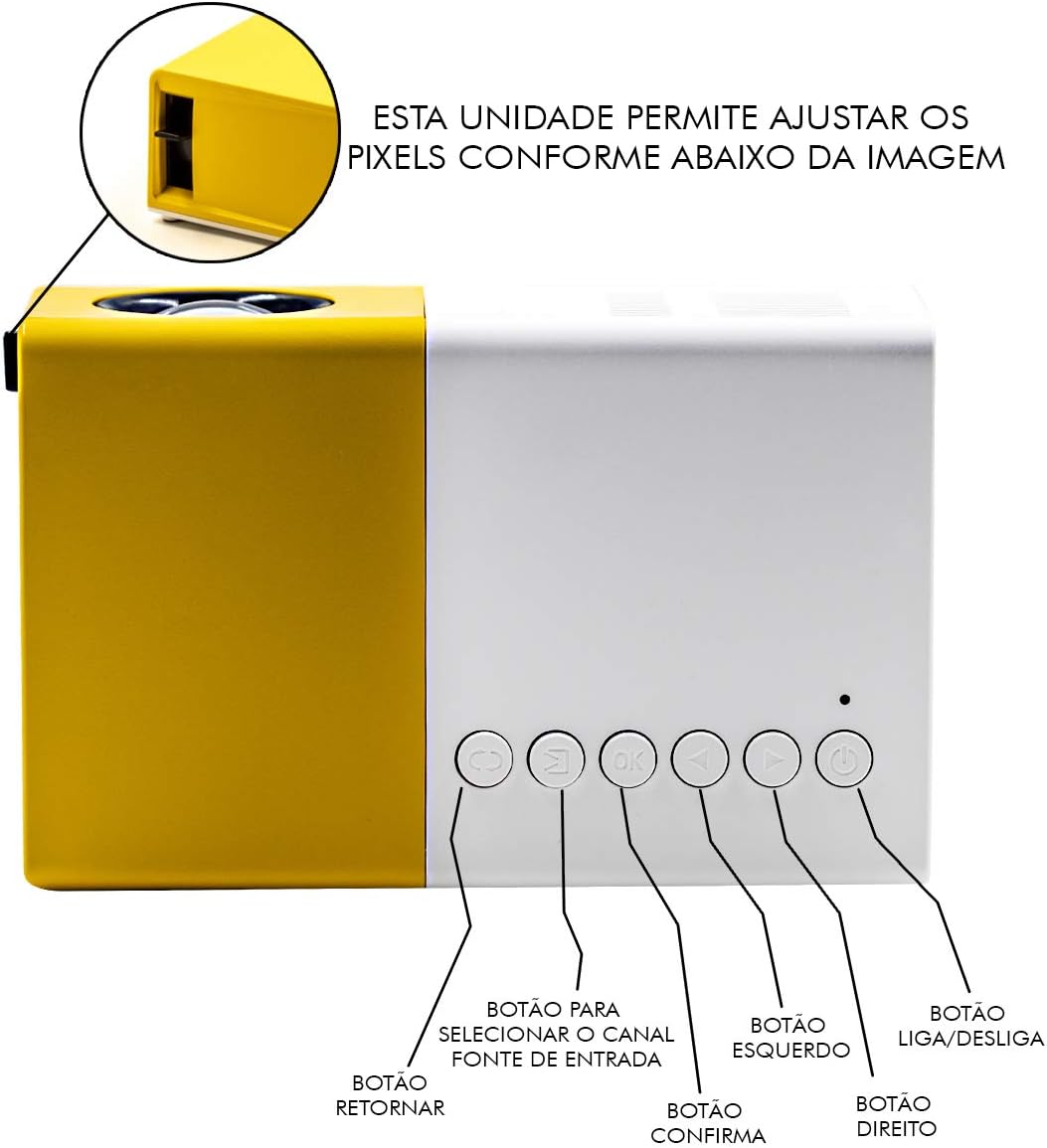
Figure 3.2: Top panel controls of the YG-300 projector. From left to right: Return button, Input Source selection button, OK (Confirm) button, Left navigation button, Right navigation button, and Power On/Off button.
3.3. Projector Rear Panel Ports
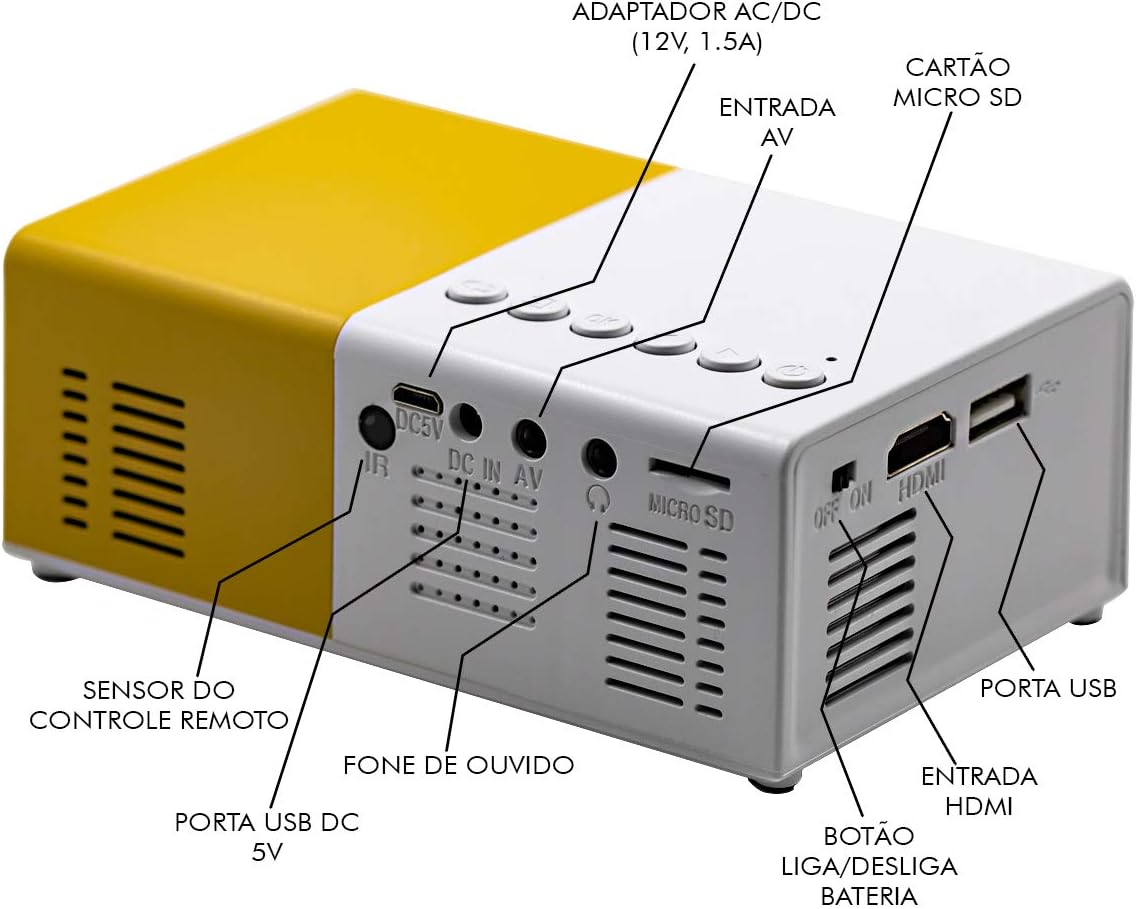
Figure 3.3: Rear panel of the YG-300 projector, detailing the connectivity options including USB, AV, Micro SD, HDMI, and audio output.
3.4. വിദൂര നിയന്ത്രണ പ്രവർത്തനങ്ങൾ

Figure 3.4: Remote control for the YG-300 projector, showing buttons for power, menu access, source selection, directional navigation, OK, play/pause, volume control, and exit.
4. സജ്ജീകരണം
4.1. പവർ കണക്ഷൻ
- Connect the provided power adapter to the "DC IN AV" port on the rear of the projector.
- പവർ അഡാപ്റ്റർ ഒരു സാധാരണ ഇലക്ട്രിക്കൽ ഔട്ട്ലെറ്റിലേക്ക് പ്ലഗ് ചെയ്യുക.
- Ensure the power switch (if present, often near the DC IN port) is in the "ON" position.
4.2. Positioning the Projector
Place the projector on a stable, flat surface. For optimal image quality, position the projector between 1.2 to 3 meters (approximately 4 to 10 feet) from the projection surface. This distance will yield an image size between 20 to 80 inches.

ചിത്രം 4.1: ഉദാample setup of the YG-300 projector for home use.
4.3. ഇൻപുട്ട് ഉപകരണങ്ങൾ ബന്ധിപ്പിക്കുന്നു
The YG-300 supports multiple input sources:
- എച്ച്ഡിഎംഐ: Connect an HDMI cable from your device (e.g., laptop, game console, streaming stick) to the HDMI port on the projector.
- USB: മീഡിയ പ്ലേ ചെയ്യാൻ USB പോർട്ടിലേക്ക് ഒരു USB ഫ്ലാഷ് ഡ്രൈവ് ചേർക്കുക. fileനേരിട്ട്.
- മൈക്രോ എസ്ഡി: Insert a Micro SD card into the Micro SD slot to play media files.
- ഓഫ്: Use the provided three-in-one AV cable to connect to devices with AV output (e.g., older DVD players, set-top boxes).
5. പ്രവർത്തന നിർദ്ദേശങ്ങൾ
5.1. പവർ ഓൺ/ഓഫ്
- പവർ ഓണാക്കാൻ, അമർത്തുക പവർ ഓൺ/ഓഫ് button on the projector's top panel or the remote control.
- പവർ ഓഫ് ചെയ്യാൻ, അമർത്തുക പവർ ഓൺ/ഓഫ് വീണ്ടും ബട്ടൺ.
5.2. ഇൻപുട്ട് ഉറവിടം തിരഞ്ഞെടുക്കൽ
After powering on, use the ഉറവിടം വിദൂര നിയന്ത്രണത്തിലെ ബട്ടൺ അല്ലെങ്കിൽ ഇൻപുട്ട് ഉറവിട തിരഞ്ഞെടുപ്പ് button on the projector's top panel to cycle through available input sources (HDMI, USB, Micro SD, AV).
5.3. Adjusting Image Focus
The projector features a manual focus adjustment. Rotate the focus ring located around the lens until the projected image appears clear and sharp.
5.4. Navigating Menus and Media
Use the directional buttons (ഇടത്, ശരിയാണ്, Up, താഴേക്ക്) കൂടാതെ OK button on the remote control or projector to navigate through menus and select media fileഎസ്. ദി മടങ്ങുക button will take you back to the previous screen.
5.5. വോളിയം നിയന്ത്രണം
ഉപയോഗിച്ച് വോളിയം ക്രമീകരിക്കുക വോളിയം കൂട്ടുക ഒപ്പം വോളിയം ഡൗൺ buttons on the remote control. You can also connect external speakers or headphones to the 3.5mm audio jack for enhanced sound.
6. പരിപാലനം
6.1. ലെൻസ് വൃത്തിയാക്കൽ
ഒപ്റ്റിക്കൽ പ്രതലങ്ങൾക്കായി പ്രത്യേകം രൂപകൽപ്പന ചെയ്ത മൃദുവായ, ലിന്റ് രഹിത തുണി ഉപയോഗിച്ച് പ്രൊജക്ടർ ലെൻസ് സൌമ്യമായി തുടയ്ക്കുക. അബ്രാസീവ് ക്ലീനറുകളോ ലായകങ്ങളോ ഉപയോഗിക്കരുത്.
6.2. പ്രൊജക്ടർ ബോഡി വൃത്തിയാക്കൽ
Wipe the exterior of the projector with a soft, dry cloth. Avoid using liquid cleaners directly on the device.
6.3. വെൻ്റിലേഷൻ
Ensure that the ventilation grilles on the projector are not blocked to prevent overheating. Adequate airflow is crucial for the projector's longevity.
7. പ്രശ്നപരിഹാരം
| പ്രശ്നം | സാധ്യമായ കാരണം | പരിഹാരം |
|---|---|---|
| ഒരു ചിത്രവും പ്രൊജക്റ്റ് ചെയ്തിട്ടില്ല. |
|
|
| ചിത്രം മങ്ങിയതാണ് |
|
|
| ശബ്ദമില്ല |
|
|
| പ്രൊജക്ടർ അമിതമായി ചൂടാകുകയും ഓഫാകുകയും ചെയ്യുന്നു |
|
|
8 സ്പെസിഫിക്കേഷനുകൾ
| ഫീച്ചർ | വിശദാംശങ്ങൾ |
|---|---|
| ബ്രാൻഡ് | ലോട്ടസ് |
| മോഡൽ | YG-300 |
| നിർമ്മാതാവ് | LEJIADA |
| തെളിച്ചം | 600 ല്യൂമെൻസ് |
| നേറ്റീവ് റെസല്യൂഷൻ | 800 x 480 പിക്സലുകൾ |
| പ്രൊജക്ഷൻ ദൂരം | 1.2 - 3 meters (approx. 4 - 10 feet) |
| ചിത്രത്തിൻ്റെ വലുപ്പം | 20 - 80 ഇഞ്ച് |
| സ്ക്രീൻ റേഷ്യോ | 4:3 |
| കണക്റ്റിവിറ്റി | HDMI, USB, 3.5mm Audio, Micro SD Card Slot |
| ഉൽപ്പന്ന അളവുകൾ | 12.5 x 8 x 5 സെ.മീ (4.9 x 3.1 x 2 ഇഞ്ച്) |
| ഉൽപ്പന്ന ഭാരം | 480 ഗ്രാം (1.06 പൗണ്ട്) |

Figure 8.1: Dimensions of the YG-300 projector and its remote control.
9. വാറൻ്റിയും പിന്തുണയും
For warranty information and technical support, please refer to the contact details provided by your retailer or the manufacturer, LEJIADA. Keep your purchase receipt as proof of purchase for any warranty claims.
This product is designed for durability and performance. For any issues not covered in the troubleshooting section, please contact customer support.


