1. ആമുഖം
This manual provides essential information for setting up, operating, and maintaining your VIZIO V-Series 50-inch Class 4K HDR Smart TV. Please read these instructions thoroughly before using your television to ensure proper functionality and safety.

ചിത്രം 1: മുൻഭാഗം view of the VIZIO V-Series 50-inch 4K HDR Smart TV.
2. ബോക്സിൽ എന്താണുള്ളത്?
പാക്കേജിംഗിൽ എല്ലാ ഇനങ്ങളും ഉണ്ടെന്ന് ഉറപ്പാക്കുക:
- VIZIO V-Series 50-inch Class 4K HDR Smart TV
- പവർ കേബിൾ
- റിമോട്ട് കൺട്രോൾ
- സ്റ്റാൻഡ് (2 കഷണങ്ങൾ)
3. സജ്ജീകരണം
3.1 സ്റ്റാൻഡ് അറ്റാച്ചുചെയ്യുന്നു
- കേടുപാടുകൾ സംഭവിക്കാതിരിക്കാൻ ടിവി സ്ക്രീൻ-ഡൗൺ മൃദുവായതും വൃത്തിയുള്ളതുമായ ഒരു പ്രതലത്തിൽ ശ്രദ്ധാപൂർവ്വം വയ്ക്കുക.
- ഓരോ സ്റ്റാൻഡ് പീസും ടിവിയുടെ അടിയിലുള്ള അനുബന്ധ സ്ലോട്ടുകളുമായി വിന്യസിക്കുക.
- നൽകിയിരിക്കുന്ന സ്ക്രൂകൾ ഉപയോഗിച്ച് സ്റ്റാൻഡുകൾ ഉറപ്പിക്കുക. അവ ദൃഢമായി ഘടിപ്പിച്ചിട്ടുണ്ടെന്ന് ഉറപ്പാക്കുക.

Figure 2: VIZIO V-Series TV with its two-piece stand attached.
3.2 പവറും ബാഹ്യ ഉപകരണങ്ങളും ബന്ധിപ്പിക്കുന്നു
- പവർ കേബിൾ ടിവിയുടെ പവർ ഇൻപുട്ടിലേക്കും തുടർന്ന് ഒരു വാൾ ഔട്ട്ലെറ്റിലേക്കും ബന്ധിപ്പിക്കുക.
- For external devices (e.g., cable box, gaming console, Blu-ray player), use HDMI ports. The TV features multiple HDMI inputs.
- For internet connectivity, connect an Ethernet cable to the LAN port or connect wirelessly via Wi-Fi during the initial setup.
- USB devices can be connected to the USB port for media playback.
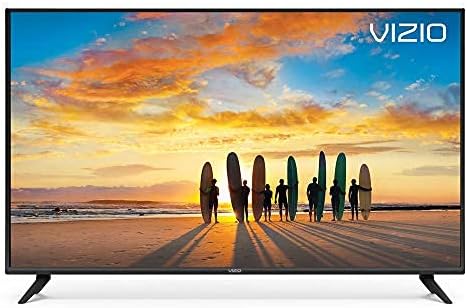
Figure 3: Close-up of the rear input ports, including HDMI, USB, Ethernet, and audio outputs.
3.3 പ്രാരംഭ സജ്ജീകരണ വിസാർഡ്
Upon first power-on, the TV will guide you through an on-screen setup wizard to configure language, network settings, and channel scanning.
4. ടിവി പ്രവർത്തിപ്പിക്കൽ
4.1 വിദൂര നിയന്ത്രണ പ്രവർത്തനങ്ങൾ
The included remote control provides access to all TV functions. It features dedicated buttons for popular streaming apps and navigation controls.
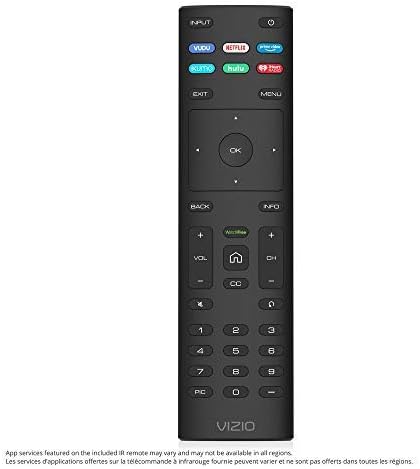
Figure 4: The VIZIO Smart TV remote control with quick access buttons for streaming services.
4.2 SmartCast 3.0
VIZIO SmartCast 3.0 provides an intuitive interface to access streaming apps, live TV, and inputs. Navigate using the remote's directional pad and the 'Home' button.
4.3 ശബ്ദ നിയന്ത്രണം
The TV supports hands-free voice control through compatible devices like Amazon Alexa or Google Assistant. Follow the on-screen instructions to link your voice assistant device.
4.4 VIZIO Watch Free
Access over 100 free streaming channels, including news, movies, and sports, directly through the VIZIO Watch Free+ app.
4.5 Chromecast Built-in and Screen Mirroring
Utilize Chromecast built-in to stream content from thousands of compatible apps on your smartphone or tablet directly to the TV. Screen mirroring allows you to display your device's screen on the TV.

ചിത്രം 5: ഉദാample of screen mirroring from a smartphone to the VIZIO Smart TV.
5 പ്രധാന സവിശേഷതകൾ
- ഡോൾബി വിഷൻ HDR: Capable of displaying a wider spectrum of colors and detail, including HDR10 and HLG content support.
- Full Array LED Backlight: Evenly distributes LEDs across the screen's backlight for superior light uniformity and picture performance.
- 4K അൾട്രാ HD: Offers four times the resolution of 1080p with over 8 million pixels for enhanced clarity.
- Octal-Core Processor: A high-powered processor ensures less lag in smart home apps and during activity switching.
6 സ്പെസിഫിക്കേഷനുകൾ
| ഫീച്ചർ | സ്പെസിഫിക്കേഷൻ |
|---|---|
| ബ്രാൻഡ് | VIZIO |
| മോഡൽ നമ്പർ | V505-G9 |
| സ്ക്രീൻ വലിപ്പം | 50 ഇഞ്ച് (49.5" ഡയഗ്.) |
| റെസലൂഷൻ | 4K അൾട്രാ എച്ച്ഡി (3840x2160) |
| ഡിസ്പ്ലേ ടെക്നോളജി | എൽഇഡി |
| പുതുക്കിയ നിരക്ക് | 120 Hz |
| പ്രത്യേക ഫീച്ചർ | ഫ്ലാറ്റ് |
| വീക്ഷണാനുപാതം | 16:9 |
| ഉൽപ്പന്ന അളവുകൾ | 44.13 x 2.42 x 25.59 ഇഞ്ച് |
| ഇനത്തിൻ്റെ ഭാരം | 21.2 പൗണ്ട് (9600 ഗ്രാം) |
| വാല്യംtage | 120 വോൾട്ട് (എസി) |
| വാട്ട്tage | 135 വാട്ട്സ് |
| കണക്റ്റിവിറ്റി ടെക്നോളജി | ഇഥർനെറ്റ്, HDMI, USB |

Figure 6: Energy Guide label for the VIZIO V505-G9 TV, showing estimated yearly energy cost.
7. പരിപാലനം
7.1 സ്ക്രീൻ വൃത്തിയാക്കൽ
സ്ക്രീൻ വൃത്തിയാക്കാൻ, മൃദുവായ, ലിന്റ് രഹിത തുണി ഉപയോഗിച്ച് സൌമ്യമായി തുടയ്ക്കുക. കഠിനമായ പാടുകൾക്ക്, നേരിയ തോതിൽ dampവെള്ളം അല്ലെങ്കിൽ ഒരു പ്രത്യേക സ്ക്രീൻ ക്ലീനർ ഉപയോഗിച്ച് തുണി വൃത്തിയാക്കുക. കഠിനമായ രാസവസ്തുക്കളോ ഉരച്ചിലുകളോ ഉള്ള വസ്തുക്കൾ ഉപയോഗിക്കുന്നത് ഒഴിവാക്കുക.
7.2 പൊതു പരിചരണം
Keep the TV in a well-ventilated area. Avoid blocking ventilation openings. Do not expose the TV to direct sunlight, extreme temperatures, or high humidity.
8. പ്രശ്നപരിഹാരം
- ശക്തിയില്ല: പവർ കേബിൾ ടിവിയിലേക്കും വാൾ ഔട്ട്ലെറ്റിലേക്കും സുരക്ഷിതമായി ബന്ധിപ്പിച്ചിട്ടുണ്ടെന്ന് ഉറപ്പാക്കുക. മറ്റൊരു ഔട്ട്ലെറ്റ് പരീക്ഷിക്കുക.
- ചിത്രം/ശബ്ദം ഇല്ല: ശരിയായ ഇൻപുട്ട് ഉറവിടം തിരഞ്ഞെടുത്തിട്ടുണ്ടെന്ന് ഉറപ്പാക്കുക. ബാഹ്യ ഉപകരണങ്ങളിലേക്കുള്ള എല്ലാ കേബിൾ കണക്ഷനുകളും പരിശോധിക്കുക.
- നെറ്റ്വർക്ക് കണക്ഷൻ പ്രശ്നങ്ങൾ: നിങ്ങളുടെ റൂട്ടറും മോഡവും പുനരാരംഭിക്കുക. ടിവിയുടെ നെറ്റ്വർക്ക് ക്രമീകരണങ്ങളിൽ നിങ്ങളുടെ വൈഫൈ പാസ്വേഡ് വീണ്ടും നൽകുക. വയർഡ് കണക്ഷനുകൾക്ക്, ഇതർനെറ്റ് കേബിൾ ശരിയായി ബന്ധിപ്പിച്ചിട്ടുണ്ടെന്ന് ഉറപ്പാക്കുക.
- റിമോട്ട് പ്രതികരിക്കുന്നില്ല: റിമോട്ട് കൺട്രോളിലെ ബാറ്ററികൾ മാറ്റിസ്ഥാപിക്കുക. റിമോട്ടിനും ടിവിയുടെ സെൻസറിനും ഇടയിൽ തടസ്സങ്ങളൊന്നുമില്ലെന്ന് ഉറപ്പാക്കുക.
9. വാറൻ്റിയും പിന്തുണയും
For warranty information, product registration, and technical support, please refer to the official VIZIO website or contact VIZIO customer service. Keep your purchase receipt for warranty claims.


