1. ആമുഖം
Thank you for choosing the Best Choice Products 12V Kids Ride-On Truck. This manual provides essential information for the safe assembly, operation, and maintenance of your new toy vehicle. Please read all instructions carefully before use and retain this manual for future reference.

Image 1: Best Choice Products 12V Kids Ride-On Truck (White)
2. സുരക്ഷാ മുന്നറിയിപ്പുകൾ
WARNING: To reduce the risk of injury, adult supervision is required at all times.
- റോഡരികിൽ, മോട്ടോർ വാഹനങ്ങൾക്ക് സമീപം, കുത്തനെയുള്ള ചരിവുകളിലോ പടവുകളിലോ, നീന്തൽക്കുളങ്ങളിലോ മറ്റ് ജലാശയങ്ങളിലോ ഒരിക്കലും ഉപയോഗിക്കരുത്.
- എപ്പോഴും ഷൂസ് ധരിക്കുക.
- Never allow more than one rider at a time. This model is designed for a single child.
- Ensure the child is within the recommended age range of 36 months to 8 years and does not exceed the maximum weight capacity of 65 lbs.
- Always use the provided seat belt.
3. ഉൽപ്പന്നം കഴിഞ്ഞുview & സവിശേഷതകൾ
The Best Choice Products 12V Ride-On Truck offers a realistic driving experience with several interactive functions.
- Realistic Driving Action: Controls are sized for small hands, providing an authentic driving feel.
- രക്ഷാകർതൃ റിമോട്ട് കൺട്രോൾ: Allows adults to fully control the truck's driving features for added safety and guidance.
- Interactive Functions: Features spring suspension for multi-terrain use, working LED headlights, and tail lights.
- ശിശുസൗഹൃദ ഡിസൈൻ: Equipped with plastic wheels, seat belts, and locking doors for secure play.
- ബ്ലൂടൂത്ത് സ്പീക്കർ: Connects to your child's favorite devices for musical accompaniment during playtime.

Image 2: Realistic Driving Action on various terrains.

Image 3: Parental Remote Control for safe supervision.

Image 4: Interactive functions including spring suspension and LED headlights.

Image 5: Child-friendly design with seat belt and locking doors.

Image 6: Built-in Bluetooth speaker for entertainment.
4. സജ്ജീകരണം
4.1 അസംബ്ലി
The ride-on truck requires assembly. Refer to the included 'Assembly Guide' for detailed, step-by-step instructions. Ensure all parts are present and securely fastened before proceeding to battery charging.
4.2 ബാറ്ററി ചാർജിംഗ്
Before first use, fully charge the 12V battery for 12 hours. Subsequent charges typically take 8 hours. The charger will indicate when charging is complete (e.g., red light for charging, green light for full charge). Always use the original charger provided with the product.
- Locate the battery compartment, usually under the hood.
- Connect the charger to the battery and a standard wall outlet.
- ബാറ്ററി അമിതമായി ചാർജ് ചെയ്യരുത്.
5. പ്രവർത്തന നിർദ്ദേശങ്ങൾ
5.1 Starting the Vehicle
- ബാറ്ററി പൂർണ്ണമായും ചാർജ്ജ് ചെയ്തിട്ടുണ്ടെന്നും ശരിയായി ബന്ധിപ്പിച്ചിട്ടുണ്ടെന്നും ഉറപ്പാക്കുക.
- Press the power button on the dashboard to turn on the vehicle.
5.2 Driving the Truck
- The child can operate the truck by pressing the foot pedal for acceleration.
- Steer using the steering wheel.
- The truck has a maximum speed of 3.7 mph.
- Doors can be opened and closed, and feature a locking mechanism for safety.
5.3 Using the Parental Remote Control
The remote control allows parents to override manual controls for safety and assistance.
- The remote can control forward, reverse, left, and right steering.
- It also features an emergency stop button (often labeled 'P' for parking) to immediately halt the vehicle.
- Speed settings (slow, medium, fast) can be adjusted via the remote.
5.4 ബ്ലൂടൂത്ത് പ്രവർത്തനം
- വാഹനം ഓണാക്കുക.
- നിങ്ങളുടെ ഉപകരണത്തിൽ (ഉദാ: സ്മാർട്ട്ഫോൺ, ടാബ്ലെറ്റ്) ബ്ലൂടൂത്ത് സജീവമാക്കുക.
- ഇതിനായി തിരയുക the truck's Bluetooth name (refer to the 'Assembly Guide' or dashboard display for the name).
- Pair your device. Once connected, you can play music through the truck's built-in speakers.
6. പരിപാലനം
- വൃത്തിയാക്കൽ: പരസ്യം ഉപയോഗിച്ച് വാഹനം തുടയ്ക്കുകamp cloth. Do not use harsh chemicals or abrasive cleaners. Avoid spraying water directly onto electrical components.
- ബാറ്ററി കെയർ: Always recharge the battery after each use. If storing the vehicle for an extended period, charge the battery at least once a month to prolong its lifespan.
- സംഭരണം: വാഹനം നേരിട്ട് സൂര്യപ്രകാശവും ഈർപ്പവും ഏൽക്കാത്ത വരണ്ടതും തണുത്തതുമായ സ്ഥലത്ത് സൂക്ഷിക്കുക.
- പരിശോധന: Regularly check all screws, nuts, and connections to ensure they are tight and secure. Inspect wheels and tires for wear.
7. പ്രശ്നപരിഹാരം
| പ്രശ്നം | സാധ്യമായ കാരണം | പരിഹാരം |
|---|---|---|
| വാഹനം നീങ്ങുന്നില്ല | Low battery; Loose battery connection; Blown fuse | Charge battery; Check connections; Replace fuse (consult manual) |
| വാഹനം പതുക്കെ നീങ്ങുന്നു | Low battery; Overload (too much weight); Rough terrain | Charge battery; Reduce weight; Move to smoother surface |
| റിമോട്ട് കൺട്രോൾ പ്രവർത്തിക്കുന്നില്ല | Remote batteries low/dead; Not paired; Out of range | Replace remote batteries; Re-pair remote (consult manual); Move closer to vehicle |
| Lights/Sounds not working | Loose wiring; Component failure | Check wiring connections; Contact customer support |
8 സ്പെസിഫിക്കേഷനുകൾ
| ഫീച്ചർ | വിശദാംശങ്ങൾ |
|---|---|
| മോഡൽ നമ്പർ | SKY5165 |
| ഉൽപ്പന്ന അളവുകൾ | 46" (L) x 29.5" (W) x 31" (H) |
| ഇനത്തിൻ്റെ ഭാരം | 48 പൗണ്ട് |
| ഭാരം ശേഷി | 65 പൗണ്ട് |
| ബാറ്ററി തരം | 12V |
| പരമാവധി വേഗത | 3.7 mph |
| ശുപാർശ ചെയ്യുന്ന പ്രായം | 36 മാസം - 8 വർഷം |
| ഫീച്ചറുകൾ | Remote Control, Spring Suspension, LED Lights, Bluetooth Speaker, Seat Belt, Locking Doors |
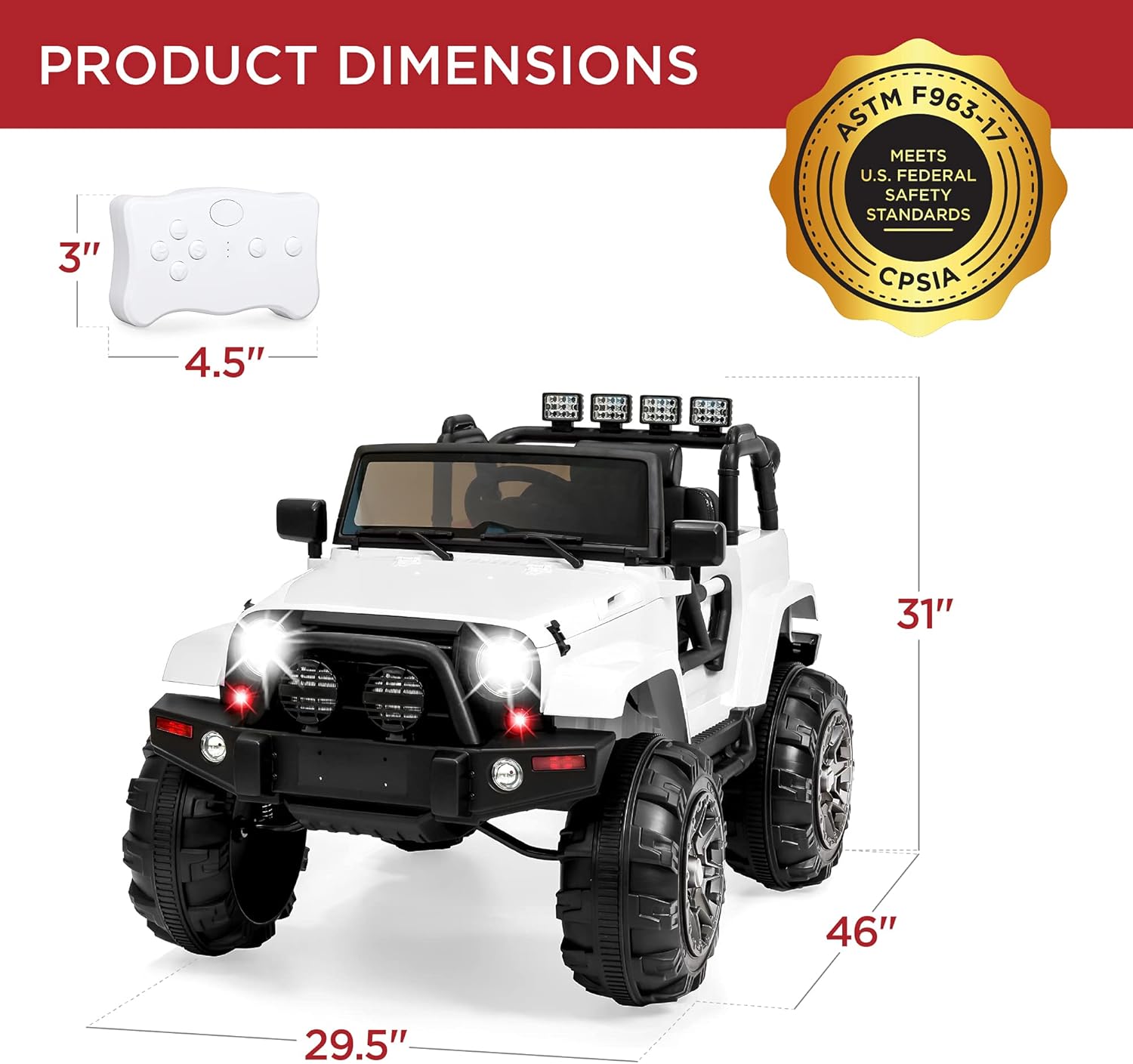
Image 7: Product Dimensions Overview.
9. വാറൻ്റിയും പിന്തുണയും
For warranty information, please refer to the documentation included with your purchase or visit the Best Choice Products official website. For customer support, including assistance with assembly, parts, or troubleshooting, please contact Best Choice Products directly. Contact details can typically be found on the product packaging or their webസൈറ്റ്.
ഓൺലൈൻ പിന്തുണ: Visit the Best Choice Products Store on Amazon


