ആമുഖം
Welcome to the user manual for your new Magnavox 32MV319R/F7 32-inch LED HDTV. This guide provides essential information for the safe and efficient use of your television, including setup instructions, operational procedures, maintenance tips, and troubleshooting advice. Please read this manual thoroughly before operating your TV and retain it for future reference.
സുരക്ഷാ വിവരങ്ങൾ
തീ, വൈദ്യുതാഘാതം, പരിക്കുകൾ എന്നിവ കുറയ്ക്കുന്നതിന് ഈ ടെലിവിഷൻ ഉപയോഗിക്കുമ്പോൾ എല്ലായ്പ്പോഴും അടിസ്ഥാന സുരക്ഷാ മുൻകരുതലുകൾ പാലിക്കുക.
- മഴയോ ഈർപ്പമോ ടിവിയെ തുറന്നുകാട്ടരുത്.
- വെന്റിലേഷൻ തുറക്കൽ തടയരുത്.
- Ensure proper grounding for the power plug.
- പവർ കോർഡ് നടക്കുകയോ നുള്ളുകയോ ചെയ്യുന്നതിൽ നിന്ന് സംരക്ഷിക്കുക.
- ഇടിമിന്നൽ ഉണ്ടാകുമ്പോഴോ ദീർഘനേരം ഉപയോഗിക്കാതിരിക്കുമ്പോഴോ ടിവി പ്ലഗ് ഊരിവയ്ക്കുക.
- എല്ലാ സേവനങ്ങളും യോഗ്യതയുള്ള സേവന ഉദ്യോഗസ്ഥർക്ക് റഫർ ചെയ്യുക.
പാക്കേജ് ഉള്ളടക്കം
പാക്കേജിൽ എല്ലാ ഇനങ്ങളും ഉണ്ടെന്ന് ഉറപ്പാക്കുക:
- Magnavox 32MV319R/F7 32-inch LED HDTV
- ടിവി സ്റ്റാൻഡ് (2 കഷണങ്ങൾ)
- ബാറ്ററികളുള്ള റിമോട്ട് കൺട്രോൾ
- പവർ കോർഡ്
- സ്റ്റാൻഡ് ഇൻസ്റ്റാളേഷനുള്ള സ്ക്രൂകൾ
സജ്ജമാക്കുക
1. ടിവി സ്റ്റാൻഡ് ഘടിപ്പിക്കൽ
- സ്ക്രീനിന് കേടുപാടുകൾ സംഭവിക്കാതിരിക്കാൻ ടിവി മൃദുവായതും വൃത്തിയുള്ളതുമായ ഒരു പ്രതലത്തിൽ ശ്രദ്ധാപൂർവ്വം മുഖം താഴേക്ക് വയ്ക്കുക.
- ടിവിയുടെ അടിയിലുള്ള മൗണ്ടിംഗ് ദ്വാരങ്ങളുമായി സ്റ്റാൻഡ് പീസുകൾ വിന്യസിക്കുക.
- നൽകിയിരിക്കുന്ന സ്ക്രൂകൾ ഉപയോഗിച്ച് സ്റ്റാൻഡുകൾ ഉറപ്പിക്കുക. അമിതമായി മുറുക്കരുത്.
2. ഉപകരണങ്ങൾ ബന്ധിപ്പിക്കുന്നു
The Magnavox 32MV319R/F7 offers various connectivity options. Refer to the image below for port locations.
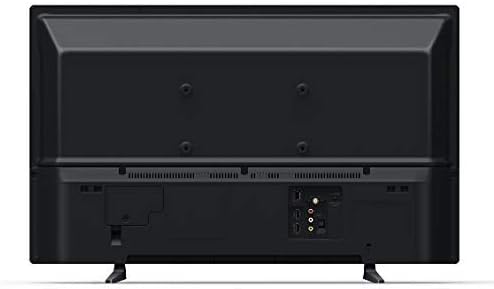
ചിത്രം: പിൻഭാഗം view of the Magnavox 32MV319R/F7 TV, displaying various input ports including HDMI, USB, and composite video inputs.
- എച്ച്ഡിഎംഐ: Connect Blu-ray players, game consoles, or cable/satellite boxes using HDMI cables.
- USB: ഇതിലേക്ക് ഒരു USB ഡ്രൈവ് ചേർക്കുക view ഫോട്ടോകൾ എടുക്കുക, സംഗീതം പ്ലേ ചെയ്യുക, അല്ലെങ്കിൽ വീഡിയോകൾ കാണുക.
- ആന്റിന/കേബിൾ: Connect an antenna or cable TV feed for over-the-air or basic cable channels.
- സംയോജിത വീഡിയോ: Use for older devices with yellow (video), white (left audio), and red (right audio) RCA connectors.
3. പവർ ഓണും പ്രാരംഭ സജ്ജീകരണവും
- പവർ കോർഡ് ടിവിയിലേക്കും പിന്നീട് ഒരു വാൾ ഔട്ട്ലെറ്റിലേക്കും പ്ലഗ് ചെയ്യുക.
- റിമോട്ട് കൺട്രോളിലോ ടിവിയിലോ പവർ ബട്ടൺ അമർത്തുക.
- Follow the on-screen instructions for the Roku TV guided setup. This includes selecting your language, connecting to a Wi-Fi network, and activating your Roku account.
പ്രവർത്തിക്കുന്നു
വിദൂര നിയന്ത്രണ പ്രവർത്തനങ്ങൾ
The remote control allows you to navigate the Roku TV interface and control your television. Key buttons include:
- ശക്തി: ടിവി ഓണാക്കുകയോ ഓഫാക്കുകയോ ചെയ്യുന്നു.
- വീട്: റോക്കു ടിവി ഹോം സ്ക്രീനിലേക്ക് മടങ്ങുന്നു.
- ദിശാസൂചന പാഡ് (മുകളിലേക്ക്/താഴേക്ക്/ഇടത്/വലത്): മെനുകളിലൂടെ സഞ്ചരിച്ച് ഇനങ്ങൾ തിരഞ്ഞെടുക്കുന്നു.
- ശരി/തിരഞ്ഞെടുക്കുക: തിരഞ്ഞെടുക്കലുകൾ സ്ഥിരീകരിക്കുന്നു.
- തിരികെ: മുമ്പത്തെ സ്ക്രീനിലേക്ക് മടങ്ങുന്നു.
- വോളിയം കൂട്ടുക/താഴ്ത്തുക: ശബ്ദ നില ക്രമീകരിക്കുന്നു.
- നിശബ്ദമാക്കുക: ടിവി ഓഡിയോ നിശബ്ദമാക്കുന്നു.
- ഇൻപുട്ട്: Selects the desired input source (HDMI, AV, TV).
- Streaming Channel Buttons: ജനപ്രിയ സ്ട്രീമിംഗ് സേവനങ്ങൾക്കായി സമർപ്പിത ബട്ടണുകൾ.
Roku TV Interface
The Roku TV home screen provides access to all your entertainment. You can:
- Browse and add streaming channels from the Roku Channel Store.
- Switch between connected devices (e.g., game console on HDMI 1, cable box on HDMI 2).
- Access TV settings to customize picture, sound, and network options.
മെയിൻ്റനൻസ്
ടിവി വൃത്തിയാക്കുന്നു
- സ്ക്രീൻ: മൃദുവായ, ലിന്റ് രഹിത തുണി ഉപയോഗിച്ച് സ്ക്രീൻ സൌമ്യമായി തുടയ്ക്കുക. കഠിനമായ പാടുകൾക്ക്, നേരിയ തോതിൽ dampen the cloth with water or a screen cleaner specifically designed for TVs. Do not spray liquid directly onto the screen.
- മന്ത്രിസഭ: മൃദുവായതും ഉണങ്ങിയതുമായ തുണി ഉപയോഗിച്ച് ടിവി കാബിനറ്റ് തുടയ്ക്കുക. അബ്രാസീവ് ക്ലീനറുകളോ ലായകങ്ങളോ ഉപയോഗിക്കുന്നത് ഒഴിവാക്കുക.
- വൃത്തിയാക്കുന്നതിന് മുമ്പ് എപ്പോഴും ടിവി അൺപ്ലഗ് ചെയ്യുക.
സോഫ്റ്റ്വെയർ അപ്ഡേറ്റുകൾ
Your Roku TV automatically checks for software updates when connected to the internet. To manually check for updates:
- ഹോം സ്ക്രീനിലേക്ക് പോകുക.
- നാവിഗേറ്റ് ചെയ്യുക ക്രമീകരണങ്ങൾ > സിസ്റ്റം > സോഫ്റ്റ്വെയർ അപ്ഡേറ്റ്.
- തിരഞ്ഞെടുക്കുക ഇപ്പോൾ പരിശോധിക്കുക.
ട്രബിൾഷൂട്ടിംഗ്
നിങ്ങളുടെ ടിവിയിൽ പ്രശ്നങ്ങൾ നേരിടുകയാണെങ്കിൽ, ഇനിപ്പറയുന്ന പൊതുവായ പ്രശ്നങ്ങളും പരിഹാരങ്ങളും പരിശോധിക്കുക:
| പ്രശ്നം | പരിഹാരം |
|---|---|
| ശക്തിയില്ല | ടിവിയിലേക്കും പ്രവർത്തിക്കുന്ന ഒരു ഇലക്ട്രിക്കൽ ഔട്ട്ലെറ്റിലേക്കും പവർ കോർഡ് സുരക്ഷിതമായി പ്ലഗ് ചെയ്തിട്ടുണ്ടെന്ന് ഉറപ്പാക്കുക. മറ്റൊരു ഔട്ട്ലെറ്റ് പരീക്ഷിക്കുക. |
| ചിത്രമില്ല, പക്ഷേ ശബ്ദം ഉണ്ട് | ഇൻപുട്ട് ഉറവിടം പരിശോധിക്കുക. കണക്റ്റുചെയ്തിരിക്കുന്ന ഉപകരണം ഓണാണെന്നും ശരിയായി പ്രവർത്തിക്കുന്നുണ്ടെന്നും ഉറപ്പാക്കുക. മറ്റൊരു HDMI കേബിൾ പരീക്ഷിക്കുക. |
| ശബ്ദമില്ല, പക്ഷേ ചിത്രം ഉണ്ട് | Check the volume level and ensure the TV is not muted. Verify audio settings in the TV menu. If using external audio, check its connections and power. |
| Wi-Fi-യിലേക്ക് കണക്റ്റുചെയ്യാൻ കഴിയില്ല | Ensure your Wi-Fi router is on and within range. Re-enter the Wi-Fi password carefully. Restart your router and the TV. |
| റിമോട്ട് കൺട്രോൾ പ്രവർത്തിക്കുന്നില്ല | ബാറ്ററികൾ മാറ്റിസ്ഥാപിക്കുക. റിമോട്ടിനും ടിവിയുടെ ഐആർ സെൻസറിനും ഇടയിൽ തടസ്സങ്ങളൊന്നുമില്ലെന്ന് ഉറപ്പാക്കുക. |
ഫാക്ടറി റീസെറ്റ്
A factory reset will erase all personal settings and data, returning the TV to its original factory state. This can resolve persistent software issues.
- ഹോം സ്ക്രീനിലേക്ക് പോകുക.
- നാവിഗേറ്റ് ചെയ്യുക ക്രമീകരണങ്ങൾ > സിസ്റ്റം > വിപുലമായ സിസ്റ്റം ക്രമീകരണങ്ങൾ > ഫാക്ടറി റീസെറ്റ്.
- റീസെറ്റ് സ്ഥിരീകരിക്കാൻ ഓൺ-സ്ക്രീൻ നിർദ്ദേശങ്ങൾ പാലിക്കുക.
സ്പെസിഫിക്കേഷനുകൾ
| ഫീച്ചർ | വിശദാംശങ്ങൾ |
|---|---|
| മോഡൽ നമ്പർ | 32MV319R/F7 |
| സ്ക്രീൻ വലിപ്പം | 32 ഇഞ്ച് |
| ഡിസ്പ്ലേ ടെക്നോളജി | എൽഇഡി |
| റെസലൂഷൻ | 720p |
| വീക്ഷണാനുപാതം | 16:9 |
| കണക്റ്റിവിറ്റി ടെക്നോളജി | HDMI, USB, Wireless |
| പിന്തുണയ്ക്കുന്ന ഇന്റർനെറ്റ് സേവനങ്ങൾ | റോക്കു ടിവി |
| ഉൽപ്പന്ന അളവുകൾ (D x W x H) | 6.7 x 29.1 x 30.9 ഇഞ്ച് (സ്റ്റാൻഡോടുകൂടി) |
| ഇനത്തിൻ്റെ ഭാരം | 11.23 പൗണ്ട് |
| വാട്ട്tage | 50 വാട്ട്സ് |
വാറൻ്റിയും പിന്തുണയും
For warranty information, please refer to the warranty card included with your product or visit the official Magnavox website. For technical support or service inquiries, please contact Magnavox customer service. Keep your purchase receipt and model number handy when contacting support.
Note: This product may be refurbished. Refurbished products are tested and certified to work like new. The refurbishing process includes functionality testing, basic cleaning, inspection, and repackaging.


