ആമുഖം
This manual provides comprehensive instructions for the use and maintenance of your Zerone Replacement Remote Control. Designed as a direct replacement, this remote offers seamless compatibility with various Samsung LCD, LED, and HD TV models, including BN59-00857A, BN59-00865A, and BN59-00942A, without requiring any programming or setup.
ഉൽപ്പന്നം കഴിഞ്ഞുview
The Zerone Replacement Remote Control is engineered for ease of use and reliable performance. Its ergonomic design ensures a comfortable grip, and its responsive buttons provide precise control over your television.
പ്രധാന സവിശേഷതകൾ:
- അനുയോജ്യത: Works seamlessly with LCD, LED, and HD TVs including models BN59-00857A, BN59-00865A, and BN59-00942A. Eliminates the need for programming or setup.
- Ergonomic & User-Friendly: Compact 19.1cm design fits comfortably in hand with anti-slip texture. Features an operation indicator light for intuitive nighttime use.
- പ്രതികരിക്കുന്ന പ്രകടനം: Strong signal emission ensures reliable command transmission up to 10 meters. Stable performance for daily home entertainment or presentations.
- ഊർജ്ജ-കാര്യക്ഷമമായ ഡിസൈൻ: Requires 2 AAA batteries (not included) for extended use. Auto-sleep mode conserves power during idle periods.
- Direct OEM Replacement: Restores full functionality to suitable smart TVs without pairing delays. Ideal for broken or misplaced original remotes.
റിമോട്ട് കൺട്രോൾ ലേഔട്ട്:

ചിത്രം 1: മുൻഭാഗം view of the Zerone Replacement Remote Control. This image displays the full layout of the remote, including the power button, number pad, volume and channel controls, menu, source, and navigation buttons.

ചിത്രം 2: വിശദമായി view of the remote control's buttons and the infrared (IR) emitter. This image highlights the tactile buttons and the IR window at the top, which transmits signals to the TV.
സജ്ജമാക്കുക
The Zerone Replacement Remote Control is designed for immediate use without complex setup procedures. Simply install the batteries, and it is ready to operate your compatible Samsung TV.
ബാറ്ററി ഇൻസ്റ്റാളേഷൻ:
- റിമോട്ട് കൺട്രോളിന്റെ പിൻഭാഗത്ത് ബാറ്ററി കമ്പാർട്ട്മെന്റ് കണ്ടെത്തുക.
- ബാറ്ററി കമ്പാർട്ട്മെന്റ് കവർ താഴേക്ക് സ്ലൈഡ് ചെയ്യുക അല്ലെങ്കിൽ അത് തുറക്കാൻ ലാച്ച് അമർത്തുക.
- Insert two (2) AAA batteries (not included) into the compartment, ensuring the positive (+) and negative (-) terminals align correctly with the indicators inside.
- സുരക്ഷിതമായി ക്ലിക്ക് ചെയ്യുന്നതുവരെ ബാറ്ററി കമ്പാർട്ട്മെന്റ് കവർ തിരികെ സ്ഥലത്തേക്ക് സ്ലൈഡുചെയ്ത് അടയ്ക്കുക.

ചിത്രം 3: പിൻഭാഗം view of the remote control, highlighting the battery compartment. This image shows the location where the battery cover can be removed to insert the AAA batteries.
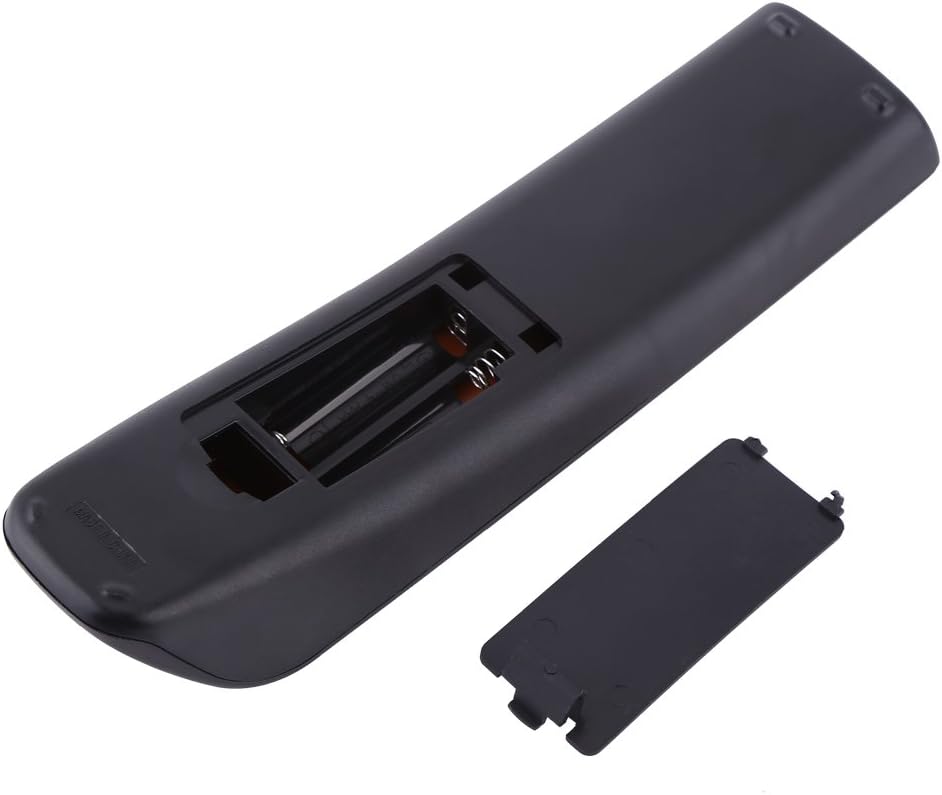
Figure 4: The remote control with its battery compartment open, revealing the slots for two AAA batteries. This view assists in correctly inserting the batteries.
കുറിപ്പ്: This remote control does not require any programming or pairing. Once batteries are installed, it is ready to control your compatible Samsung TV.
പ്രവർത്തന നിർദ്ദേശങ്ങൾ
To operate your TV using the Zerone Replacement Remote Control, point the remote directly at the TV's infrared receiver. Ensure there are no obstructions between the remote and the TV.
അടിസ്ഥാന പ്രവർത്തനങ്ങൾ:
- പവർ (പവർ): ടിവി ഓണാക്കുകയോ ഓഫാക്കുകയോ ചെയ്യുന്നു.
- ടിവി: Switches the TV to TV mode.
- നമ്പർ ബട്ടണുകൾ (0-9): ചാനലുകൾ നേരിട്ട് തിരഞ്ഞെടുക്കുക.
- വോളിയം (വോൾ +/-): വോളിയം ലെവൽ ക്രമീകരിക്കുന്നു.
- Channel (CH +/-): ചാനലുകൾ മുകളിലേക്കോ താഴേക്കോ മാറ്റുന്നു.
- നിശബ്ദമാക്കുക (നിശബ്ദമാക്കുക): ടിവി ശബ്ദം മ്യൂട്ട് ചെയ്യുകയോ അൺമ്യൂട്ട് ചെയ്യുകയോ ചെയ്യുന്നു.
- ഉറവിടം (ഉറവിടം): Selects input sources (HDMI, AV, Component, etc.).
- മെനു (മെനു): ടിവിയുടെ പ്രധാന മെനു ആക്സസ് ചെയ്യുന്നു.
- നാവിഗേഷൻ ബട്ടണുകൾ (മുകളിലേക്ക്, താഴേക്ക്, ഇടത്തേക്ക്, വലത്തേക്ക്, നൽകുക): മെനുകൾ നാവിഗേറ്റ് ചെയ്യുന്നതിനും തിരഞ്ഞെടുപ്പുകൾ സ്ഥിരീകരിക്കുന്നതിനും ഉപയോഗിക്കുന്നു.
- പുറത്ത് (പുറത്ത്): നിലവിലെ മെനുവിൽ നിന്നോ പ്രവർത്തനത്തിൽ നിന്നോ പുറത്തുകടക്കുന്നു.
- മടക്കം (മടങ്ങുക): മുമ്പത്തെ സ്ക്രീനിലേക്കോ ചാനലിലേക്കോ മടങ്ങുന്നു.
- CH പട്ടിക: ചാനൽ ലിസ്റ്റ് പ്രദർശിപ്പിക്കുന്നു.
- ഉപകരണങ്ങൾ: ദ്രുത ക്രമീകരണങ്ങൾ അല്ലെങ്കിൽ ഉപകരണ മെനു ആക്സസ് ചെയ്യുന്നു.
- വിവരം: നിലവിലെ പ്രോഗ്രാമിനെക്കുറിച്ചോ ഇൻപുട്ടിനെക്കുറിച്ചോ ഉള്ള വിവരങ്ങൾ പ്രദർശിപ്പിക്കുന്നു.
- P.SIZE: Adjusts picture size/aspect ratio.
- MTS: Multi-track sound selection.
- CC: Activates or deactivates closed captions.
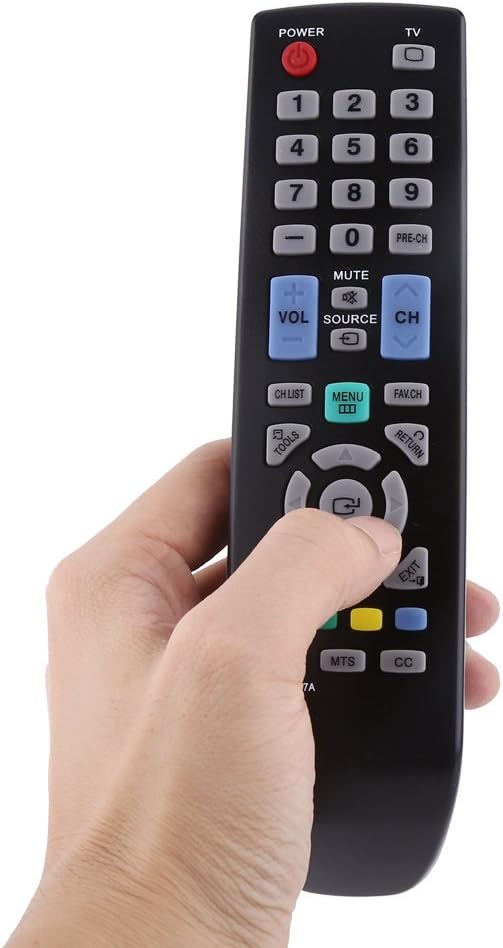
Figure 5: A hand demonstrating the natural grip and button accessibility of the remote control during use.
മെയിൻ്റനൻസ്
ശരിയായ പരിചരണവും പരിപാലനവും നിങ്ങളുടെ റിമോട്ട് കൺട്രോളിന്റെ ആയുസ്സ് വർദ്ധിപ്പിക്കും.
വൃത്തിയാക്കൽ:
- മൃദുവായതും ഉണങ്ങിയതുമായ തുണി ഉപയോഗിച്ച് റിമോട്ട് കൺട്രോൾ തുടയ്ക്കുക.
- കഠിനമായ അഴുക്കിന്, ചെറുതായി dampen the cloth with water or a mild, non-abrasive cleaner. Do not use harsh chemicals or abrasive cleaning agents.
- Avoid getting moisture into the battery compartment or any openings.
ബാറ്ററി മാറ്റിസ്ഥാപിക്കൽ:
- റിമോട്ടിന്റെ പ്രതികരണം മന്ദഗതിയിലാകുകയോ പ്രവർത്തിക്കുന്നത് നിർത്തുകയോ ചെയ്യുമ്പോൾ ബാറ്ററികൾ മാറ്റിസ്ഥാപിക്കുക.
- Always replace both AAA batteries at the same time.
- പഴയതും പുതിയതുമായ ബാറ്ററികളോ വ്യത്യസ്ത തരം ബാറ്ററികളോ മിക്സ് ചെയ്യരുത്.
- ചോർച്ച തടയാൻ റിമോട്ട് ദീർഘനേരം ഉപയോഗിക്കുന്നില്ലെങ്കിൽ ബാറ്ററികൾ നീക്കം ചെയ്യുക.
സംഭരണം:
- നേരിട്ടുള്ള സൂര്യപ്രകാശത്തിൽ നിന്നും ഉയർന്ന താപനിലയിൽ നിന്നും അകലെ തണുത്തതും വരണ്ടതുമായ സ്ഥലത്ത് റിമോട്ട് കൺട്രോൾ സൂക്ഷിക്കുക.
- റിമോട്ട് താഴെയിടുന്നത് ഒഴിവാക്കുക അല്ലെങ്കിൽ ശക്തമായ ആഘാതങ്ങൾക്ക് വിധേയമാക്കുക.
ട്രബിൾഷൂട്ടിംഗ്
If you experience issues with your remote control, please refer to the following common problems and solutions:
| പ്രശ്നം | സാധ്യമായ കാരണം | പരിഹാരം |
|---|---|---|
| റിമോട്ട് പ്രവർത്തിക്കുന്നില്ല. | ബാറ്ററികൾ തീർന്നിരിക്കുന്നു അല്ലെങ്കിൽ തെറ്റായി ചേർത്തിരിക്കുന്നു. | ബാറ്ററികൾ പുതിയ AAA ബാറ്ററികൾ ഉപയോഗിച്ച് മാറ്റിസ്ഥാപിക്കുക, ശരിയായ പോളാരിറ്റി (+/-) ഉറപ്പാക്കുക. |
| Remote is unresponsive or has a short range. | Weak batteries; Obstruction between remote and TV; Remote is too far from TV. | Replace batteries. Remove any objects blocking the line of sight. Move closer to the TV (within 10 meters). |
| പ്രത്യേക ബട്ടണുകൾ പ്രവർത്തിക്കുന്നില്ല. | Dirt or debris under the button; Internal malfunction. | Clean the remote surface. If the issue persists, the remote may require replacement. |
| TV does not respond to remote commands. | TV is off or unplugged; TV's IR receiver is blocked or faulty; Remote is not compatible with the specific TV model. | Ensure TV is powered on. Check for obstructions on the TV's IR receiver. Verify your TV model is listed as compatible (BN59-00857A, BN59-00865A, BN59-00942A). |
സ്പെസിഫിക്കേഷനുകൾ
Detailed specifications for the Zerone Replacement Remote Control:
| ആട്രിബ്യൂട്ട് | വിശദാംശങ്ങൾ |
|---|---|
| ബ്രാൻഡ് | സീറോൺ |
| മോഡൽ നമ്പർ | Zeronemz476r5kfu |
| അനുയോജ്യമായ മോഡലുകൾ | BN59-00857A, BN59-00865A, BN59-00942A |
| പവർ ഉറവിടം | 2 x AAA ബാറ്ററികൾ (ഉൾപ്പെടുത്തിയിട്ടില്ല) |
| അനുയോജ്യത | LCD, LED, HD TVs |
| നിറം | കറുപ്പ് |
| ഭാരം | 66 ഗ്രാം (2.46 ഔൺസ്) |
| അളവുകൾ (L x W x H) | 19.1 x 5 x 3.5 സെ.മീ (7.5 x 2 x 1.4 ഇഞ്ച്) |
| ടൈപ്പ് ചെയ്യുക | റിമോട്ട് കൺട്രോൾ |
| ഫംഗ്ഷൻ | ടിവി റിമോട്ട് കൺട്രോൾ |
| പിന്തുണയ്ക്കുന്ന ഉപകരണങ്ങളുടെ പരമാവധി എണ്ണം | 1 |
| പ്രത്യേക ഫീച്ചർ | എർഗണോമിക് |

Figure 6: The remote control with its dimensions (length, width, and height) clearly marked in centimeters. This provides a visual reference for the physical size of the device.
പ്രധാനപ്പെട്ട കുറിപ്പുകൾ
- Monitors are not calibrated the same; item color displayed in photos may be showing slightly different from the real object. Please take the real one as standard.
- Please allow 1-3cm error due to manual measurement.
