1. ആമുഖം
This user manual provides comprehensive instructions for the setup, operation, and maintenance of your SHARP LC-32HI5012E HD Ready Smart LED TV. Please read this manual thoroughly before using your television to ensure proper functionality and safety.
The SHARP LC-32HI5012E is an 81 cm (32-inch) HD Ready Smart LED TV featuring Active Motion 200 technology for enhanced picture quality and a Triple Tuner for versatile reception options. It includes integrated Wi-Fi and a Harman/Kardon sound system for a complete entertainment experience.
2. പാക്കേജ് ഉള്ളടക്കം
പാക്കേജ് തുറക്കുമ്പോൾ, ഇനിപ്പറയുന്ന എല്ലാ ഇനങ്ങളും ഉൾപ്പെടുത്തിയിട്ടുണ്ടെന്ന് ദയവായി ഉറപ്പാക്കുക:
- SHARP LC-32HI5012E Main Unit
- റിമോട്ട് കൺട്രോൾ (ബാറ്ററികൾക്കൊപ്പം)
- ഉപയോക്തൃ മാനുവൽ (ഈ പ്രമാണം)

ചിത്രം: മുൻഭാഗം view of the SHARP LC-32HI5012E television, displaying a vibrant city skyline on its screen. This image shows the slim bezel design and the central SHARP logo.
3. സജ്ജീകരണം
3.1 സ്റ്റാൻഡ് കൂട്ടിച്ചേർക്കൽ
Carefully place the TV screen-down on a soft, flat surface to prevent damage. Attach the two stand feet to the designated slots at the bottom of the TV, securing them with the provided screws. Ensure the stand is firmly attached before proceeding.
3.2 പെരിഫറലുകൾ ബന്ധിപ്പിക്കുന്നു
നിങ്ങളുടെ ടിവി ബാഹ്യ ഉപകരണങ്ങൾക്കായി വിവിധ കണക്ഷൻ ഓപ്ഷനുകൾ വാഗ്ദാനം ചെയ്യുന്നു:
- HDMI പോർട്ടുകൾ (x3): ബ്ലൂ-റേ പ്ലെയറുകൾ, ഗെയിം കൺസോളുകൾ, അല്ലെങ്കിൽ സെറ്റ്-ടോപ്പ് ബോക്സുകൾ എന്നിവ ബന്ധിപ്പിക്കുക.
- യുഎസ്ബി പോർട്ടുകൾ (x2): USB ഡ്രൈവുകളിൽ നിന്നുള്ള മീഡിയ പ്ലേബാക്കിനായി.
- Antenna In (RF): Connect your terrestrial antenna for DVB-T/T2HD reception.
- Sat In: DVB-S/S2 റിസപ്ഷനായി നിങ്ങളുടെ സാറ്റലൈറ്റ് ഡിഷ് ബന്ധിപ്പിക്കുക.
- RJ45 (LAN): വയർഡ് ഇന്റർനെറ്റ് കണക്ഷന്.
- CI+ Port: For conditional access modules (CAM) to view എൻക്രിപ്റ്റ് ചെയ്ത ചാനലുകൾ.
- Mini Component/YPbPr, Mini AV Composite: പഴയ അനലോഗ് ഉപകരണങ്ങൾക്ക്.
- ഡിജിറ്റൽ ഒപ്റ്റിക്കൽ ഓഡിയോ ഔട്ട്പുട്ട്: ബാഹ്യ ഓഡിയോ സിസ്റ്റങ്ങളുമായി ബന്ധിപ്പിക്കുന്നതിന്.
- Audio out / Headphone: ഹെഡ്ഫോണുകൾക്കോ ബാഹ്യ സ്പീക്കറുകൾക്കോ വേണ്ടി.

ചിത്രം: പിൻഭാഗം view of the SHARP LC-32HI5012E television, highlighting the arrangement of various input and output ports for connecting external devices.
3.3 പ്രാരംഭ പവർ ഓണും ആദ്യ തവണ സജ്ജീകരണവും
After connecting all necessary cables, plug the power cord into an electrical outlet. Press the power button on the remote control or the TV. The first-time setup wizard will guide you through:
- ഭാഷ തിരഞ്ഞെടുക്കൽ.
- Network connection (Wi-Fi or wired LAN).
- Channel scanning for DVB-C, DVB-S/S2, or DVB-T/T2HD.
- സമയ മേഖലയും മറ്റ് അടിസ്ഥാന ക്രമീകരണങ്ങളും.
4. പ്രവർത്തന നിർദ്ദേശങ്ങൾ
4.1 അടിസ്ഥാന ടിവി പ്രവർത്തനങ്ങൾ
- പവർ ഓൺ/ഓഫ്: റിമോട്ടിലോ ടിവിയിലോ ഉള്ള പവർ ബട്ടൺ ഉപയോഗിക്കുക.
- വോളിയം നിയന്ത്രണം: VOL +/- ബട്ടണുകൾ ഉപയോഗിക്കുക.
- ചാനൽ തിരഞ്ഞെടുക്കൽ: Use CH +/- or number buttons.
- ഇൻപുട്ട് ഉറവിടം: HDMI, AV, TV മുതലായവയ്ക്കിടയിൽ മാറാൻ SOURCE ബട്ടൺ അമർത്തുക.
- മെനു നാവിഗേഷൻ: Use arrow keys and OK button to navigate menus.
4.2 സ്മാർട്ട് ടിവി സവിശേഷതകൾ
Your SHARP LC-32HI5012E is equipped with integrated Wi-Fi and offers access to various smart features:
- മുൻകൂട്ടി ഇൻസ്റ്റാൾ ചെയ്ത ആപ്പുകൾ: Access popular streaming services like Netflix and YouTube directly.
- Web ബ്രൗസർ: നിങ്ങളുടെ ടിവിയിൽ നിന്ന് നേരിട്ട് ഇന്റർനെറ്റ് ബ്രൗസ് ചെയ്യുക.
- Aquos Net+: Access additional online content and services provided by Sharp.
Ensure your TV is connected to the internet for full Smart TV functionality.
4.3 ഓഡിയോ സിസ്റ്റം
The integrated Harman/Kardon sound system provides a high-quality audio experience with excellent dynamics and clarity. Adjust audio settings in the TV menu to customize your sound preferences.
5. പരിപാലനം
5.1 സ്ക്രീൻ വൃത്തിയാക്കൽ
സ്ക്രീൻ വൃത്തിയാക്കാൻ, മൃദുവായ, ലിന്റ് രഹിത തുണി ഉപയോഗിച്ച് സൌമ്യമായി തുടയ്ക്കുക. കഠിനമായ പാടുകൾക്ക്, ചെറുതായി dampen വെള്ളമുള്ള തുണി അല്ലെങ്കിൽ ഒരു പ്രത്യേക സ്ക്രീൻ ക്ലീനർ. ചെയ്യരുത് spray liquid directly onto the screen.
5.2 പൊതു പരിചരണം
- ടിവി നേരിട്ട് സൂര്യപ്രകാശം ഏൽക്കുന്നതിൽ നിന്നും താപ സ്രോതസ്സുകളിൽ നിന്നും അകറ്റി നിർത്തുക.
- ടിവിക്ക് ചുറ്റും മതിയായ വായുസഞ്ചാരം ഉറപ്പാക്കുക.
- ഇടിമിന്നൽ ഉണ്ടാകുമ്പോഴോ അല്ലെങ്കിൽ ദീർഘനേരം ശ്രദ്ധിക്കാതെ ഇരിക്കുമ്പോഴോ ടിവി പവർ ഔട്ട്ലെറ്റിൽ നിന്ന് ഊരിവയ്ക്കുക.
6. പ്രശ്നപരിഹാരം
If you encounter any issues with your TV, please refer to the following common problems and solutions before contacting support.
| പ്രശ്നം | സാധ്യമായ കാരണം | പരിഹാരം |
|---|---|---|
| പവർ ഇല്ല | Power cord unplugged, power outlet issue. | Check power cord connection. Try a different outlet. |
| ചിത്രമില്ല, പക്ഷേ ശബ്ദം ഉണ്ട് | Incorrect input source, faulty cable. | Verify correct input source. Check HDMI/AV cable connections. |
| ശബ്ദമില്ല | Volume muted or too low, external audio system issue. | Unmute volume, increase volume. Check external audio connections. |
| വൈഫൈയിലേക്ക് കണക്റ്റുചെയ്യാൻ കഴിയില്ല | Incorrect password, router issue, TV too far from router. | Re-enter password. Restart router. Move TV closer or use wired connection. |
7 സ്പെസിഫിക്കേഷനുകൾ
| ഫീച്ചർ | വിശദാംശങ്ങൾ |
|---|---|
| ബ്രാൻഡ് | ഷാർപ്പ് |
| മോഡൽ നമ്പർ | LC-32HI5012E |
| സ്ക്രീൻ സാങ്കേതികവിദ്യ | എൽഇഡി |
| റെസലൂഷൻ | HD റെഡി (1366 x 768 പിക്സലുകൾ) |
| സ്ക്രീൻ ഡയഗണൽ | 81.3 സെ.മീ (32 ഇഞ്ച്) |
| പുതുക്കിയ നിരക്ക് | 60 Hz |
| പ്രത്യേക ഫീച്ചർ | ഇന്റർനെറ്റ് (സ്മാർട്ട് ടിവി) |
| പിന്തുണയ്ക്കുന്ന ഇന്റർനെറ്റ് സേവനങ്ങൾ | Netflix, YouTube, Browser |
| കണക്റ്റിവിറ്റി ടെക്നോളജി | USB, HDMI, LAN, Wi-Fi |
| ട്യൂണറുകൾ | DVB-C, DVB-S/S2, DVB-T/T2HD |
| ഓഡിയോ സിസ്റ്റം | ഹർമാൻ/കാർഡൻ |
| ഉൽപ്പന്ന അളവുകൾ (W x H x D) | 74 x 49.1 x 18 സെ.മീ (സ്റ്റാൻഡോടുകൂടി) |
| ഭാരം | 4.8 കിലോഗ്രാം |
| മൗണ്ടിംഗ് തരം | ടേബിൾ മൗണ്ട് |
7.1 ഊർജ്ജ കാര്യക്ഷമത
The SHARP LC-32HI5012E has an energy efficiency rating of F. For detailed energy consumption information, please refer to the energy label and product information sheet.

Image: Energy efficiency label for the SHARP LC-32HI5012E television, showing its energy class F and power consumption details.
കൂടുതൽ വിവരങ്ങൾക്ക്, ഔദ്യോഗിക EPREL ഡാറ്റാബേസ് സന്ദർശിക്കുക: https://eprel.ec.europa.eu/qr/402565
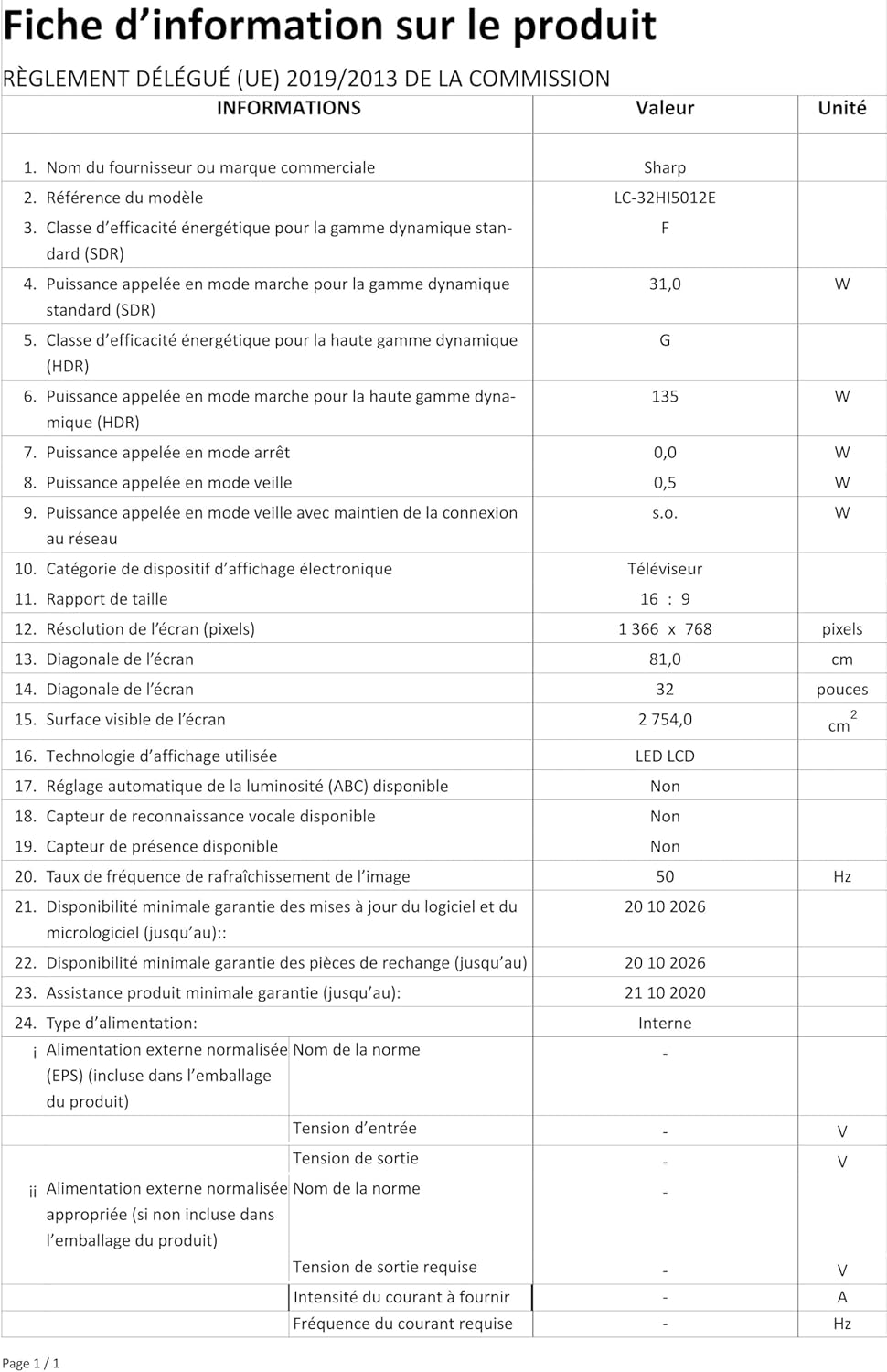
Image: Product information sheet detailing technical specifications and compliance information for the SHARP LC-32HI5012E television.
8. വാറൻ്റിയും പിന്തുണയും
വാറന്റി വിവരങ്ങൾക്ക്, നിങ്ങളുടെ ഉൽപ്പന്നത്തിനൊപ്പം ഉൾപ്പെടുത്തിയിരിക്കുന്ന വാറന്റി കാർഡ് പരിശോധിക്കുക അല്ലെങ്കിൽ ഔദ്യോഗിക SHARP സന്ദർശിക്കുക. webസൈറ്റ്. ഏതെങ്കിലും വാറന്റി ക്ലെയിമുകൾക്ക് വാങ്ങിയതിന്റെ തെളിവായി നിങ്ങളുടെ വാങ്ങൽ രസീത് സൂക്ഷിക്കുക.
For technical support or service inquiries, please contact SHARP customer service. Contact details can typically be found on the SHARP official webസൈറ്റ് അല്ലെങ്കിൽ ഉൽപ്പന്ന പാക്കേജിംഗിൽ.


