ആമുഖം
This manual provides comprehensive instructions for the HUAYU URC1511 Universal Remote Control. This remote is designed for direct use with Sony, Samsung, and LG LCD/LED Smart TVs, offering a convenient solution to control multiple devices with a single remote. No complex setup is required for these compatible brands.
സജ്ജമാക്കുക
1. ബാറ്ററി ഇൻസ്റ്റാളേഷൻ
റിമോട്ട് കൺട്രോളിന് രണ്ട് AAA ബാറ്ററികൾ ആവശ്യമാണ് (ഉൾപ്പെടുത്തിയിട്ടില്ല). അവ ഇൻസ്റ്റാൾ ചെയ്യാൻ ഈ ഘട്ടങ്ങൾ പാലിക്കുക:
- റിമോട്ട് കൺട്രോളിന്റെ പിൻഭാഗത്ത് ബാറ്ററി കമ്പാർട്ട്മെന്റ് കണ്ടെത്തുക.
- ടാബിൽ താഴേക്ക് അമർത്തി ബാറ്ററി കവർ നീക്കുക.
- രണ്ട് AAA ബാറ്ററികൾ ഇടുക, കമ്പാർട്ടുമെന്റിനുള്ളിലെ ഡയഗ്രമുകളുമായി പോസിറ്റീവ് (+) ഉം നെഗറ്റീവ് (-) ടെർമിനലുകളും പൊരുത്തപ്പെടുന്നുണ്ടെന്ന് ഉറപ്പാക്കുക.
- Slide the battery cover back on until it clicks into place.
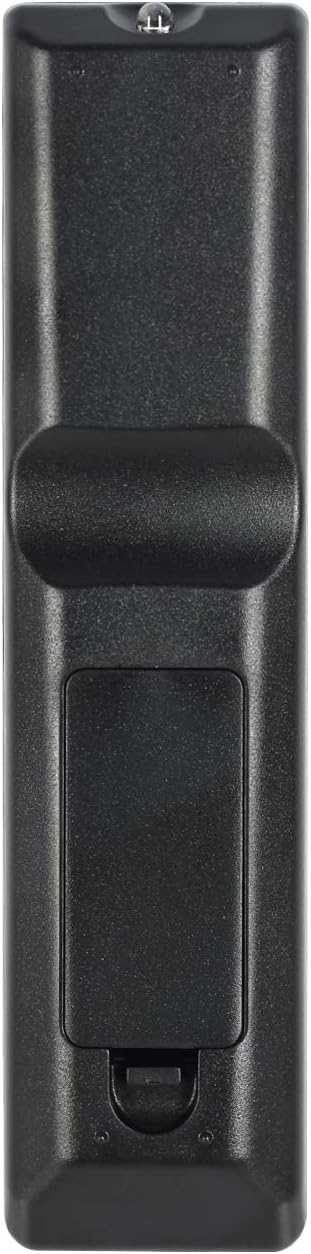
Image: Back of the remote control with battery compartment.
2. പ്രാരംഭ ഉപയോഗം
For SAMSUNG, LG, and SONY brand TVs, the HUAYU URC1511 remote control is ready for use immediately after battery installation. No additional programming or setup is required. Simply point the remote at your TV and begin operating it.
പ്രവർത്തന നിർദ്ദേശങ്ങൾ
റിമോട്ട് കൺട്രോൾ ലേഔട്ടും പ്രവർത്തനങ്ങളും
The HUAYU URC1511 remote control features a standard layout with dedicated buttons for various TV functions. Refer to the image below for a visual guide to the button layout.
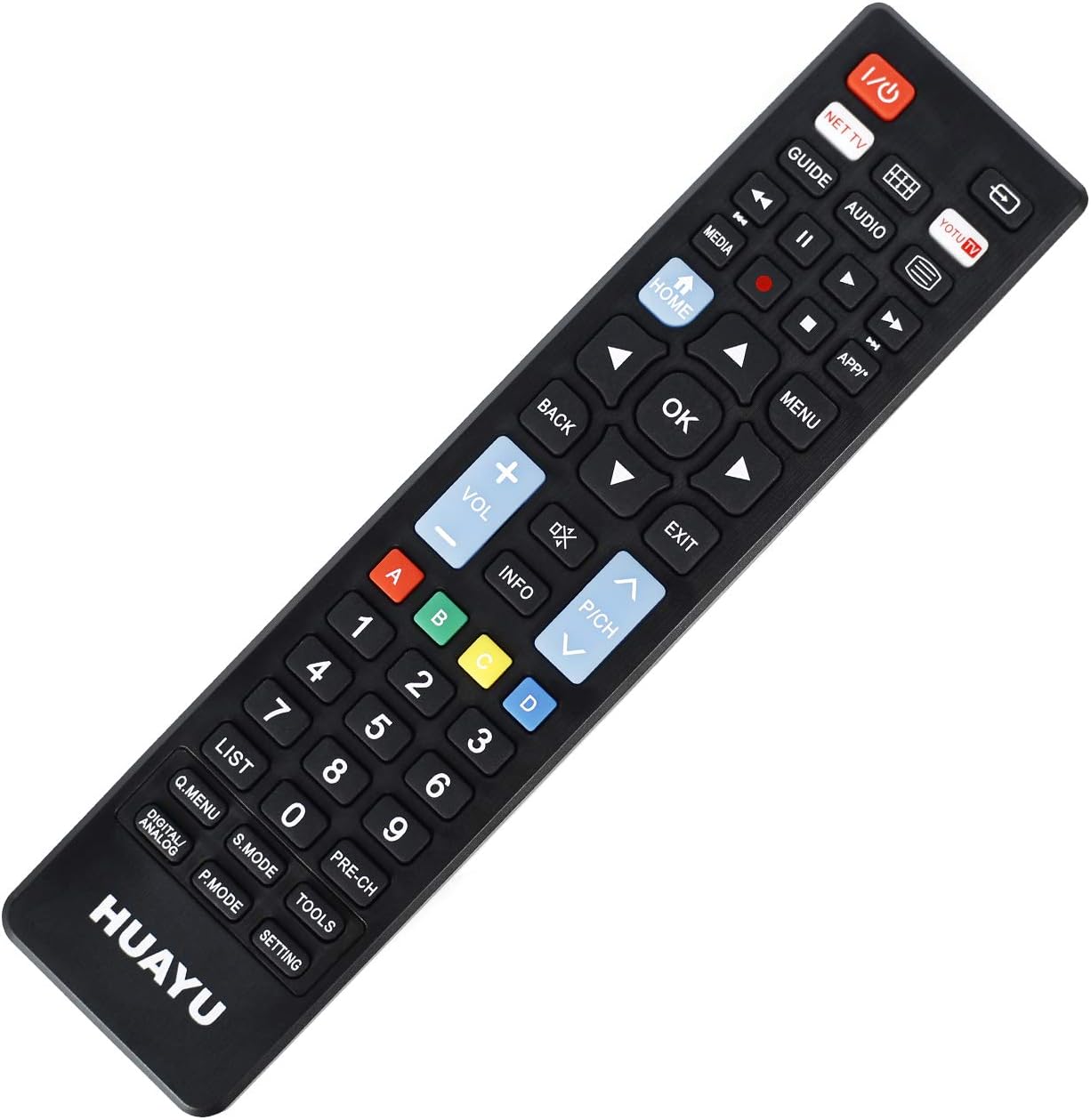
ചിത്രം: മുൻഭാഗം view ബട്ടൺ ലേഔട്ടുള്ള റിമോട്ട് കൺട്രോളിന്റെ.
പ്രധാന പ്രവർത്തനങ്ങൾ:
- പവർ (ചുവപ്പ് ബട്ടൺ): ടിവി ഓണാക്കുകയോ ഓഫാക്കുകയോ ചെയ്യുന്നു.
- NET TV / YOTU TV: Dedicated buttons for accessing smart TV applications or specific streaming services.
- വഴികാട്ടി: ഇലക്ട്രോണിക് പ്രോഗ്രാം ഗൈഡ് പ്രദർശിപ്പിക്കുന്നു.
- മീഡിയ: മീഡിയ പ്ലേബാക്ക് ഫംഗ്ഷനുകൾ ആക്സസ് ചെയ്യുന്നു.
- വീട്: Returns to the TV's main home screen or smart hub.
- തിരികെ: മെനുകളിലോ ആപ്ലിക്കേഷനുകളിലോ തിരികെ നാവിഗേറ്റ് ചെയ്യുന്നു.
- ശരി (മധ്യ ബട്ടൺ): തിരഞ്ഞെടുക്കലുകൾ സ്ഥിരീകരിക്കുന്നു.
- ദിശാസൂചന അമ്പടയാളങ്ങൾ (മുകളിലേക്ക്, താഴേക്ക്, ഇടത്, വലത്): മെനുകളിലൂടെയും ഓപ്ഷനുകളിലൂടെയും നാവിഗേറ്റ് ചെയ്യുന്നു.
- വോളിയം കൂട്ടുക/താഴ്ത്തുക (+/-): ടിവി വോളിയം ക്രമീകരിക്കുന്നു.
- Channel Up/Down (P/CH +/-): ടിവി ചാനലുകൾ മാറ്റുന്നു.
- നിശബ്ദമാക്കുക: ടിവി ഓഡിയോ നിശബ്ദമാക്കുകയോ അൺമ്യൂട്ടുചെയ്യുകയോ ചെയ്യുന്നു.
- മെനു: ടിവിയുടെ പ്രധാന മെനു തുറക്കുന്നു.
- പുറത്ത്: നിലവിലുള്ള മെനുവിൽ നിന്നോ ആപ്ലിക്കേഷനിൽ നിന്നോ പുറത്തുകടക്കുന്നു.
- നമ്പർ പാഡ് (0-9): Direct channel input.
- Colored Buttons (A, B, C, D): Often used for specific functions within smart TV apps or teletext.
- പട്ടിക: Displays a list of channels or recordings.
- Q.MENU / DIGITAL ANALOG: Quick menu access or toggling between digital/analog inputs.
- എസ്. മോഡ്: Sound mode selection.
- പി. മോഡ്: Picture mode selection.
- ഉപകരണങ്ങൾ: Accesses TV tools or settings.
- പ്രീ-സിഎച്ച്: മുമ്പത്തേതിലേക്ക് മടങ്ങുന്നു viewഎഡി ചാനൽ.
- ക്രമീകരണം: ടിവി ക്രമീകരണങ്ങൾ തുറക്കുന്നു.
അനുയോജ്യത
Compatible TV Brands
This universal remote control is designed for direct compatibility with the following television brands:
- സാംസങ്
- LG
- സോണി
No setup is required for these brands; simply insert batteries and begin use.
സ്പെസിഫിക്കേഷനുകൾ
ഉൽപ്പന്ന സവിശേഷതകൾ
| ഫീച്ചർ | വിശദാംശങ്ങൾ |
|---|---|
| മോഡൽ നമ്പർ | URC1511 |
| പ്രവർത്തന ദൂരം | 8 മീറ്ററിൽ കൂടുതൽ |
| പവർ ആവശ്യകതകൾ | DC 3V |
| ബാറ്ററി തരം | രണ്ട് AAA ബാറ്ററികൾ (ഉൾപ്പെടുത്തിയിട്ടില്ല) |
| അനുയോജ്യമായ ഉപകരണങ്ങൾ | ടെലിവിഷൻ |
| പിന്തുണയ്ക്കുന്ന ഉപകരണങ്ങളുടെ പരമാവധി എണ്ണം | 3 (for specific brands) |
| നിറം | കറുപ്പ് |
| നിർമ്മാതാവ് | ഹുവായു |
പരിചരണവും പരിപാലനവും
- Keep the remote control dry. Avoid exposure to water or high humidity.
- റിമോട്ട് താഴെയിടുകയോ ശക്തമായ ആഘാതങ്ങൾക്ക് വിധേയമാക്കുകയോ ചെയ്യരുത്.
- മൃദുവായതും ഉണങ്ങിയതുമായ തുണി ഉപയോഗിച്ച് റിമോട്ട് കൺട്രോൾ വൃത്തിയാക്കുക. അബ്രാസീവ് ക്ലീനറുകളോ ലായകങ്ങളോ ഉപയോഗിക്കരുത്.
- റിമോട്ട് കൺട്രോൾ ദീർഘനേരം ഉപയോഗിക്കുന്നില്ലെങ്കിൽ, ചോർച്ച തടയാൻ ബാറ്ററികൾ നീക്കം ചെയ്യുക.
- Avoid exposing the remote control to direct sunlight or extreme temperatures.
ട്രബിൾഷൂട്ടിംഗ്
റിമോട്ട് കൺട്രോൾ പ്രതികരിക്കുന്നില്ല:
- ബാറ്ററികൾ പരിശോധിക്കുക: Ensure batteries are inserted correctly with the correct polarity (+/-). Replace old or depleted batteries with new ones.
- വീക്ഷണരേഖ: Make sure there is a clear line of sight between the remote control and the TV's infrared receiver. Obstructions can block the signal.
- ദൂരം: Ensure you are within the operable distance (typically within 8 meters).
- ടിവി അനുയോജ്യത: Confirm your TV is one of the directly supported brands (SAMSUNG, LG, SONY).
ബട്ടണുകൾ ശരിയായി പ്രവർത്തിക്കുന്നില്ല:
- റിമോട്ട് വൃത്തിയാക്കുക: Dust or debris under buttons can cause issues. Gently clean around the buttons.
- ബാറ്ററി പരിശോധന: Low batteries can sometimes cause intermittent button functionality. Replace batteries.
വാറൻ്റിയും ഉപഭോക്തൃ പിന്തുണയും
For warranty information or technical support regarding your HUAYU URC1511 Universal Remote Control, please refer to the documentation provided at the point of purchase or contact your retailer. Specific warranty terms may vary.


