1. ആമുഖം
This manual provides comprehensive instructions for the safe and efficient operation of your CAMRY ACS-30-JC81W Waterproof Commercial Digital Price Computing Scale. Designed for commercial use in environments such as farmers' markets, seafood counters, and delis, this scale offers high precision, durability, and ease of use. Its IPX7 waterproof rating ensures reliable performance even when exposed to water, and the dual LCD display facilitates clear readings for both operator and customer.

Figure 1.1: CAMRY ACS-30-JC81W Digital Price Computing Scale, highlighting its waterproof design and suitability for weighing items like seafood.

Figure 1.2: Visual representation of the scale's IPX7 waterproof capability, indicating its resilience to water exposure.
2. സജ്ജീകരണം
2.1 അൺബോക്സിംഗും ഘടക പരിശോധനയും
പാക്കേജിംഗിൽ നിന്ന് എല്ലാ ഘടകങ്ങളും ശ്രദ്ധാപൂർവ്വം നീക്കം ചെയ്യുക. ഇനിപ്പറയുന്ന ഇനങ്ങൾ ഉണ്ടെന്ന് ഉറപ്പാക്കുക:
- CAMRY ACS-30-JC81W Digital Price Computing Scale unit
- Weighing platform (stainless steel)
- എസി പവർ അഡാപ്റ്റർ
- ഉപയോക്തൃ മാനുവൽ (ഈ പ്രമാണം)
2.2 പ്ലേസ്മെന്റും ലെവലിംഗും
Place the scale on a stable, flat surface away from vibrations, drafts, and direct sunlight. Ensure the surface is level to guarantee accurate readings. The scale is equipped with adjustable leveling feet. Rotate these feet until the bubble in the level indicator (if present) is centered, or until the scale feels stable and does not wobble.
2.3 പ്രാരംഭ ചാർജിംഗ്
Before first use, fully charge the built-in rechargeable battery. Connect the AC power adapter to the scale's charging port and plug it into a standard electrical outlet. The charging indicator will illuminate. A full charge can provide up to 3 months of use, depending on usage patterns.

Figure 2.1: Location of the AC plug-in port and adjustable leveling feet for proper scale setup.
3. പ്രവർത്തന നിർദ്ദേശങ്ങൾ
3.1 പവർ ഓൺ/ഓഫ്
- പവർ ഓൺ ചെയ്യാൻ: അമർത്തുക ഓൺ/ഓഫ് button. The display will light up and perform a self-check.
- പവർ ഓഫ് ചെയ്യാൻ: അമർത്തിപ്പിടിക്കുക ഓൺ/ഓഫ് ഡിസ്പ്ലേ ഓഫാക്കുന്നതുവരെ ബട്ടൺ.
3.2 അടിസ്ഥാന തൂക്കം
- Ensure the scale is powered on and the display shows '0.000'.
- Place the item to be weighed onto the center of the weighing platform.
- Read the weight displayed on the 'Weight' LCD screen.
3.3 Unit Conversion (KG/LB)
The scale supports weighing in kilograms (kg) and pounds (lb). To switch between units:
- അമർത്തുക കെ.ജി./എൽ.ബി button. The unit displayed on the 'Weight' screen will change accordingly.
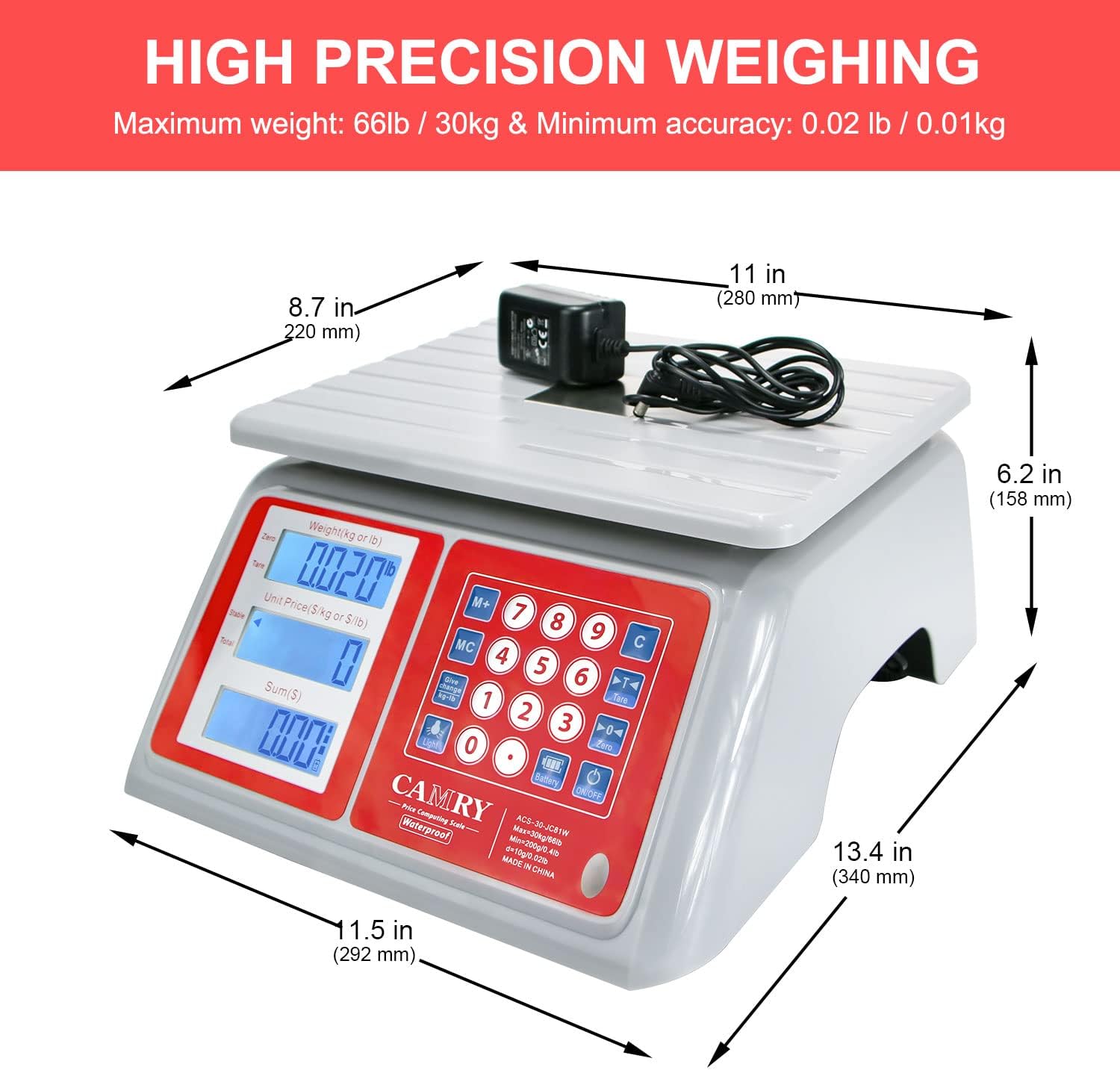
Figure 3.1: Demonstrating the KG/LB unit conversion feature on the scale's control panel.
3.4 ടാരെ ഫംഗ്ഷൻ
ഒരു കണ്ടെയ്നറിന്റെ ഭാരം കുറയ്ക്കാൻ ടെയർ ഫംഗ്ഷൻ നിങ്ങളെ അനുവദിക്കുന്നു, അതിനാൽ ഉള്ളടക്കത്തിന്റെ മൊത്തം ഭാരം മാത്രമേ അളക്കൂ.
- വെയ്സിംഗ് പ്ലാറ്റ്ഫോമിൽ ഒരു ഒഴിഞ്ഞ പാത്രം വയ്ക്കുക.
- അമർത്തുക TARE ബട്ടൺ. ഡിസ്പ്ലേ '0.000' ആയി പുനഃസജ്ജമാക്കും.
- തൂക്കാനുള്ള വസ്തുക്കൾ പാത്രത്തിലേക്ക് ചേർക്കുക. ഡിസ്പ്ലേ ഇനങ്ങളുടെ ആകെ ഭാരം കാണിക്കും.
3.5 വില കമ്പ്യൂട്ടിംഗ്
This scale can calculate the total price based on weight and unit price.
- Place the item on the weighing platform.
- Enter the unit price using the numeric keypad. The 'Unit Price' display will show the entered value.
- The 'Total Price' display will automatically calculate and show the total cost.
- ഉപയോഗിക്കുക PLU buttons (P1-P5) to store and recall frequently used unit prices.
- ദി M+ button can be used for accumulation of multiple items.
3.6 ഡ്യുവൽ ഡിസ്പ്ലേ
The scale features dual LCD displays, allowing both the operator and the customer to view the weight, unit price, and total price simultaneously.

Figure 3.2: Illustration of the easy-to-read dual display feature for both operator and customer visibility.
4. പരിപാലനം
4.1 വൃത്തിയാക്കൽ
Due to its IPX7 waterproof design and stainless steel platform, the scale is easy to clean. Use a damp cloth with mild soap to wipe down the platform and body. Avoid abrasive cleaners or harsh chemicals that could damage the display or finish. Ensure the charging port cover is securely closed before cleaning with water.

Figure 4.1: Cleaning the stainless steel platform of the scale.
4.2 ബാറ്ററി കെയർ
To prolong battery life, charge the scale when the low battery indicator appears. Avoid completely draining the battery frequently. If the scale will not be used for an extended period, charge it fully before storage and recharge every few months.

Figure 4.2: Battery charging and endurance illustration.
5. പ്രശ്നപരിഹാരം
നിങ്ങളുടെ സ്കെയിലിൽ പ്രശ്നങ്ങൾ നേരിടുകയാണെങ്കിൽ, ഇനിപ്പറയുന്ന പൊതുവായ പ്രശ്നങ്ങളും പരിഹാരങ്ങളും പരിശോധിക്കുക:
- സ്കെയിൽ ഓണാക്കുന്നില്ല:
Ensure the battery is charged. Connect the AC adapter and try again. If using battery power, check if the battery is properly connected (if user-serviceable). - കൃത്യമല്ലാത്ത വായനകൾ:
Verify the scale is on a stable, level surface. Ensure no objects are touching the platform. Perform a tare operation before weighing. Avoid placing items off-center. - Display shows 'OVERLOAD':
The item on the platform exceeds the maximum weight capacity (66lb / 30kg). Remove the item immediately to prevent damage. - കുറഞ്ഞ ബാറ്ററി അലാറം:
The battery indicator will show when the battery is low. Connect the AC adapter to recharge the scale.
6 സ്പെസിഫിക്കേഷനുകൾ
Detailed technical specifications for the CAMRY ACS-30-JC81W scale:
| ഫീച്ചർ | സ്പെസിഫിക്കേഷൻ |
|---|---|
| മോഡൽ നമ്പർ | ACS-30-JC81W |
| ഭാര പരിധി | 66 lb / 30 kg |
| വായനാ കൃത്യത | 0.02 lb / 10 ഗ്രാം |
| മെറ്റീരിയൽ | Stainless Steel (platform), ABS (body) |
| ഡിസ്പ്ലേ തരം | Dual LCD with White Backlight |
| വാട്ടർപ്രൂഫ് റേറ്റിംഗ് | IPX7 |
| പവർ ഉറവിടം | AC/DC Built-in Rechargeable Battery |
| ഉൽപ്പന്ന അളവുകൾ | 11.5 x 13.4 x 6.2 ഇഞ്ച് (292 x 340 x 158 മിമി) |
| ഇനത്തിൻ്റെ ഭാരം | 6.26 പൗണ്ട് |
| യു.പി.സി | 607376379275 |

Figure 6.1: Product dimensions of the scale.
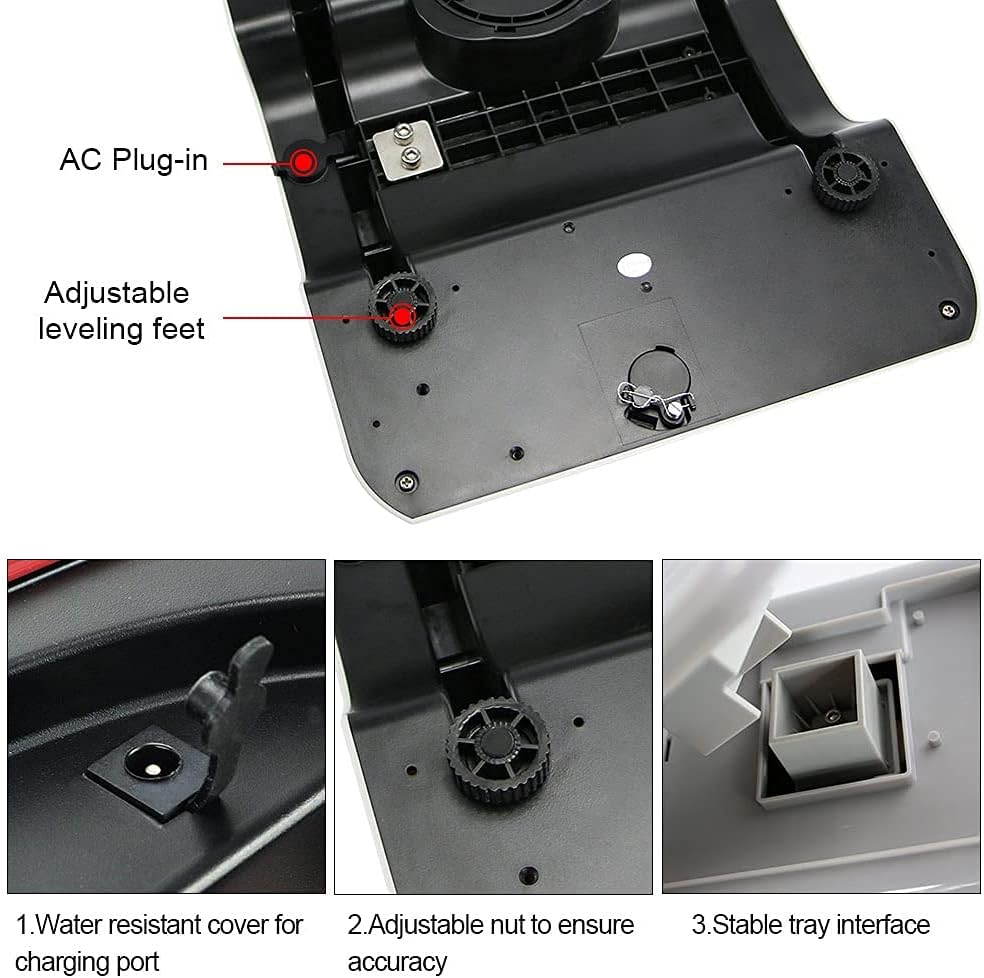
Figure 6.2: Illustration of the durable ABS material used for the scale's body.
7. വാറൻ്റിയും പിന്തുണയും
7.1 വാറൻ്റി വിവരങ്ങൾ
This CAMRY product is covered by a manufacturer's warranty against defects in materials and workmanship. Please refer to the warranty card included with your purchase or contact customer support for specific warranty terms and conditions.
7.2 ഉപഭോക്തൃ പിന്തുണ
For technical assistance, troubleshooting, or warranty claims, please contact CAMRY customer support. Contact details can typically be found on the product packaging or the official CAMRY webസൈറ്റ്.


