ആമുഖം
This manual provides essential information for the safe and efficient use of your Amazon Basics 10-12 Sheet Cross-Cut Paper and Credit Card Shredder, Model AU1202XB. Please read these instructions thoroughly before operating the device and retain them for future reference.
പ്രധാനപ്പെട്ട സുരക്ഷാ നിർദ്ദേശങ്ങൾ
- Always keep hands, loose clothing, jewelry, hair, and other foreign objects away from the shredder opening.
- Do not allow children or pets near the shredder. The shredder blades are designed to be inaccessible during normal operation, but caution is always advised.
- Unplug the shredder from the power outlet when not in use or before cleaning, moving, or emptying the waste bin.
- Do not shred metal objects, large paper clips, or adhesive labels as these can damage the blades. Small staples are generally acceptable.
- Do not spray any flammable products or lubricants into the shredder. Only use shredder-specific lubricants.
- Avoid operating the shredder continuously for more than 5 minutes to prevent overheating. Allow a cool-down period of at least 30 minutes after continuous use.
- Do not attempt to shred more than the specified sheet capacity (10-12 sheets of 20 lb bond paper) or one credit card at a time.
- ഷ്രെഡർ ഒരു സ്ഥിരതയുള്ള, നിരപ്പായ പ്രതലത്തിൽ സ്ഥാപിച്ചിട്ടുണ്ടെന്ന് ഉറപ്പാക്കുക.
പാക്കേജ് ഉള്ളടക്കം
പാക്കേജിൽ ഇനിപ്പറയുന്ന ഇനങ്ങൾ ഉണ്ടോ എന്ന് പരിശോധിക്കുക:
- Amazon Basics 10-12 Sheet Cross-Cut Shredder Head
- വേസ്റ്റ് ബിൻ
- ഉപയോക്തൃ മാനുവൽ (ഈ പ്രമാണം)
ഉൽപ്പന്നം കഴിഞ്ഞുview
Familiarize yourself with the components of your shredder.

ചിത്രം 1: മുൻ വശം view of the Amazon Basics 10-12 Sheet Cross-Cut Shredder. This image shows the main shredder unit with its black casing and a transparent window on the waste bin to monitor shredded paper levels.

ചിത്രം 2: മുകളിൽ view of the shredder head, highlighting the control panel. The control panel includes a slide switch for REV (Reverse), OFF, and AUTO/FWD (Forward) modes, along with indicator lights for Overload, Overheat, and Power. The paper and credit card entry slots are also visible.

ചിത്രം 3: The Amazon Basics shredder positioned in a typical office or home office setting, next to a desk with books and a plant, demonstrating its compact size and integration into a workspace.
- പേപ്പർ എൻട്രി സ്ലോട്ട്: For inserting paper documents.
- Credit Card Entry Slot: A dedicated slot for shredding credit cards.
- നിയന്ത്രണ സ്വിച്ച്: Selects operation mode (REV, OFF, AUTO/FWD).
- പവർ സൂചകം: Illuminates when the shredder is powered on.
- ഓവർലോഡ് സൂചകം: അധികം പേപ്പർ ചേർത്താൽ പ്രകാശം പരത്തുന്നു.
- അമിത ചൂടാക്കൽ സൂചകം: Illuminates if the motor temperature exceeds safe limits.
- വേസ്റ്റ് ബിൻ: Collects shredded materials.
- Viewവിൻഡോ: Allows monitoring of shredded waste level.
സജ്ജമാക്കുക
- പാക്കേജിംഗിൽ നിന്ന് എല്ലാ ഘടകങ്ങളും ശ്രദ്ധാപൂർവ്വം നീക്കം ചെയ്യുക.
- മാലിന്യ ബിൻ പരന്നതും സ്ഥിരതയുള്ളതുമായ ഒരു പ്രതലത്തിൽ സ്ഥാപിക്കുക.
- Position the shredder head securely onto the waste bin. Ensure it is properly seated to activate the safety interlock (if present).
- Plug the power cord into a standard electrical outlet. The Power indicator light should illuminate.
പ്രവർത്തന നിർദ്ദേശങ്ങൾ
ഷ്രെഡിംഗ് പേപ്പർ
- Ensure the control switch is set to AUTO/FWD. The shredder is now in standby mode.
- Insert up to 10-12 sheets of paper (20 lb bond) straight into the paper entry slot. The shredder will automatically start and stop once the paper has passed through.
- For optimal performance and to prevent jams, avoid exceeding the maximum sheet capacity.

ചിത്രം 4: A document being inserted into the paper entry slot of the shredder. Ensure paper is inserted straight to prevent jams.
ക്രെഡിറ്റ് കാർഡുകൾ കീറിമുറിക്കൽ
- Ensure the control switch is set to AUTO/FWD.
- Insert one credit card at a time into the dedicated credit card entry slot. The shredder will automatically start and stop.
Control Switch Functions
- AUTO/FWD: The shredder is ready to operate. It will automatically start when paper or a credit card is detected and stop when shredding is complete.
- ഓഫാണ്: The shredder is powered off. It is recommended to set the switch to OFF when not in use or during maintenance.
- REV (റിവേഴ്സ്): This function is used to clear paper jams. When selected, the shredder blades will rotate in reverse, pushing the paper back out of the entry slot.
തുടർച്ചയായ പ്രവർത്തന സമയം
The shredder is designed for intermittent use. It can operate continuously for approximately 5 minutes before requiring a cool-down period of 30 minutes. The Overheat indicator will illuminate if this limit is exceeded.
മെയിൻ്റനൻസ്
വേസ്റ്റ് ബിൻ ശൂന്യമാക്കുന്നു
പതിവായി പരിശോധിക്കുക viewing window and empty the waste bin when it is full. Unplug the shredder before lifting the shredder head to empty the bin.
ലൂബ്രിക്കേഷൻ
To maintain optimal performance and extend the life of your shredder, lubricate the cutting blades regularly, especially after emptying the waste bin multiple times or if performance decreases. Use shredder-specific lubricating sheets or oil. Follow the lubricant manufacturer's instructions.
വൃത്തിയാക്കൽ
Unplug the shredder before cleaning. Wipe the exterior of the shredder with a soft, dry cloth. Do not use abrasive cleaners or solvents. Do not immerse the shredder head in water.
ട്രബിൾഷൂട്ടിംഗ്
| പ്രശ്നം | സാധ്യമായ കാരണം | പരിഹാരം |
|---|---|---|
| ഷ്രെഡർ ഓണാകുന്നില്ല. | No power, shredder head not seated correctly, control switch in OFF position. | Ensure power cord is securely plugged in. Re-seat the shredder head on the waste bin. Set control switch to AUTO/FWD. |
| പേപ്പർ ജാം. | Too much paper inserted, paper inserted incorrectly. | Set control switch to REV to clear the jam. If necessary, unplug the shredder and carefully remove paper manually. Reduce paper quantity for future shredding. |
| Shredder stops during operation and Overheat indicator is on. | Continuous operation exceeded the duty cycle. | ഷ്രെഡർ ഓഫ് ചെയ്ത് കുറഞ്ഞത് 30 മിനിറ്റെങ്കിലും തണുക്കാൻ അനുവദിക്കുക. |
| Shredder runs but does not shred. | Waste bin is full, blades are dull or dirty. | Empty the waste bin. Lubricate the blades. |
സ്പെസിഫിക്കേഷനുകൾ
| ഫീച്ചർ | വിശദാംശങ്ങൾ |
|---|---|
| ബ്രാൻഡ് | ആമസോൺ അടിസ്ഥാനങ്ങൾ |
| മോഡൽ നമ്പർ | AU1202XB |
| കട്ട് തരം | ക്രോസ്-കട്ട് |
| ഷീറ്റ് ശേഷി | 10-12 sheets (20 lb bond paper) |
| ക്രെഡിറ്റ് കാർഡ് ഷ്രെഡിംഗ് | Yes (1 card at a time) |
| അളവുകൾ (L x W x H) | 22 സെ.മീ x 38.4 സെ.മീ x 38.4 സെ.മീ (ഏകദേശം) |
| മെറ്റീരിയൽ | പ്ലാസ്റ്റിക്, മെറ്റൽ |
| പവർ ഉറവിടം | കോർഡഡ് ഇലക്ട്രിക് |
| പ്രത്യേക ഫീച്ചർ | പോർട്ടബിൾ |
| തുടർച്ചയായ പ്രവർത്തന സമയം | 5 മിനിറ്റ് (ഏകദേശം) |
| തണുപ്പിക്കൽ സമയം | 30 മിനിറ്റ് (ഏകദേശം) |
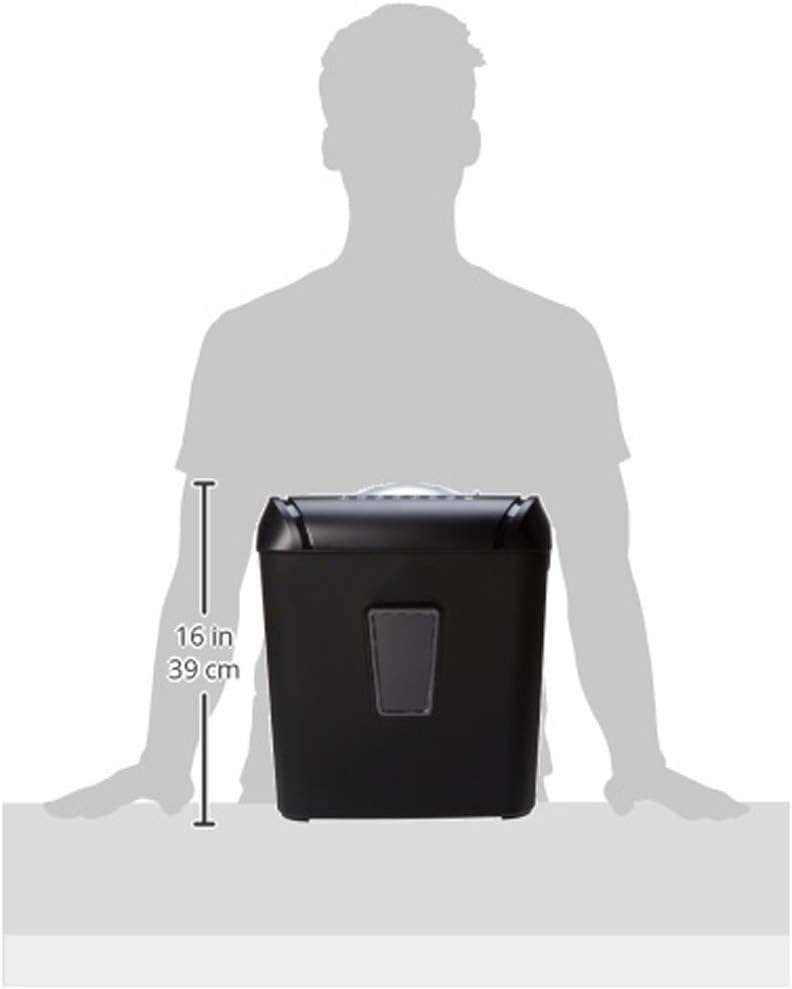
ചിത്രം 5: A diagram illustrating the approximate height of the shredder, which is 16 inches (39 cm).
വാറൻ്റിയും പിന്തുണയും
For warranty information or technical support, please refer to the Amazon Basics official webസൈറ്റിൽ ബന്ധപ്പെടുക അല്ലെങ്കിൽ ആമസോണിന്റെ ഉപഭോക്തൃ സേവനവുമായി നേരിട്ട് ബന്ധപ്പെടുക. വാറന്റി ക്ലെയിമുകൾക്കായി നിങ്ങളുടെ വാങ്ങൽ രസീത് സൂക്ഷിക്കുക.


