1. ആമുഖം
This manual provides essential information for the safe and efficient use of your Sharp 40-inch LED TV, model LC-40LE185M. Please read these instructions thoroughly before operating the television and retain them for future reference. This television is designed to provide a high-quality viewing experience with its 1366 x 768 resolution display and various connectivity options.
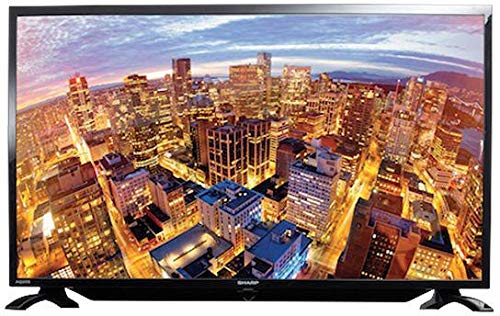
ചിത്രം 1.1: മുൻഭാഗം view of the Sharp 40-inch LED TV.
2 സുരക്ഷാ വിവരങ്ങൾ
വൈദ്യുതാഘാതം, തീപിടുത്തം അല്ലെങ്കിൽ പരിക്ക് എന്നിവ തടയാൻ ഇനിപ്പറയുന്ന സുരക്ഷാ മുൻകരുതലുകൾ എപ്പോഴും പാലിക്കുക:
- മഴയോ ഈർപ്പമോ ടിവിയെ തുറന്നുകാട്ടരുത്.
- ടിവി തുറക്കരുത് casing. എല്ലാ സേവനങ്ങളും യോഗ്യതയുള്ള ഉദ്യോഗസ്ഥർക്ക് റഫർ ചെയ്യുക.
- ശരിയായ വായുസഞ്ചാരം ഉറപ്പാക്കുക; വായുസഞ്ചാര ദ്വാരങ്ങൾ അടയ്ക്കരുത്.
- ടിവി വീഴാതിരിക്കാൻ സ്ഥിരതയുള്ളതും നിരപ്പായതുമായ ഒരു പ്രതലത്തിൽ വയ്ക്കുക.
- ഇടിമിന്നൽ ഉണ്ടാകുമ്പോഴോ ദീർഘനേരം ഉപയോഗിക്കാതിരിക്കുമ്പോഴോ ടിവി പ്ലഗ് ഊരിവയ്ക്കുക.
- ടിവി നേരിട്ട് സൂര്യപ്രകാശം, താപ സ്രോതസ്സുകൾ, ശക്തമായ കാന്തികക്ഷേത്രങ്ങൾ എന്നിവയിൽ നിന്ന് അകറ്റി നിർത്തുക.
3. പാക്കേജ് ഉള്ളടക്കം
പാക്കേജിൽ എല്ലാ ഇനങ്ങളും ഉണ്ടെന്ന് ഉറപ്പാക്കുക:
- Sharp 40-inch LED TV (Model LC-40LE185M)
- റിമോട്ട് കൺട്രോൾ
- പവർ കോർഡ്
- Table-top Stand (including screws)
- ഉപയോക്തൃ മാനുവൽ (ഈ പ്രമാണം)
4. സജ്ജീകരണം
4.1 അൺപാക്കിംഗ്
Carefully remove the TV and all accessories from the packaging. Retain the packaging materials for future transport or storage.
4.2 സ്റ്റാൻഡ് അറ്റാച്ചുചെയ്യുന്നു
If using the table-top stand:
- സ്ക്രീൻ കേടുപാടുകൾ തടയുന്നതിന് ടിവി മുഖം മൃദുവായതും വൃത്തിയുള്ളതുമായ ഒരു പ്രതലത്തിൽ വയ്ക്കുക.
- ടിവിയുടെ അടിയിലുള്ള മൗണ്ടിംഗ് ദ്വാരങ്ങൾ ഉപയോഗിച്ച് സ്റ്റാൻഡ് വിന്യസിക്കുക.
- നൽകിയിരിക്കുന്ന സ്ക്രൂകൾ ഉപയോഗിച്ച് സ്റ്റാൻഡ് ഉറപ്പിക്കുക. സ്റ്റാൻഡ് ദൃഢമായി ഘടിപ്പിച്ചിട്ടുണ്ടെന്ന് ഉറപ്പാക്കുക.
If wall-mounting, consult a professional installer. കുറിപ്പ്: Some users have reported that the lower screw bracket hole for wall mounting may not be firmly attached, and the frame can be flimsy/wobbly. Exercise caution and ensure secure installation if wall mounting.

Figure 4.1: Illustration of the TV with its table-top stand.
4.3 ബന്ധിപ്പിക്കുന്ന പവർ
പവർ കോർഡ് ടിവിയുടെ പവർ ഇൻപുട്ടിലേക്കും തുടർന്ന് ഒരു വാൾ ഔട്ട്ലെറ്റിലേക്കും ബന്ധിപ്പിക്കുക.
4.4 ബാഹ്യ ഉപകരണങ്ങൾ ബന്ധിപ്പിക്കുന്നു
Your TV supports various connections:
- എച്ച്ഡിഎംഐ: Connect Blu-ray players, gaming consoles, or set-top boxes using HDMI cables. The TV has HDMI ports for compatible devices.
- USB: USB സംഭരണ ഉപകരണങ്ങൾ ഇതിലേക്ക് ബന്ധിപ്പിക്കുക view photos or other media. The TV has a USB port for compatible devices.
- MHL: Use MHL connectivity to connect your smartphone to the TV.
5. പ്രവർത്തന നിർദ്ദേശങ്ങൾ
5.1 പവർ ഓൺ/ഓഫ്
Press the Power button on the remote control or on the TV to turn the TV on or off. The TV automatically switches to standby mode when there is no signal, saving power consumption.
5.2 അടിസ്ഥാന നിയന്ത്രണങ്ങൾ
Use the remote control to navigate menus, adjust volume, and change channels. Refer to the remote control diagram (not included in this manual) for specific button functions.
5.3 ഇൻപുട്ട് തിരഞ്ഞെടുക്കൽ
Press the 'Input' or 'Source' button on your remote to select the desired input source (e.g., HDMI 1, USB, TV).
5.4 ചിത്ര, ശബ്ദ ക്രമീകരണങ്ങൾ
Access the TV's menu to adjust picture settings (brightness, contrast, color, sharpness) and sound settings (bass, treble, balance, sound mode). The Easy Colour Adjustment feature allows you to achieve ideal color tones.
5.5 പ്രത്യേക സവിശേഷതകൾ
- കഴുകൻ View സാങ്കേതികവിദ്യ: Enhances your visual experience with improved display quality.
- AquoMotion Lite Technology: Reduces motion blur and distortions, improving transitions during fast-paced movements.
- Photo Frame Mode: Relive your special memories by displaying vibrant photos on the screen.
- യുഎസ്ബി പ്ലേബാക്ക്: Enjoy content stored on compatible USB devices directly on the TV screen.
- HDMI കണക്റ്റിവിറ്റി: Connect various compatible devices for an immersive viewഇൻ-ഗെയിം അല്ലെങ്കിൽ ഗെയിമിംഗ് അനുഭവം.
6 സ്പെസിഫിക്കേഷനുകൾ
| ഫീച്ചർ | സ്പെസിഫിക്കേഷൻ |
|---|---|
| ബ്രാൻഡ് | മൂർച്ചയുള്ള |
| മോഡൽ നമ്പർ | LC-40LE185M ഡോക്യുമെന്റേഷൻ |
| സ്ക്രീൻ വലിപ്പം | 40 ഇഞ്ച് |
| ഡിസ്പ്ലേ ടെക്നോളജി | എൽഇഡി |
| റെസലൂഷൻ | 1366 x 768 പിക്സലുകൾ |
| പുതുക്കിയ നിരക്ക് | 60 Hz |
| ഉൽപ്പന്ന അളവുകൾ | 40.8 x 29 x 2.8 സെ.മീ |
| ഭാരം | 5.8 കി.ഗ്രാം |
| കണക്റ്റിവിറ്റി ടെക്നോളജി | HDMI, USB |
| വീക്ഷണാനുപാതം | 1.77:1 |
| പിന്തുണയ്ക്കുന്ന ഇന്റർനെറ്റ് സേവനങ്ങൾ | YouTube |
| പ്രത്യേക ഫീച്ചർ | വിശാലമായ സ്ക്രീൻ |
7. പ്രശ്നപരിഹാരം
നിങ്ങളുടെ ടിവിയിൽ പ്രശ്നങ്ങൾ നേരിടുകയാണെങ്കിൽ, ഇനിപ്പറയുന്ന പൊതുവായ പ്രശ്നങ്ങളും പരിഹാരങ്ങളും പരിശോധിക്കുക:
- ശക്തിയില്ല: Ensure the power cord is securely connected to both the TV and the wall outlet. Check if the outlet is functional.
- ചിത്രം/ശബ്ദം ഇല്ല: ശരിയായ ഇൻപുട്ട് ഉറവിടം തിരഞ്ഞെടുത്തിട്ടുണ്ടെന്ന് ഉറപ്പാക്കുക. എല്ലാ കേബിൾ കണക്ഷനുകളും (HDMI, ആന്റിന) പരിശോധിക്കുക.
- മോശം ചിത്ര നിലവാരം: ചിത്ര ക്രമീകരണങ്ങൾ ക്രമീകരിക്കുക (തെളിച്ചം, ദൃശ്യതീവ്രത, മൂർച്ച). ഇൻപുട്ട് ഉറവിടം ഉയർന്ന നിലവാരമുള്ള സിഗ്നൽ നൽകുന്നുണ്ടെന്ന് ഉറപ്പാക്കുക.
- റിമോട്ട് കൺട്രോൾ പ്രവർത്തിക്കുന്നില്ല: Check the batteries and ensure there are no obstructions between the remote and the TV's IR sensor.
- TV Automatically Switches to Standby: This is a power-saving feature that activates when no signal is detected. Ensure your input source is active.
സ്ഥിരമായ പ്രശ്നങ്ങൾക്ക്, ഉപഭോക്തൃ പിന്തുണയുമായി ബന്ധപ്പെടുക.
8. പരിപാലനം
- സ്ക്രീൻ വൃത്തിയാക്കൽ: Gently wipe the screen with a soft, lint-free cloth. For stubborn marks, use a screen cleaner specifically designed for LED TVs. Do not spray cleaner directly onto the screen.
- കാബിനറ്റ് വൃത്തിയാക്കൽ: ടിവി കാബിനറ്റ് തുടയ്ക്കാൻ മൃദുവായതും ഉണങ്ങിയതുമായ തുണി ഉപയോഗിക്കുക. അബ്രസീവ് ക്ലീനറുകളോ ലായകങ്ങളോ ഉപയോഗിക്കരുത്.
- വെൻ്റിലേഷൻ: ടിവിയുടെ പിൻഭാഗത്തുള്ള വെന്റിലേഷൻ ഓപ്പണിംഗുകൾ അമിതമായി ചൂടാകുന്നത് തടയാൻ അടഞ്ഞിട്ടില്ലെന്ന് ഉറപ്പാക്കുക.
9. വാറൻ്റിയും പിന്തുണയും
Your Sharp TV comes with a standard manufacturer's warranty. Please refer to the warranty card included in your product packaging for details regarding coverage, terms, and conditions. For technical support, service, or warranty claims, please contact Sharp customer service through their official webസൈറ്റ് അല്ലെങ്കിൽ നിങ്ങളുടെ വാങ്ങൽ ഡോക്യുമെന്റേഷനോടൊപ്പം നൽകിയിരിക്കുന്ന ബന്ധപ്പെടാനുള്ള വിവരങ്ങൾ.


