1. ആമുഖം
This manual provides essential information for the installation, operation, and maintenance of the Cisco Catalyst 3850 48-Port PoE IP Base Switch, model WS-C3850-48PW-S. The Cisco Catalyst 3850 Series is designed as an enterprise-class stackable access-layer switch, offering full convergence between wired and wireless networks on a unified platform. It integrates Cisco's Unified Access Data Plane (UADP) application-specific integrated circuit (ASIC) to facilitate consistent wired-wireless policy enforcement, application visibility, and optimization.
This device supports full IEEE 802.3at Power over Ethernet Plus (PoE+), modular and field-replaceable network modules, redundant fans, and power supplies, ensuring high availability and flexibility for network deployments.
2. ഉൽപ്പന്നം കഴിഞ്ഞുview
The Cisco Catalyst 3850 48-Port PoE IP Base Switch is a robust networking solution. Below is an image illustrating the front panel of the switch, highlighting its 48 Gigabit Ethernet ports with Power over Ethernet Plus (PoE+) capabilities.
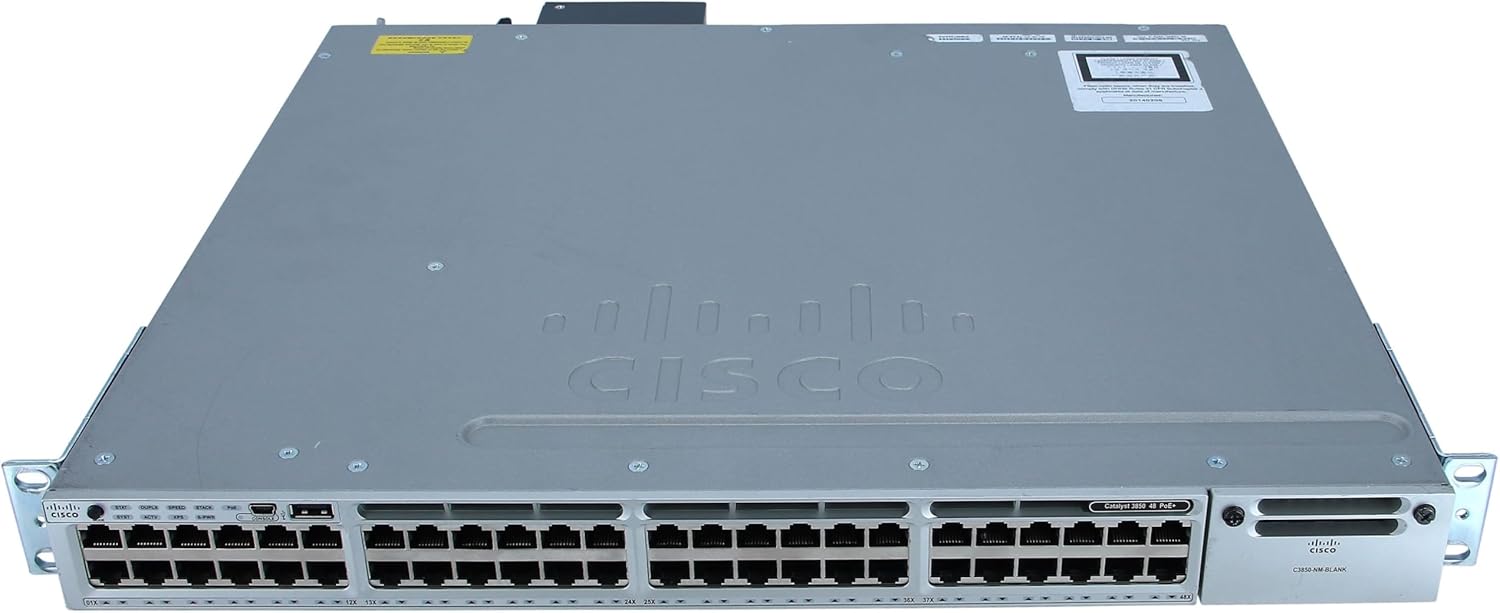
Figure 1: Front Panel of Cisco Catalyst 3850 48-Port PoE IP Base Switch
This image displays the front of the Cisco Catalyst 3850 switch. It features 48 RJ-45 Ethernet ports, each capable of 10/100/1000Mbps data transfer with Power over Ethernet Plus (PoE+). To the left of the ports, there are LED indicators for various statuses such as System (SYST), Redundant Power System (RPS), Stack (STACK), and PoE. On the right side, a blank network module slot is visible, labeled "C3850-NM BLANK", indicating modular expandability. The overall chassis is gray with the Cisco logo prominently displayed.
പ്രധാന സവിശേഷതകൾ:
- 48-Port Gigabit Ethernet with PoE+: Provides 48 ports supporting 10/100/1000Mbps data and IEEE 802.3at Power over Ethernet Plus, with a 435-watt power budget.
- Unified Wired and Wireless Access: Offers full convergence on a single platform for simplified network management.
- Cisco UADP ASIC: Enables uniform wired-wireless policy enforcement, enhanced application visibility, flexibility, and optimization.
- StackWise-480 Technology: Provides high resilience and scalability for stacking multiple switches.
- Modular Network Modules: Supports field-replaceable network modules for future expansion and flexibility.
- Redundant Components: Features redundant fans and power supplies to ensure continuous operation.
- Advanced Layer 3 Features: Includes auto-negotiation, ARP support, trunking, VLAN support, auto-uplink (auto MDI/MDI-X), IGMP snooping, Syslog support, IPv6 support, Rapid Spanning Tree Protocol (RSTP), and Multiple Spanning Tree Protocol (MSTP) support.
3. സജ്ജീകരണവും ഇൻസ്റ്റാളേഷനും
3.1 അൺപാക്കിംഗും പരിശോധനയും
- അതിൻ്റെ പാക്കേജിംഗിൽ നിന്ന് സ്വിച്ച് ശ്രദ്ധാപൂർവ്വം നീക്കം ചെയ്യുക.
- Inspect the switch for any signs of physical damage. If damage is observed, contact your supplier immediately.
- പാക്കിംഗ് ലിസ്റ്റിൽ ലിസ്റ്റ് ചെയ്തിരിക്കുന്ന എല്ലാ ഘടകങ്ങളും ഉണ്ടെന്ന് ഉറപ്പാക്കുക.
3.2 റാക്ക് മൗണ്ടിംഗ് (ഓപ്ഷണൽ)
The Cisco Catalyst 3850 switch can be installed in a standard 19-inch equipment rack. Use the provided rack-mount brackets and screws to secure the switch. Ensure adequate airflow around the unit for proper cooling.
3.3 ബന്ധിപ്പിക്കുന്ന പവർ
- Connect the power cord to the AC power connector on the rear panel of the switch.
- പവർ കോർഡിന്റെ മറ്റേ അറ്റം ഗ്രൗണ്ടഡ് ഇലക്ട്രിക്കൽ ഔട്ട്ലെറ്റിലേക്ക് പ്ലഗ് ചെയ്യുക.
- The switch will begin its power-on self-test (POST) sequence. Observe the system status LEDs on the front panel.
3.4 നെറ്റ്വർക്ക് കണക്ഷനുകൾ
- Connect Ethernet cables from your network devices (computers, IP phones, wireless access points) to the RJ-45 ports on the front panel.
- For devices requiring Power over Ethernet (PoE+), ensure they are connected to the appropriate ports. The switch will automatically detect and provide power if the device is PoE+ compliant.
- For uplink connections to other network devices or the core network, use the appropriate uplink ports (if a network module is installed) or standard Gigabit Ethernet ports.
4. സ്വിച്ച് പ്രവർത്തിപ്പിക്കൽ
4.1 പ്രാരംഭ കോൺഫിഗറേഷൻ
Upon initial power-up, the switch will load its operating system. Access to the command-line interface (CLI) for configuration is typically done via a console cable connected to the console port on the front panel, or via a network connection if the switch has obtained an IP address.
- Connect a terminal emulator (e.g., PuTTY, Tera Term) to the console port using a serial cable.
- Configure basic settings such as hostname, IP address, subnet mask, and default gateway.
- Set up user accounts and passwords for secure access.
4.2 LED സൂചകങ്ങൾ
സ്വിച്ചിന്റെ പ്രവർത്തനത്തിന്റെ ദൃശ്യ നില മുൻ പാനൽ LED-കൾ നൽകുന്നു:
- സി.എസ്.ടി (സിസ്റ്റം): മൊത്തത്തിലുള്ള സിസ്റ്റം സ്റ്റാറ്റസ് സൂചിപ്പിക്കുന്നു (ഉദാ: സാധാരണ പ്രവർത്തനത്തിന് പച്ച, തകരാറിന് ആമ്പർ).
- RPS (Redundant Power System): Indicates the status of an optional external redundant power supply.
- സ്റ്റാക്ക്: Indicates the status of the switch in a StackWise-480 stack.
- PoE: Indicates the Power over Ethernet status for the ports.
- പോർട്ട് സ്റ്റാറ്റസ് LED-കൾ: Each port has LEDs indicating link status, activity, speed, and duplex mode.
4.3 വിപുലമായ സവിശേഷതകൾ
The Cisco Catalyst 3850 supports a wide range of advanced networking features:
- VLAN-കൾ: Configure Virtual Local Area Networks to segment network traffic.
- Spanning Tree Protocols (RSTP/MSTP): നെറ്റ്വർക്ക് ലൂപ്പുകൾ തടയുകയും പാത്ത് റിഡൻഡൻസി നൽകുകയും ചെയ്യുക.
- സേവനത്തിൻ്റെ ഗുണനിലവാരം (QoS): Prioritize critical network traffic.
- സുരക്ഷാ സവിശേഷതകൾ: Implement access control lists (ACLs), port security, and 802.1X authentication.
- StackWise-480: Create a unified switching system with multiple Catalyst 3850 switches for increased bandwidth and redundancy.
Refer to the comprehensive Cisco documentation for detailed configuration guides on these advanced features.
5. പരിപാലനം
5.1 പൊതു പരിചരണം
- Keep the switch in a clean, dust-free environment with adequate ventilation.
- Ensure operating temperature and humidity are within specified ranges.
- വെൻ്റിലേഷൻ ഓപ്പണിംഗുകൾ തടയുന്നത് ഒഴിവാക്കുക.
5.2 സോഫ്റ്റ്വെയർ അപ്ഡേറ്റുകൾ
Regularly check the Cisco website for the latest software updates and security patches. Keeping the switch's operating system up-to-date ensures optimal performance, stability, and security.
5.3 ഘടകം മാറ്റിസ്ഥാപിക്കൽ
The Cisco Catalyst 3850 Series supports modular and field-replaceable network modules, redundant fans, and power supplies. Refer to the specific component's documentation for replacement procedures. Always power down the switch and disconnect power before replacing internal components.
6. പ്രശ്നപരിഹാരം
6.1 വൈദ്യുതി പ്രശ്നങ്ങൾ
- ശക്തിയില്ല: Verify the power cord is securely connected to both the switch and the power outlet. Check the power source.
- System LED Amber: Indicates a system fault. Check logs via console for specific error messages.
6.2 നെറ്റ്വർക്ക് കണക്റ്റിവിറ്റി പ്രശ്നങ്ങൾ
- ലിങ്ക് ലൈറ്റ് ഇല്ല: Ensure the Ethernet cable is properly connected at both ends. Test with a different cable or port. Verify the connected device is powered on.
- മന്ദഗതിയിലുള്ള പ്രകടനം: Check for network congestion, duplex mismatches, or errors on the port. Verify port speed settings.
- PoE ഉപകരണം ഓണാക്കുന്നില്ല: Confirm the device is PoE+ compliant. Check the PoE status LED on the switch. Verify the switch's PoE power budget is not exceeded.
6.3 Console Access Issues
- No Output on Console: Verify the console cable is correctly connected. Check terminal emulator settings (baud rate, data bits, parity, stop bits, flow control). Typical settings are 9600 baud, 8 data bits, no parity, 1 stop bit, no flow control.
For more detailed troubleshooting, consult the official Cisco documentation or contact Cisco technical support.
7 സ്പെസിഫിക്കേഷനുകൾ
| ഫീച്ചർ | വിശദാംശങ്ങൾ |
|---|---|
| മോഡൽ നമ്പർ | WS-C3850-48PW-S |
| തുറമുഖങ്ങൾ | 48 x 10/100/1000Base-T Gigabit Ethernet with PoE+ |
| PoE സ്റ്റാൻഡേർഡ് | IEEE 802.3at PoE+ (Power over Ethernet Plus), Cisco Universal Power Over Ethernet |
| PoE പവർ ബജറ്റ് | 435 വാട്ട്സ് |
| സ്വിച്ചിംഗ് കപ്പാസിറ്റി | (Not specified in input, placeholder for typical value if known) |
| കൈമാറുന്ന നിരക്ക് | (Not specified in input, placeholder for typical value if known) |
| സ്റ്റാക്കിംഗ് ബാൻഡ്വിഡ്ത്ത് | StackWise-480 (480 Gbps) |
| അളവുകൾ (H x W x D) | 21.8 x 21 x 9.1 ഇഞ്ച് |
| ഭാരം | 24.1 പൗണ്ട് |
| നിർമ്മാതാവ് | സിസ്കോ സിസ്റ്റംസ് - എന്റർപ്രൈസ് |
| ആദ്യ തീയതി ലഭ്യമാണ് | 3 ജനുവരി 2019 |
8. വാറൻ്റിയും പിന്തുണയും
This product is offered as a renewed item. Renewed products are typically eligible for replacement or refund under the Amazon Renewed Guarantee if not satisfied with the purchase. Specific warranty terms may vary depending on the seller and region. Please refer to the purchase documentation or the Amazon Renewed program details for precise warranty information.
സാങ്കേതിക സഹായം:
For technical assistance, configuration guidance, or advanced troubleshooting, it is recommended to consult the official Cisco documentation available on the Cisco website. For issues related to the renewed product's functionality or warranty claims, please contact the seller or Amazon Renewed support directly.
- Cisco Documentation: Cisco Catalyst 3850 Series Support
- ആമസോൺ പുതുക്കിയ പിന്തുണ: Refer to your Amazon order details for specific support contacts.


