ആമുഖം
This manual provides essential information for the setup, operation, maintenance, and troubleshooting of your Fujitsu ESPRIMO P557 desktop computer. The Fujitsu ESPRIMO P557 is a powerful Midi Tower PC designed for reliable performance, featuring a 7th Gen Intel Core i7 processor, 16 GB of RAM, and a 512 GB storage capacity, running on Windows 10 Pro.
Please read this manual thoroughly before using your computer to ensure proper functionality and to maximize its lifespan.
സജ്ജമാക്കുക
Follow these steps to set up your Fujitsu ESPRIMO P557 PC:
- അൺപാക്ക് ചെയ്യുന്നു: Carefully remove the computer and all accessories from the packaging. Retain the original packaging for future transport or service needs.
- പ്ലേസ്മെൻ്റ്: Place the computer on a stable, flat surface with adequate ventilation. Ensure that the air vents are not obstructed.
- ബന്ധിപ്പിക്കുന്ന പെരിഫറലുകൾ:
- Connect your monitor to the appropriate video output port (e.g., HDMI, DVI) on the back of the PC.
- ലഭ്യമായ യുഎസ്ബി പോർട്ടുകളിലേക്ക് നിങ്ങളുടെ കീബോർഡും മൗസും ബന്ധിപ്പിക്കുക.
- If using wired network, connect an Ethernet cable to the LAN port.
- സ്പീക്കറുകൾ, പ്രിന്ററുകൾ അല്ലെങ്കിൽ ബാഹ്യ ഡ്രൈവുകൾ പോലുള്ള മറ്റ് ആവശ്യമുള്ള പെരിഫറലുകൾ ബന്ധിപ്പിക്കുക.
- പവർ കണക്ഷൻ: Connect the power cable to the power input on the back of the PC, then plug the other end into a grounded electrical outlet.
- പ്രാരംഭ പവർ ഓൺ: Press the power button located on the front of the PC. The system will boot into Windows 10 Pro. Follow the on-screen instructions for initial setup, including language, region, and network configuration.

ചിത്രം 1: മുൻവശം view of the Fujitsu ESPRIMO P557 PC, showcasing its compact tower design and front panel features.

ചിത്രം 2: നേർരേഖ view of the Fujitsu ESPRIMO P557 PC, highlighting the optical drive, front USB ports, and power button.
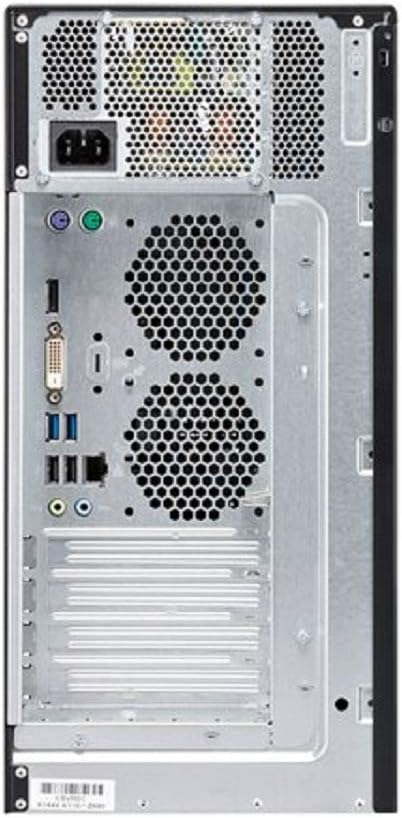
ചിത്രം 3: പിൻഭാഗം view of the Fujitsu ESPRIMO P557 PC, illustrating various connectivity ports including power, video outputs, and USB ports.
പ്രവർത്തന നിർദ്ദേശങ്ങൾ
This section covers the basic operation of your Fujitsu ESPRIMO P557.
പവർ ഓൺ/ഓഫ്
- പവർ ഓണാക്കാൻ: Press the power button on the front panel. The system will initiate the boot sequence.
- ഷട്ട് ഡൗൺ ചെയ്യാൻ: In Windows 10 Pro, click the ആരംഭിക്കുക ബട്ടൺ, തുടർന്ന് തിരഞ്ഞെടുക്കുക ശക്തി > ഷട്ട് ഡൗൺ. This ensures all applications are closed properly and data is saved.
- പുനരാരംഭിക്കാൻ: In Windows 10 Pro, click the ആരംഭിക്കുക ബട്ടൺ, തുടർന്ന് തിരഞ്ഞെടുക്കുക ശക്തി > പുനരാരംഭിക്കുക.
- ഉറങ്ങാൻ: In Windows 10 Pro, click the ആരംഭിക്കുക ബട്ടൺ, തുടർന്ന് തിരഞ്ഞെടുക്കുക ശക്തി > ഉറങ്ങുക.
Using the Optical Drive (DVD Super Multi)
The integrated DVD Super Multi drive supports reading and writing various disc formats.
- Press the eject button on the optical drive to open the disc tray.
- Place the disc (CD/DVD) gently onto the tray with the label side facing up.
- ട്രേ ഷട്ട് ക്ലിക്ക് ചെയ്യുന്നതുവരെ ഡ്രൈവിലേക്ക് പതുക്കെ തള്ളുക.
- The operating system will typically detect the disc and prompt you for action or automatically launch content.
USB പോർട്ടുകൾ
The Fujitsu ESPRIMO P557 is equipped with multiple USB ports (both front and rear) for connecting external devices such as USB drives, printers, and other peripherals. Simply plug your USB device into an available port. Windows 10 Pro will typically install the necessary drivers automatically.
മെയിൻ്റനൻസ്
നിങ്ങളുടെ കമ്പ്യൂട്ടറിന്റെ ദീർഘായുസ്സും മികച്ച പ്രകടനവും ഉറപ്പാക്കാൻ പതിവ് അറ്റകുറ്റപ്പണികൾ സഹായിക്കുന്നു.
- വൃത്തിയാക്കൽ:
- Use a soft, lint-free cloth to wipe the exterior of the computer.
- കഠിനമായ അടയാളങ്ങൾക്ക്, ചെറുതായി dampവെള്ളം അല്ലെങ്കിൽ മൃദുവായ, ഉരച്ചിലുകളില്ലാത്ത ക്ലീനർ ഉപയോഗിച്ച് തുണിയിൽ വയ്ക്കുക.
- Use compressed air to clear dust from the ventilation grilles and ports periodically. Ensure the PC is powered off and unplugged before cleaning.
- സോഫ്റ്റ്വെയർ അപ്ഡേറ്റുകൾ: Regularly check for and install updates for Windows 10 Pro and your installed applications. This ensures security, stability, and performance improvements.
- To check for Windows updates: Go to ക്രമീകരണങ്ങൾ > അപ്ഡേറ്റും സുരക്ഷയും > വിൻഡോസ് അപ്ഡേറ്റ്.
- വെൻ്റിലേഷൻ: Ensure that the computer's ventilation openings are not blocked. Proper airflow is crucial to prevent overheating. Avoid placing the PC in enclosed spaces or on soft surfaces that can restrict airflow.
- ഡാറ്റ ബാക്കപ്പ്: സിസ്റ്റം തകരാറിലായാൽ ഡാറ്റ നഷ്ടപ്പെടുന്നത് തടയാൻ നിങ്ങളുടെ പ്രധാനപ്പെട്ട ഡാറ്റ ഒരു ബാഹ്യ ഡ്രൈവിലേക്കോ ക്ലൗഡ് സ്റ്റോറേജിലേക്കോ പതിവായി ബാക്കപ്പ് ചെയ്യുക.
ട്രബിൾഷൂട്ടിംഗ്
നിങ്ങൾ നേരിട്ടേക്കാവുന്ന പൊതുവായ പ്രശ്നങ്ങൾക്കുള്ള പരിഹാരങ്ങൾ ഈ വിഭാഗം നൽകുന്നു.
- ശക്തിയില്ല:
- Ensure the power cable is securely connected to both the PC and the electrical outlet.
- മറ്റൊരു ഉപകരണം പ്ലഗ് ഇൻ ചെയ്ത് പവർ ഔട്ട്ലെറ്റ് പ്രവർത്തനക്ഷമമാണെന്ന് ഉറപ്പാക്കുക.
- Check the power supply unit (PSU) switch on the back of the PC, if present, to ensure it is in the 'On' position.
- മോണിറ്ററിൽ ഡിസ്പ്ലേ ഇല്ല:
- മോണിറ്റർ ഓണാണെന്നും അതിന്റെ പവർ ഇൻഡിക്കേറ്റർ ലൈറ്റ് സജീവമാണെന്നും ഉറപ്പാക്കുക.
- Check that the video cable (HDMI, DVI) is securely connected to both the PC and the monitor.
- Ensure the monitor's input source is correctly selected (e.g., HDMI 1, DVI).
- If you have a dedicated graphics card, ensure the monitor is connected to its ports, not the integrated graphics ports.
- System is Slow or Unresponsive:
- പശ്ചാത്തലത്തിൽ പ്രവർത്തിക്കുന്ന അനാവശ്യ ആപ്ലിക്കേഷനുകൾ അടയ്ക്കുക.
- Check Task Manager (Ctrl+Shift+Esc) for processes consuming high CPU, memory, or disk usage.
- നിങ്ങളുടെ ഓപ്പറേറ്റിംഗ് സിസ്റ്റവും ഡ്രൈവറുകളും കാലികമാണെന്ന് ഉറപ്പാക്കുക.
- Run a full system scan with antivirus software to check for malware.
- കമ്പ്യൂട്ടർ പുനരാരംഭിക്കുക.
- പെരിഫറൽ കണ്ടെത്തിയില്ല:
- മറ്റൊരു USB പോർട്ടിലേക്ക് പെരിഫറൽ ബന്ധിപ്പിക്കാൻ ശ്രമിക്കുക.
- കമ്പ്യൂട്ടർ പുനരാരംഭിക്കുക.
- ഡ്രൈവർ പ്രശ്നങ്ങൾക്കായി വിൻഡോസിലെ ഉപകരണ മാനേജർ പരിശോധിക്കുക.
സ്പെസിഫിക്കേഷനുകൾ
Below are the key technical specifications for the Fujitsu ESPRIMO P557:
| ഫീച്ചർ | സ്പെസിഫിക്കേഷൻ |
|---|---|
| ബ്രാൻഡ് | ഫുജിത്സു |
| മോഡൽ നമ്പർ | VFY:P0557PP761DE |
| പ്രോസസ്സർ ബ്രാൻഡ് | ഇൻ്റൽ |
| പ്രോസസ്സർ തരം | Core i7 (7th Gen Intel® Core i7-7700) |
| പ്രോസസ്സർ വേഗത | 3.6 GHz |
| പ്രോസസ്സർ എണ്ണം | 4 |
| റാം വലിപ്പം | 16 ജിബി |
| മെമ്മറി ടെക്നോളജി | DDR4 SDRAM |
| ഹാർഡ് ഡിസ്ക് വിവരണം | HDD (512 GB) |
| ഗ്രാഫിക്സ് കോപ്രൊസസർ | ഇൻ്റൽ എച്ച്ഡി ഗ്രാഫിക്സ് 630 |
| ഗ്രാഫിക്സ് കാർഡ് വിവരണം | സംയോജിപ്പിച്ചത് |
| ഓപ്പറേറ്റിംഗ് സിസ്റ്റം | വിൻഡോസ് 10 പ്രോ |
| ഫോം ഫാക്ടർ | ടവർ |
| നിറം | ചുവപ്പ്, കറുപ്പ് |
| ഇനത്തിൻ്റെ ഭാരം | 7 കി.ഗ്രാം |
| ഒപ്റ്റിക്കൽ ഡ്രൈവ് | ഡിവിഡി സൂപ്പർ മൾട്ടി |
| HDMI പോർട്ടുകൾ | 1 |
വാറൻ്റിയും പിന്തുണയും
Your Fujitsu ESPRIMO P557 comes with a standard manufacturer's warranty. For specific warranty terms and conditions, please refer to the documentation included with your purchase or visit the official Fujitsu support webസൈറ്റ്.
For technical support, driver downloads, or further assistance, please visit the official Fujitsu support portal. You may need your product model number (VFY:P0557PP761DE) and serial number (if applicable) when contacting support.
ഫുജിത്സു പിന്തുണ Webസൈറ്റ്: https://www.fujitsu.com/global/support/


