1. ആമുഖം
This manual provides instructions for the proper setup, operation, and maintenance of your ELECOM USB-A Wireless Membrane Full-Size Keyboard, Model TK-FDM106TXWH. Please read this manual thoroughly before using the product to ensure optimal performance and longevity.

Figure 1: ELECOM TK-FDM106TXWH Wireless Keyboard with USB receiver.
2. പാക്കേജ് ഉള്ളടക്കം
- ELECOM TK-FDM106TXWH Wireless Keyboard x 1
- USB Micro Receiver x 1
- AA Alkaline Dry Cell Battery (for operation check) x 1
- ഉപയോക്തൃ മാനുവൽ x 1
3. സജ്ജീകരണം
3.1. ബാറ്ററികൾ ഇൻസ്റ്റാൾ ചെയ്യുന്നു
- കീബോർഡിന്റെ അടിഭാഗത്ത് ബാറ്ററി കമ്പാർട്ട്മെന്റ് കണ്ടെത്തുക.
- ബാറ്ററി കമ്പാർട്ട്മെൻ്റ് കവർ തുറക്കുക.
- ശരിയായ പോളാരിറ്റി (+/-) ഉറപ്പാക്കിക്കൊണ്ട് ഒരു AA ബാറ്ററി ഇടുക.
- ബാറ്ററി കമ്പാർട്ട്മെൻ്റ് കവർ സുരക്ഷിതമായി അടയ്ക്കുക.
3.2. യുഎസ്ബി റിസീവർ ബന്ധിപ്പിക്കുന്നു
- Remove the USB micro receiver from its storage slot on the underside of the keyboard.
- നിങ്ങളുടെ കമ്പ്യൂട്ടറിൽ ലഭ്യമായ ഒരു USB-A പോർട്ടിലേക്ക് USB റിസീവർ പ്ലഗ് ചെയ്യുക.
- നിങ്ങളുടെ കമ്പ്യൂട്ടർ ആവശ്യമായ ഡ്രൈവറുകൾ യാന്ത്രികമായി കണ്ടെത്തി ഇൻസ്റ്റാൾ ചെയ്യണം.
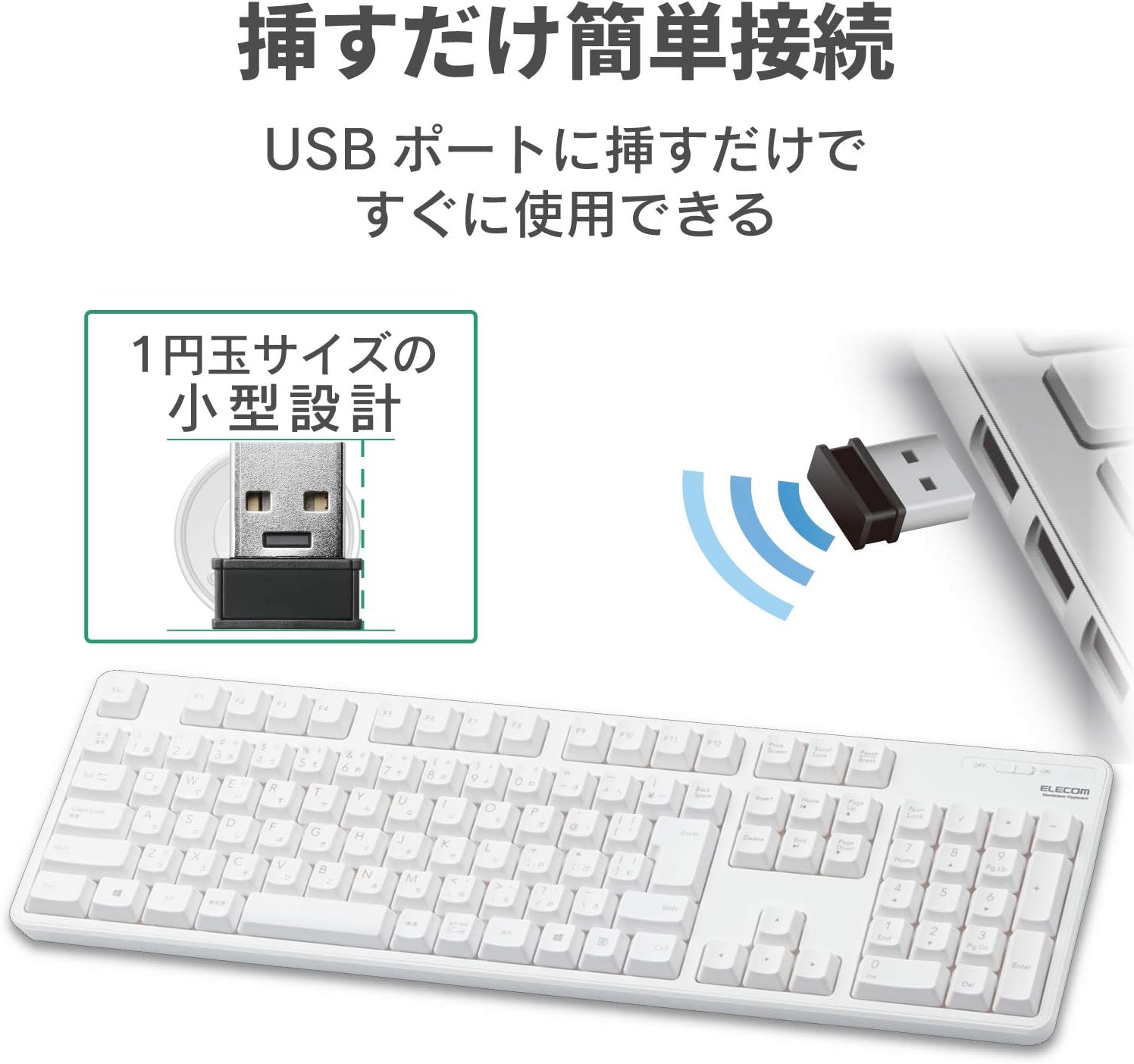
Figure 2: Connecting the compact USB receiver to your computer.
3.3. Powering On the Keyboard
Locate the power switch on the top right side of the keyboard. Slide the switch to the "ON" position. The keyboard is now ready for use.
4. പ്രവർത്തന നിർദ്ദേശങ്ങൾ
4.1. Key Layout and Features
The keyboard features a standard 109-key Japanese layout, designed for comfortable typing. It includes a large Enter key and independently positioned special keys such as Delete and Insert to minimize mistyping.

Figure 3: Key layout with highlighted features.
4.2. Adjustable Tilt Angle
The keyboard is equipped with a two-stage adjustable tilt stand on its underside. You can adjust the typing angle to two different positions for ergonomic comfort. The stands also feature non-slip pads for stability during use.
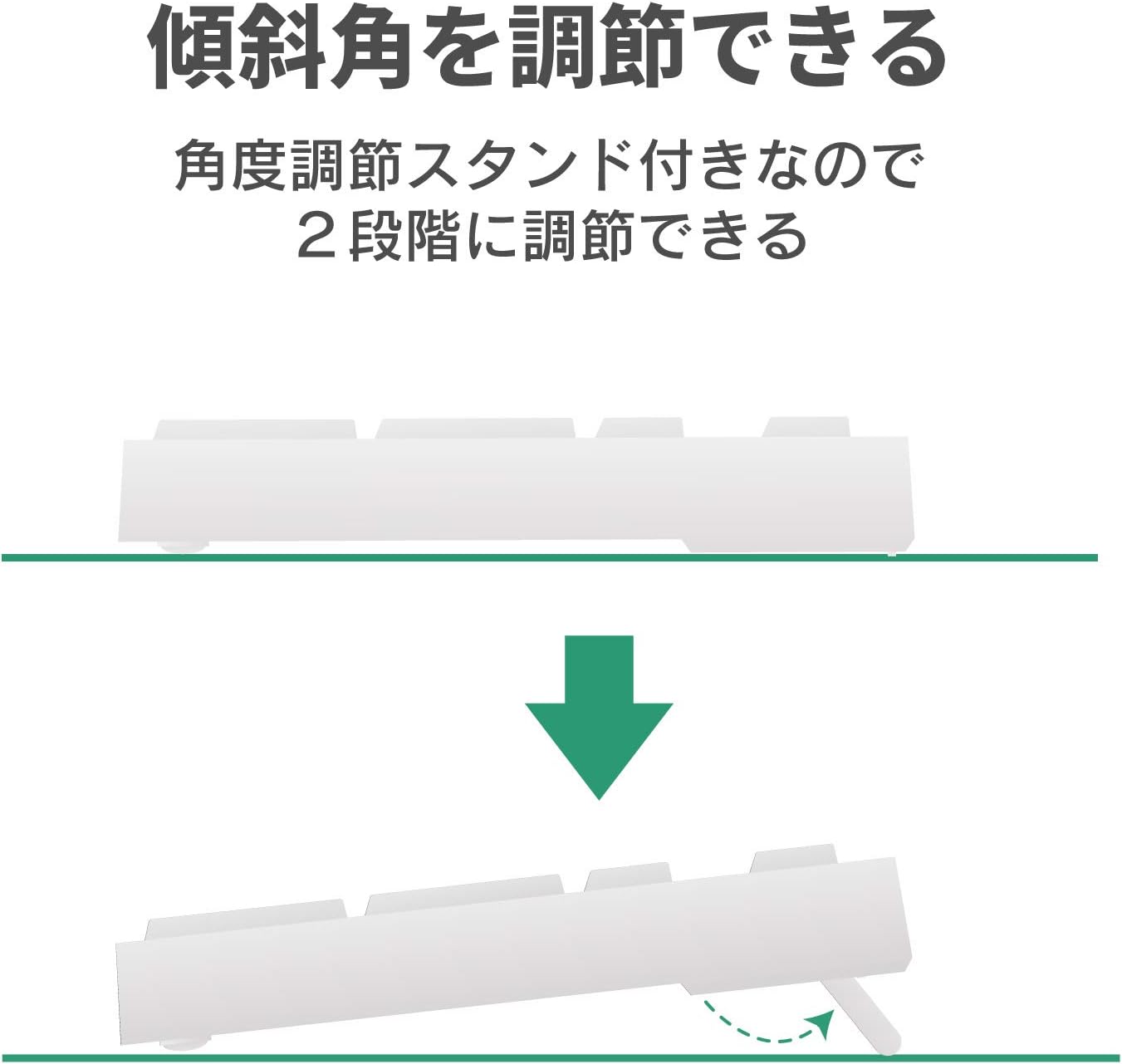
ചിത്രം 4: രണ്ട്-സെക്കൻഡ്tage adjustable tilt stand.
4.3. Battery Life Indicator
A battery level indicator lamp is located on the keyboard to notify you when the battery needs to be replaced. The estimated battery life is approximately 4 years when using an alkaline dry cell battery (based on ELECOM test values, not guaranteed).

Figure 5: Battery life indicator and estimated battery duration.
5. പരിപാലനം
5.1. ഡ്രെയിനേജ് ഫംഗ്ഷൻ
The keyboard is equipped with a drainage function. If liquids are accidentally spilled on the keyboard, they can be quickly expelled through drainage holes on the underside. Note: This product is not waterproof.
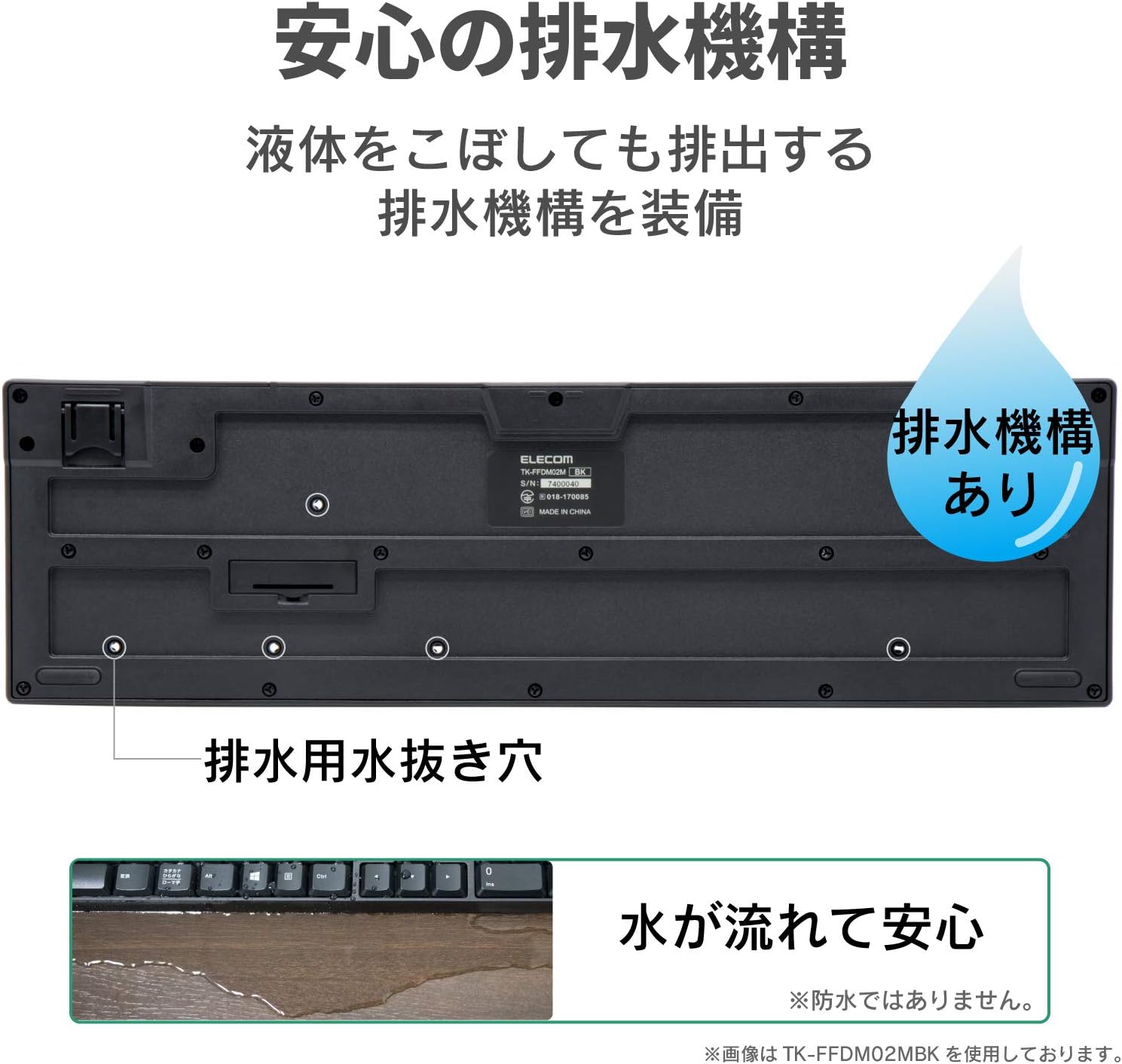
Figure 6: Drainage holes on the keyboard's underside.
5.2. വൃത്തിയാക്കൽ
To clean the keyboard, gently wipe the surface with a soft, dry cloth. For stubborn dirt, a slightly damp cloth can be used, ensuring no liquid enters the key mechanisms. Avoid using harsh chemicals or abrasive materials.
6. പ്രശ്നപരിഹാരം
- കീബോർഡ് പ്രതികരിക്കുന്നില്ല:
Check if the keyboard is powered on. Ensure the USB receiver is securely plugged into a working USB port. Replace the battery if the battery indicator lamp is lit or if the keyboard has been in use for an extended period. - Keys not registering or delayed:
Ensure the keyboard is within the effective radio range (approx. 3m on magnetic surfaces, 10m on non-magnetic surfaces). Move the keyboard closer to the receiver. Avoid placing the receiver near other wireless devices that may cause interference. - Receiver not detected:
Try plugging the receiver into a different USB port on your computer. Restart your computer.
7 സ്പെസിഫിക്കേഷനുകൾ
| ഫീച്ചർ | സ്പെസിഫിക്കേഷൻ |
|---|---|
| ഇൻ്റർഫേസ് | USB |
| കണക്റ്റർ ആകൃതി | യുഎസ്ബി (എ) പുരുഷൻ |
| അനുയോജ്യമായ മോഡലുകൾ | Windows PCs equipped with a USB port |
| അനുയോജ്യമായ OS | Windows 11/10/8.1/7/XP (latest version/service pack may be required) |
| നിറം | വെള്ള |
| ആശയവിനിമയ രീതി | ജി.എഫ്.എസ്.കെ |
| റേഡിയോ ആവൃത്തി | 2.4GHz ബാൻഡ് |
| റേഡിയോ റേഞ്ച് | Approx. 3m (magnetic surfaces), Approx. 10m (non-magnetic surfaces) |
| കീ തരം | മെംബ്രൺ |
| കീ ലേഔട്ട് | 109 കീകൾ (ജാപ്പനീസ് ലേഔട്ട്) |
| കീ പിച്ച് | 19.0 മി.മീ |
| കീ സ്ട്രോക്ക് | 3.5 മി.മീ |
| പവർ സപ്ലൈ (കീബോർഡ്) | 1 x AA alkaline dry cell, AA manganese dry cell, or AA nickel-metal hydride rechargeable battery |
| കണക്കാക്കിയ ബാറ്ററി ലൈഫ് | Approx. 4 years (with alkaline dry cell, test values, not guaranteed) |
| External Dimensions (Keyboard) | W 447.7mm x D 136.0mm x H 31.6mm (excluding stand), W 447.7mm x D 136.0mm x H 40.1mm (including stand) |
| Size Classification | പൂർണ്ണ വലിപ്പം |
| ഭാരം (കീബോർഡ്) | ഏകദേശം. 568 ഗ്രാം (ബാറ്ററി ഒഴികെ) |
| External Dimensions (Receiver) | W 19.5mm x D 15.8mm x H 6.5mm |
| Weight (Receiver) | ഏകദേശം 2 ഗ്രാം |
| കീ ഡ്യൂറബിലിറ്റി | 10 ദശലക്ഷം കീസ്ട്രോക്കുകൾ വരെ |
| Key Legends | ലേസർ-എൻഗ്രേവ്ഡ് |
8. വാറൻ്റിയും പിന്തുണയും
8.1. വാറൻ്റി വിവരങ്ങൾ
ഈ ഉൽപ്പന്നം എ 6 മാസ വാറൻ്റി from the date of purchase. Please retain your proof of purchase for warranty claims. The warranty covers manufacturing defects under normal use. It does not cover damage caused by misuse, accidents, unauthorized modifications, or natural disasters.
8.2. ഉപഭോക്തൃ പിന്തുണ
For further assistance, technical support, or warranty inquiries, please visit the official ELECOM website or contact your local ELECOM customer service representative. Contact details can typically be found on the ELECOM webസൈറ്റ് അല്ലെങ്കിൽ ഉൽപ്പന്ന പാക്കേജിംഗ്.


