1. ആമുഖം
The GameMax Mirage 120mm PC Cooling Fan is designed to provide efficient cooling for computer components while offering customizable RGB lighting. This fan features a dual-ring Rainbow LED design, a hydraulic bearing for quiet operation, and a 7-blade fan structure. It is compatible with 5V addressable 3-pin Aura Sync systems, allowing for synchronized lighting effects with compatible motherboards or controllers.

ചിത്രം 1.1: മുൻഭാഗം view of the GameMax Mirage fan with active Rainbow LED lighting.
2 സുരക്ഷാ വിവരങ്ങൾ
- ഇൻസ്റ്റാളേഷൻ അല്ലെങ്കിൽ അറ്റകുറ്റപ്പണികൾ നടത്തുന്നതിന് മുമ്പ് നിങ്ങളുടെ കമ്പ്യൂട്ടർ സിസ്റ്റം പവർ ഓഫ് ചെയ്തിട്ടുണ്ടെന്നും വാൾ ഔട്ട്ലെറ്റിൽ നിന്ന് അൺപ്ലഗ് ചെയ്തിട്ടുണ്ടെന്നും ഉറപ്പാക്കുക.
- Handle components with care to avoid damage from static electricity. Consider using an anti-static wrist strap.
- കണക്ടറുകൾ നിർബന്ധിക്കരുത്. കേബിളുകൾ പ്ലഗ് ഇൻ ചെയ്യുന്നതിന് മുമ്പ് ശരിയായ ഓറിയന്റേഷൻ ഉറപ്പാക്കുക.
- ദ്രാവകങ്ങളിൽ നിന്നും അമിതമായ ഈർപ്പത്തിൽ നിന്നും ഫാനിനെ അകറ്റി നിർത്തുക.
- Do not attempt to disassemble the fan unit beyond what is described in this manual.
3. പാക്കേജ് ഉള്ളടക്കം
നിങ്ങളുടെ പാക്കേജിൽ എല്ലാ ഇനങ്ങളും ഉണ്ടെന്ന് ഉറപ്പാക്കുക:
- 1 x GameMax Mirage 120mm PC Cooling Fan
- 4 x മൗണ്ടിംഗ് സ്ക്രൂകൾ
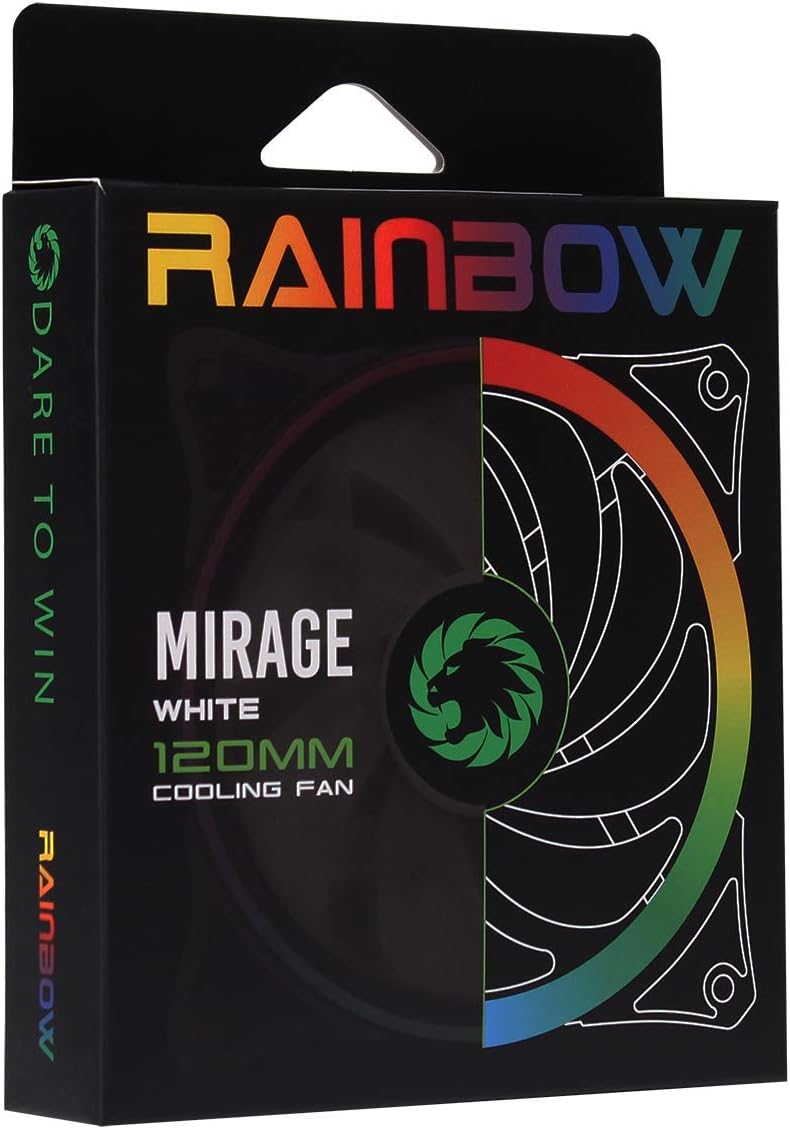
Image 3.1: Retail packaging for the GameMax Mirage fan.
4. സജ്ജീകരണവും ഇൻസ്റ്റാളേഷനും
Follow these steps to install your GameMax Mirage 120mm PC Cooling Fan:
- നിങ്ങളുടെ സിസ്റ്റം തയ്യാറാക്കുക: നിങ്ങളുടെ കമ്പ്യൂട്ടർ ഓഫ് ചെയ്ത് പവർ ഔട്ട്ലെറ്റിൽ നിന്ന് അത് ഊരിവയ്ക്കുക. ഫാൻ മൗണ്ടിംഗ് ലൊക്കേഷനുകൾ ആക്സസ് ചെയ്യാൻ നിങ്ങളുടെ കമ്പ്യൂട്ടർ കേസ് തുറക്കുക.
- ഫാൻ ഘടിപ്പിക്കുക: Position the fan in your desired location (e.g., case front, rear, top, or radiator). Ensure the airflow direction is correct for your cooling setup. Use the four included mounting screws to secure the fan to the chassis or radiator. The fan features rubber pads on the corners to help reduce vibration.
- ഫാൻ പവർ ബന്ധിപ്പിക്കുക: Locate the 3-pin power connector on the fan cable. Connect this cable to an available 3-pin fan header on your motherboard or a fan controller.
- RGB ലൈറ്റിംഗ് ബന്ധിപ്പിക്കുക: Locate the 5V addressable 3-pin Aura connector on the fan cable. Connect this to a compatible 5V ARGB header on your motherboard (often labeled 'VDG' or 'ARGB') or an external RGB controller/hub. Warning: Do not connect this to a 12V RGB header, as it will damage the LEDs.

Image 4.1: The 3-pin power connector (top) and 5V addressable 3-pin Aura connector (bottom).
The fan cables are braided for improved aesthetics and durability, helping to keep your build neat and tidy.
5. പ്രവർത്തന നിർദ്ദേശങ്ങൾ
Once installed, the GameMax Mirage fan operates as follows:
- ഫാൻ സ്പീഡ് നിയന്ത്രണം: The fan speed is controlled via the 3-pin power connector. If connected to a motherboard fan header, the speed can typically be adjusted through your motherboard's BIOS/UEFI settings or dedicated software.
- RGB ലൈറ്റിംഗ് നിയന്ത്രണം: The Rainbow LED lighting is controlled via the 5V addressable 3-pin Aura connector.
- If connected to a compatible motherboard (e.g., ASUS Aura Sync, MSI Mystic Light, Gigabyte RGB Fusion, ASRock Polychrome Sync), you can use the motherboard's software to customize lighting effects, colors, and synchronization with other ARGB components.
- If connected to an external RGB hub/controller, refer to the instructions provided with your specific hub/controller for lighting customization options.

ചിത്രം 5.1: ആംഗിൾഡ് view of the GameMax Mirage fan showcasing its dual-ring Rainbow LED lighting.
6. പരിപാലനം
Regular maintenance helps ensure optimal performance and longevity of your cooling fan:
- പൊടി വൃത്തിയാക്കൽ: Periodically inspect the fan blades and frame for dust accumulation. Use compressed air or a soft brush to gently remove dust. Ensure the fan is powered off and unplugged before cleaning.
- കേബിൾ പരിശോധന: Occasionally check the power and RGB cables for any signs of wear or damage.
7. പ്രശ്നപരിഹാരം
- ഫാൻ കറങ്ങുന്നില്ല:
- Ensure the 3-pin power connector is securely plugged into a functional fan header on the motherboard or controller.
- ഫാൻ ഹെഡർ പ്രവർത്തനക്ഷമമാക്കിയിട്ടുണ്ടെന്നും ശരിയായി കോൺഫിഗർ ചെയ്തിട്ടുണ്ടെന്നും ഉറപ്പാക്കാൻ മദർബോർഡ് BIOS/UEFI ക്രമീകരണങ്ങൾ പരിശോധിക്കുക.
- LEDs Not Lighting Up or Incorrect Colors:
- Verify the 5V addressable 3-pin Aura connector is securely connected to a compatible 5V ARGB header (not 12V RGB).
- Ensure your motherboard's RGB software or external controller is properly installed and configured.
- If using a splitter or hub, ensure it is powered and functioning correctly.
- അമിതമായ ശബ്ദം:
- Check for any cables or obstructions interfering with the fan blades.
- Ensure the fan is securely mounted and the rubber pads are properly seated to absorb vibrations.
- Dust accumulation can cause imbalance and noise; clean the fan as described in the Maintenance section.
8 സ്പെസിഫിക്കേഷനുകൾ
| ഫീച്ചർ | സ്പെസിഫിക്കേഷൻ |
|---|---|
| മോഡൽ | MIRAGEWHITE FINS |
| ഫാൻ വലിപ്പം | 120mm x 120mm x 25mm (0.98 x 4.72 x 4.72 ഇഞ്ച്) |
| ബെയറിംഗ് തരം | ഹൈഡ്രോളിക് ബെയറിംഗ് |
| ഫാൻ ബ്ലേഡുകൾ | 7 ബ്ലേഡുകൾ |
| LED തരം | Addressable Rainbow LED (Dual-Ring) |
| ഫാൻ പവർ കണക്റ്റർ | 3-പിൻ |
| RGB കണക്റ്റർ | 5V Addressable 3-Pin Aura Connector |
| ഓപ്പറേറ്റിംഗ് വോളിയംtage | 5 Volts (for RGB) / 12 Volts (for fan motor, typical for 3-pin) |
| റേറ്റുചെയ്ത വാട്ട്tage | 3 വാട്ട്സ് |
| പരമാവധി റൊട്ടേഷണൽ സ്പീഡ് | 1800 ആർപിഎം |
| ശബ്ദ നില | ഏകദേശം 25 dB(A) |
| മെറ്റീരിയൽ | Rubber (for vibration dampഎനിങ്) |

ചിത്രം 8.1: പിന്നിലേക്ക് view of the GameMax Mirage fan, displaying the product label with model and electrical specifications.
9. വാറൻ്റിയും പിന്തുണയും
വാറന്റി വിവരങ്ങൾക്കും സാങ്കേതിക പിന്തുണയ്ക്കും, ദയവായി ഔദ്യോഗിക GAMEMAX പരിശോധിക്കുക. webനിങ്ങളുടെ സൈറ്റിൽ ബന്ധപ്പെടുക അല്ലെങ്കിൽ നിങ്ങളുടെ റീട്ടെയിലറെ ബന്ധപ്പെടുക. വാറന്റി ക്ലെയിമുകൾക്കായി നിങ്ങളുടെ വാങ്ങിയതിന്റെ തെളിവ് സൂക്ഷിക്കുക.