1. ആമുഖം
Thank you for choosing the mcdodo Smart LED Auto Disconnect and Auto Recharge Nylon Braided Sync Charge USB Data Cable. This cable is designed to provide efficient and safe charging for your compatible devices, featuring intelligent power management to protect your device's battery life. It incorporates an auto-disconnect function upon full charge and an auto-recharge mechanism to maintain optimal battery levels.
This manual will guide you through the proper setup, operation, and maintenance of your new cable.
2. ഉൽപ്പന്ന സവിശേഷതകൾ
- സ്മാർട്ട് LED സൂചകം: Two-color LED light to indicate charging status (orange for quick charge, green for trickle charge, off for full charge).
- സ്വയമേവ വിച്ഛേദിക്കുക: Automatically stops charging when your device reaches 100% battery to prevent overcharging.
- Auto Recharge: Initiates charging again after approximately 120 minutes if the device's battery level drops, ensuring your device remains fully charged.
- നീണ്ടുനിൽക്കുന്ന നിർമ്മാണം: Features a nylon braided exterior and alloy shell for enhanced durability and resistance to bending.
- ഡാറ്റ കൈമാറ്റം: Supports data synchronization between your device and a computer.

ചിത്രം 1: ഓവർview of the mcdodo Smart LED Auto Disconnect USB Data Cable.
3. സജ്ജീകരണ നിർദ്ദേശങ്ങൾ
- പവർ ഉറവിടത്തിലേക്ക് കണക്റ്റുചെയ്യുക: Insert the USB-A end of the cable into a compatible USB power adapter (not included) or a computer's USB port. Ensure the power source provides adequate current (e.g., 2.4 Amps for optimal charging).
- ഉപകരണത്തിലേക്ക് കണക്റ്റുചെയ്യുക: Insert the Lightning connector end of the cable into your compatible smartphone or tablet's charging port.
- Initial Indication: Upon connection, the LED indicator on the Lightning connector will illuminate, typically orange, indicating that charging has begun.
4. പ്രവർത്തന നിർദ്ദേശങ്ങൾ
4.1 ചാർജിംഗ് പ്രക്രിയ
The cable's intelligent LED indicator provides visual feedback on the charging status:
- Orange Light Flashing: Indicates the device is undergoing quick charging.
- ഗ്രീൻ ലൈറ്റ് ഓൺ: Indicates the device is in trickle charge mode, nearing full capacity.
- Light Off Automatically: Indicates the device has reached 100% charge, and the auto-disconnect feature has activated.

Figure 2: LED indicator states for charging status.
4.2 Auto Disconnect and Auto Recharge
The cable features a second-generation intelligent control IC that manages the charging cycle:
- When your device reaches 100% charge, the cable will automatically stop power delivery to prevent overcharging, indicated by the LED turning off.
- After approximately 120 minutes (2 hours) of being fully charged and disconnected, the cable will automatically identify the power status and initiate a cycle charge if the battery level has dropped, ensuring your device remains fully charged without continuous power flow.
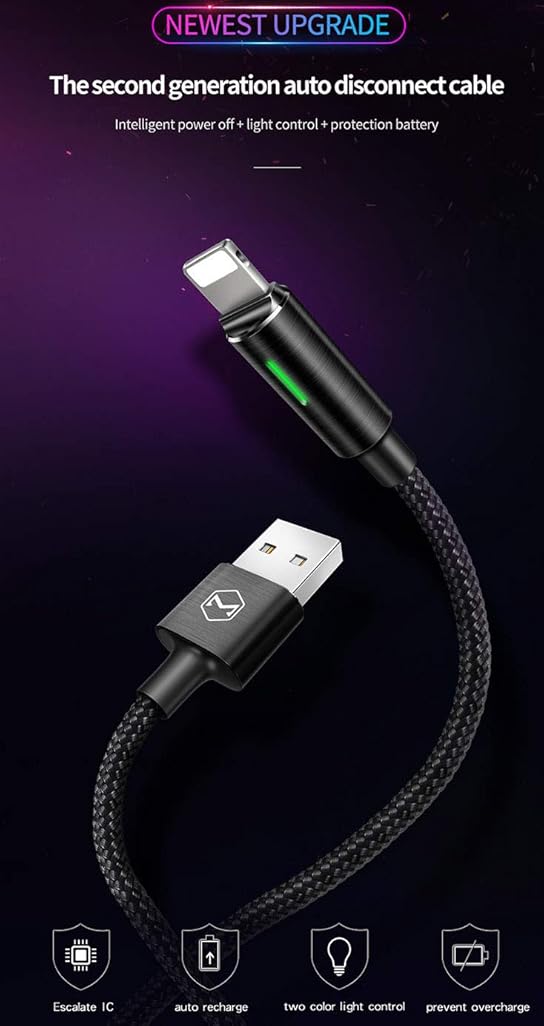
Figure 3: Smart IC for safe overnight charging.
4.3 ഡാറ്റ കൈമാറ്റം
To transfer data, connect the USB-A end of the cable to a computer's USB port and the Lightning end to your compatible device. Your device should then be recognized by the computer for data synchronization.
Video 1: Demonstration of the Second Generation Smart Auto Disconnect and Auto Recharge feature.
5. പരിപാലനം
- വൃത്തിയാക്കൽ: Use a soft, dry cloth to gently wipe the cable and connectors. Avoid using liquid cleaners or abrasive materials.
- സംഭരണം: നേരിട്ടുള്ള സൂര്യപ്രകാശത്തിൽ നിന്നും ഉയർന്ന താപനിലയിൽ നിന്നും അകന്ന് തണുത്തതും വരണ്ടതുമായ സ്ഥലത്ത് കേബിൾ സൂക്ഷിക്കുക. കേബിൾ മുറുകെ ചുരുട്ടുകയോ അതിൽ ഭാരമുള്ള വസ്തുക്കൾ വയ്ക്കുകയോ ചെയ്യുന്നത് ഒഴിവാക്കുക.
- കൈകാര്യം ചെയ്യൽ: Always grasp the connector head when plugging or unplugging the cable. Avoid pulling directly on the cable itself to prevent damage to the internal wires. Do not bend the cable sharply, especially near the connectors.
6. പ്രശ്നപരിഹാരം
- ഉപകരണം ചാർജ് ചെയ്യുന്നില്ല:
- കേബിളിന്റെ രണ്ട് അറ്റങ്ങളും സുരക്ഷിതമായി ബന്ധിപ്പിച്ചിട്ടുണ്ടെന്ന് ഉറപ്പാക്കുക.
- Verify that the power adapter or USB port is functional.
- നിങ്ങളുടെ ഉപകരണത്തിന്റെ ചാർജിംഗ് പോർട്ട് വൃത്തിയുള്ളതാണോയെന്നും അവശിഷ്ടങ്ങളില്ലാത്തതാണോയെന്നും പരിശോധിക്കുക.
- സ്ലോ ചാർജിംഗ്:
- Confirm that your power adapter provides sufficient output (e.g., 2.4A). Lower current adapters may result in slower charging.
- Avoid using the device extensively while charging, as this can slow down the process.
- LED ഇൻഡിക്കേറ്റർ പ്രവർത്തിക്കുന്നില്ല:
- If the LED does not light up when connected, ensure the cable is properly plugged into both the power source and the device.
- If the device is already fully charged, the LED will turn off as part of the auto-disconnect feature.
- Cable Not Compatible with All Boxes: Some power adapters may not be fully compatible. Ensure you are using a standard USB-A power adapter.
7 സ്പെസിഫിക്കേഷനുകൾ
| ഫീച്ചർ | വിശദാംശങ്ങൾ |
|---|---|
| ബ്രാൻഡ് | mcdodo |
| മോഡൽ നമ്പർ | 694536541795 |
| കണക്റ്റർ തരം | USB Type A to Lightning |
| കേബിൾ തരം | USB Data and Charge Cable |
| അനുയോജ്യമായ ഉപകരണങ്ങൾ | Smartphones, Tablets (e.g., Phone XS Max/XS/8/7/6/5/Pod/Pad and More) |
| പ്രത്യേക സവിശേഷതകൾ | Braided, Data Transfer, Auto Disconnect, Auto Recharge, Smart LED Indicator |
| നിറം | കറുപ്പ് |
| നീളം | 4FT/1.2M |
| ബാഹ്യ മെറ്റീരിയൽ | നൈലോൺ |
| പരമാവധി വോളിയംtage | 5 വോൾട്ട് |
| എസി അഡാപ്റ്റർ കറന്റ് | 2.4 Amps |
| വാട്ട്tage | 12 വാട്ട്സ് |
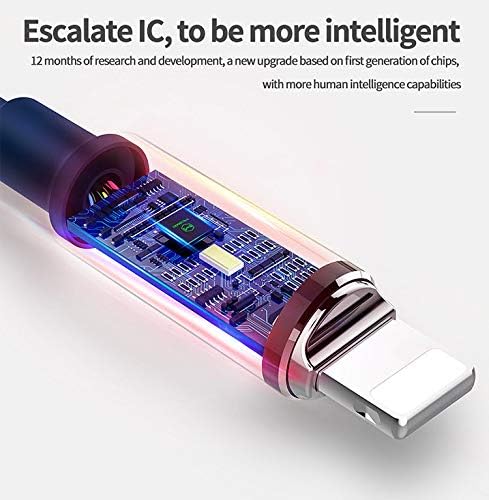
ചിത്രം 4: ആന്തരിക view of the intelligent control IC.
8. വാറൻ്റിയും പിന്തുണയും
Specific warranty information for this product is not provided in the available data. For detailed warranty terms and customer support, please refer to the official mcdodo webസൈറ്റ് അല്ലെങ്കിൽ വിൽപ്പനക്കാരനെ നേരിട്ട് ബന്ധപ്പെടുക.
You can visit the mcdodo store for more information: mcdodo Store