ആമുഖം
This manual provides essential information for the setup, operation, and maintenance of your PowerA Wired Controller for Xbox One. Designed for comfort and precision, this officially licensed controller enhances your gaming experience on Xbox One, Xbox One S, Xbox One X, and Windows 10. It features a soft-touch rubberized finish, dual rumble motors, and a 3.5mm stereo headset jack.
സജ്ജമാക്കുക
Follow these steps to connect your PowerA Wired Controller to your console or PC.
- കൺട്രോളർ അൺപാക്ക് ചെയ്യുക: Carefully remove the controller and its detachable 8ft micro-USB to standard USB cable from the packaging.
- Connect the Cable to Controller: Insert the micro-USB end of the cable into the port on the top of the controller.
- കൺസോൾ/പിസിയിലേക്ക് കണക്റ്റുചെയ്യുക: Insert the standard USB end of the cable into an available USB port on your Xbox One console or Windows 10 PC.
- പവർ സൂചകം: The LED power indicator on the controller will illuminate, indicating a successful connection and that the controller is ready for use.

ചിത്രം 1: മുൻഭാഗം view of the PowerA Wired Controller, showcasing അതിന്റെ എർഗണോമിക് ഡിസൈനും ബട്ടൺ ലേഔട്ടും.
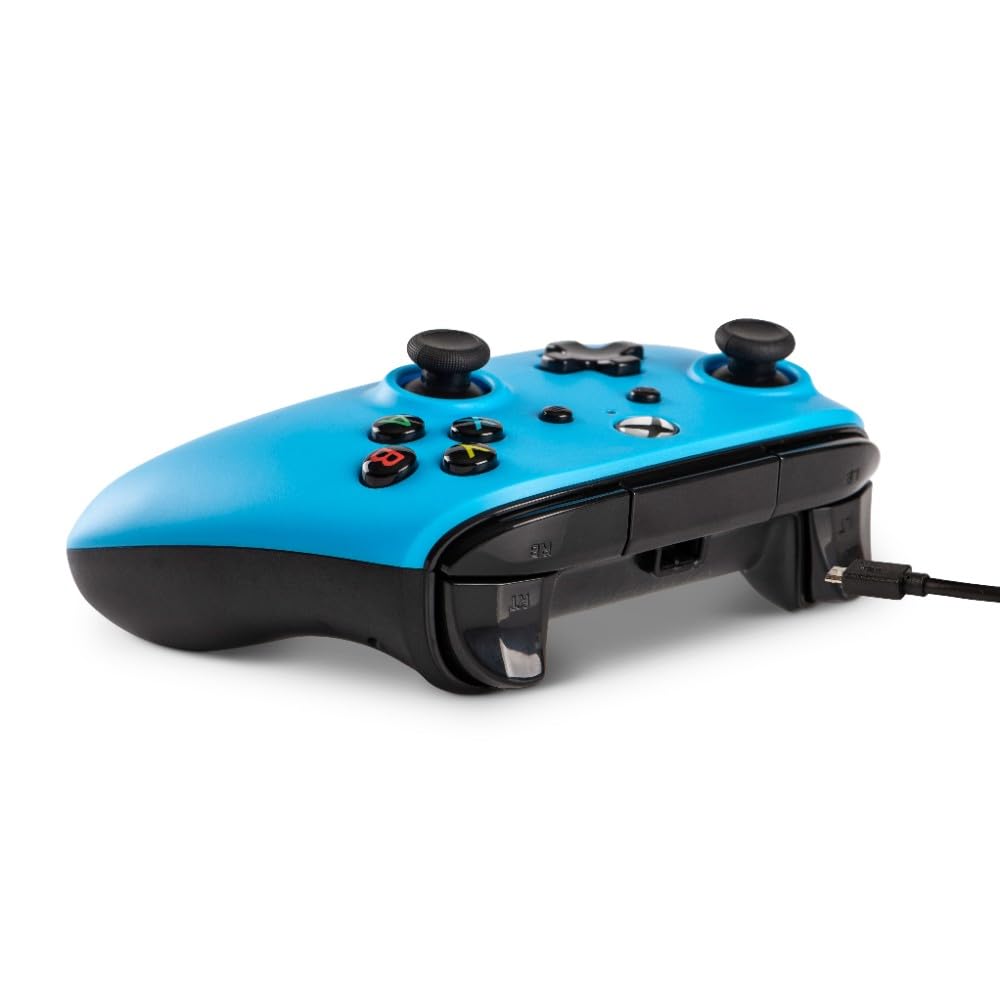
ചിത്രം 2: വശം view illustrating the detachable micro-USB cable connection point on the controller.
പ്രവർത്തന നിർദ്ദേശങ്ങൾ
The PowerA Wired Controller is designed for intuitive gameplay. Familiarize yourself with its key components:
- അനലോഗ് സ്റ്റിക്കുകൾ: Two precision-tuned analog sticks for smooth, accurate movement and camera control.
- ഡി-പാഡ്: An 8-way plus-shaped directional pad for precise directional input.
- ABXY ബട്ടണുകൾ: Standard button placement for action commands.
- Bumpers and Triggers: Left/right bumpers and triggers for quick actions and nuanced control.
- ഡ്യുവൽ റംബിൾ മോട്ടോറുകൾ: Provides immersive force feedback during gameplay.
- 3.5mm Stereo Headset Jack: Connect your compatible gaming headset for in-game audio and chat.
Simply launch your game after connecting the controller. The system will automatically recognize the controller, allowing you to navigate menus and play games.
മെയിൻ്റനൻസ്
നിങ്ങളുടെ കൺട്രോളറിന്റെ ദീർഘായുസ്സും ഒപ്റ്റിമൽ പ്രകടനവും ഉറപ്പാക്കാൻ, ഈ പരിപാലന മാർഗ്ഗനിർദ്ദേശങ്ങൾ പാലിക്കുക:
- വൃത്തിയാക്കൽ: കൺട്രോളർ തുടയ്ക്കാൻ മൃദുവായതും ഉണങ്ങിയതുമായ തുണി ഉപയോഗിക്കുക. കഠിനമായ അഴുക്കിന്, ചെറുതായി dampതുണിയിൽ വെള്ളം ഒഴിക്കുക. കഠിനമായ രാസവസ്തുക്കളോ ഉരച്ചിലുകളുള്ള ക്ലീനറുകളോ ഒഴിവാക്കുക.
- സംഭരണം: When not in use, store the controller in a cool, dry place. The detachable cable allows for easy storage and reduces clutter, preventing cable damage.
- കൈകാര്യം ചെയ്യൽ: Avoid dropping the controller or exposing it to extreme temperatures or direct sunlight. Do not pull the cable forcefully from the controller or console.
ട്രബിൾഷൂട്ടിംഗ്
If you encounter issues with your PowerA Wired Controller, try the following solutions:
- കൺട്രോളർ പ്രതികരിക്കുന്നില്ല:
- യുഎസ്ബി കേബിൾ കൺട്രോളറിലേക്കും കൺസോളിലേക്കും/പിസിയിലേക്കും സുരക്ഷിതമായി ബന്ധിപ്പിച്ചിട്ടുണ്ടെന്ന് ഉറപ്പാക്കുക.
- നിങ്ങളുടെ കൺസോളിലെയോ പിസിയിലെയോ മറ്റൊരു യുഎസ്ബി പോർട്ടിലേക്ക് കൺട്രോളർ ബന്ധിപ്പിക്കാൻ ശ്രമിക്കുക.
- നിങ്ങളുടെ കൺസോൾ അല്ലെങ്കിൽ പിസി പുനരാരംഭിക്കുക.
- ഹെഡ്സെറ്റ് ഓഡിയോ പ്രശ്നങ്ങൾ:
- നിങ്ങളുടെ ഹെഡ്സെറ്റ് കൺട്രോളറിലെ 3.5mm ജാക്കിൽ പൂർണ്ണമായും പ്ലഗ് ചെയ്തിട്ടുണ്ടോയെന്ന് പരിശോധിക്കുക.
- Check your console's audio settings to ensure the headset is recognized and volume levels are appropriate.
- ഹെഡ്സെറ്റ് ശരിയായി പ്രവർത്തിക്കുന്നുണ്ടെന്ന് ഉറപ്പാക്കാൻ മറ്റൊരു ഉപകരണം ഉപയോഗിച്ച് അത് പരിശോധിക്കുക.
- Buttons/Sticks Not Working Correctly:
- ബട്ടണുകൾക്കോ സ്റ്റിക്കുകൾക്കോ ചുറ്റും അവശിഷ്ടങ്ങൾ അടിഞ്ഞുകൂടുന്നില്ലെന്ന് ഉറപ്പാക്കുക.
- കൺട്രോളർ വിച്ഛേദിച്ച് വീണ്ടും ബന്ധിപ്പിക്കുക.
- If issues persist, contact PowerA customer support.
സ്പെസിഫിക്കേഷനുകൾ
| ഫീച്ചർ | വിശദാംശങ്ങൾ |
|---|---|
| മോഡൽ നമ്പർ | 1508493-01 |
| അനുയോജ്യത | Xbox One, Xbox One S, Xbox One X, Windows 10 |
| കണക്റ്റിവിറ്റി | Wired (Detachable 8ft Micro-USB to Standard USB Cable) |
| അളവുകൾ (L x W x H) | 3.9 x 4.02 x 7.91 ഇഞ്ച് |
| ഭാരം | 10.9 ഔൺസ് |
| ഫീച്ചറുകൾ | Dual rumble motors, 3.5mm stereo headset jack, precision-tuned analog sticks, 8-way D-pad, standard ABXY buttons, left/right bumpers and triggers |
| നിർമ്മാതാവ് | പവർഎ |
| ആദ്യം ലഭ്യമായത് | ഫെബ്രുവരി 13, 2019 |
വാറൻ്റിയും പിന്തുണയും
For information regarding product warranty, returns, or technical support, please refer to the documentation included with your product or visit the official PowerA webസൈറ്റ്.
നിങ്ങൾക്ക് സന്ദർശിക്കാനും കഴിയും ആമസോണിലെ പവർഎ സ്റ്റോർ കൂടുതൽ ഉൽപ്പന്ന വിവരങ്ങൾക്കും പിന്തുണാ ഉറവിടങ്ങൾക്കും.


