ആമുഖം
The AJA IPR-10G2-HDMI is a reliable, high-quality mini converter designed for professional video and audio conversion. It bridges UltraHD/HD single-channel SMPTE ST 2110 IP video and audio to HDMI 1.4b. This versatile tool supports a wide range of applications, converting 4K/UHD and fiber signals to 4K/UHD, audio, and HDMI. It monitors UltraHD and HD SMPTE 2110 signals from 10 Gigabit to HDMI output, seamlessly extracting and embedding audio. Featuring dual 10GbE SFP+ cages for hitless switching and a 1x reference input via BNC, it's ideal for integration into existing baseband environments. Its robust, fanless design makes it suitable for various display and device scenarios, from studio to field.
ഉൽപ്പന്നം കഴിഞ്ഞുview
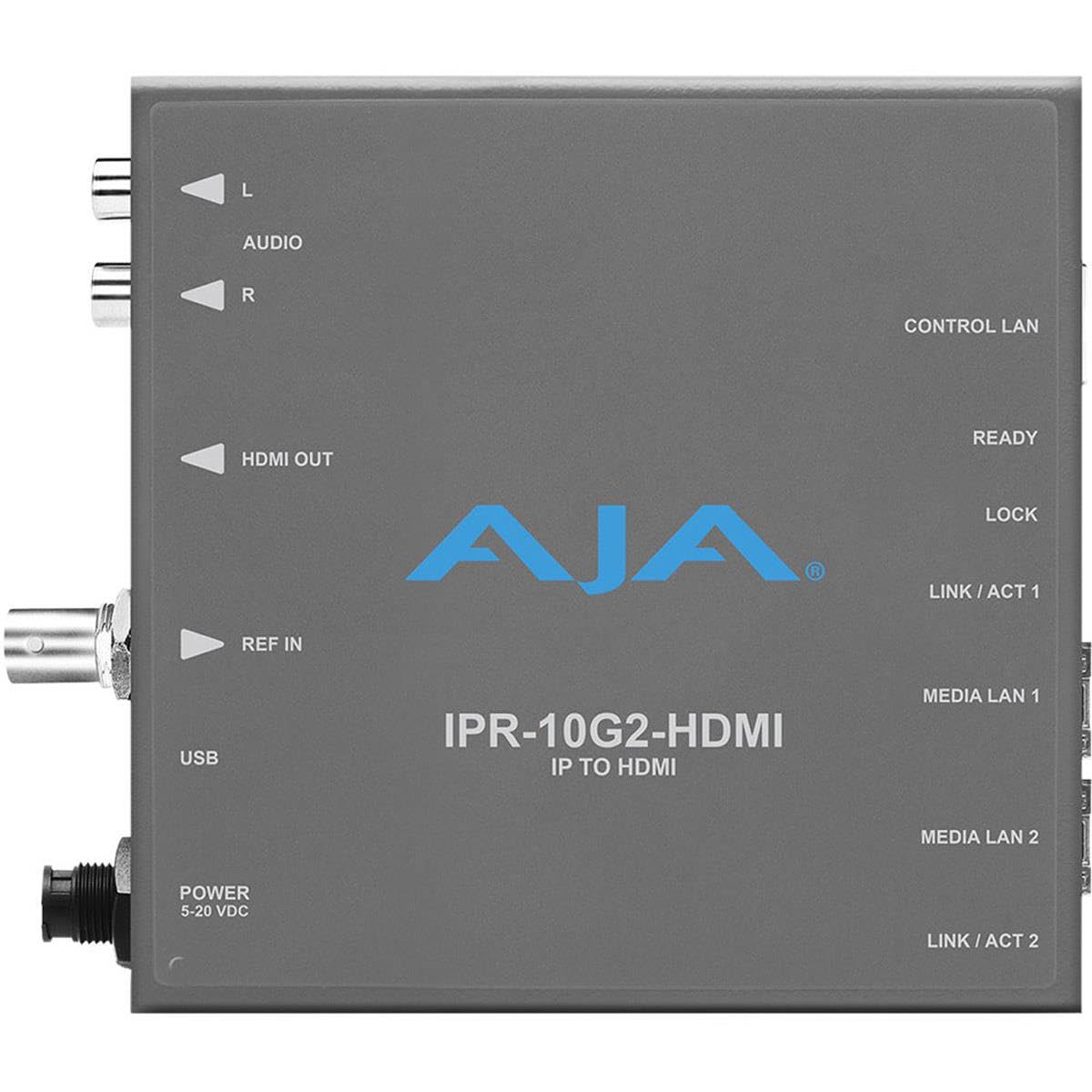
Figure 1: AJA IPR-10G2-HDMI Mini Converter. ഈ ചിത്രം മുകളിൽ കാണിക്കുന്നു view of the AJA IPR-10G2-HDMI unit, highlighting its various input and output ports and indicators. On the left side, from top to bottom, are the L and R audio outputs, HDMI OUT, REF IN, USB port, and POWER (5-20 VDC) input. On the right side, from top to bottom, are the CONTROL LAN port, READY indicator, LOCK indicator, LINK/ACT 1 indicator, MEDIA LAN 1 port, MEDIA LAN 2 port, and LINK/ACT 2 indicator. The AJA logo and "IPR-10G2-HDMI IP TO HDMI" text are prominently displayed in the center.
പ്രധാന സവിശേഷതകൾ:
- Excellent Video Quality: Experience pristine 10-bit, 4:2:2 uncompressed video. All details are captured with exceptional clarity and color accuracy for professional-grade results.
- ബഹുമുഖ ഫോർമാറ്റ് പിന്തുണ: Supports a wide range of video formats including UltraHD and HD (23.98-60fps), and SD, providing flexibility for diverse production needs and workflows.
- Seamless IP Integration: Features SMPTE ST 2110 with dual SFP+ cages for hitless switching (ST 2022-7), ensuring reliable and uninterrupted video and audio delivery over IP networks.
- ഹൈ-ഡെഫനിഷൻ ഔട്ട്പുട്ട്: Equipped with HDMI 1.4b output, providing 24/30-bit per pixel RGB/YUV video for high-quality display on compatible monitors and devices.
- സമഗ്ര ഓഡിയോ പിന്തുണ: Offers up to 8 channels of HDMI embedded audio at 24-bit/48kHz, plus 2x RCA analog audio outputs, ensuring high-fidelity sound reproduction and integration.
സജ്ജമാക്കുക
Follow these steps to set up your AJA IPR-10G2-HDMI Mini Converter:
- പവർ കണക്ഷൻ: Connect the provided power supply to the POWER 5-20 VDC input port on the unit. Ensure the power source is within the specified voltagഇ ശ്രേണി.
- HDMI ഔട്ട്പുട്ട്: എന്നതിൽ നിന്ന് ഒരു HDMI കേബിൾ ബന്ധിപ്പിക്കുക HDMI ഔട്ട് port on the IPR-10G2-HDMI to the HDMI input of your display monitor or recording device.
- ഓഡിയോ ഔട്ട്പുട്ട്: For analog audio monitoring, connect RCA cables from the L ഒപ്പം ആർ ഓഡിയോ output ports to your audio monitoring equipment.
- റഫറൻസ് ഇൻപുട്ട്: If external synchronization is required, connect a BNC cable from your reference signal source to the REF IN തുറമുഖം.
- USB കണക്ഷൻ: ദി USB port is typically used for initial configuration, firmware updates, or advanced control via AJA software. Connect a USB cable to a computer if needed for these purposes.
- നെറ്റ്വർക്ക് കണക്ഷനുകൾ:
- ഇതിലേക്ക് ഒരു ഇഥർനെറ്റ് കേബിൾ ബന്ധിപ്പിക്കുക കൺട്രോൾ ലാൻ port for network-based control and configuration of the device.
- Connect your SMPTE ST 2110 IP video and audio streams to the MEDIA LAN 1 ഒപ്പം MEDIA LAN 2 ports using appropriate SFP+ transceivers (not included). These dual ports enable redundant IP stream reception for hitless switching.
- പവർ ഓൺ: Once all connections are secure, apply power to the unit. Observe the തയ്യാർ ഒപ്പം ലോക്ക് ചെയ്യുക indicators for proper operation. The ലിങ്ക് / ആക്റ്റ് indicators for Media LAN ports will show network activity.
പ്രവർത്തന നിർദ്ദേശങ്ങൾ
The AJA IPR-10G2-HDMI is designed for straightforward operation once configured. It automatically detects and processes incoming SMPTE ST 2110 IP streams.
- സിഗ്നൽ അക്വിസിഷൻ: The converter will automatically acquire the SMPTE ST 2110 IP video and audio streams from the connected Media LAN ports. The തയ്യാർ indicator will illuminate when the unit is operational, and the ലോക്ക് ചെയ്യുക indicator will show a stable input signal.
- വീഡിയോ ഔട്ട്പുട്ട്: The incoming IP video stream (UltraHD or HD) will be converted and output via the HDMI 1.4b port. Ensure your display device is set to the correct input.
- ഓഡിയോ കൈകാര്യം ചെയ്യൽ: Associated audio from the IP video stream is seamlessly extracted, synchronized, and embedded into the HDMI output. Additionally, selected audio channels can be output via the analog RCA ports.
- Redundancy (Hitless Switching): If using both Media LAN 1 and Media LAN 2 with redundant ST 2110-7 streams, the device will automatically switch between them without interruption in case of a primary stream failure.
- നിരീക്ഷണം: ഉപയോഗിക്കുക LINK/ACT 1 ഒപ്പം LINK/ACT 2 indicators to monitor network link status and activity on the Media LAN ports.
For advanced configuration, such as IP address settings, audio channel mapping, or firmware updates, refer to the comprehensive AJA IPR-10G2-HDMI manual available on the AJA website and use the AJA Mini-Config software.
മെയിൻ്റനൻസ്
The AJA IPR-10G2-HDMI is designed for robust and reliable operation with minimal maintenance requirements due to its fanless design.
- വൃത്തിയാക്കൽ: Periodically clean the exterior of the unit with a soft, dry cloth. Do not use liquid cleaners or solvents. Ensure all ports are free from dust and debris.
- വെൻ്റിലേഷൻ: Although fanless, ensure the unit is placed in an area with adequate airflow to prevent overheating. Do not block any ventilation openings.
- ഫേംവെയർ അപ്ഡേറ്റുകൾ: AJA periodically releases firmware updates to improve performance, add features, or address issues. Check the AJA website for the latest firmware and instructions on how to update your device using the AJA Mini-Config software.
- കേബിൾ മാനേജുമെന്റ്: Ensure all connected cables are securely fastened and not under undue strain to prevent damage to the ports or cables themselves.
ട്രബിൾഷൂട്ടിംഗ്
If you encounter issues with your AJA IPR-10G2-HDMI, refer to the following common troubleshooting steps:
| പ്രശ്നം | സാധ്യമായ കാരണം | പരിഹാരം |
|---|---|---|
| No video output on HDMI. |
|
|
| No audio output (HDMI or RCA). |
|
|
| നെറ്റ്വർക്ക് കണക്ഷൻ പ്രശ്നങ്ങൾ. |
|
|
If the problem persists, consult the full AJA IPR-10G2-HDMI manual or contact AJA technical support for further assistance.
സ്പെസിഫിക്കേഷനുകൾ
| ഫീച്ചർ | വിശദാംശങ്ങൾ |
|---|---|
| ബ്രാൻഡ് | AJA |
| ഉൽപ്പന്ന മോഡൽ നമ്പർ | IPR-10G2-HDMI |
| കണക്റ്റിവിറ്റി | HDMI |
| ഉൽപ്പന്ന അളവുകൾ | 12.88 x 2.39 x 12.85 സെ.മീ |
| ഇനത്തിൻ്റെ ഭാരം | 848.22 ഗ്രാം (1.87 പൗണ്ട്) |
| റിലീസ് വർഷം | 2019 |
| ബാറ്ററി ഉൾപ്പെടുത്തിയിട്ടുണ്ട് | ഇല്ല |
| അനുയോജ്യമായ ഉപകരണങ്ങൾ | Game Console (General reference, likely for display compatibility) |
| ആദ്യ തീയതി ലഭ്യമാണ് | 2020/10/15 |
വാറൻ്റിയും പിന്തുണയും
AJA products are backed by a manufacturer's warranty. For specific warranty terms and conditions, please refer to the warranty information included with your product packaging or visit the official AJA webസൈറ്റ്.
For technical support, product registration, and access to the latest drivers, firmware, and documentation, please visit the AJA support page:
When contacting support, please have your product model number (IPR-10G2-HDMI) and serial number ready.


