ആമുഖം
This manual provides comprehensive instructions for the One For All URC4812 TV Replacement Remote. Designed for seamless compatibility with Sony LCD, LED, OLED, and Plasma TVs, this remote offers the same core functionalities as your original Sony remote control. Please read this manual thoroughly to ensure proper setup and operation.
ഉൽപ്പന്നം കഴിഞ്ഞുview
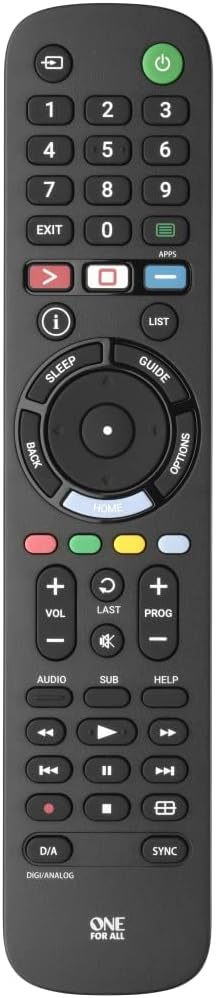
ചിത്രം 1: ഫ്രണ്ട് view of the One For All URC4812 remote control, showing all buttons and layout.

ചിത്രം 2: കോണാകൃതിയിലുള്ളത് view of the One For All URC4812 remote control, highlighting its ergonomic design.

ചിത്രം 3: വശം view of the One For All URC4812 remote control, showing its slim profile.

ചിത്രം 4: തിരികെ view of the One For All URC4812 remote control, showing the battery compartment.
പ്രധാന സവിശേഷതകൾ:
- Works just like your original television remote. Compatible with Sony TVs.
- No setup required. Insert batteries and it is ready to use.
- Learning feature allows customization of the remote to your specific needs.
- Quick Setup Guide Included for codeless setup.
- App Shortcut keys provide direct access to your favorite streaming services.
- Number of keys: 53.
- Remote Control Technology: IR (Infrared).
സജ്ജമാക്കുക
1. ബാറ്ററി ഇൻസ്റ്റാളേഷൻ
The One For All URC4812 remote requires 2 AA batteries (not included). Follow these steps to install them:
- റിമോട്ട് കൺട്രോളിന്റെ പിൻഭാഗത്ത് ബാറ്ററി കമ്പാർട്ട്മെന്റ് കണ്ടെത്തുക (ചിത്രം 4 കാണുക).
- ബാറ്ററി കവർ തുറക്കാൻ താഴേക്ക് സ്ലൈഡ് ചെയ്യുക.
- രണ്ട് AA ബാറ്ററികൾ ഇടുക, പോസിറ്റീവ് (+) ഉം നെഗറ്റീവ് (-) ടെർമിനലുകളും കമ്പാർട്ടുമെന്റിനുള്ളിലെ സൂചകങ്ങളുമായി വിന്യസിക്കുന്നുണ്ടെന്ന് ഉറപ്പാക്കുക.
- സുരക്ഷിതമായി ക്ലിക്കുചെയ്യുന്നത് വരെ ബാറ്ററി കവർ തിരികെ സ്ഥലത്തേക്ക് സ്ലൈഡ് ചെയ്യുക.
2. പ്രാരംഭ ഉപയോഗം (സജ്ജീകരണം ആവശ്യമില്ല)
This remote is pre-programmed for Sony TVs. In most cases, no additional setup is required. Simply insert the batteries, point the remote at your Sony TV, and begin using it.
3. Learning Feature (Optional)
If you wish to customize certain functions or if some functions do not work as expected, the remote has a learning feature. This allows you to copy functions directly from your original remote control.
Detailed instructions for using the learning feature are typically provided in the Quick Setup Guide included with your remote. Please refer to that guide for specific steps.
പ്രവർത്തന നിർദ്ദേശങ്ങൾ
The One For All URC4812 remote is designed to replicate the functionality of your original Sony TV remote. Below are common operations:
- പവർ ഓൺ/ഓഫ്: അമർത്തുക ശക്തി button (usually red, top right) to turn your TV on or off.
- ചാനൽ നാവിഗേഷൻ: ഉപയോഗിക്കുക CH +/- buttons to change channels. Use the number pad (0-9) for direct channel input.
- വോളിയം നിയന്ത്രണം: ഉപയോഗിക്കുക വോൾ +/- വോളിയം ക്രമീകരിക്കാനുള്ള ബട്ടണുകൾ. അമർത്തുക നിശബ്ദമാക്കുക button to silence the audio.
- ഇൻപുട്ട് തിരഞ്ഞെടുക്കൽ: അമർത്തുക ഇൻപുട്ട് or ഉറവിടം ലഭ്യമായ ഇൻപുട്ട് സ്രോതസ്സുകളിലൂടെ (HDMI, AV, മുതലായവ) സൈക്കിൾ ചെയ്യാനുള്ള ബട്ടൺ.
- നാവിഗേഷൻ പാഡ്: The central circular pad with മുകളിലേക്ക്, താഴേക്ക്, ഇടത്, വലത് arrows and an ശരി/എന്റർ ചെയ്യുക button is used to navigate menus and confirm selections.
- Smart TV/App Access: ദി APPS button provides direct access to your TV's smart features and installed applications.
- മെനു ആക്സസ്: അമർത്തുക മെനു button to open your TV's main settings menu.
- പ്ലേബാക്ക് നിയന്ത്രണങ്ങൾ: പോലുള്ള ബട്ടണുകൾ Play, Pause, Stop, Fast Forward, Rewind മീഡിയ പ്ലേബാക്കിനായി ലഭ്യമാണ്.
വീഡിയോ 1: Demonstration of the One For All remote turning on a Sony TV. This video illustrates the immediate functionality of the remote upon battery insertion, showing the power button being pressed and the TV screen displaying the Sony logo as it powers on.
മെയിൻ്റനൻസ്
To ensure the longevity and optimal performance of your One For All URC4812 remote control, please follow these maintenance guidelines:
- വൃത്തിയാക്കൽ: Use a soft, dry cloth to clean the remote's surface. Do not use abrasive cleaners, solvents, or harsh chemicals, as these can damage the finish or internal components.
- ബാറ്ററി മാറ്റിസ്ഥാപിക്കൽ: Replace batteries when the remote's response becomes sluggish or stops working. Always replace both batteries at the same time with new AA alkaline batteries. Do not mix old and new batteries, or different types of batteries.
- സംഭരണം: നേരിട്ടുള്ള സൂര്യപ്രകാശം, തീവ്രമായ താപനില, ഉയർന്ന ഈർപ്പം എന്നിവയിൽ നിന്ന് മാറി തണുത്തതും വരണ്ടതുമായ സ്ഥലത്ത് റിമോട്ട് സൂക്ഷിക്കുക.
- തുള്ളികൾ ഒഴിവാക്കുക: Protect the remote from physical impact. Dropping the remote can damage internal circuitry or buttons.
- ദ്രാവക എക്സ്പോഷർ: Keep the remote away from liquids. Spills can cause short circuits and permanent damage.
ട്രബിൾഷൂട്ടിംഗ്
If you experience issues with your One For All URC4812 remote, consult the following troubleshooting tips:
| പ്രശ്നം | സാധ്യമായ കാരണം | പരിഹാരം |
|---|---|---|
| റിമോട്ട് ഒട്ടും പ്രവർത്തിക്കുന്നില്ല. | ഡെഡ് അല്ലെങ്കിൽ തെറ്റായി ചേർത്ത ബാറ്ററികൾ. | Check battery polarity (+/-). Replace with fresh AA batteries. |
| റിമോട്ട് ഇടയ്ക്കിടെ മാത്രമേ പ്രവർത്തിക്കൂ. | Low battery power; Obstruction between remote and TV; Remote too far from TV. | Replace batteries. Ensure clear line of sight to TV's IR receiver. Move closer to the TV. |
| ചില ബട്ടണുകൾ പ്രവർത്തിക്കുന്നില്ല. | Button stuck or damaged; TV model specific function not supported by universal remote; Learning feature not correctly programmed. | Clean around the button. Verify if the function is supported for your TV model. Re-program the learning feature for that specific button if applicable. |
| TV does not respond to remote commands. | TV is off or unplugged; Remote is not correctly paired (rare for pre-programmed); IR receiver on TV is blocked. | Ensure TV is powered on. Check if anything is blocking the TV's IR sensor. Try re-inserting batteries to reset the remote. |
If the problem persists after trying these solutions, please refer to the "Warranty and Support" section for further assistance.
സ്പെസിഫിക്കേഷനുകൾ
| ഫീച്ചർ | വിശദാംശങ്ങൾ |
|---|---|
| ബ്രാൻഡ് നാമം | എല്ലാവർക്കും വേണ്ടി ഒന്ന് |
| മോഡൽ നമ്പർ | URC4812 |
| അനുയോജ്യമായ ഉപകരണങ്ങൾ | Sony Televisions (LCD, LED, OLED, Plasma) |
| റിമോട്ട് കൺട്രോൾ ടെക്നോളജി | ഇൻഫ്രാറെഡ് (IR) |
| കീകളുടെ എണ്ണം | 53 |
| ബാറ്ററികൾ ആവശ്യമാണ് | 2 AA ബാറ്ററികൾ (ഉൾപ്പെടുത്തിയിട്ടില്ല) |
| ഇനത്തിൻ്റെ ഭാരം | 4.8 ഔൺസ് |
| ഉൽപ്പന്ന അളവുകൾ | 8.07 x 1.81 x 0.79 ഇഞ്ച് |
| പ്രത്യേക സവിശേഷതകൾ | Pre-Programmed, Learning Feature, App Shortcut Keys |
വാറൻ്റിയും പിന്തുണയും
One For All products are designed for reliability and performance. For specific warranty details, please refer to the warranty card included with your product packaging or visit the official One For All webസൈറ്റ്.
For technical support, troubleshooting assistance beyond this manual, or inquiries about product registration, please contact One For All customer service through their official channels. Contact information can typically be found on the product packaging or their webസൈറ്റ്.
ഓൺലൈൻ ഉറവിടങ്ങൾ:
- Official One For All Webസൈറ്റ്: www.oneforall.com
- ഉൽപ്പന്ന പിന്തുണ പേജ് (ലഭ്യമെങ്കിൽ): ഇതിനായി തിരയുക Model URC4812 on the One For All support section.


