ആമുഖം
വാങ്ങിയതിന് നന്ദി.asing the Divoom Voombox-Pro Portable Bluetooth Speaker. This manual provides essential information for setting up, operating, and maintaining your speaker to ensure optimal performance and longevity. The Voombox-Pro delivers powerful 40W DSP professional-tuned audio with 360° surround sound, designed for both indoor and outdoor use. It features TWS stereo pairing, a 10000mAh battery with 12 hours of playtime, and IPX5 water resistance.
സുരക്ഷാ വിവരങ്ങൾ
- ഉയർന്ന താപനിലയിലോ നേരിട്ടുള്ള സൂര്യപ്രകാശത്തിലോ ദീർഘനേരം സ്പീക്കറിനെ തുറന്നുകാട്ടരുത്.
- സ്പീക്കറെ ശക്തമായ ആഘാതങ്ങൾക്ക് വിധേയമാക്കുകയോ താഴെയിടുകയോ ചെയ്യുന്നത് ഒഴിവാക്കുക.
- തുറന്ന തീജ്വാലകളിൽ നിന്നോ താപ സ്രോതസ്സുകളിൽ നിന്നോ സ്പീക്കർ സൂക്ഷിക്കുക.
- സ്പീക്കർ സ്വയം ഡിസ്അസംബ്ലിംഗ് ചെയ്യാനോ നന്നാക്കാനോ പരിഷ്ക്കരിക്കാനോ ശ്രമിക്കരുത്. യോഗ്യതയുള്ള സേവന ഉദ്യോഗസ്ഥരെ ബന്ധപ്പെടുക.
- Ensure all ports are securely closed when using the speaker near water to maintain IPX5 water resistance.
- നൽകിയിരിക്കുന്ന ചാർജിംഗ് കേബിളോ സാക്ഷ്യപ്പെടുത്തിയ തത്തുല്യമായതോ മാത്രം ഉപയോഗിക്കുക.
പാക്കേജ് ഉള്ളടക്കം
പാക്കേജിൽ ഇനിപ്പറയുന്ന ഇനങ്ങൾ ഉണ്ടോ എന്ന് പരിശോധിക്കുക:
- Divoom Voombox-Pro Portable Bluetooth Speaker
- USB-C ചാർജിംഗ് കേബിൾ
- AUX കേബിൾ
- ഉപയോക്തൃ മാനുവൽ (ഈ പ്രമാണം)
ഉൽപ്പന്നം കഴിഞ്ഞുview
The Divoom Voombox-Pro is designed for robust performance and ease of use. Below is an image illustrating its water-resistant design, highlighting its durability for various environments.

Figure 1: Divoom Voombox-Pro showcasing its IPX5 water-resistant design.
The speaker features intuitive controls on its top panel for power, volume, Bluetooth pairing, and playback. Its robust casing ensures protection against dust, snow, and spills, making it suitable for diverse settings.
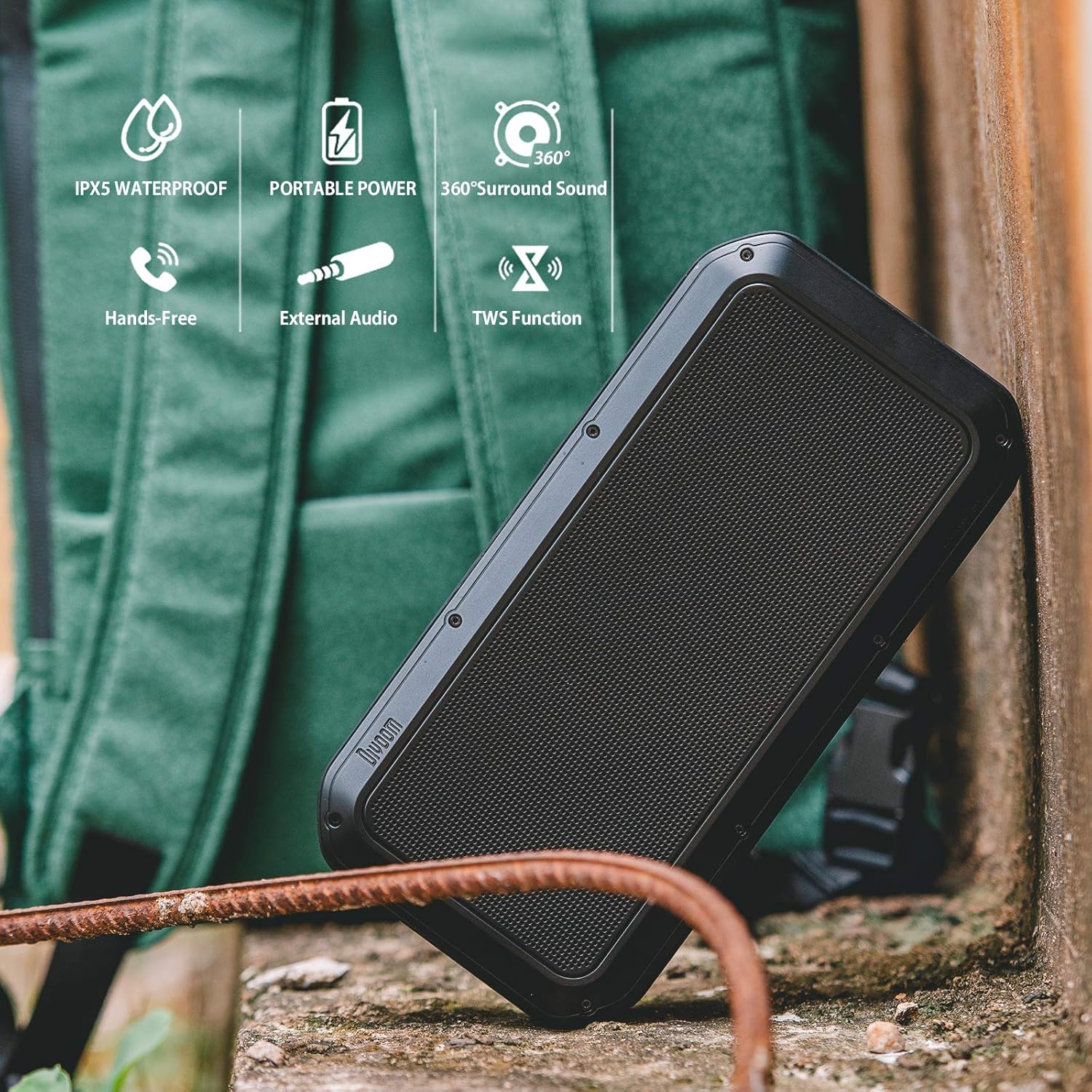
Figure 2: Key features of the Divoom Voombox-Pro, including IPX5 water resistance, portable power, 360° surround sound, hands-free calling, external audio input, and TWS function.
സജ്ജമാക്കുക
1. സ്പീക്കറിൽ നിന്ന് നിരക്ക് ഈടാക്കുന്നു
Before first use, fully charge the Voombox-Pro. Connect the provided USB-C cable to the charging port on the speaker and the other end to a USB power adapter (not included) or a computer USB port. The battery indicator lights will show charging progress.

Figure 3: Charging the Voombox-Pro and its ability to charge other devices.
The built-in 10000mAh battery also allows the speaker to function as a power bank to charge your mobile devices via its USB-A output port.
2. പവർ ഓൺ/ഓഫ്
Press and hold the Power button on the speaker's control panel for a few seconds to turn it on or off. A sound indicator will confirm the action.
3. ബ്ലൂടൂത്ത് ജോടിയാക്കൽ
- സ്പീക്കർ ഓണാണെന്നും ബ്ലൂടൂത്ത് ജോടിയാക്കൽ മോഡിലാണെന്നും ഉറപ്പാക്കുക (മിന്നുന്ന LED ഉപയോഗിച്ച് സൂചിപ്പിച്ചിരിക്കുന്നു).
- നിങ്ങളുടെ മൊബൈൽ ഉപകരണത്തിൽ, ബ്ലൂടൂത്ത് പ്രവർത്തനക്ഷമമാക്കി ലഭ്യമായ ഉപകരണങ്ങൾക്കായി തിരയുക.
- Select "Divoom Voombox-Pro" from the list.
- Once connected, the LED indicator will become solid, and a confirmation sound will play.
4. TWS (ട്രൂ വയർലെസ് സ്റ്റീരിയോ) ജോടിയാക്കൽ
For an enhanced audio experience, you can pair two Voombox-Pro speakers together to create a true wireless stereo system, doubling the acoustic output to 80W.

Figure 4: TWS Stereo Pairing setup for two Voombox-Pro speakers.
- Turn on both Voombox-Pro speakers.
- Press the TWS button on one speaker (this will be your primary speaker). It will automatically search for the second speaker.
- കണക്റ്റ് ചെയ്തുകഴിഞ്ഞാൽ, രണ്ട് സ്പീക്കറുകളും ഒരു സ്ഥിരീകരണ ശബ്ദം പുറപ്പെടുവിക്കും, കൂടാതെ അവയുടെ LED-കൾ TWS കണക്ഷൻ വിജയകരമാണെന്ന് സൂചിപ്പിക്കും.
- Connect your mobile device to the primary speaker via Bluetooth as described above.
പ്രവർത്തന നിർദ്ദേശങ്ങൾ
ഓഡിയോ പ്ലേബാക്ക്
- പ്ലേ/താൽക്കാലികമായി നിർത്തുക: പ്ലേ/പോസ് ബട്ടൺ അമർത്തുക.
- വോളിയം കൂട്ടുക/താഴ്ത്തുക: വോളിയം + അല്ലെങ്കിൽ വോളിയം - ബട്ടണുകൾ അമർത്തുക.
- അടുത്തത് / മുമ്പത്തെ ട്രാക്ക്: Long press the Volume + or Volume - buttons.
- AUX ഇൻപുട്ട്: നൽകിയിരിക്കുന്ന 3.5mm AUX കേബിൾ ഉപയോഗിച്ച് ഒരു ഓഡിയോ ഉപകരണം AUX പോർട്ടിലേക്ക് ബന്ധിപ്പിക്കുക. സ്പീക്കർ സ്വയമേവ AUX മോഡിലേക്ക് മാറും.
കോൾ കൈകാര്യം ചെയ്യൽ
- ഉത്തരം/അവസാന കോൾ: പ്ലേ/പോസ് ബട്ടൺ അമർത്തുക.
- കോൾ നിരസിക്കുക: പ്ലേ/പോസ് ബട്ടൺ ദീർഘനേരം അമർത്തുക.
ഔട്ട്ഡോർ, ഇൻഡോർ ഉപയോഗം
The Voombox-Pro is versatile for various environments, delivering consistent audio quality.

Figure 5: The Voombox-Pro is designed for outdoor use, providing 360° omni-directional sound.

Figure 6: The Voombox-Pro is also suitable for indoor environments, featuring 3D audio compensation technology.
മെയിൻ്റനൻസ്
- വൃത്തിയാക്കൽ: മൃദുവായ സ്പീക്കർ തുടയ്ക്കുക, ഡിamp തുണി. ഉരച്ചിലുകളുള്ള ക്ലീനറുകളോ ലായകങ്ങളോ ഉപയോഗിക്കരുത്.
- സംഭരണം: ഉപയോഗത്തിലില്ലാത്തപ്പോൾ തണുത്തതും വരണ്ടതുമായ സ്ഥലത്ത് സ്പീക്കർ സൂക്ഷിക്കുക. കടുത്ത താപനില ഒഴിവാക്കുക.
- ജല പ്രതിരോധം: Ensure the rubber flap covering the ports is securely closed to maintain IPX5 water resistance. Do not submerge the speaker in water.
ട്രബിൾഷൂട്ടിംഗ്
| പ്രശ്നം | പരിഹാരം |
|---|---|
| സ്പീക്കർ ഓണാക്കുന്നില്ല. | സ്പീക്കർ ചാർജ് ചെയ്തിട്ടുണ്ടെന്ന് ഉറപ്പാക്കുക. ഒരു പവർ സ്രോതസ്സുമായി ബന്ധിപ്പിച്ച് വീണ്ടും ശ്രമിക്കുക. |
| ബ്ലൂടൂത്ത് വഴി ജോടിയാക്കാൻ കഴിയില്ല. | Make sure the speaker is in pairing mode. Turn off and on Bluetooth on your device. Move closer to the speaker. |
| ശബ്ദമില്ല അല്ലെങ്കിൽ കുറഞ്ഞ ശബ്ദമില്ല. | സ്പീക്കറിലും കണക്റ്റ് ചെയ്തിരിക്കുന്ന ഉപകരണത്തിലും വോളിയം ലെവലുകൾ പരിശോധിക്കുക. സ്പീക്കർ മ്യൂട്ട് ചെയ്തിട്ടില്ലെന്ന് ഉറപ്പാക്കുക. |
| TWS ജോടിയാക്കൽ പരാജയപ്പെടുന്നു. | Ensure both speakers are Voombox-Pro models and are within range of each other. Reset both speakers and try pairing again. |
| ചാർജിംഗ് പ്രശ്നം. | Verify the charging cable and adapter are working correctly. Check the charging port for debris. |
സ്പെസിഫിക്കേഷനുകൾ
| ഫീച്ചർ | വിശദാംശങ്ങൾ |
|---|---|
| ഉൽപ്പന്ന അളവുകൾ | 9.65 x 4.84 x 2.4 ഇഞ്ച് |
| ഇനത്തിൻ്റെ ഭാരം | 3.19 പൗണ്ട് |
| മോഡൽ നമ്പർ | Voombox Pro BK |
| ബാറ്ററികൾ | 1 ലിഥിയം പോളിമർ ബാറ്ററികൾ ആവശ്യമാണ് |
| ഓഡിയോ ഔട്ട്പുട്ട് | 40W DSP professional-tuned audio |
| കളിസമയം | 12 മണിക്കൂർ വരെ |
| ജല പ്രതിരോധം | IPX5 |
| നിർമ്മാതാവ് | ദിവ്യൂം |
ഔദ്യോഗിക ഉൽപ്പന്ന വീഡിയോ
Watch the official product video for a visual guide on the Divoom Voombox-Pro's features and usage scenarios.
Video 1: Divoom Voombox-Pro features and usage demonstration.
വാറൻ്റിയും പിന്തുണയും
For warranty information and technical support, please refer to the official Divoom webസൈറ്റിൽ ബന്ധപ്പെടുക അല്ലെങ്കിൽ അവരുടെ ഉപഭോക്തൃ സേവനവുമായി ബന്ധപ്പെടുക. വാറന്റി ക്ലെയിമുകൾക്കായി നിങ്ങളുടെ വാങ്ങൽ രസീത് സൂക്ഷിക്കുക.
Official Divoom Store: Divoom Store on Amazon


