1. ഓവർview
The Cisco Catalyst 2960-X Series Switches are fixed-configuration, stackable Gigabit Ethernet switches that provide enterprise-class access for campus and branch applications. Designed for operational simplicity to lower total cost of ownership, they enable scalable, secure, and energy-efficient business operations with intelligent services and a range of advanced Cisco IOS Software features.
This particular model, the WS-C2960X-48FPS-L, features 48 Gigabit Ethernet ports with Power over Ethernet Plus (PoE+) capability, making it suitable for connecting and powering a wide array of network devices such as IP phones, wireless access points, and video surveillance cameras.

ചിത്രം 1: മുൻഭാഗം view of the Cisco WS-C2960X-48FPS-L switch, displaying its 48 Ethernet ports, console port, USB ports, and LED indicators.
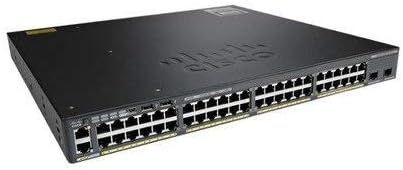
Figure 2: Angled perspective of the Cisco WS-C2960X-48FPS-L switch, showcasing its overall form factor and port layout.
2. സജ്ജീകരണം
2.1 അൺപാക്കിംഗും പരിശോധനയും
Upon receiving your Cisco WS-C2960X-48FPS-L switch, carefully unpack all components and inspect them for any signs of damage during transit. Retain the packaging materials for future use or in case of return.
- പാക്കിംഗ് ലിസ്റ്റിൽ ലിസ്റ്റ് ചെയ്തിരിക്കുന്ന എല്ലാ ഇനങ്ങളും ഉണ്ടെന്ന് ഉറപ്പാക്കുക.
- Check the switch chassis for any dents, scratches, or other physical damage.
- Inspect all ports and connectors for bent pins or obstructions.
2.2 റാക്ക് മൗണ്ടിംഗ്
The switch is designed for standard 19-inch rack mounting. Use the provided rack-mount brackets and screws to secure the switch in your equipment rack.
- Attach the rack-mount brackets to the sides of the switch using the screws provided.
- Align the switch with the desired rack unit (RU) space in your equipment rack.
- Secure the switch to the rack posts using appropriate rack screws. Ensure the switch is level and firmly seated.
2.3 പവർ കണക്ഷൻ
Connect the power cord to the AC power connector on the rear of the switch and then to a grounded AC power outlet. Ensure the power source meets the switch's power requirements.
- Use only the power cord supplied with the switch or a compatible replacement.
- Verify that the power outlet is properly grounded.
- Once connected, the system LED on the front panel should illuminate, indicating power is supplied.
2.4 പ്രാരംഭ കോൺഫിഗറേഷൻ ആക്സസ്
To perform initial configuration, you can connect to the switch via the console port or a management Ethernet port.
- കൺസോൾ പോർട്ട്: Connect a console cable (RJ-45 to DB-9 or USB-to-RJ-45) from your computer's serial port or USB port to the switch's console port. Use terminal emulation software (e.g., PuTTY, Tera Term) with settings: 9600 baud, 8 data bits, no parity, 1 stop bit, no flow control.
- മാനേജ്മെന്റ് പോർട്ട്: Connect an Ethernet cable from your computer to the switch's dedicated management port (if available) or any standard Ethernet port. Configure your computer's IP address to be in the same subnet as the switch's default management IP (refer to Cisco documentation for default IP).
3. പ്രവർത്തിക്കുന്നു
3.1 അടിസ്ഥാന പ്രവർത്തനം
Once powered on, the switch will perform a Power-On Self-Test (POST). After POST completes, the switch will load the Cisco IOS software. You can then access the command-line interface (CLI) via the console or management port to configure network settings, VLANs, security features, and more.
3.2 LED സൂചകങ്ങൾ
The front panel of the switch features various LED indicators that provide status information about the system and individual ports. Refer to the table below for common LED meanings:
| എൽഇഡി | നിറം/സംസ്ഥാനം | അർത്ഥം |
|---|---|---|
| System (SYST) | പച്ച (ഖര) | സിസ്റ്റം സാധാരണയായി പ്രവർത്തിക്കുന്നു. |
| ആമ്പർ (ഖര) | System fault or error. | |
| ആർ.പി.എസ് | പച്ച (ഖര) | Redundant Power System is active and providing power. |
| പോർട്ട് സ്റ്റാറ്റസ് | പച്ച (ഖര) | ലിങ്ക് സ്ഥാപിച്ചു. |
| പച്ച (മിന്നുന്ന) | Activity on port. | |
| ഓഫ് | No link or port disabled. | |
| PoE (PoE+) | പച്ച (ഖര) | PoE power being supplied. |
| ആമ്പർ (ഖര) | PoE fault or power issue. |
3.3 ഉപകരണങ്ങൾ ബന്ധിപ്പിക്കുന്നു
Connect network devices (computers, servers, IP phones, access points) to the switch's Ethernet ports using standard Ethernet cables (Cat5e or better for Gigabit speeds). For PoE+ enabled devices, simply connect them to any of the 48 PoE+ ports; the switch will automatically detect and provide power if the device is compliant.
3.4 പവർ ഓവർ ഇതർനെറ്റ് (PoE+) പ്രവർത്തനം
The WS-C2960X-48FPS-L supports PoE+ (802.3at) and PoE (802.3af), providing up to 30W per port for connected devices. The switch intelligently manages power allocation. Ensure that the total power draw of all connected PoE devices does not exceed the switch's maximum PoE power budget.
4. പരിപാലനം
4.1 വൃത്തിയാക്കൽ
പതിവായി വൃത്തിയാക്കുന്നത് മികച്ച പ്രകടനം നിലനിർത്താൻ സഹായിക്കുകയും നിങ്ങളുടെ സ്വിച്ചിന്റെ ആയുസ്സ് വർദ്ധിപ്പിക്കുകയും ചെയ്യുന്നു.
- വൃത്തിയാക്കുന്നതിനുമുമ്പ് സ്വിച്ച് ഓഫ് ചെയ്തിട്ടുണ്ടെന്നും പവർ സ്രോതസ്സിൽ നിന്ന് വിച്ഛേദിക്കപ്പെട്ടിട്ടുണ്ടെന്നും ഉറപ്പാക്കുക.
- Use a soft, dry, lint-free cloth to wipe the exterior of the chassis.
- For dust accumulation in ventilation openings, use compressed air to gently blow out dust. Do not use liquid cleaners or aerosol sprays directly on the switch.
4.2 ഫേംവെയർ അപ്ഡേറ്റുകൾ
ഇടയ്ക്കിടെ സിസ്കോ പിന്തുണ പരിശോധിക്കുക website for the latest Cisco IOS software updates for your switch model. Keeping the firmware updated ensures you have the latest features, security patches, and bug fixes. Follow Cisco's official documentation for the correct procedure to upgrade the IOS software.
4.3 പരിസ്ഥിതി പരിഗണനകൾ
To ensure reliable operation, maintain the switch within its specified environmental limits:
- താപനില: Operate within the recommended ambient temperature range (typically 0°C to 45°C or 32°F to 113°F).
- ഈർപ്പം: Maintain non-condensing humidity levels (typically 10% to 90%).
- വെൻ്റിലേഷൻ: സ്വിച്ചിന് ചുറ്റും മതിയായ വായുസഞ്ചാരം ഉറപ്പാക്കുക. വെന്റിലേഷൻ ദ്വാരങ്ങൾ അടയ്ക്കരുത്.
5. പ്രശ്നപരിഹാരം
5.1 പൊതുവായ പ്രശ്നങ്ങൾ
| പ്രശ്നം | സാധ്യമായ കാരണം | പരിഹാരം |
|---|---|---|
| സ്വിച്ച് ഓണാക്കുന്നില്ല | No power to outlet, faulty power cord, internal power supply issue. | Check power outlet, replace power cord, verify power supply status. |
| Port Link LED is off | Cable not connected, faulty cable, incorrect port configuration, device not powered on. | Verify cable connection, try a different cable, check device power, ensure port is enabled in configuration. |
| PoE ഉപകരണത്തിന് വൈദ്യുതി ലഭിക്കുന്നില്ല. | Device not PoE compliant, cable issue, power budget exceeded, port disabled for PoE. | Verify device PoE compliance, check cable, ensure total power draw is within budget, check port PoE configuration. |
| Cannot access switch CLI | Incorrect console settings, wrong cable, network connectivity issue for management port. | Verify console settings (baud rate, etc.), use correct console cable, check IP configuration for management access. |
5.2 ഉപകരണം പുനഃസജ്ജമാക്കുന്നു
In some cases, a factory reset may be necessary to resolve persistent issues or to clear configurations. Refer to Cisco's official documentation for the specific procedure to perform a factory reset on the WS-C2960X-48FPS-L, as this will erase all configurations and return the switch to its default state.
6 സ്പെസിഫിക്കേഷനുകൾ
The following table outlines the key technical specifications for the Cisco WS-C2960X-48FPS-L switch:
| ഫീച്ചർ | വിശദാംശങ്ങൾ |
|---|---|
| മോഡൽ നമ്പർ | WS-C2960X-48FPS-L സ്പെസിഫിക്കേഷൻ |
| ബ്രാൻഡ് | സിസ്കോ |
| സ്വിച്ച് തരം | നിയന്ത്രിച്ചു |
| തുറമുഖങ്ങളുടെ എണ്ണം | 48 ഗിഗാബിറ്റ് ഇതർനെറ്റ് (PoE+) |
| ഇൻ്റർഫേസ് തരം | RJ45 |
| PoE+ പിന്തുണ | Yes (IEEE 802.3at/af) |
| കേസ് മെറ്റീരിയൽ | ലോഹം |
| നിറം | കറുപ്പ് |
| ഉൽപ്പന്ന അളവുകൾ | 18 x 15 x 2 ഇഞ്ച് |
| ഇനത്തിൻ്റെ ഭാരം | 14 പൗണ്ട് |
| നിർമ്മാതാവ് | സിസ്കോ സിസ്റ്റംസ് - എന്റർപ്രൈസ് |
| യു.പി.സി | 090952120314, 647213670592 |
7. വാറൻ്റിയും പിന്തുണയും
This product is listed as "Renewed" and is typically backed by the Amazon Renewed Guarantee. This guarantee ensures that the product has been professionally inspected and tested to work and look like new. If you are not satisfied with your purchase, renewed products are eligible for replacement or refund under the Amazon Renewed Guarantee.
ആമസോൺ പുതുക്കിയ ഗ്യാരണ്ടിയെക്കുറിച്ചുള്ള വിശദമായ വിവരങ്ങൾക്ക്, ദയവായി ഔദ്യോഗിക വെബ്സൈറ്റ് സന്ദർശിക്കുക ആമസോൺ പുതുക്കിയ സ്റ്റോർ or refer to the product listing on Amazon. For technical support and advanced configuration, refer to Cisco's official documentation and support resources for the Catalyst 2960-X series switches.


