ആമുഖം
Thank you for choosing the Black+Decker BES610K-QS 650W Corded Jigsaw. This manual provides important information regarding the safe operation, setup, maintenance, and troubleshooting of your new tool. Please read this manual thoroughly before use and keep it for future reference.
The Black+Decker BES610K-QS is a 650W corded pendulum jigsaw designed for various cutting tasks. It offers a speed of 3100 strokes per minute and can cut up to 90mm in wood, 15mm in aluminum, and 8mm in metal. Key features include 3 pendulum settings, variable speed control, a dust extraction port, and an integrated LED light for improved visibility.
പൊതു സുരക്ഷാ നിർദ്ദേശങ്ങൾ
മുന്നറിയിപ്പ്: ഈ പവർ ടൂളിനൊപ്പം നൽകിയിരിക്കുന്ന എല്ലാ സുരക്ഷാ മുന്നറിയിപ്പുകളും നിർദ്ദേശങ്ങളും ചിത്രീകരണങ്ങളും സവിശേഷതകളും വായിക്കുക. ചുവടെ ലിസ്റ്റുചെയ്തിരിക്കുന്ന എല്ലാ നിർദ്ദേശങ്ങളും പാലിക്കുന്നതിൽ പരാജയപ്പെടുന്നത് വൈദ്യുതാഘാതം, തീ, കൂടാതെ/അല്ലെങ്കിൽ ഗുരുതരമായ പരിക്കിന് കാരണമായേക്കാം.
വർക്ക് ഏരിയ സുരക്ഷ
- ജോലിസ്ഥലം വൃത്തിയുള്ളതും നല്ല വെളിച്ചമുള്ളതുമായി സൂക്ഷിക്കുക. അലങ്കോലമായതോ ഇരുണ്ടതോ ആയ പ്രദേശങ്ങൾ അപകടങ്ങൾ ക്ഷണിച്ചുവരുത്തുന്നു.
- തീപിടിക്കുന്ന ദ്രാവകങ്ങൾ, വാതകങ്ങൾ, പൊടി എന്നിവയുടെ സാന്നിധ്യം പോലെ സ്ഫോടനാത്മക അന്തരീക്ഷത്തിൽ പവർ ടൂളുകൾ പ്രവർത്തിപ്പിക്കരുത്. പവർ ടൂളുകൾ സ്പാർക്കുകൾ സൃഷ്ടിക്കുന്നു, അത് പൊടിയോ പുകയോ കത്തിച്ചേക്കാം.
- പവർ ടൂൾ പ്രവർത്തിപ്പിക്കുമ്പോൾ കുട്ടികളെയും കാഴ്ചക്കാരെയും അകറ്റി നിർത്തുക. ശ്രദ്ധാശൈഥില്യങ്ങൾ നിങ്ങളുടെ നിയന്ത്രണം നഷ്ടപ്പെടുത്തും.
ഇലക്ട്രിക്കൽ സുരക്ഷ
- പവർ ടൂൾ പ്ലഗുകൾ ഔട്ട്ലെറ്റുമായി പൊരുത്തപ്പെടണം. പ്ലഗ് ഒരു തരത്തിലും പരിഷ്കരിക്കരുത്. എർത്ത് ചെയ്ത (ഗ്രൗണ്ടഡ്) പവർ ടൂളുകളുള്ള അഡാപ്റ്റർ പ്ലഗുകളൊന്നും ഉപയോഗിക്കരുത്. പരിഷ്ക്കരിക്കാത്ത പ്ലഗുകളും മാച്ചിംഗ് ഔട്ട്ലെറ്റുകളും ഇലക്ട്രിക് ഷോക്ക് സാധ്യത കുറയ്ക്കും.
- പൈപ്പുകൾ, റേഡിയറുകൾ, റേഞ്ചുകൾ, റഫ്രിജറേറ്ററുകൾ എന്നിവ പോലെയുള്ള എർത്ത് അല്ലെങ്കിൽ ഗ്രൗണ്ടഡ് പ്രതലങ്ങളുമായി ശരീര സമ്പർക്കം ഒഴിവാക്കുക. നിങ്ങളുടെ ശരീരം മണ്ണിലോ നിലത്തോ ആണെങ്കിൽ വൈദ്യുതാഘാതം ഉണ്ടാകാനുള്ള സാധ്യത കൂടുതലാണ്.
- പവർ ടൂളുകൾ മഴയിലോ നനഞ്ഞ അവസ്ഥയിലോ തുറന്നുകാട്ടരുത്. പവർ ടൂളിലേക്ക് വെള്ളം കയറുന്നത് വൈദ്യുതാഘാതത്തിനുള്ള സാധ്യത വർദ്ധിപ്പിക്കും.
- ചരട് ദുരുപയോഗം ചെയ്യരുത്. പവർ ടൂൾ കൊണ്ടുപോകുന്നതിനോ വലിക്കുന്നതിനോ അൺപ്ലഗ്ഗുചെയ്യുന്നതിനോ ഒരിക്കലും ചരട് ഉപയോഗിക്കരുത്. ചൂട്, എണ്ണ, മൂർച്ചയുള്ള അരികുകൾ അല്ലെങ്കിൽ ചലിക്കുന്ന ഭാഗങ്ങൾ എന്നിവയിൽ നിന്ന് ചരട് സൂക്ഷിക്കുക. കേടായതോ കുരുങ്ങിയതോ ആയ ചരടുകൾ വൈദ്യുതാഘാതത്തിനുള്ള സാധ്യത വർദ്ധിപ്പിക്കുന്നു.
വ്യക്തിഗത സുരക്ഷ
- എപ്പോഴും കണ്ണിന് സംരക്ഷണം ധരിക്കുക. സുരക്ഷാ ഗ്ലാസുകൾ, കണ്ണടകൾ അല്ലെങ്കിൽ മുഖം മറയ്ക്കുന്ന കവചം ഉപയോഗിക്കുക.
- ആവശ്യമുള്ളപ്പോൾ പൊടി മാസ്കുകൾ, വഴുതിപ്പോകാത്ത സുരക്ഷാ ഷൂകൾ, ഹാർഡ് തൊപ്പികൾ, അല്ലെങ്കിൽ കേൾവി സംരക്ഷണം എന്നിവ പോലുള്ള ഉചിതമായ വ്യക്തിഗത സംരക്ഷണ ഉപകരണങ്ങൾ (PPE) ധരിക്കുക.
- ശരിയായി വസ്ത്രം ധരിക്കുക. അയഞ്ഞ വസ്ത്രങ്ങളോ ആഭരണങ്ങളോ ധരിക്കരുത്. നിങ്ങളുടെ മുടിയും വസ്ത്രവും ചലിക്കുന്ന ഭാഗങ്ങളിൽ നിന്ന് അകറ്റി നിർത്തുക.
- അതിരുകടക്കരുത്. എല്ലായ്പ്പോഴും ശരിയായ കാലും ബാലൻസും നിലനിർത്തുക. ഇത് അപ്രതീക്ഷിത സാഹചര്യങ്ങളിൽ പവർ ടൂളിൻ്റെ മികച്ച നിയന്ത്രണം സാധ്യമാക്കുന്നു.
- എന്തെങ്കിലും ക്രമീകരണങ്ങൾ നടത്തുന്നതിനോ, ആക്സസറികൾ മാറ്റുന്നതിനോ, പവർ ടൂളുകൾ സൂക്ഷിക്കുന്നതിനോ മുമ്പ് എല്ലായ്പ്പോഴും പവർ സ്രോതസ്സിൽ നിന്ന് പ്ലഗ് വിച്ഛേദിക്കുക.
ഉൽപ്പന്നം കഴിഞ്ഞുview
The Black+Decker BES610K-QS Jigsaw is a versatile tool designed for precision cutting in various materials. Familiarize yourself with its components before operation.

Figure 1: Black+Decker BES610K-QS Jigsaw main view.
This image shows the overall design of the Black+Decker BES610K-QS Jigsaw, highlighting its ergonomic handle and control layout.
പ്രധാന സവിശേഷതകൾ:
- 650W മോട്ടോർ: നൽകുന്നു ampവിവിധ കട്ടിംഗ് ജോലികൾക്കുള്ള le പവർ.
- എർഗണോമിക് ഡിസൈൻ: Slim grip handle for optimized control and comfort.
- പൊടി വേർതിരിച്ചെടുക്കൽ പോർട്ട്: Removable adapter for easy connection to a vacuum cleaner, keeping the work area clean.
- Quick Accessory Change: Facilitates fast and easy blade changes.
- സംയോജിത LED ലൈറ്റ്: Enhances visibility of the cutting line.
- Variable Speed (0-3100 SPM): Allows adjustment for different materials and cutting requirements.
- കട്ടിംഗ് ശേഷി: 90mm in wood, 15mm in aluminum, 8mm in metal.
- 3 Pendulum Settings: For optimized cutting performance in various materials.
- Beveled Metal Base: For angled cuts.
സജ്ജീകരണവും അസംബ്ലിയും
അൺപാക്ക് ചെയ്യുന്നു
Carefully remove the jigsaw and all accessories from the packaging. Ensure all components are present and undamaged. The package typically includes the jigsaw, a standard blade, a guide blade, and a storage case.

Figure 2: Jigsaw with included storage case and blade.
This image displays the jigsaw along with its protective storage case and one of the included blades, ready for use.
ബ്ലേഡ് ഇൻസ്റ്റാളേഷൻ
- പവർ സ്രോതസ്സിൽ നിന്ന് ഉപകരണം അൺപ്ലഗ് ചെയ്തിട്ടുണ്ടെന്ന് ഉറപ്പാക്കുക.
- ബ്ലേഡ് cl കണ്ടെത്തുകamp mechanism, usually near the front of the tool.
- ബ്ലേഡ് cl തുറക്കുകamp (refer to Figure 3 for visual guidance).
- cl-യിലേക്ക് ബ്ലേഡ് തിരുകുകamp with the teeth facing forward. Ensure the back edge of the blade fits into the blade guide roller.
- ബ്ലേഡ് cl അടയ്ക്കുകamp securely. Tug gently on the blade to ensure it is firmly seated.

Figure 3: Proper blade installation into the jigsaw.
This image illustrates the process of inserting a blade into the jigsaw's quick-change mechanism, ensuring it is correctly aligned and secured.
Adjusting the Base Plate for Bevel Cuts
The jigsaw's base plate can be adjusted for angled cuts (bevel cuts).
- ഉപകരണം അൺപ്ലഗ് ചെയ്യുക.
- Loosen the screws that secure the base plate.
- Tilt the base plate to the desired angle (e.g., 15°, 30°, 45°). The tool has 3 pre-selected bevel angles.
- Tighten the screws firmly to secure the base plate in position.
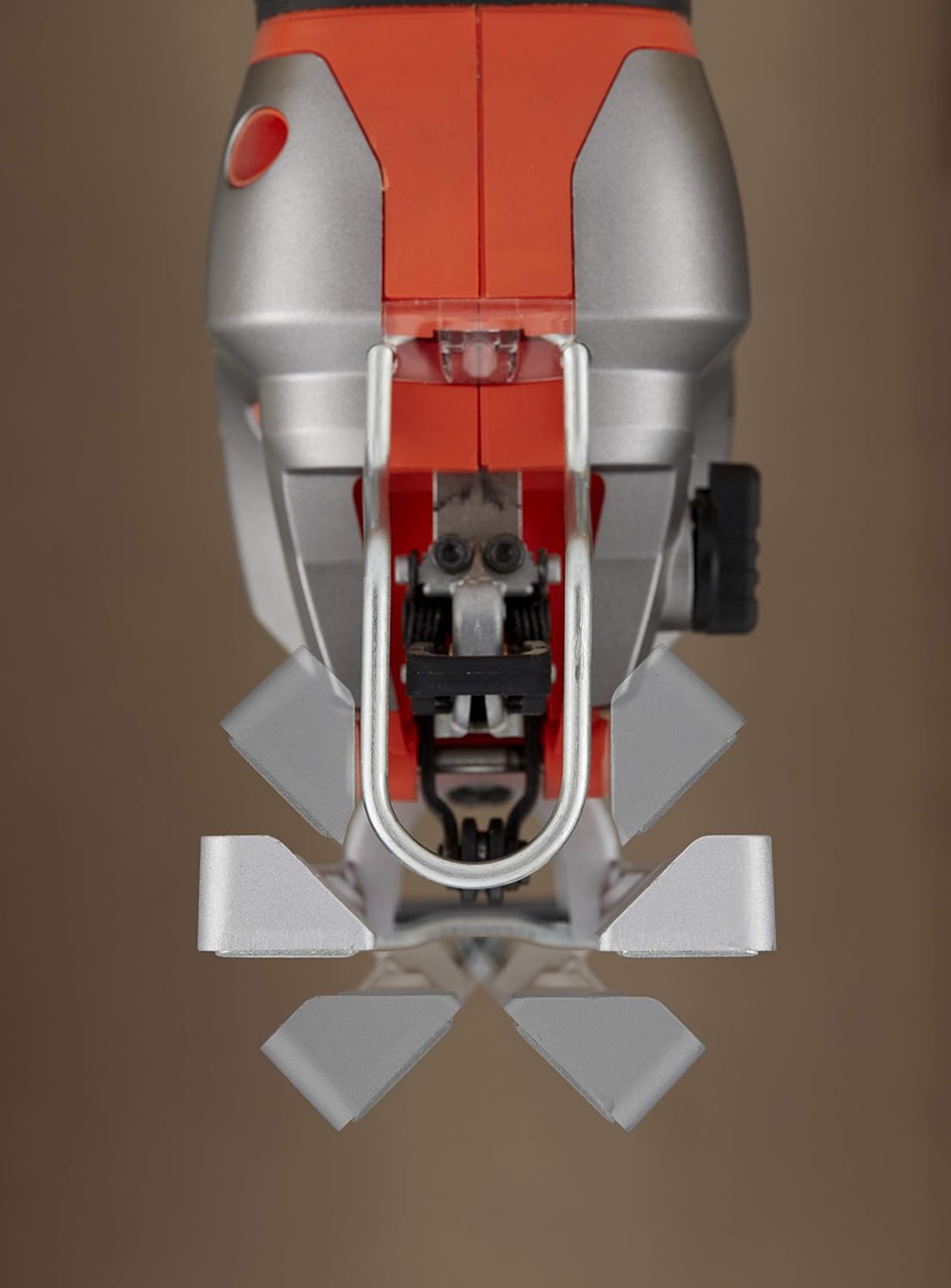
Figure 4: Jigsaw base plate set for an angled cut.
This image shows the jigsaw's base plate tilted to an angle, demonstrating its capability for making bevel cuts in a workpiece.
Dust Extraction Connection
For a cleaner work environment, connect a vacuum cleaner to the dust extraction port.
- Attach the removable adapter to the dust extraction port on the jigsaw.
- Connect the hose of a suitable vacuum cleaner to the adapter.
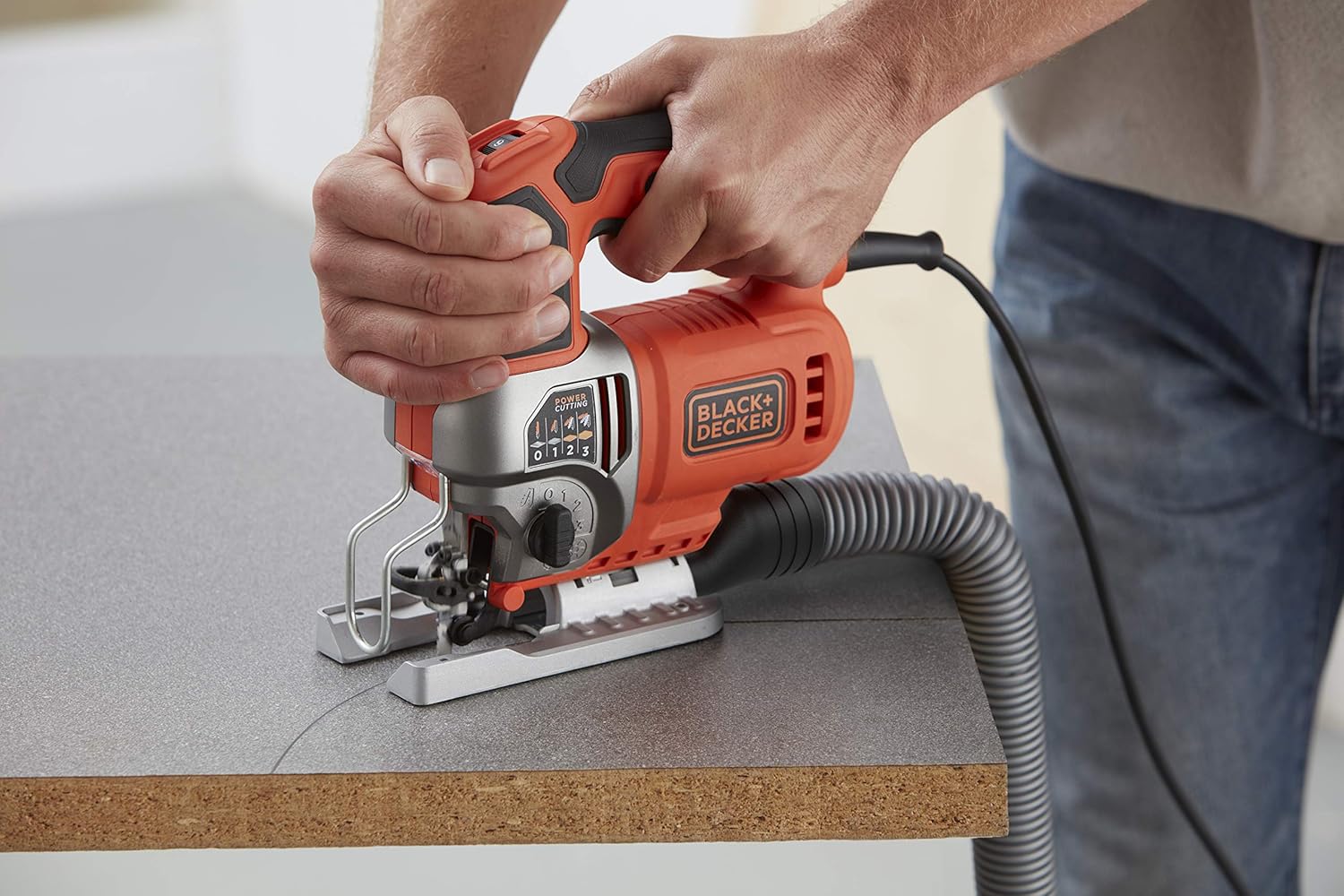
Figure 5: Jigsaw connected to a dust extraction system.
This image shows the jigsaw in operation with a vacuum hose attached to its dust extraction port, illustrating how to maintain a clean work area.
പ്രവർത്തന നിർദ്ദേശങ്ങൾ
പവർ ചെയ്യുന്നത് ഓൺ/ഓഫ്
- To turn on the jigsaw, press the trigger switch.
- ഓഫാക്കാൻ, ട്രിഗർ സ്വിച്ച് വിടുക.
വേരിയബിൾ സ്പീഡ് നിയന്ത്രണം
The jigsaw features a variable speed control dial, allowing you to adjust the cutting speed for different materials and applications.
- Locate the variable speed dial, typically on the top or side of the handle.
- Rotate the dial to select the desired speed. Lower speeds are suitable for harder materials or intricate cuts, while higher speeds are for softer materials and faster cutting.

Figure 6: Adjusting the variable speed dial on the jigsaw.
This image shows a hand adjusting the speed dial on the jigsaw, indicating the control over strokes per minute for different cutting needs.
Pendulum Action Adjustment
The pendulum action (orbital action) allows the blade to move in an elliptical motion, providing faster cutting in softer materials. The BES610K-QS has 3 pendulum settings.
- Locate the pendulum action selector switch, usually on the side of the tool.
- Select setting '0' for straight cuts or fine finishes.
- Select settings '1', '2', or '3' for increasingly aggressive cuts in wood or other soft materials. Higher settings provide faster cutting but may result in a rougher finish.
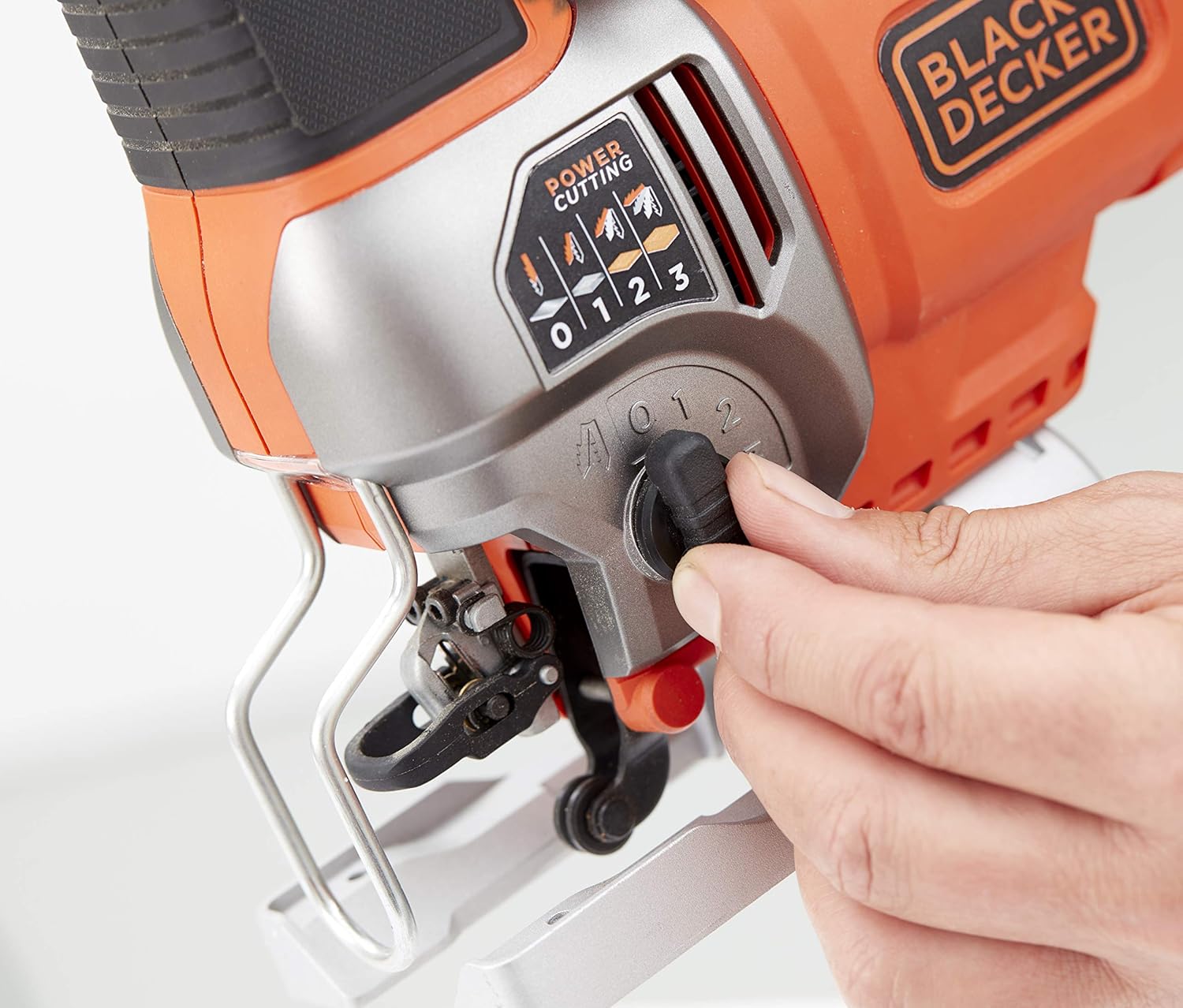
Figure 7: Adjusting the pendulum action setting on the jigsaw.
This image demonstrates how to adjust the pendulum action selector, which controls the aggressiveness of the blade's orbital motion for various materials.
ഒരു കട്ട് ഉണ്ടാക്കുന്നു
- മുറിക്കുമ്പോൾ ചലനം തടയാൻ വർക്ക്പീസ് ദൃഡമായി ഉറപ്പിക്കുക.
- Place the front edge of the jigsaw's base plate flat on the workpiece, ensuring the blade is clear of the material.
- Start the tool and allow it to reach full speed before engaging the blade with the material.
- Guide the jigsaw along the cutting line with steady, even pressure. Do not force the tool.
- The integrated LED light will illuminate the cutting area for better visibility.

Figure 8: User operating the jigsaw to cut a wooden board.
This image shows a user holding the jigsaw firmly and guiding it along a wooden workpiece to make a cut.

Figure 9: Jigsaw being used to cut a piece of trim.
This image depicts the jigsaw being used for a more delicate cut on a piece of trim, demonstrating its versatility.

Figure 10: Close-up of the jigsaw's LED light illuminating the cutting path.
This close-up image highlights the integrated LED light, which brightens the cutting line for enhanced accuracy and visibility.

Figure 11: Jigsaw cutting a metal pipe.
This image shows the jigsaw effectively cutting through a metal pipe, demonstrating its capability with different materials.

Figure 12: Jigsaw cutting a corrugated sheet.
This image illustrates the jigsaw cutting a corrugated sheet, showcasing its ability to handle various material shapes and textures.

Figure 13: Jigsaw cutting wood from the underside.
This image shows the jigsaw being used to cut a wooden piece from the underside, a technique often used to minimize splintering on the visible surface.
മെയിൻ്റനൻസ്
പതിവ് അറ്റകുറ്റപ്പണികൾ നിങ്ങളുടെ ജൈസയുടെ ദീർഘായുസ്സും മികച്ച പ്രകടനവും ഉറപ്പാക്കുന്നു.
വൃത്തിയാക്കൽ
- വൃത്തിയാക്കുന്നതിന് മുമ്പ് എല്ലായ്പ്പോഴും ഉപകരണം അൺപ്ലഗ് ചെയ്യുക.
- Use a soft brush or compressed air to clean dust and debris from the ventilation openings and around the blade clamp പ്രദേശം.
- പരസ്യം ഉപയോഗിച്ച് ടൂൾ ഹൗസിംഗ് തുടയ്ക്കുകamp തുണി. കഠിനമായ രാസവസ്തുക്കളോ ഉരച്ചിലുകളുള്ള ക്ലീനറുകളോ ഉപയോഗിക്കരുത്.
ബ്ലേഡ് കെയർ
- Replace dull or damaged blades immediately. Using worn blades can lead to poor cutting performance and increased strain on the tool.
- തുരുമ്പ് തടയാൻ ബ്ലേഡുകൾ ഉണങ്ങിയ സ്ഥലത്ത് സൂക്ഷിക്കുക.
പൊതു പരിശോധന
- Periodically check the power cord for any signs of damage. If damaged, have it replaced by a qualified service technician.
- എല്ലാ സ്ക്രൂകളും ഫാസ്റ്റനറുകളും ഇറുകിയതാണെന്ന് ഉറപ്പാക്കുക.
ട്രബിൾഷൂട്ടിംഗ്
നിങ്ങളുടെ ജൈസയിൽ നിങ്ങൾ നേരിട്ടേക്കാവുന്ന പൊതുവായ പ്രശ്നങ്ങളെ ഈ വിഭാഗം അഭിസംബോധന ചെയ്യുന്നു.
| പ്രശ്നം | സാധ്യമായ കാരണം | പരിഹാരം |
|---|---|---|
| ഉപകരണം ആരംഭിക്കുന്നില്ല. | വൈദ്യുതി വിതരണം ഇല്ല. കേടായ പവർ കോർഡ്. | പവർ ഔട്ട്ലെറ്റും സർക്യൂട്ട് ബ്രേക്കറും പരിശോധിക്കുക. Inspect cord for damage; have it replaced by a professional if necessary. |
| മോശം കട്ടിംഗ് പ്രകടനം / പരുക്കൻ മുറിവുകൾ. | മങ്ങിയ അല്ലെങ്കിൽ തെറ്റായ ബ്ലേഡ്. Incorrect speed or pendulum setting. Forcing the tool. | Replace blade; ensure it's suitable for the material. Adjust speed and pendulum action according to material. Allow the tool to work at its own pace. |
| അമിതമായ വൈബ്രേഷൻ. | അയഞ്ഞ ബ്ലേഡ്. കേടായ ബ്ലേഡ്. ധരിച്ച ആന്തരിക ഘടകങ്ങൾ. | ബ്ലേഡ് സുരക്ഷിതമായി cl ആണെന്ന് ഉറപ്പാക്കുകamped. ബ്ലേഡ് മാറ്റിസ്ഥാപിക്കുക. പരിശോധനയ്ക്കായി ഉപഭോക്തൃ സേവനവുമായി ബന്ധപ്പെടുക. |
| Blade gets stuck. | Forcing the tool. Incorrect blade for material thickness. | Reduce feed pressure. Use a blade appropriate for the material and thickness. |
If you encounter problems not listed here or if the suggested solutions do not resolve the issue, please contact Black+Decker customer service.
സ്പെസിഫിക്കേഷനുകൾ
Technical data for the Black+Decker BES610K-QS Jigsaw:
| ഫീച്ചർ | മൂല്യം |
|---|---|
| നിർമ്മാതാവ് | ബ്ലാക്ക്+ഡെക്കർ |
| മോഡൽ നമ്പർ | BES610K-QS |
| ശക്തി | 650 വാട്ട്സ് |
| വാല്യംtage | 230 വോൾട്ട് |
| വേഗത | 3100 strokes/min (variable) |
| പവർ ഉറവിടം | കോർഡഡ് ഇലക്ട്രിക് |
| മുറിക്കാനുള്ള ശേഷി (മരം) | 90 മി.മീ |
| കട്ടിംഗ് ശേഷി (അലൂമിനിയം) | 15 മി.മീ |
| കട്ടിംഗ് ശേഷി (ലോഹം) | 8 മി.മീ |
| പ്രത്യേക സവിശേഷതകൾ | Bevel Capacity, LED Light, Dust Extraction |
| ഉൽപ്പന്ന അളവുകൾ (L x W x H) | 31 x 11 x 30.5 സെ.മീ |
| ഭാരം | 3.05 കിലോഗ്രാം |
| ഉൾപ്പെടുത്തിയ ഘടകങ്ങൾ | Jigsaw, 2 blades (as per product variant), Storage Case |
വാറൻ്റിയും പിന്തുണയും
Black+Decker products are manufactured to high-quality standards and are guaranteed against defects in materials and workmanship. This product comes with a limited warranty.
For specific warranty terms and conditions, or if you require technical assistance, spare parts, or repair service, please refer to the warranty card included with your product or visit the official Black+Decker website. You can also contact Black+Decker customer support directly.
ഓൺലൈൻ പിന്തുണ: സന്ദർശിക്കുക www.blackanddecker.com for product information, FAQs, and service center locations.