1. ഉൽപ്പന്നം കഴിഞ്ഞുview
The radtel Bluetooth Headset is designed to provide hands-free communication for two-way radios, offering simultaneous connection to both your walkie-talkie and a mobile phone. It features noise cancellation for clear audio and a convenient wireless Push-To-Talk (PTT) button.
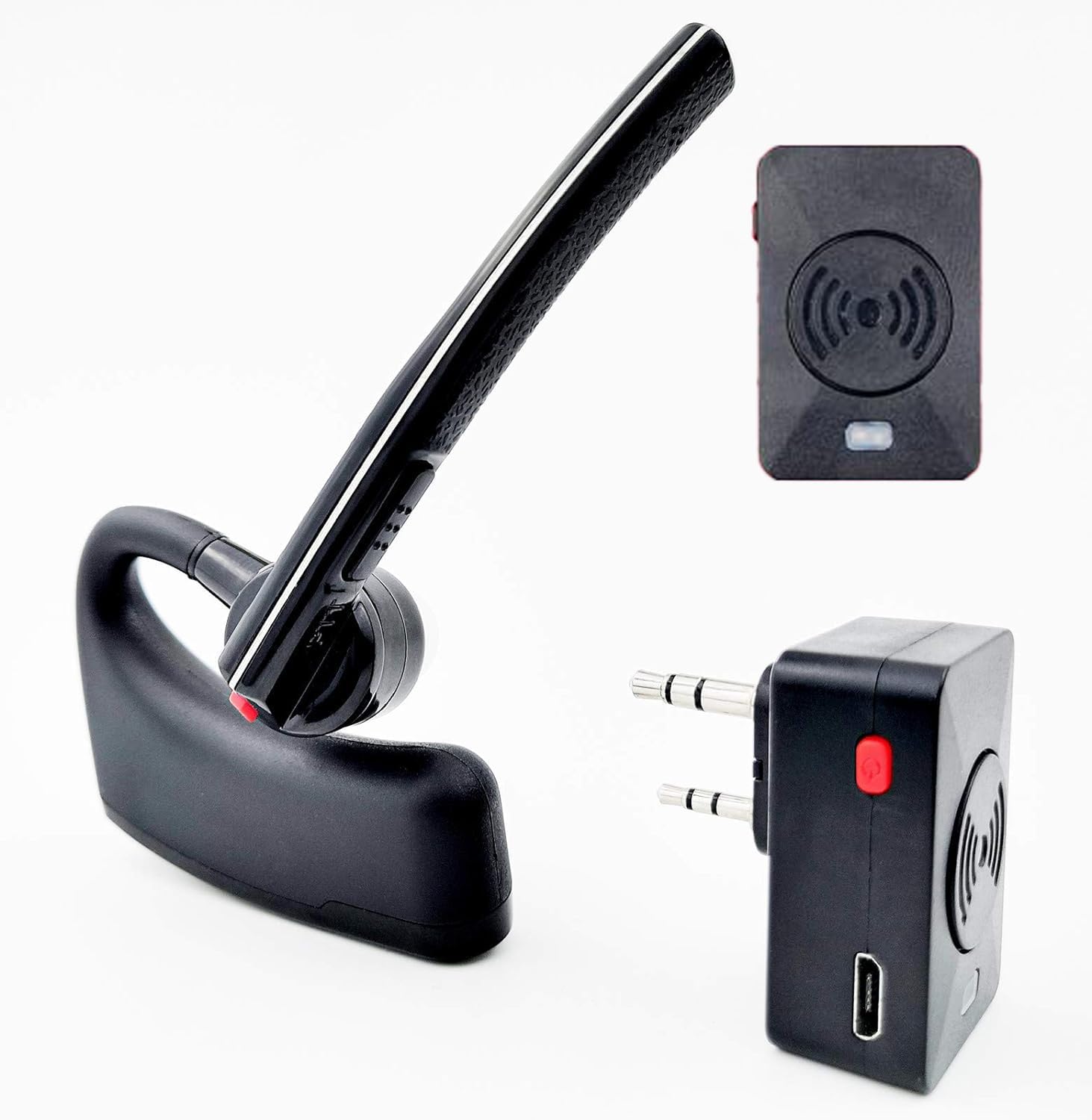
Image: The radtel Bluetooth Headset, Bluetooth adapter, and wireless finger PTT button.
2. പാക്കേജ് ഉള്ളടക്കം
നിങ്ങളുടെ പാക്കേജിൽ എല്ലാ ഇനങ്ങളും ഉണ്ടെന്ന് ഉറപ്പാക്കുക:
- 1x Bluetooth Headset
- 1x Bluetooth Adapter for Radios
- 1x Wireless Finger PTT
- 1x ചാർജിംഗ് കേബിൾ
- 1x Plastic Bander (for PTT)
- 2x Silicone Earbud Maps
- 1x ഇംഗ്ലീഷ് ഉപയോക്തൃ മാനുവൽ

Image: All components included in the package, numbered for easy identification.
3 അനുയോജ്യത
This headset is compatible with two-way radios featuring a K-type connector (two-pin plug with 3.5mm and 2.5mm connectors).
അനുയോജ്യമായ റേഡിയോ മോഡലുകൾ:
- Baofeng: UV-5R, UV-82, BF-F8HP, UV-17R, BF-888S, AR-152, GM-15 (and almost all models)
- Radtel: RT-12, RT-590, RT-830, RT-890, RT-470X, RT-470, RT-630, RT-490
- Retevis: RT22, RT22S, RT21, RT68, H777, RA79, RT-5R, RT-17, RT-29
- കെൻവുഡ്: KPG27D, KPG29D, KPG48D, KPG49, KPG55D, KPG56D, TH-D7, TH-D7A, TH-D7AG, TH-D7E, TH-F6, TH-F6A
- ടൈറ്റ്: MD-UV380, TH-UVF8D, TH-UVF9D, TH-UV8000D/E, MD-380, MD-390
- HYT: TC286/386/2685/3865/6685/278/378/388/2100/2088
- വൂക്സൻ: KG-UV8D, UV6D, UVD1PUV-899
- പക്സിംഗ്: PX-777, PX-888, PX-888K, PX-325, PX-358
- Quansheng: UV-K5, UV-K5(99), UV-K6, UV-5R PLUS
Incompatible Brands:
ഈ ഹെഡ്സെറ്റ് അല്ല compatible with Motorola, Icom, Yaesu, Hytera, Midland, or similar radios that do not use the K-type connector.

Image: Visual guide to compatible radio brands and models, highlighting the K-type connector.
4. ഘടകങ്ങളും നിയന്ത്രണങ്ങളും
ബ്ലൂടൂത്ത് ഹെഡ്സെറ്റ്
The headset features an ergonomic design, suitable for both left and right ears with a 270-degree rotating earpiece. It includes integrated controls for power, volume, and PTT.

Image: The Bluetooth headset demonstrating its 270-degree rotating design for left or right ear use.
Wireless Finger PTT
The wireless finger PTT button allows for convenient push-to-talk functionality, especially useful for activities requiring hands-free operation.

ചിത്രം: ഒരു ക്ലോസ്-അപ്പ് view of the wireless finger PTT button, showing its compact design.
5. സജ്ജീകരണ ഗൈഡ്
5.1 ചാർജിംഗ് നിർദ്ദേശങ്ങൾ
The Bluetooth headset, adapter, and wireless PTT key each have internal rechargeable batteries. Use the provided USB charging cable to charge them via a standard DC 5V power supply (e.g., computer USB port, power bank).
- ചാർജിംഗ് സൂചകം: A red light will be on during charging.
- പൂർണ്ണ ചാർജ് സൂചകം: പൂർണ്ണമായി ചാർജ് ചെയ്യുമ്പോൾ ചുവന്ന ലൈറ്റ് ഓഫാകും.
- ചാർജിംഗ് സമയം: Approximately 1-2.5 hours for the headset.
5.2 Bluetooth Adapter Installation
Insert the Bluetooth adapter into the K-type intercom port of your two-way radio.

Image: Diagram illustrating the correct method for installing the Bluetooth adapter into the radio's accessory port (Figure 1) and removal (Figure 2).
5.3 Pairing Instructions
Follow these steps to pair your devices:
- Bluetooth Adapter Power On/Off:
Press and hold the Multi-function button on the adapter for 2 seconds to power on (blue light glints). Press and hold for 3 seconds to power off (red light glints). - Bluetooth Adapter Pairing Mode:
When the adapter is OFF, press and hold the Multi-function button for approximately 7 seconds to enter pairing status. The red and blue lights will glint alternately. - Wireless PTT Key Pairing:
Ensure the wireless PTT key is charged. With the Bluetooth adapter in pairing mode, press the PTT button on the wireless PTT key for about 1 second. The adapter's red light will disappear, indicating successful pairing. - Bluetooth Headset Pairing:
Ensure the Bluetooth headset is charged and powered off. Press and hold the On/Off button on the headset for 6 seconds to enter Bluetooth pairing mode (blue and red lights glint alternately). Place the headset near the paired adapter. Wait approximately 40 seconds for the initial pairing. When the alternating red and blue lights disappear, and only the blue light glints, the headset is successfully paired with the adapter.
6. പ്രവർത്തന നിർദ്ദേശങ്ങൾ
6.1 ഹെഡ്സെറ്റ് നിയന്ത്രണങ്ങൾ
Refer to the diagram below for button identification:
Image: Detailed diagram showing the location and function of buttons on the Bluetooth headset (buttons 1-7) and indicator light.
- Walkie Talkie PTT Button: Press to transmit via the radio.
- ഓൺ/ഓഫ് ബട്ടൺ:
- ഓൺ/ഓഫ് ചെയ്യാൻ 2 സെക്കൻഡ് ദീർഘനേരം അമർത്തുക.
- Long press 6 seconds to enter Bluetooth pairing mode.
- Press to pause/continue music.
- ഫോൺ കോളുകൾക്ക് ഉത്തരം നൽകാൻ/അവസാനിപ്പിക്കാൻ അമർത്തുക.
- വോളിയം കൂട്ടാനുള്ള ബട്ടൺ:
- വോളിയം കൂട്ടാൻ അമർത്തുക.
- Long press 2 seconds for previous song (during music playback).
- വോളിയം ഡൗൺ ബട്ടൺ:
- വോളിയം കുറയ്ക്കാൻ അമർത്തുക.
- Long press 2 seconds for next song (during music playback).
6.2 ഇൻഡിക്കേറ്റർ ലൈറ്റ് സ്റ്റാറ്റസ്
- നീല വെളിച്ചം പതുക്കെ മിന്നുന്നു: Power on, in standby mode.
- Blue light flashes fast: Bluetooth connection is interrupted. Check if the earpiece is on or within range.
- ചുവന്ന ലൈറ്റ് ഓണാണ്: Device is transmitting (via radio).
- ചുവന്ന ലൈറ്റ് ഓഫ്: Transmission ended.
- Low battery tips: In standby mode, the red light flashes to indicate low battery. Charge promptly.
6.3 Dual Connection (Radio and Mobile Phone)
The headset can be paired with both the walkie-talkie (via the Bluetooth adapter) and a mobile phone simultaneously. When a radio transmission is received, it will take priority. After 8 seconds of radio inactivity, the headset will automatically return to the mobile phone pairing state, allowing you to listen to music or manage calls.

Image: Illustration of the headset's ability to connect to both a two-way radio and a smartphone simultaneously.
6.4 Noise Reduction Function
To activate or deactivate the noise reduction function, press and hold the Volume + and Volume - buttons simultaneously. This feature helps to eliminate background noise for clearer communication.

Image: Visual representation of the noise cancelling function, showing sound wave reduction.
6.5 ഭാഷാ മാറ്റം
To switch the voice prompt language, press and hold the Power and Volume - buttons simultaneously.
6.6 Pairing Elimination (Reset)
To clear all previous pairings, press and hold the Power and Volume + buttons simultaneously. You will hear a beep indicating the reset is complete.
7. പരിപാലനം
To ensure the longevity and optimal performance of your radtel Bluetooth Headset, follow these maintenance guidelines:
- വൃത്തിയാക്കൽ: Wipe the headset and adapter with a soft, dry cloth. Avoid using harsh chemicals or abrasive cleaners.
- സംഭരണം: നേരിട്ടുള്ള സൂര്യപ്രകാശത്തിൽ നിന്നും കടുത്ത താപനിലയിൽ നിന്നും മാറി തണുത്തതും വരണ്ടതുമായ സ്ഥലത്ത് ഉപകരണം സൂക്ഷിക്കുക.
- ബാറ്ററി കെയർ: For extended storage, charge the battery to about 50% every few months to prevent deep discharge.
- ജല പ്രതിരോധം: The product is water resistant, but not waterproof. Avoid submerging it in water or exposing it to heavy rain.
8. പ്രശ്നപരിഹാരം
If you encounter issues with your radtel Bluetooth Headset, refer to the following common problems and solutions:
- Difficulty Pairing:
- Ensure all devices (headset, adapter, PTT) are fully charged.
- Make sure the adapter and headset are in pairing mode (alternating red/blue lights).
- Keep devices within close proximity (within 1 meter) during pairing.
- Try resetting the headset's pairings (Power + Volume + simultaneously) and re-attempt the pairing process.
- Verify that the Bluetooth adapter is correctly inserted into the radio.
- ഓഡിയോ ഇല്ല അല്ലെങ്കിൽ മോശം ഓഡിയോ നിലവാരം:
- Check volume levels on both the headset and the connected radio/phone.
- Ensure the headset and adapter are properly paired and connected.
- Verify that the radio is transmitting and receiving correctly.
- Move closer to the connected devices to ensure you are within the 10-meter Bluetooth range.
- Activate the noise reduction function if background noise is an issue (Power + Volume - simultaneously).
- ഹ്രസ്വ ബാറ്ററി ലൈഫ്:
- ഉപയോഗിക്കുന്നതിന് മുമ്പ് ഉപകരണം പൂർണ്ണമായി ചാർജ്ജ് ചെയ്തിട്ടുണ്ടെന്ന് ഉറപ്പാക്കുക.
- Operating at maximum volume or in areas with weak signal can consume more power.
- Battery life is rated for approximately 5-8 hours of work time and less than 100 hours standby.
- PTT Function Not Working:
- Ensure the wireless PTT key is charged and correctly paired with the Bluetooth adapter.
- Verify that the PTT button on the headset itself is functioning.
- Confirm that the radio is powered on and set to a transmitting channel.
- Headset Disconnects Randomly:
- Ensure the headset and adapter are within the 10-meter Bluetooth range.
- Avoid obstacles that may interfere with the Bluetooth signal.
- Check for other strong wireless signals that might cause interference.
- Re-pair the devices if disconnections persist.
9 സ്പെസിഫിക്കേഷനുകൾ
| ഫീച്ചർ | സ്പെസിഫിക്കേഷൻ |
|---|---|
| മോഡലിൻ്റെ പേര് | ഇയർഫോൺ |
| കണക്റ്റിവിറ്റി ടെക്നോളജി | ബ്ലൂടൂത്ത് |
| വയർലെസ് കമ്മ്യൂണിക്കേഷൻ ടെക്നോളജി | ബ്ലൂടൂത്ത് |
| ബ്ലൂടൂത്ത് പതിപ്പ് | 5.2 |
| ബ്ലൂടൂത്ത് ശ്രേണി | 10 മീറ്റർ |
| ശബ്ദ നിയന്ത്രണം | സജീവ നോയ്സ് റദ്ദാക്കൽ |
| ചാർജിംഗ് സമയം | 1-2.5 മണിക്കൂർ |
| ബാറ്ററി ലൈഫ് (ജോലി സമയം) | 5-8 മണിക്കൂർ |
| സ്റ്റാൻഡ്ബൈ സമയം | <100 മണിക്കൂർ |
| ഫ്രീക്വൻസി റേഞ്ച് | 20 Hz മുതൽ 20,000 Hz വരെ |
| കണക്റ്റർ തരം | K plug (2.5mm and 3.5mm) |
| മെറ്റീരിയൽ | പ്ലാസ്റ്റിക് |
| ഇനത്തിൻ്റെ ഭാരം | 0.12 കിലോഗ്രാം (ഏകദേശം 4.2 ഔൺസ്) |
| ജല പ്രതിരോധ നില | വെള്ളത്തെ പ്രതിരോധിക്കുന്ന |
| നിയന്ത്രണ രീതി | ടച്ച് / മീഡിയ നിയന്ത്രണം |
| നിർമ്മാതാവ് | Xiamen Radtel Electronics Co.,Ltd |
10. വാറൻ്റിയും പിന്തുണയും
This radtel Bluetooth Headset comes with a 1 വർഷത്തെ വാറൻ്റി വാങ്ങിയ തീയതി മുതൽ.
For technical support, warranty claims, or further assistance, please contact radtel customer service through their official channels or the retailer where the product was purchased.


