1. ആമുഖം
Thank you for choosing the Karlsson Gummy Digital Alarm Clock. This manual provides essential information for the safe and efficient operation of your new alarm clock. Please read it thoroughly before use and retain it for future reference.
This digital alarm clock features a soft silicone exterior, a clear digital display, and essential functions like alarm and snooze, designed for ease of use and integration into any bedroom environment.
2 സുരക്ഷാ വിവരങ്ങൾ
- വെള്ളം, ഉയർന്ന ആർദ്രത എന്നിവയിൽ നിന്ന് ഉപകരണം അകറ്റി നിർത്തുക.
- നേരിട്ടുള്ള സൂര്യപ്രകാശത്തിലോ ഉയർന്ന താപനിലയിലോ ഉപകരണത്തെ തുറന്നുകാട്ടരുത്.
- Use only the specified battery type (3 x AAA batteries).
- ബാറ്ററികൾ ശരിയായ പോളാരിറ്റിയോടെ (+/-) ചേർത്തിട്ടുണ്ടെന്ന് ഉറപ്പാക്കുക.
- ഉപകരണം ദീർഘനേരം ഉപയോഗിക്കുന്നില്ലെങ്കിൽ, ചോർച്ച തടയാൻ ബാറ്ററികൾ നീക്കം ചെയ്യുക.
- ഉപയോഗിച്ച ബാറ്ററികൾ പ്രാദേശിക നിയന്ത്രണങ്ങൾ അനുസരിച്ച് ഉത്തരവാദിത്തത്തോടെ നീക്കം ചെയ്യുക.
- ഉപകരണം സ്വയം വേർപെടുത്താനോ നന്നാക്കാനോ ശ്രമിക്കരുത്. യോഗ്യതയുള്ള സേവന ഉദ്യോഗസ്ഥരെ ബന്ധപ്പെടുക.
3. പാക്കേജ് ഉള്ളടക്കം
പാക്കേജിൽ ഇനിപ്പറയുന്ന ഇനങ്ങൾ ഉണ്ടോ എന്ന് പരിശോധിക്കുക:
- 1 x Karlsson Gummy Digital Alarm Clock (Model KA5753GY)
കുറിപ്പ്: പ്രവർത്തനത്തിന് 3 x AAA ബാറ്ററികൾ ആവശ്യമാണ്, അവ പാക്കേജിൽ ഉൾപ്പെടുത്തിയിട്ടില്ല.
4. ഉൽപ്പന്ന സവിശേഷതകൾ
- മെറ്റീരിയൽ: Soft Silicone exterior for a comfortable touch.
- ഡിസ്പ്ലേ: Clear Digital display showing hours and minutes.
- പ്രവർത്തനങ്ങൾ: Classic Alarm function and Snooze button.
- വായനാക്ഷമത: Large numbers for easy reading, even in low light conditions with the light function.
- ഊർജ്ജ സ്രോതസ്സ്: Battery operated (3 x AAA batteries, not included).
- അളവുകൾ: Approximately 7 cm (Height) x 14 cm (Width) x 5 cm (Depth).
5. സജ്ജീകരണം
5.1 ബാറ്ററി ഇൻസ്റ്റാളേഷൻ
- അലാറം ക്ലോക്കിന്റെ പിൻഭാഗത്ത് ബാറ്ററി കമ്പാർട്ട്മെന്റ് കണ്ടെത്തുക.
- Open the battery compartment cover by sliding it off.
- Insert 3 x AAA batteries, ensuring correct polarity (+ and -) as indicated inside the compartment.
- ബാറ്ററി കമ്പാർട്ട്മെൻ്റ് കവർ സുരക്ഷിതമായി അടയ്ക്കുക.

ചിത്രം: പിന്നിലേക്ക് view ബാറ്ററി കമ്പാർട്ടുമെന്റിനൊപ്പം.
5.2 പ്രാരംഭ പവർ ഓൺ
Once batteries are installed, the digital display should light up, and the clock will be ready for time setting.
6. പ്രവർത്തന നിർദ്ദേശങ്ങൾ
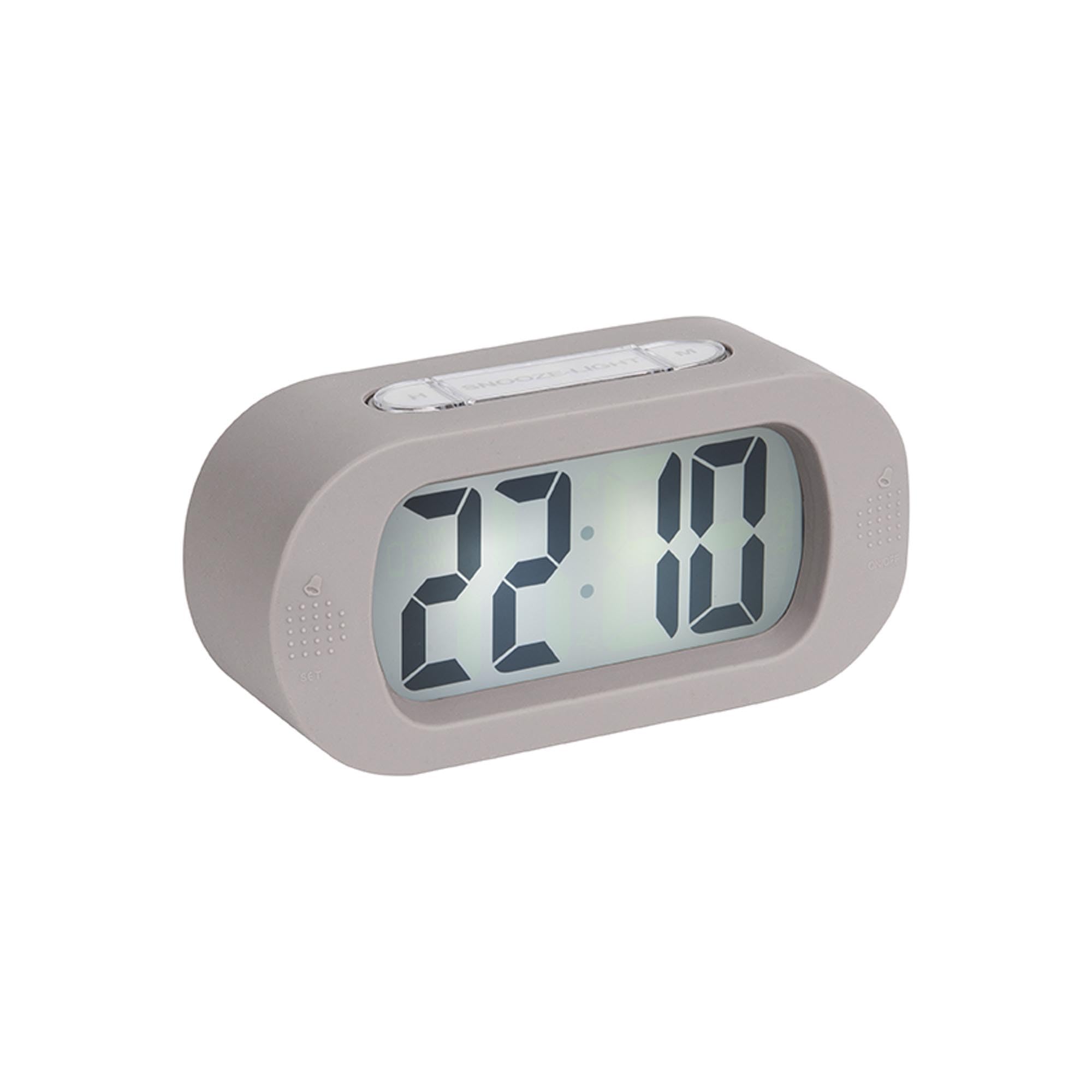
ചിത്രം: മുൻഭാഗം view of the alarm clock.
6.1 സമയം ക്രമീകരിക്കുന്നു
- അമർത്തിപ്പിടിക്കുക "TIME SET" button (located on the back) until the hour digits start flashing.
- ഉപയോഗിക്കുക "എച്ച്" button (on top) to adjust the hour.
- അമർത്തുക "TIME SET" button again to switch to minute setting.
- ഉപയോഗിക്കുക "എം" button (on top) to adjust the minutes.
- അമർത്തുക "TIME SET" സമയ ക്രമീകരണ മോഡ് സ്ഥിരീകരിക്കാനും പുറത്തുകടക്കാനും അവസാനമായി ഒരിക്കൽ കൂടി.
6.2 അലാറം സജ്ജമാക്കുന്നു
- അമർത്തിപ്പിടിക്കുക "സെറ്റ്" button (on the front bottom left) until the alarm hour digits start flashing.
- ഉപയോഗിക്കുക "എച്ച്" അലാറം മണിക്കൂർ ക്രമീകരിക്കുന്നതിനുള്ള ബട്ടൺ.
- അമർത്തുക "സെറ്റ്" again to switch to alarm minute setting.
- ഉപയോഗിക്കുക "എം" അലാറം മിനിറ്റ് ക്രമീകരിക്കാൻ ബട്ടൺ.
- അമർത്തുക "സെറ്റ്" one last time to confirm and exit alarm setting mode.
6.3 അലാറം സജീവമാക്കൽ/നിർജ്ജീവമാക്കൽ
To turn the alarm on or off, locate the alarm switch or button (often on the side or back, indicated by an alarm icon). Slide or press it to toggle the alarm status. A small alarm icon on the display usually indicates the alarm is active.
6.4 സ്നൂസ് ഫംഗ്ഷൻ
അലാറം മുഴങ്ങുമ്പോൾ, വലിയ ബട്ടൺ അമർത്തുക "SNOOZE/LIGHT" button on top of the clock. The alarm will pause for a few minutes (typically 5-9 minutes) and then sound again. You can repeat this process.
6.5 ലൈറ്റ് ഫംഗ്ഷൻ
അമർത്തുക "SNOOZE/LIGHT" button briefly to illuminate the display for a few seconds, allowing you to read the time in the dark.
7. പരിപാലനം
7.1 വൃത്തിയാക്കൽ
Wipe the clock with a soft, dry cloth. Do not use abrasive cleaners or solvents, as these may damage the silicone surface or display.
7.2 ബാറ്ററി മാറ്റിസ്ഥാപിക്കൽ
When the display dims or the alarm weakens, it's time to replace the batteries. Follow the battery installation steps in Section 5.1.
8. പ്രശ്നപരിഹാരം
| പ്രശ്നം | സാധ്യമായ കാരണം | പരിഹാരം |
|---|---|---|
| ഡിസ്പ്ലേ ശൂന്യമോ മങ്ങിയതോ ആണ്. | ബാറ്ററികൾ കുറവാണ് അല്ലെങ്കിൽ തെറ്റായി ചേർത്തിരിക്കുന്നു. | Replace batteries with new 3 x AAA batteries, ensuring correct polarity. |
| അലാറം മുഴങ്ങുന്നില്ല. | Alarm is not activated or batteries are low. | Ensure the alarm is switched ON. Replace batteries if needed. |
| Time/Alarm cannot be set. | Buttons are not being pressed correctly or device is unresponsive. | Ensure you are pressing and holding the correct buttons as per instructions. Remove and reinsert batteries to reset the device. |
9 സ്പെസിഫിക്കേഷനുകൾ
- മോഡൽ നമ്പർ: KA5753GY
- മെറ്റീരിയൽ: സിലിക്കൺ
- നിറം: ഊഷ്മള ചാരനിറം
- ഡിസ്പ്ലേ തരം: ഡിജിറ്റൽ
- അളവുകൾ (H x W x D): ഏകദേശം 7 സെ.മീ x 14 സെ.മീ x 5 സെ.മീ (2.76 x 5.51 x 1.97 ഇഞ്ച്)
- ഭാരം: ഏകദേശം 220 ഗ്രാം (0.49 പൗണ്ട്)
- ഊർജ്ജ സ്രോതസ്സ്: 3 x AAA ബാറ്ററികൾ (ഉൾപ്പെടുത്തിയിട്ടില്ല)
- പ്രത്യേക സവിശേഷതകൾ: അലാറം, സ്നൂസ്, ലൈറ്റ്
- മുറിയുടെ തരം: കിടപ്പുമുറി
- ഉപയോഗം: ഇൻഡോർ
10. വാറൻ്റിയും പിന്തുണയും
For warranty information and customer support, please refer to the retailer where you purchased the Karlsson Gummy Digital Alarm Clock or visit the official Karlsson webസൈറ്റ്. ഏതെങ്കിലും വാറന്റി ക്ലെയിമുകൾക്ക് നിങ്ങളുടെ വാങ്ങലിന്റെ തെളിവ് സൂക്ഷിക്കുക.
ഓൺലൈൻ പിന്തുണ: www.karlssonclocks.com


