1. ആമുഖം
The SecuX W20 is a hardware wallet designed for secure storage and management of digital assets, including cryptocurrencies, tokens, and NFTs. It features an intuitive touchscreen and Bluetooth connectivity, providing a user-friendly interface while maintaining robust security measures.
2. പാക്കേജ് ഉള്ളടക്കം
Verify that all items are present in your SecuX W20 package:
- SecuX W20 Hardware Wallet
- യുഎസ്ബി-സി കേബിൾ
- Recovery Seed Phrase Cards
- ദ്രുത ആരംഭ ഗൈഡ്
3. ഡിവൈസ് ഓവർview
The SecuX W20 features a 2.8-inch color touchscreen for direct interaction and transaction verification. It includes a USB-C port for charging and wired connectivity, and a Bluetooth module for wireless connection to compatible devices.

Image: The SecuX W20 device showing its account portfolio screen.
4. പ്രാരംഭ സജ്ജീകരണം
- ഉപകരണം ചാർജ് ചെയ്യുക: Connect the SecuX W20 to a power source using the provided USB-C cable. Ensure the device is fully charged before proceeding with setup.
- പവർ ഓൺ: Press and hold the power button until the SecuX logo appears on the screen.
- Set Up PIN: Follow the on-screen instructions to create a Personal Identification Number (PIN). This PIN will be required for device access and transaction authorization. The dynamic keypad enhances security against shoulder surfing.
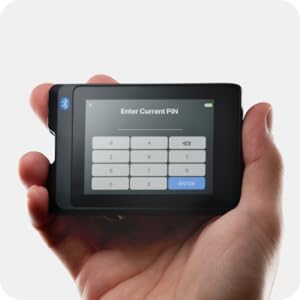
Image: The SecuX W20 displaying the PIN entry screen.
- Generate/Restore Recovery Phrase: The device will guide you through generating a new 24-word recovery phrase or restoring from an existing one. Write down your recovery phrase on the provided cards and store it in a secure, offline location. Do not share this phrase with anyone.
- Connect to SecuXess: Download the SecuXess mobile app or access the web interface via a desktop browser. Follow the instructions within the app/web interface to pair your W20 device via Bluetooth or USB.
5. ഉപകരണം പ്രവർത്തിപ്പിക്കുന്നു
5.1 ടച്ച്സ്ക്രീൻ നാവിഗേറ്റ് ചെയ്യൽ
The 2.8-inch color touchscreen allows for intuitive navigation. Swipe and tap to select options, view your portfolio, and authorize transactions.

Image: A user's hand operating the intuitive touchscreen of the SecuX W20.
5.2 Managing Cryptocurrencies
Through the SecuXess app or web ഇന്റർഫേസ്, നിങ്ങൾക്ക് കഴിയും view your portfolio, check account balances, and manage over 10,000 coins and tokens across more than 300 blockchain networks.

Image: The SecuX W20 hardware wallet shown alongside a laptop running the SecuXess management interface.
5.3 Sending and Receiving Assets
To send or receive assets, initiate the transaction through the SecuXess app/web interface. The transaction details will be displayed on your W20 device for clear-sign verification. Confirm the details on the device before authorizing the transaction with your PIN.
5.4 MetaMask and WalletConnect Support
The SecuX W20 supports connection to MetaMask via QR-based linking and WalletConnect for access to various DeFi applications and marketplaces. This allows for secure interaction with decentralized applications (DApps) by signing transactions directly on your hardware wallet.

Image: The SecuX W20 connected to a mobile device, illustrating DApp connectivity.
6. സുരക്ഷാ സവിശേഷതകൾ
The SecuX W20 incorporates multiple layers of security to protect your digital assets:
- Secure Element (SE) Chip: Equipped with a certified CC EAL5+ Infineon Solid Flash Secure Element chip, which securely stores your private keys in an isolated environment.
- ഓഫ്ലൈൻ സംഭരണം: Your private keys are stored offline on the device, isolated from internet-connected systems, protecting them from online hacking threats and phishing attacks.
- പിൻ പരിരക്ഷ: Access to the device is secured by a user-defined PIN. The device features a dynamic keypad to prevent pattern recognition. After 5 unsuccessful PIN entries, the device automatically resets to protect against brute-force attacks.
- Clear-Sign Transactions: All transaction details are displayed on the device's screen for your review and explicit authorization, preventing malicious transactions from being signed without your knowledge.
- Tamper-Proof Seal: The device comes with a tamper-proof seal to ensure its integrity upon arrival. Inspect this seal before first use.

Image: Diagram of the Infineon EAL5+ Secure Element chip for enhanced security.

ചിത്രം: ഒരു ക്ലോസ്-അപ്പ് view of the SecuX W20 highlighting its tamper-proof seal.
7. Supported Cryptocurrencies and Tokens
The SecuX W20 supports over 10,000 coins and tokens on more than 300 blockchain networks. This includes major cryptocurrencies such as Bitcoin (BTC), Ethereum (ETH), Tether (USDT), USDC, BNB, XRP, Cardano (ADA), Polygon (MATIC), Dogecoin (DOGE), Shiba Inu (SHIB), Solana (SOL), Tron (TRX), Litecoin (LTC), and Avalanche (AVAX), among others. For a comprehensive and up-to-date list, please refer to the official SecuX webസൈറ്റ്.

Image: The SecuX W20 displaying its interface, with various cryptocurrency logos indicating broad support.
8. കണക്റ്റിവിറ്റി
The SecuX W20 offers flexible connectivity options:
- ബ്ലൂടൂത്ത്: Connect wirelessly to your mobile device (iOS/Android) or desktop computer for convenient management via the SecuXess app.
- USB: Connect directly to your computer via the USB-C cable for a wired connection to the SecuXess web ഇൻ്റർഫേസ്.
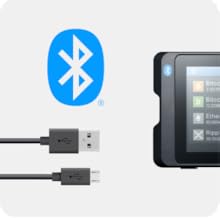
Image: The SecuX W20 with its USB-C cable, demonstrating connectivity options.
9. ഫേംവെയർ അപ്ഡേറ്റുകൾ
Regular firmware updates are released to enhance security, add new features, and improve device performance. It is recommended to keep your device's firmware updated. The SecuXess app or web interface will guide you through the update process. Ensure your device is sufficiently charged before initiating an update.
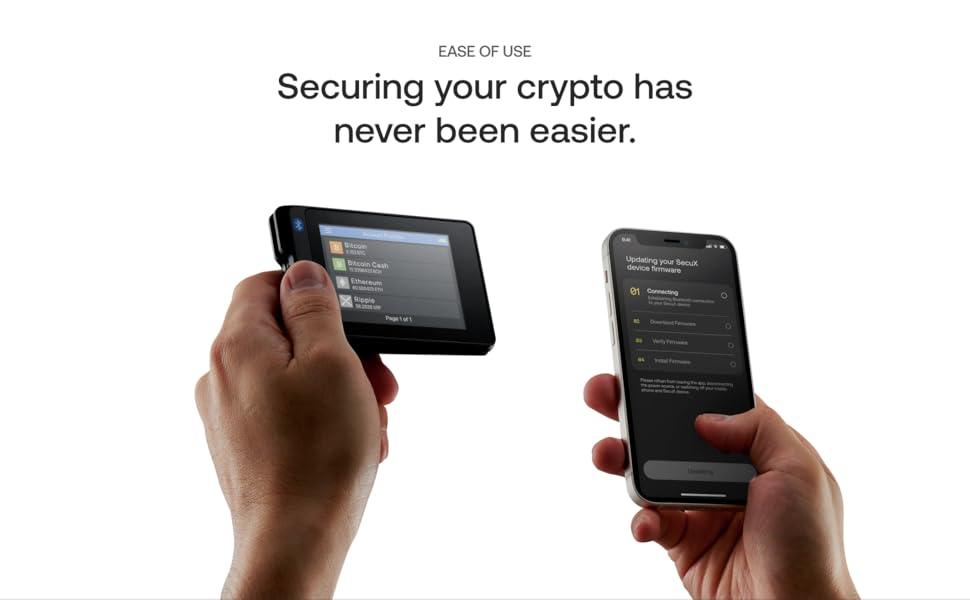
Image: Illustrates the process of updating the SecuX W20 firmware via a smartphone.
10. പ്രശ്നപരിഹാരം
- കണക്ഷൻ പ്രശ്നങ്ങൾ: If you experience difficulty connecting via Bluetooth or USB, try restarting both your SecuX W20 and the connecting device (phone/computer). Ensure Bluetooth is enabled on your host device and the SecuXess app/web interface is up to date.
- ഫേംവെയർ അപ്ഡേറ്റ് പ്രശ്നങ്ങൾ: If a firmware update fails, ensure a stable internet connection and sufficient battery on your W20. Try the update again. If issues persist, contact support.
- ഉപകരണം പ്രതികരിക്കുന്നില്ല: If the device becomes unresponsive, press and hold the power button for approximately 10-15 seconds to force a restart.
- Transaction Fees: Transaction or network fees are determined by the blockchain networks and vary with network traffic. SecuX does not profit from these fees.
11 സ്പെസിഫിക്കേഷനുകൾ
| ഉൽപ്പന്ന അളവുകൾ | 3.5 x 2.32 x 0.51 ഇഞ്ച് |
| ഇനത്തിൻ്റെ ഭാരം | 1.8 ഔൺസ് |
| സ്ക്രീൻ ഡയഗണൽ | 2.8 ഇഞ്ച് / 8 സെ.മീ |
| ബാറ്ററി | 1 ലിഥിയം പോളിമർ ബാറ്ററി (ഉൾപ്പെടുത്തിയിരിക്കുന്നു) |
| കണക്റ്റിവിറ്റി | ബ്ലൂടൂത്ത്, USB-C |
| സുരക്ഷാ ചിപ്പ് | Infineon Solid Flash CC EAL5+ Secure Element |
12. വാറൻ്റിയും പിന്തുണയും
For any questions, technical assistance, or support inquiries regarding your SecuX W20 hardware wallet, please visit the official SecuX website. A dedicated support team is available to provide guidance and ensure a seamless experience. SecuX prioritizes customer privacy and does not store any personal information or have access to your private keys.
കുറിപ്പ്: Your private key is stored securely within the device itself and is never uploaded to any website or server. You maintain full self-custody of your digital assets.


