ആമുഖം
This manual provides comprehensive instructions for the Keychron K2 75% Layout RGB Bluetooth Wireless Mechanical Keyboard. Designed for versatility and performance, the K2 offers seamless connectivity across multiple devices and operating systems. Please read this manual thoroughly to ensure proper setup, operation, and maintenance of your keyboard.
ബോക്സിൽ എന്താണുള്ളത്
- കീക്രോൺ K2 മെക്കാനിക്കൽ കീബോർഡ്
- കീക്യാപ് പുള്ളർ
- USB-A മുതൽ USB ടൈപ്പ്-സി കേബിൾ വരെ
- വിൻഡോസ്, മാക് ഓപ്പറേറ്റിംഗ് സിസ്റ്റങ്ങൾക്കുള്ള അധിക കീക്യാപ്പുകൾ

Image: Keychron K2 keyboard and its accessories.
സജ്ജമാക്കുക
പ്രാരംഭ കണക്ഷൻ
The Keychron K2 supports both wired and wireless (Bluetooth) connections. Before first use, it is recommended to fully charge the keyboard using the provided USB-A to USB Type-C cable.
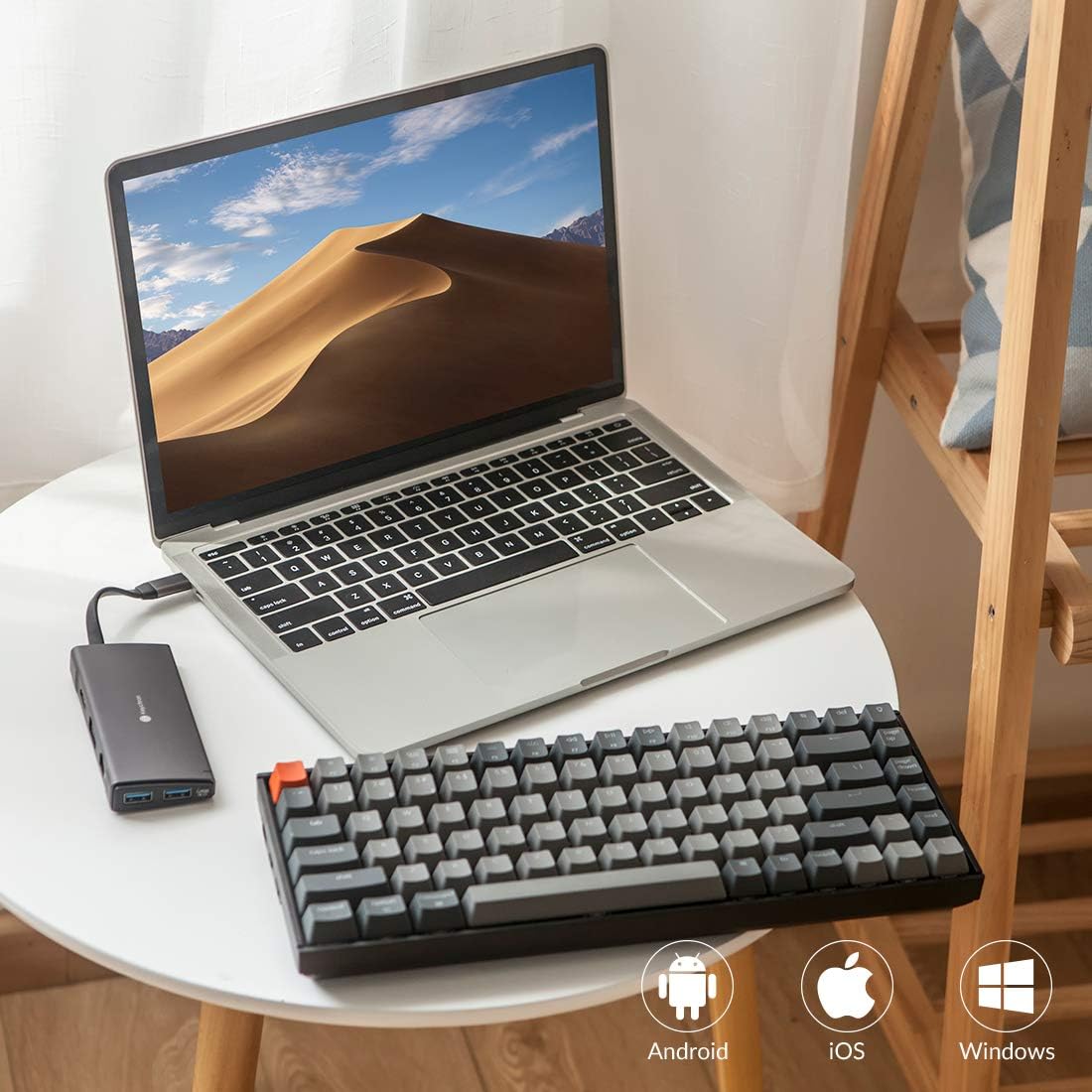
Image: Keychron K2 connected to a laptop via USB-C.
ഓപ്പറേറ്റിംഗ് സിസ്റ്റങ്ങൾ മാറുന്നു
The keyboard features a switch on the side to toggle between Windows/Android and Mac/iOS modes. Ensure the correct mode is selected for optimal functionality with your device.

ചിത്രം: വശം view of the Keychron K2, highlighting the OS mode switch.
Extra keycaps are provided to customize the keyboard layout for Windows or Mac users. Use the keycap puller to easily swap keys like 'Option' and 'Command' for Mac, or 'Alt' and 'Windows' for Windows.

Image: Keychron K2 with additional keycaps for operating system customization.
പ്രവർത്തന നിർദ്ദേശങ്ങൾ
ബ്ലൂടൂത്ത് കണക്റ്റിവിറ്റി
The K2 can connect with up to 3 devices via Bluetooth 5.1. To pair, switch the keyboard to Bluetooth mode using the side switch. Press and hold 'Fn' + '1' (or '2' or '3') until the key flashes, indicating pairing mode. Select "Keychron K2" on your device's Bluetooth settings.

Image: Keychron K2 demonstrating wireless connectivity with multiple devices.
വയർഡ് മോഡ്
For a wired connection, simply connect the USB Type-C cable to the keyboard and your device. Ensure the side switch is set to 'Cable' mode.
RGB ബാക്ക്ലൈറ്റ് നിയന്ത്രണം
The K2 features charming RGB backlighting with over 15 different light effects. Use the dedicated light key (top right) to cycle through various lighting modes and colors. Adjust brightness and speed using function key combinations (refer to the quick start guide for specific shortcuts).

Image: Keychron K2 showcasing അതിന്റെ RGB ബാക്ക്ലൈറ്റിംഗ്.
Video: Official Keychron K2 Bluetooth Wireless Mechanical Keyboard overview, demonstrating features like RGB lighting and connectivity.
മെയിൻ്റനൻസ്
Key Switch Options
The Keychron K2 is available with Gateron G Pro mechanical switches: Brown (tactile), Red (linear), and Blue (clicky). Each switch type offers a different typing experience. The Gateron G Pro Brown Switch provides a tactile bump with gentle sound, ideal for balanced typing and gaming.

ചിത്രം: വിശദമായത് view of a Gateron G Pro Brown Switch and its specifications.
ജനറൽ കെയർ
To maintain your keyboard's performance and appearance, regularly clean the keycaps and chassis with a soft, dry cloth. Use the provided keycap puller to remove keycaps for deeper cleaning if necessary. Avoid exposing the keyboard to excessive moisture or extreme temperatures.
ട്രബിൾഷൂട്ടിംഗ്
If you encounter issues with your Keychron K2, try the following:
- കണക്റ്റിവിറ്റി പ്രശ്നങ്ങൾ: Ensure the keyboard is in the correct OS mode (Windows/Android or Mac/iOS) and the correct connection mode (Bluetooth or Cable). Re-pair Bluetooth if necessary.
- ചാർജിംഗ്: Verify the USB-C cable is securely connected and try a different USB port or power adapter.
- Key Responsiveness: Ensure keycaps are properly seated. If a specific switch is unresponsive, contact support.
Video: A short clip demonstrating the USB-C port on the Keychron K2, useful for troubleshooting charging or wired connection issues.
സ്പെസിഫിക്കേഷനുകൾ
| ഫീച്ചർ | വിശദാംശങ്ങൾ |
|---|---|
| ഉൽപ്പന്ന അളവുകൾ | 4.84 x 12.32 x 1.61 ഇഞ്ച് |
| ഇനത്തിൻ്റെ ഭാരം | 1.93 പൗണ്ട് |
| ഇനം മോഡൽ നമ്പർ | Keychron K2B3 |
| ബാറ്ററികൾ | 1 ലിഥിയം അയോൺ ബാറ്ററികൾ ആവശ്യമാണ് (ഉൾപ്പെടുത്തിയിരിക്കുന്നു) |
| കണക്റ്റിവിറ്റി ടെക്നോളജി | ബ്ലൂടൂത്തും യുഎസ്ബി വയേർഡ് |
| കീബോർഡ് വിവരണം | ഗെയിമിംഗ് |
| ശുപാർശ ചെയ്യുന്ന ഉപയോഗങ്ങൾ | വീട്, ഓഫീസ് |
| പ്രത്യേക ഫീച്ചർ | Gateron G Pro Mechanical Switch, Bluetooth 5.1 & USB C, Mac and Windows, 4000mAh battery, Inclined bottom frame |
| നിറം | Gateron G Pro Brown Switch (RGB) |
| കീകളുടെ എണ്ണം | 84 |
| കീബോർഡ് ബാക്ക്ലൈറ്റിംഗ് | RGB |
വാറൻ്റിയും പിന്തുണയും
For detailed warranty information and customer support, please refer to the official documents provided by Keychron. You can also find additional resources and FAQs on the Keychron website or through the provided PDF manuals: