1. ആമുഖം
The INTERPHONE Connect is a state-of-the-art Bluetooth communication system designed for motorcyclists, enabling clear and reliable communication between rider and passenger, or between two riders. This twin pack includes two units, offering a communication range of up to 300 meters. It integrates seamlessly with smartphones for calls, music, and GPS navigation, and features an integrated FM radio. Built to withstand various weather conditions, the unit boasts an IP67 waterproof rating and offers up to 12 hours of talk time and 40 days of standby time.
2. പാക്കേജ് ഉള്ളടക്കം
Your INTERPHONE Connect Twin Pack includes the following items:
- 2 x INTERPHONE Connect Main Units
- 2 x Audio Kits (Speakers and Microphones for full-face and jet/modular helmets)
- 2 x Mounting Brackets (Clip and Adhesive)
- 2 x USB ചാർജിംഗ് കേബിളുകൾ
- ഉപയോക്തൃ മാനുവൽ
3. സജ്ജീകരണവും ഇൻസ്റ്റാളേഷനും
3.1 പ്രാരംഭ ചാർജിംഗ്
Before first use, fully charge the INTERPHONE Connect unit. Connect the supplied USB cable to the charging port on the unit and to a USB power source. The LED indicator will show charging status and turn off when fully charged. A full charge takes approximately 3 hours.
3.2 Mounting the Unit to Your Helmet
The INTERPHONE Connect can be mounted using either the clip bracket or the adhesive bracket. Choose the method most suitable for your helmet type and preference.
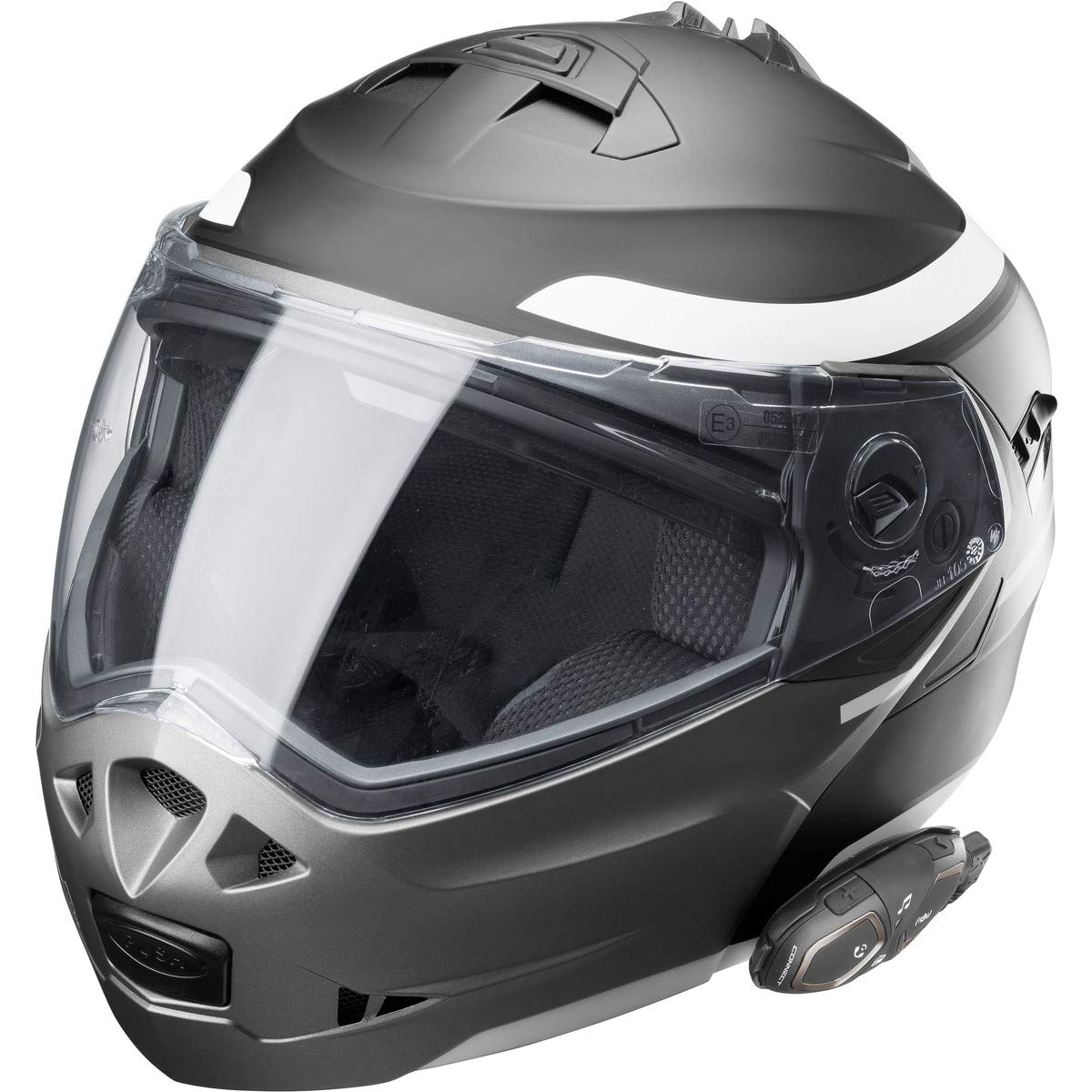
Image: INTERPHONE Connect unit securely mounted on the side of a motorcycle helmet, demonstrating typical placement.
- Clip Bracket: Slide the clip bracket between the helmet shell and the inner padding. Ensure it is firmly secured and does not interfere with helmet safety or comfort.
- പശ ബ്രാക്കറ്റ്: Clean the desired mounting area on the helmet surface thoroughly. Peel off the protective film from the adhesive bracket and firmly press it onto the helmet for at least 30 seconds. Allow the adhesive to cure for 24 hours before attaching the unit.
- Once the bracket is in place, slide the INTERPHONE Connect main unit onto the bracket until it clicks securely.
3.3 സ്പീക്കറുകളും മൈക്രോഫോണും ഇൻസ്റ്റാൾ ചെയ്യുന്നു
Carefully remove the helmet's inner padding to access the ear pockets. Place the speakers inside the ear pockets, ensuring they are centered with your ears for optimal audio quality. Route the microphone cable along the helmet's interior, positioning the microphone close to your mouth, ideally within the chin bar area for full-face helmets or on the boom for jet/modular helmets. Reinstall the helmet padding, ensuring no cables are pinched.
4. പ്രവർത്തന നിർദ്ദേശങ്ങൾ
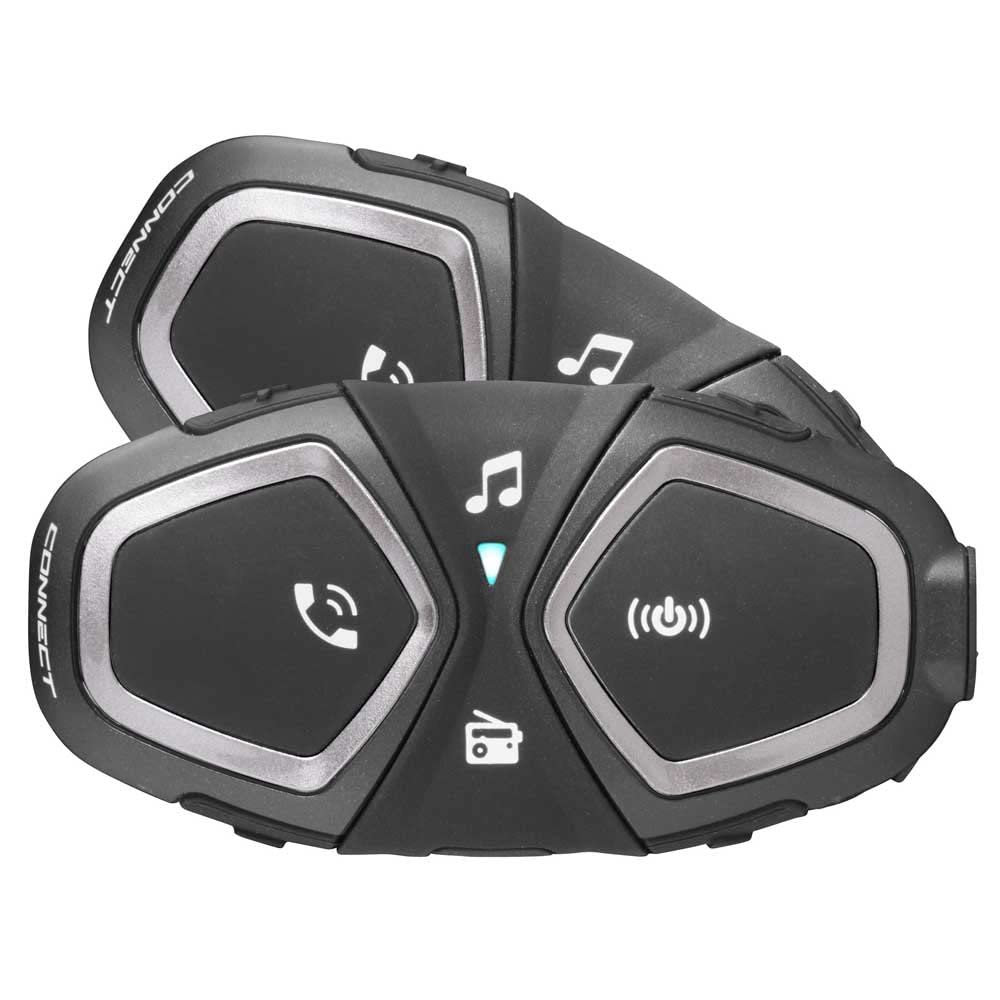
Image: Two INTERPHONE Connect units, highlighting the intuitive button layout for various functions.
4.1 പവർ ഓൺ/ഓഫ്
- പവർ ഓൺ: Press and hold the central button until the LED indicator lights up.
- പവർ ഓഫ്: Press and hold the central button until the LED indicator turns off.
4.2 വോളിയം നിയന്ത്രണം
- വോളിയം വർദ്ധിപ്പിക്കുക: Press the 'Music' button.
- വോളിയം കുറയ്ക്കുക: Press the 'Phone' button.
- The unit features NDVC (Noise Dependent Volume Control) for automatic volume adjustment based on ambient noise.
4.3 Intercom Functions
The INTERPHONE Connect allows communication with another Connect unit or other Interphone intercoms (Anycom feature).
- ജോടിയാക്കൽ: With both units off, press and hold the central button on both units until they enter pairing mode (flashing red/blue). Once paired, the LED will turn solid blue.
- Initiate Intercom Call: Briefly press the central button on either paired unit.
- End Intercom Call: Briefly press the central button again.
4.4 ഫോൺ കോളുകൾ
Pair your smartphone via Bluetooth to the INTERPHONE Connect unit.
- മറുപടി കോൾ: Briefly press the 'Phone' button.
- കോൾ അവസാനിപ്പിക്കുക: Briefly press the 'Phone' button.
- കോൾ നിരസിക്കുക: Press and hold the 'Phone' button.
- വോയ്സ് ഡയൽ: Press and hold the 'Phone' button to activate your smartphone's voice assistant (Siri/Google Assistant).
- സ്പീഡ് ഡയൽ: Store a preferred number via the smartphone app. Briefly press the 'Phone' button twice to dial.
- അവസാന നമ്പർ റീഡിയൽ: Briefly press the 'Phone' button three times.
- Call Sharing: Share a phone call with your passenger via intercom.
4.5 മ്യൂസിക് പ്ലേബാക്ക്
Stream music from your paired smartphone or MP3 player.
- പ്ലേ/താൽക്കാലികമായി നിർത്തുക: Briefly press the 'Music' button.
- അടുത്ത ട്രാക്ക്: Press and hold the 'Music' button.
- മുമ്പത്തെ ട്രാക്ക്: Press and hold the 'Phone' button.
- Song Sharing: Share music with your passenger via intercom.
4.6 എഫ്എം റേഡിയോ
The unit has an integrated FM radio with automatic station storage.
- റേഡിയോ ഓൺ/ഓഫ് ചെയ്യുക: Press the 'Radio' button (car icon).
- സ്കാൻ സ്റ്റേഷനുകൾ: Press and hold the 'Radio' button to automatically scan and save the 8 strongest stations.
- സ്റ്റേഷൻ മാറ്റുക: Briefly press the 'Music' or 'Phone' button to cycle through saved stations.
4.7 ജിപിഎസ് നാവിഗേഷൻ
Receive voice instructions from your Bluetooth-enabled GPS navigator.
- Pair your GPS device with the INTERPHONE Connect unit.
- GPS voice instructions will automatically override other audio sources when active.
4.8 Smartphone App
Download the dedicated INTERPHONE app for iOS and Android devices. The app allows for easy configuration of settings, firmware updates, and management of your unit directly from your smartphone.
5. പരിപാലനവും പരിചരണവും
- വൃത്തിയാക്കൽ: ഒരു സോഫ്റ്റ്, ഡി ഉപയോഗിച്ച് യൂണിറ്റ് വൃത്തിയാക്കുകamp തുണി. കഠിനമായ രാസവസ്തുക്കളോ ഉരച്ചിലുകളുള്ള ക്ലീനറുകളോ ഉപയോഗിക്കരുത്.
- ജല പ്രതിരോധം: The unit is IP67 waterproof. While it can withstand rain and splashes, avoid submerging it in water for extended periods. Ensure the charging port cover is securely closed.
- ബാറ്ററി കെയർ: For optimal battery life, avoid fully discharging the unit frequently. If storing for an extended period, charge the battery to approximately 50% and recharge every few months.
- സംഭരണം: നേരിട്ടുള്ള സൂര്യപ്രകാശത്തിൽ നിന്നും തീവ്രമായ താപനിലയിൽ നിന്നും മാറി തണുത്തതും വരണ്ടതുമായ സ്ഥലത്ത് യൂണിറ്റ് സൂക്ഷിക്കുക.
6. പ്രശ്നപരിഹാരം
| പ്രശ്നം | സാധ്യമായ കാരണം | പരിഹാരം |
|---|---|---|
| No power/Unit won't turn on | കുറഞ്ഞ ബാറ്ററി | യൂണിറ്റ് പൂർണ്ണമായും ചാർജ് ചെയ്യുക. |
| സ്പീക്കറുകളിൽ നിന്ന് ശബ്ദമില്ല | Speakers not connected properly or volume too low | Check speaker connections. Increase volume. |
| Cannot pair with smartphone/intercom | Incorrect pairing procedure or interference | Ensure both devices are in pairing mode. Turn off and on both devices. Clear previous pairings and try again. |
| Short intercom range | Obstructions, terrain, or environmental interference | Ensure line of sight between units. Avoid dense urban areas or large obstacles. |
| മൈക്രോഫോൺ പ്രവർത്തിക്കുന്നില്ല | Microphone not connected or positioned incorrectly | Check microphone connection. Ensure microphone is close to your mouth. |
7 സ്പെസിഫിക്കേഷനുകൾ

Image: Key specifications of the INTERPHONE Connect, including rider capacity, range, and battery life.
| ഫീച്ചർ | സ്പെസിഫിക്കേഷൻ |
|---|---|
| മോഡലിൻ്റെ പേര് | INTERPHOCONNECTTP |
| കണക്റ്റിവിറ്റി ടെക്നോളജി | വയർലെസ് (ബ്ലൂടൂത്ത്) |
| ഇന്റർകോം റേഞ്ച് | Up to 300 meters (rider-to-rider) |
| Max Riders | 2 |
| സംസാര സമയം | Up to 12 hours (advertised 15 hours in some materials) |
| സ്റ്റാൻഡ്ബൈ സമയം | 40 ദിവസം വരെ |
| ബാറ്ററി തരം | ലിഥിയം പോളിമർ |
| ചാർജിംഗ് സമയം | ഏകദേശം 3 മണിക്കൂർ |
| ജല പ്രതിരോധം | IP67 (ജലപ്രൂഫ്) |
| പ്രത്യേക സവിശേഷതകൾ | Noise Isolation, Volume Control, Noise Cancellation, Microphone Included, Water Resistant |
| അനുയോജ്യമായ ഉപകരണങ്ങൾ | Smartphones, Bluetooth Navigation Systems, most leading headsets |
| നിയന്ത്രണ തരം | ആപ്പ് നിയന്ത്രണം, ബട്ടൺ നിയന്ത്രണം |
| മെറ്റീരിയൽ | പ്ലാസ്റ്റിക് |
| ഭാരം | Approx. 1 gram (unit only) |
8. വാറൻ്റിയും പിന്തുണയും
For detailed warranty information, please refer to the warranty card included in your product packaging or visit the official Interphone website. Interphone provides customer support and firmware updates through their dedicated smartphone application and webസൈറ്റ്.
കൂടുതൽ സഹായത്തിന്, ദയവായി സന്ദർശിക്കുക ആമസോണിലെ ഇന്റർഫോൺ സ്റ്റോർ അല്ലെങ്കിൽ നിർമ്മാതാവിന്റെ ഔദ്യോഗിക പിന്തുണാ ചാനലുകൾ.


