1. ആമുഖം
This manual provides essential information for the safe and effective operation, assembly, and maintenance of your SNODE Magnetic Elliptical Trainer. This elliptical machine is designed for home fitness cardio training, offering a full-body workout with minimal impact on joints. It features a magnetic resistance system, a programmable monitor, and Bluetooth connectivity for app tracking.
2 പ്രധാനപ്പെട്ട സുരക്ഷാ വിവരങ്ങൾ
Before using this equipment, please read this entire manual. Failure to follow these instructions could result in injury or damage to the equipment.
- ഏതെങ്കിലും വ്യായാമ പരിപാടി ആരംഭിക്കുന്നതിന് മുമ്പ് നിങ്ങളുടെ ഡോക്ടറെ സമീപിക്കുക.
- ഉപയോഗ സമയത്ത് ഉപകരണങ്ങളിൽ നിന്ന് കുട്ടികളെയും വളർത്തുമൃഗങ്ങളെയും അകറ്റി നിർത്തുക.
- Place the elliptical trainer on a solid, level surface with at least 2 feet (0.6 meters) of clear space around it.
- ഓരോ ഉപയോഗത്തിനും മുമ്പ് എല്ലാ ബോൾട്ടുകളും നട്ടുകളും സുരക്ഷിതമായി മുറുക്കിയിട്ടുണ്ടെന്ന് ഉറപ്പാക്കുക.
- ഈ മെഷീനിന്റെ പരമാവധി ഉപയോക്തൃ ഭാരം 265 പൗണ്ട് (120 കിലോഗ്രാം) ആണ്.
- ഉചിതമായ വ്യായാമ വസ്ത്രങ്ങളും അത്ലറ്റിക് ഷൂകളും ധരിക്കുക.
- Do not operate the machine if it is damaged.
- Always maintain balance while operating the elliptical.
3. ഉൽപ്പന്ന ഘടകങ്ങൾ
Familiarize yourself with the main components of your SNODE Elliptical Trainer:
- പ്രധാന ഫ്രെയിം: The core structure of the elliptical.
- Magnetic Control Flywheel: Provides smooth and quiet resistance.
- Programmable Monitor: Displays workout data and allows program selection.
- Dual Workout Arms: Moving handlebars for upper body engagement.
- Static Handlebars: Stationary handlebars with integrated heart rate sensors.
- Oversized Pedals: Non-slip foot platforms for secure footing.
- ഗതാഗത ചക്രങ്ങൾ: Located at the front for easy movement.
- Cross Crank System: Heavy-duty system for performance and momentum.

ചിത്രം 3.1: ഓവർview of the SNODE Magnetic Elliptical Trainer with its main features and app connectivity.
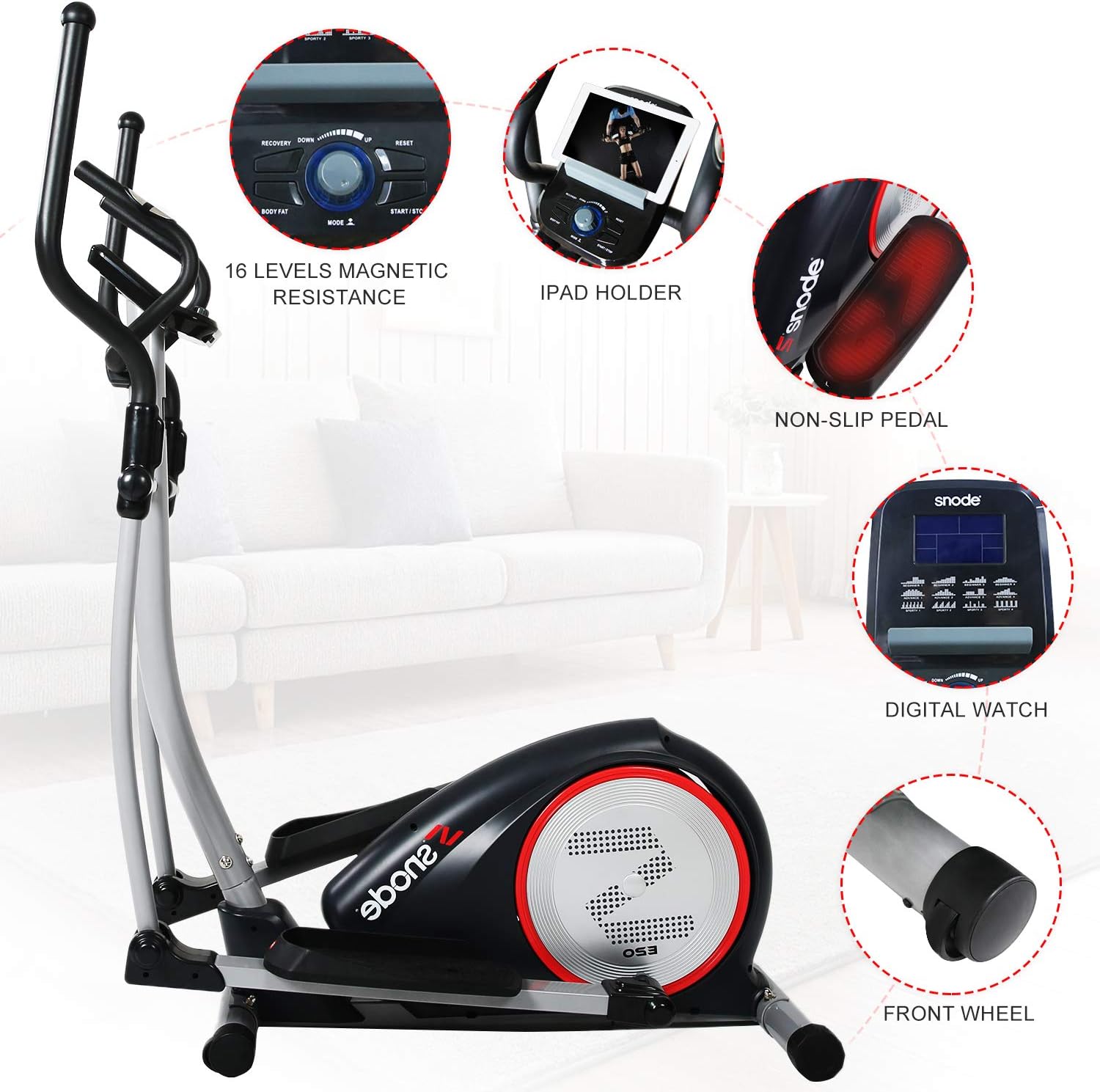
ചിത്രം 3.2: വിശദമായി view of the control console, iPad holder, non-slip pedals, digital display, and front transportation wheels.
4. അസംബ്ലി നിർദ്ദേശങ്ങൾ
Assembly typically requires two people and basic tools (not included, but usually a wrench and Allen key are sufficient). Follow the detailed instructions provided in the physical manual that accompanies your product. Ensure all parts are accounted for before beginning assembly.
- Unpack all components and verify against the parts list in your physical manual.
- മുന്നിലെയും പിന്നിലെയും സ്റ്റെബിലൈസറുകൾ പ്രധാന ഫ്രെയിമിൽ ഘടിപ്പിക്കുക.
- Secure the main upright post to the base.
- Install the pedal arms and handlebars, ensuring proper alignment and secure fastening.
- Connect the console wiring to the main frame wiring.
- Mount the console onto the upright post.
- എല്ലാ കണക്ഷനുകളും ഇറുകിയതാണെന്നും മെഷീൻ സ്ഥിരതയുള്ളതാണെന്നും ഉറപ്പാക്കാൻ ഒരു അന്തിമ പരിശോധന നടത്തുക.
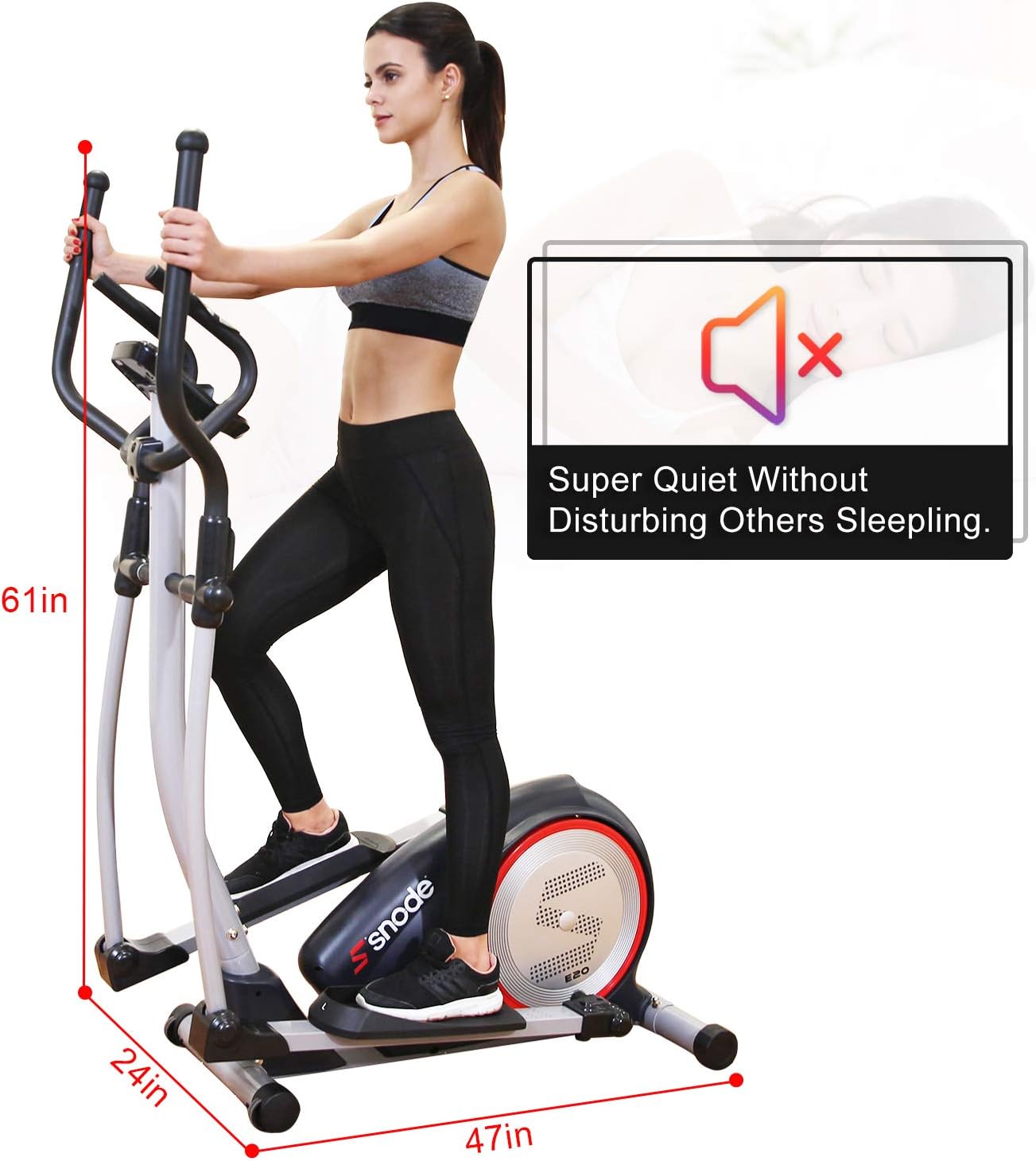
Figure 4.1: Elliptical dimensions (47in L x 24in W x 61in H) and indication of quiet operation, useful for planning placement during setup.
5. പ്രവർത്തന നിർദ്ദേശങ്ങൾ
5.1. Using the Programmable Monitor
The back-lit display allows you to track various workout metrics and select programs:
- പവർ ഓൺ: Plug in the elliptical. The monitor will activate.
- Metrics Displayed: Speed, Time, Distance, Calories Burned, Rotations Per Minute (RPM), Watt Generations, and Magnetic Resistance Load.
- വ്യായാമ പരിപാടികൾ: Select from Manual, Pre-program, Watt, Body Fat, Heart Rate, and User programs to customize your workout. Refer to the monitor's specific instructions in your physical manual for detailed navigation.
- പ്രതിരോധ ക്രമീകരണം: Use the computer console to adjust the 16 smooth levels of magnetic resistance.
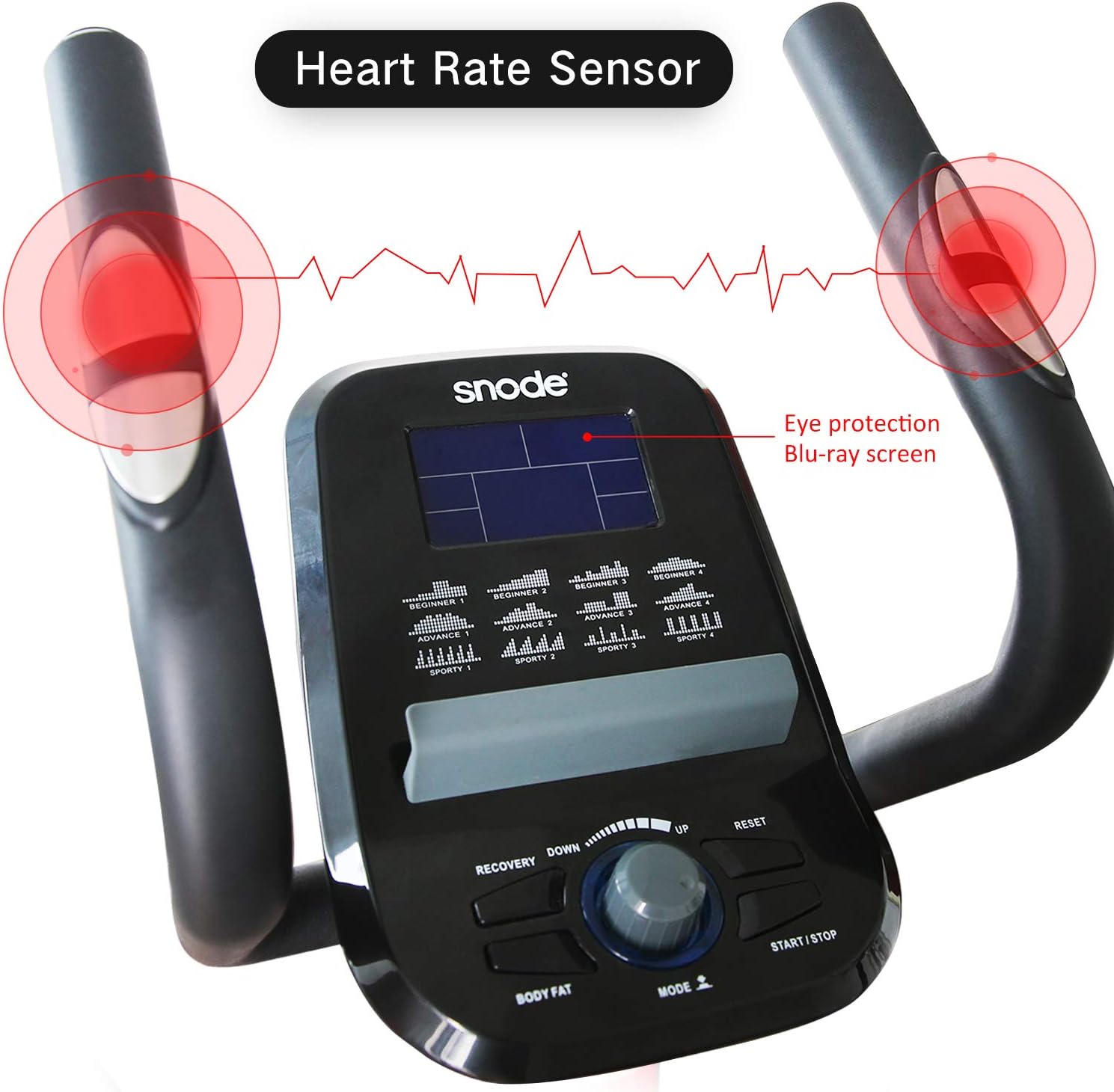
Figure 5.1: The console features heart rate sensors on the static handlebars and an eye-protection Blu-ray screen for comfortable viewing.
5.2. Bluetooth Connectivity and App Tracking
The elliptical is equipped with Bluetooth Smart technology for tracking your workouts via the free iConsole+ training app, available on Android and iOS devices.
- Download the "iConsole+ training" app from your device's app store.
- നിങ്ങളുടെ മൊബൈൽ ഉപകരണത്തിൽ ബ്ലൂടൂത്ത് പ്രവർത്തനക്ഷമമാക്കിയിട്ടുണ്ടെന്ന് ഉറപ്പാക്കുക.
- Open the iConsole+ app and follow the on-screen instructions to connect to your SNODE Elliptical Trainer.
- Once connected, you can track your workout data, set goals, and utilize additional app features.
5.3. Proper Usage Technique
- കാൽ സ്ഥാപിക്കൽ: Place your feet securely on the oversized, non-slip pedals.
- കൈ ചലനം: Engage the dual workout arms for an upper body workout, or hold the static handlebars for stability and heart rate monitoring.
- സ്ട്രൈഡ്: Maintain a smooth, continuous stride. The elliptical's design minimizes impact on knees and ankles.

Figure 5.2: Illustrates how different "slope" (resistance/effort) levels can target various muscle groups, from arms to legs, and highlights the 265 lbs weight capacity.
6. പരിപാലനം
Regular maintenance ensures the longevity and optimal performance of your elliptical trainer.
- വൃത്തിയാക്കൽ: പരസ്യം ഉപയോഗിച്ച് മെഷീൻ തുടച്ചുമാറ്റുകamp ഓരോ ഉപയോഗത്തിനു ശേഷവും വിയർപ്പും പൊടിയും നീക്കം ചെയ്യാൻ തുണി ഉപയോഗിക്കുക. ഉരച്ചിലുകൾ ഉള്ള ക്ലീനറുകൾ ഒഴിവാക്കുക.
- ലൂബ്രിക്കേഷൻ: Periodically check moving parts for friction. Apply a silicone-based lubricant to pivot points and joints as needed, following the specific instructions in your physical manual.
- കണക്ഷനുകൾ ശക്തമാക്കുക: Regularly inspect all bolts, nuts, and screws to ensure they are tight. Loose connections can lead to noise or instability.
- സംഭരണം: When not in use, store the elliptical in a dry, cool place away from direct sunlight and moisture. Use the transportation wheels to move it easily.
7. പ്രശ്നപരിഹാരം
This section addresses common issues you might encounter with your elliptical trainer.
| പ്രശ്നം | സാധ്യമായ കാരണം | പരിഹാരം |
|---|---|---|
| Machine is noisy during operation. | Loose bolts or connections; lack of lubrication on moving parts. | Check and tighten all bolts and screws. Apply lubricant to pivot points as per maintenance instructions. |
| Wobbling or instability. | Uneven floor; loose frame connections. | Ensure the machine is on a level surface. Adjust the leveling feet if available. Tighten all frame bolts. |
| മോണിറ്റർ ഡാറ്റ പ്രദർശിപ്പിക്കുന്നില്ല. | Loose console cable connection; power issue. | Check that the power adapter is securely plugged in. Verify the console cable is properly connected to the main frame. |
| Resistance not changing. | Internal mechanism issue; console malfunction. | Ensure the console is powered on and connected. If the issue persists, contact customer support. |
8. ഉൽപ്പന്ന സവിശേഷതകൾ
| ഫീച്ചർ | വിശദാംശങ്ങൾ |
|---|---|
| ബ്രാൻഡ് | സ്നോഡ് |
| മോഡൽ | E20i |
| മെറ്റീരിയൽ | Stainless Steel, Rubber |
| പ്രതിരോധ സംവിധാനം | കാന്തിക |
| പ്രതിരോധ നിലകളുടെ എണ്ണം | 16 |
| പരമാവധി ഭാരം ശുപാർശ | 265 പൗണ്ട് |
| പരമാവധി സ്ട്രൈഡ് ദൈർഘ്യം | 18 ഇഞ്ച് |
| ഇനത്തിൻ്റെ ഭാരം | 88.2 പൗണ്ട് |
| ഇനത്തിന്റെ അളവുകൾ (LxWxH) | 47 x 24 x 61 ഇഞ്ച് |
| യു.പി.സി | 735980999388 |

Figure 8.1: Illustration of the Magnetic Control Flywheel, a key component of the resistance system.
9. വാറണ്ടിയും ഉപഭോക്തൃ പിന്തുണയും
Your SNODE Magnetic Elliptical Trainer comes with a 1 വർഷത്തെ വാറൻ്റി for free replacement parts. SNODE is committed to providing satisfactory solutions and customer support.
For any issues, questions, or to claim warranty service, please refer to the contact information provided in your physical user manual or reach out to SNODE customer service via their official after-service email or hotline. The customer support team aims to respond within 24 hours.
For more information, you may visit the official SNODE store on Amazon: SNODE Fitness Store


