1. ആമുഖം
Thank you for choosing the Olafus 50W RGB LED Flood Light. This manual provides essential information for the safe and efficient operation of your new floodlight. Please read these instructions carefully before installation and use, and retain them for future reference.
2 സുരക്ഷാ വിവരങ്ങൾ
- ഇലക്ട്രിക്കൽ സുരക്ഷ: Ensure the power supply is disconnected before installation or maintenance. Use only with a compatible power source (120 Volts).
- ഔട്ട്ഡോർ ഉപയോഗം: This product is rated IP66 waterproof, suitable for outdoor environments. However, ensure all connections are secure and protected from direct water exposure to prevent damage.
- മൗണ്ടിംഗ്: Install the floodlight securely on a stable surface (wall, ceiling, or ground) using appropriate hardware.
- താപ വിസർജ്ജനം: Do not cover the floodlight during operation to ensure proper heat dissipation and prevent overheating.
- നേത്ര സംരക്ഷണം: Do not stare directly into the LED light source when illuminated, as it can cause eye strain.

Image: The Olafus 50W RGB LED Flood Light demonstrating its IP66 waterproof capability in a simulated rain environment. The inset shows a close-up of the LED array.
3. പാക്കേജ് ഉള്ളടക്കം
പാക്കേജിൽ എല്ലാ ഇനങ്ങളും ഉണ്ടെന്ന് ഉറപ്പാക്കുക:
- 2 x Olafus 50W RGB LED Flood Lights
- 2 x 44-Key Remote Controls

Image: Contents of the package, showing two Olafus 50W RGB LED Flood Lights and their corresponding remote controls.
4. ഉൽപ്പന്ന സവിശേഷതകൾ
- RGB നിറം മാറുന്നു: Offers 20 pure colors and 4900 DIY color blends.
- ഡൈനാമിക് മോഡുകൾ: Includes 6 dynamic modes (Auto, Flash, Fade, Jump) with adjustable speed and brightness.
- റിമോട്ട് കൺട്രോൾ: Convenient 44-key remote for easy operation.
- ടൈമർ പ്രവർത്തനം: Three timer options: 3, 6, or 12 hours.
- മെമ്മറി പ്രവർത്തനം: Remembers the last selected setting after power off.
- ഡ്യൂറബിൾ & വാട്ടർപ്രൂഫ്: IP66 rated for outdoor use, featuring a die-cast aluminum housing for efficient heat dissipation.
- ക്രമീകരിക്കാവുന്ന ബ്രാക്കറ്റ്: 180° ക്രമീകരിക്കാവുന്ന എൽamp body for versatile mounting.
5. സജ്ജീകരണം
The Olafus LED Flood Light is designed for simple plug-and-play installation.
- ലൊക്കേഷൻ തിരഞ്ഞെടുക്കുക: Select a suitable location for your floodlight, considering the desired lighting effect and proximity to a power outlet.
- മൗണ്ടിംഗ്: Use the integrated 180° adjustable bracket to mount the light. It can be installed on ceilings, walls, or placed directly on the ground. Secure the bracket firmly using appropriate screws or anchors (not included) for your chosen surface.
- ആംഗിൾ ക്രമീകരിക്കുക: Once mounted, adjust the lamp body to the desired angle to direct the light.
- പവർ ബന്ധിപ്പിക്കുക: പവർ കോഡ് ഒരു സാധാരണ 120 വി എസി let ട്ട്ലെറ്റിലേക്ക് പ്ലഗ് ചെയ്യുക.

Image: Detailed dimensions of the floodlight (8.19"L x 1.46"W x 5.28"H), illustrating the 180° adjustable bracket and the 1m (3.28ft) power cord. Also highlights efficient heat dissipation.
6. പ്രവർത്തന നിർദ്ദേശങ്ങൾ
Control your floodlight using the included 44-key remote control.
6.1 റിമോട്ട് കൺട്രോൾ ഓവർview
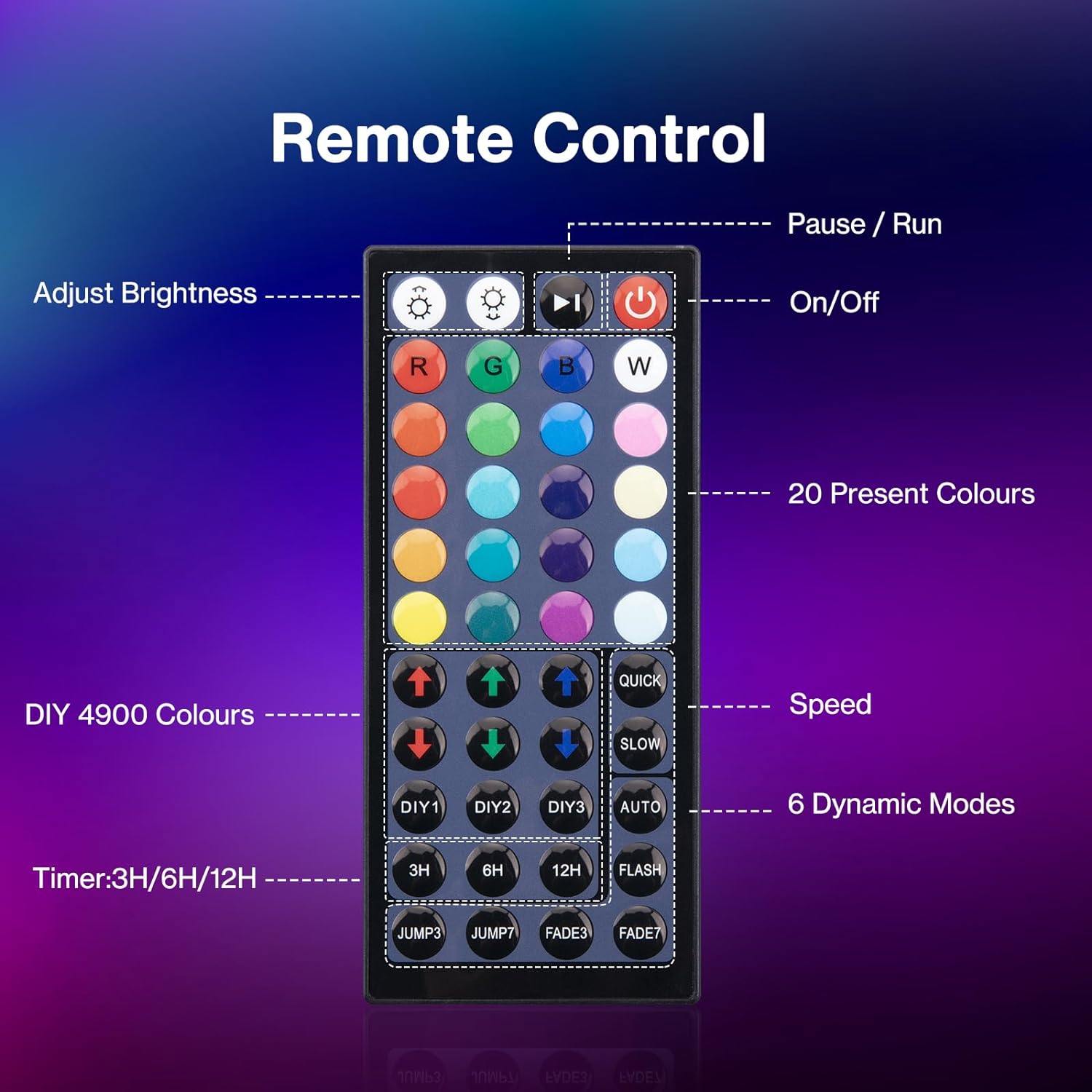
Image: A detailed diagram of the 44-key remote control, indicating buttons for On/Off, brightness adjustment, 20 preset colors, DIY color creation, speed control, and 6 dynamic modes (3H/6H/12H timer, Jump3, Jump7, Fade3, Fade7, Flash, Auto).
- ഓൺ/ഓഫ്: Press the red power button to turn the light on or off.
- തെളിച്ച ക്രമീകരണം: Use the brightness up/down buttons to adjust the light intensity.
- വർണ്ണ തിരഞ്ഞെടുപ്പ്: Select from 20 preset colors directly using the color buttons.
- DIY നിറങ്ങൾ: Use the R, G, B buttons to create custom color blends.
- ഡൈനാമിക് മോഡുകൾ: Choose from 6 dynamic modes:
- ഫ്ലാഷ്: നിറങ്ങളിലൂടെ വേഗത്തിൽ സഞ്ചരിക്കുന്നു.
- സ്ട്രോബ്: (Note: Remote may label as STROBE, but product description indicates FLASH)
- ഫേഡ്: നിറങ്ങൾക്കിടയിൽ സുഗമമായ സംക്രമണം.
- സുഗമമായ: (Note: Remote may label as SMOOTH, but product description indicates FADE)
- ചാടുക: തൽക്ഷണം നിറങ്ങൾക്കിടയിൽ മാറുന്നു.
- സ്വയമേവ: Cycles through various dynamic modes.
- വേഗത ക്രമീകരണം: Use the 'QUICK' and 'SLOW' buttons to adjust the speed of dynamic modes.
- ടൈമർ പ്രവർത്തനം: Press 3H, 6H, or 12H to set the light to automatically turn off after the selected duration.
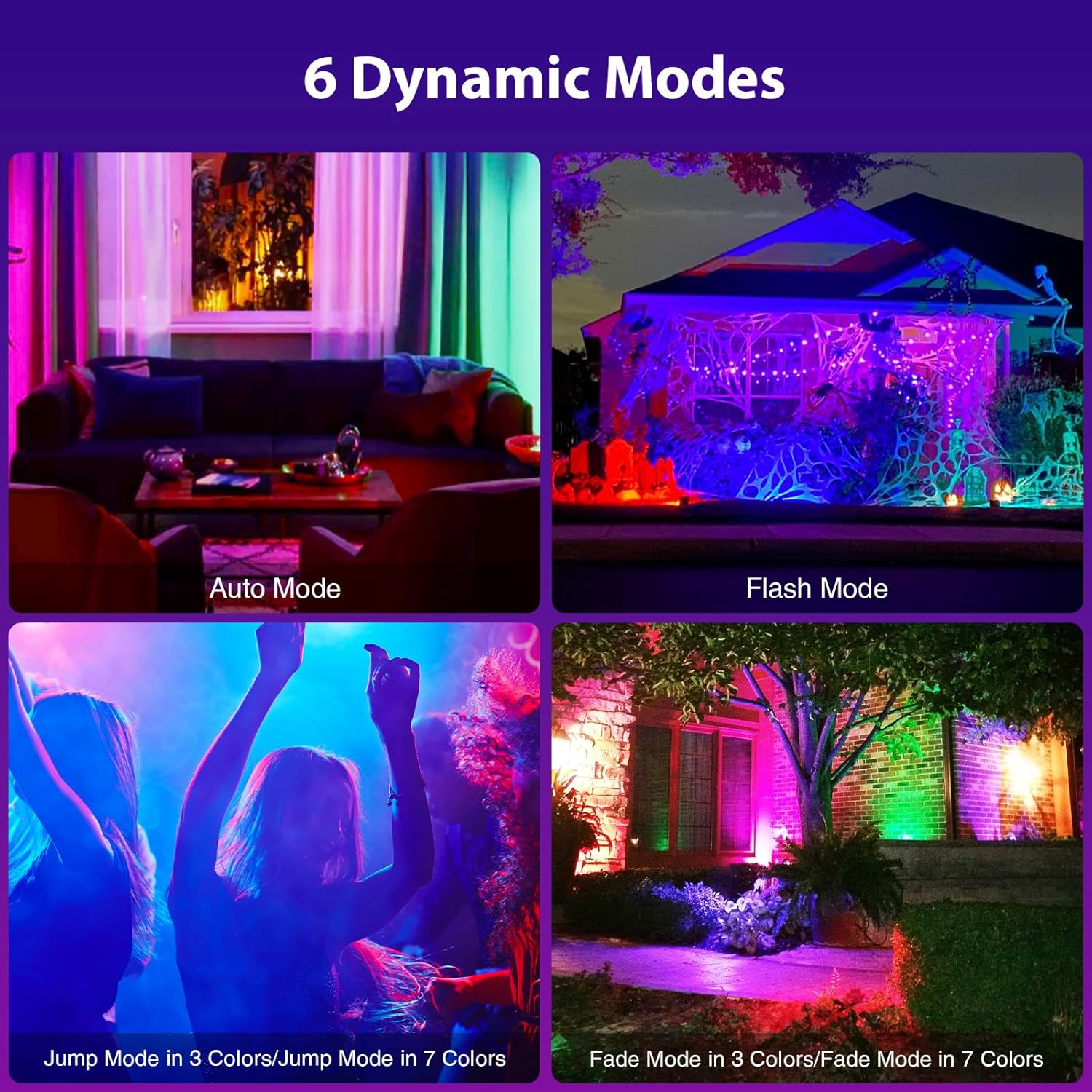
ചിത്രം: വിഷ്വൽ എക്സ്amples of the 6 dynamic modes, including Auto Mode, Flash Mode, Jump Mode (in 3 and 7 colors), and Fade Mode (in 3 and 7 colors), showcasing വിവിധ ലൈറ്റിംഗ് ഇഫക്റ്റുകൾ.
6.2 ടൈമർ പ്രവർത്തനം
The timer allows you to set the floodlight to turn off automatically after a specified period.
- Press the '3H', '6H', or '12H' button on the remote control to activate the corresponding timer.
- The light will remain on for the set duration and then turn off automatically.
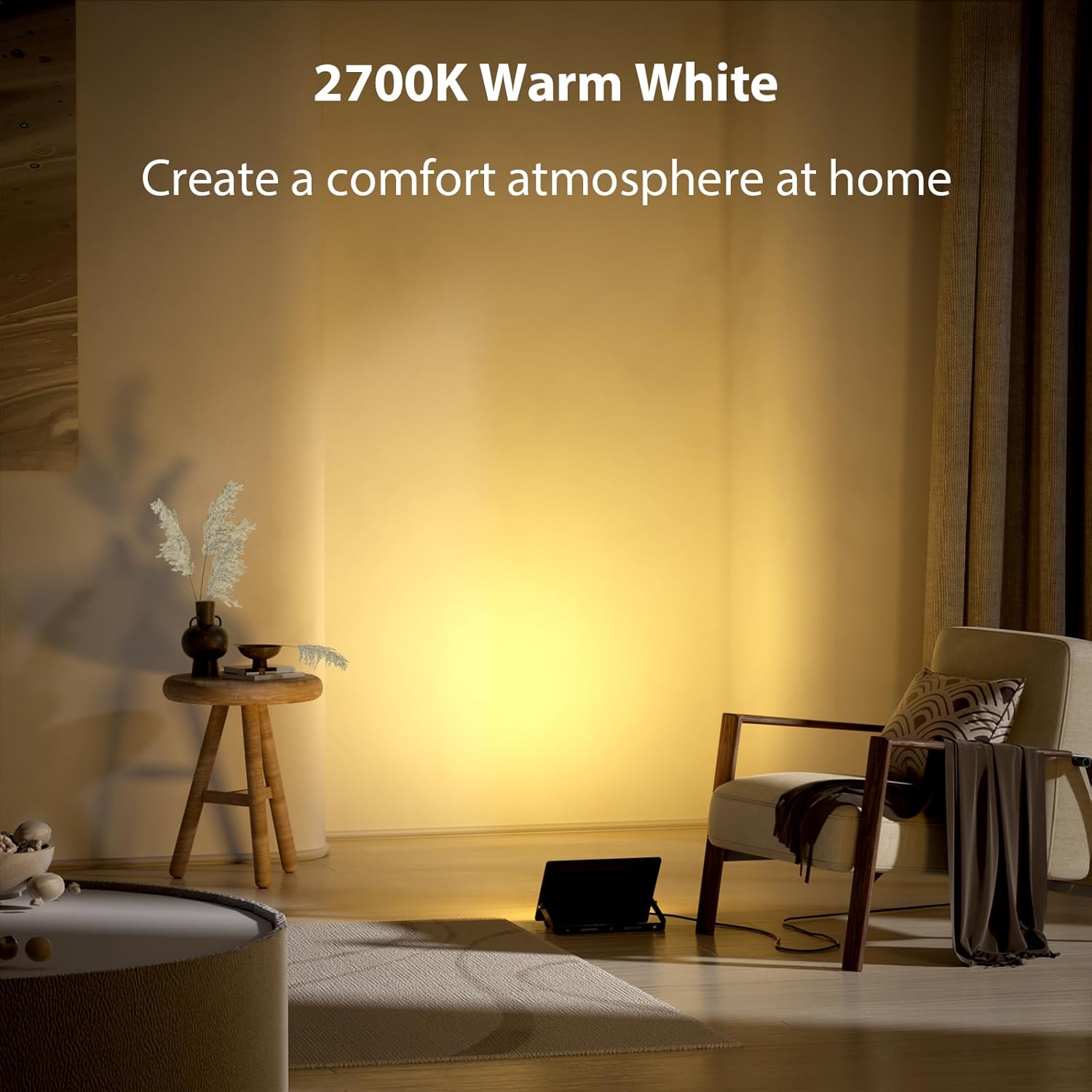
Image: An outdoor scene with floodlights illuminating trees and a house, demonstrating the 3H/6H/12H automatic turn-off options for flexible use.
6.3 മെമ്മറി പ്രവർത്തനം
The floodlight retains its last setting (color, mode, brightness) when powered off and on again, eliminating the need to reset it each time.
6.4 Warm White Light
In addition to RGB colors, the floodlight can produce a 2700K warm white light, ideal for creating a comfortable atmosphere.

Image: An indoor living space illuminated by the 2700K warm white light from the floodlight, creating a comfortable and inviting atmosphere.
7. പരിപാലനം
- വൃത്തിയാക്കൽ: Periodically clean the surface of the floodlight with a soft, damp തുണി. ഉരച്ചിലുകളുള്ള ക്ലീനറുകളോ ലായകങ്ങളോ ഉപയോഗിക്കരുത്.
- പരിശോധന: Regularly check the power cord and connections for any signs of damage. If damage is found, discontinue use and contact customer support.
- ഉപയോക്തൃ-സേവനയോഗ്യമായ ഭാഗങ്ങൾ ഇല്ല: The LED light source is not replaceable. Do not attempt to open or repair the unit.
8. പ്രശ്നപരിഹാരം
- ലൈറ്റ് ഓണാക്കുന്നില്ല:
- വർക്കിംഗ് ഔട്ട്ലെറ്റിലേക്ക് പവർ കോർഡ് സുരക്ഷിതമായി പ്ലഗ് ചെയ്തിട്ടുണ്ടെന്ന് ഉറപ്പാക്കുക.
- Check if the remote control batteries are correctly inserted and not depleted.
- ഫ്ലഡ്ലൈറ്റിന്റെ സെൻസറിലേക്ക് റിമോട്ട് നേരിട്ട് പോയിന്റ് ചെയ്യുക.
- റിമോട്ട് കൺട്രോൾ പ്രതികരിക്കുന്നില്ല:
- റിമോട്ട് കൺട്രോൾ ബാറ്ററികൾ മാറ്റിസ്ഥാപിക്കുക.
- Ensure there are no obstructions between the remote and the light.
- Verify the remote is within the effective operating range (typically 6-8 meters).
- Inconsistent color or mode changes:
- Reset the light by unplugging it for a few seconds and then plugging it back in.
- Ensure the remote control is functioning correctly.
9 സ്പെസിഫിക്കേഷനുകൾ
| ഫീച്ചർ | സ്പെസിഫിക്കേഷൻ |
|---|---|
| ബ്രാൻഡ് | ഒലഫസ് |
| മോഡലിൻ്റെ പേര് | LAR50G |
| വാട്ട്tage | 50 വാട്ട്സ് |
| പ്രകാശ സ്രോതസ്സ് തരം | എൽഇഡി |
| ഇളം നിറം | RGB, 2700K Warm White |
| വർണ്ണ താപനില | 6000 Kelvin (for white light, 2700K for warm white) |
| തെളിച്ചം | 6500 ല്യൂമെൻ |
| വാല്യംtage | 120 വോൾട്ട് |
| ജല പ്രതിരോധ നില | IP66 വാട്ടർപ്രൂഫ് |
| മെറ്റീരിയൽ | അലൂമിനിയം (ഭവനം), ഗ്ലാസ് (തണൽ) |
| ഉൽപ്പന്ന അളവുകൾ | 5"L x 1.46"W x 8.19"H |
| ഇനത്തിൻ്റെ ഭാരം | 3.32 പൗണ്ട് |
| നിയന്ത്രണ രീതി | റിമോട്ട് കൺട്രോൾ |
| പ്രത്യേക സവിശേഷതകൾ | നിറം മാറ്റൽ, മങ്ങൽ, ടൈമർ, മെമ്മറി പ്രവർത്തനം |
10. വാറൻ്റിയും പിന്തുണയും
Olafus products are designed for quality and durability. This product typically comes with a limited warranty. For specific warranty details, claims, or technical support, please contact Olafus customer service directly. Keep your purchase receipt as proof of purchase.
For further assistance, please visit the official Olafus webസൈറ്റ് ചെയ്യുക അല്ലെങ്കിൽ അവരുടെ ഉപഭോക്തൃ പിന്തുണ ചാനലുകളുമായി ബന്ധപ്പെടുക.


