1. ആമുഖം
The SHIDU M600 is a portable voice amplifier designed to project your voice clearly and effectively. It features a 15W output, a wired microphone headset, and supports various audio inputs including USB, TF card, and AUX. This device is suitable for a wide range of applications such as teaching, public speaking, tour guiding, and fitness instruction.
This manual provides detailed instructions for the proper setup, operation, and maintenance of your SHIDU M600 Portable Voice Ampജീവൻ.

Figure 1: SHIDU M600 Portable Voice Amplifier with wired microphone headset.
2. പാക്കേജ് ഉള്ളടക്കം
അൺബോക്സിംഗ് ചെയ്യുമ്പോൾ എല്ലാ ഇനങ്ങളും ഉണ്ടെന്ന് ഉറപ്പാക്കാൻ പാക്കേജ് ഉള്ളടക്കങ്ങൾ പരിശോധിക്കുക:
- 1 x SHIDU M600 Voice Ampജീവപര്യന്തം
- 1 x Wired Microphone Headset
- 1 x ബെൽറ്റ്
- 1 x ഓഡിയോ കേബിൾ
- 1 x USB ചാർജിംഗ് കേബിൾ
- 1 x ഉപയോക്തൃ മാനുവൽ
3. ഉൽപ്പന്നം കഴിഞ്ഞുview
3.1. നിയന്ത്രണങ്ങളും പോർട്ടുകളും
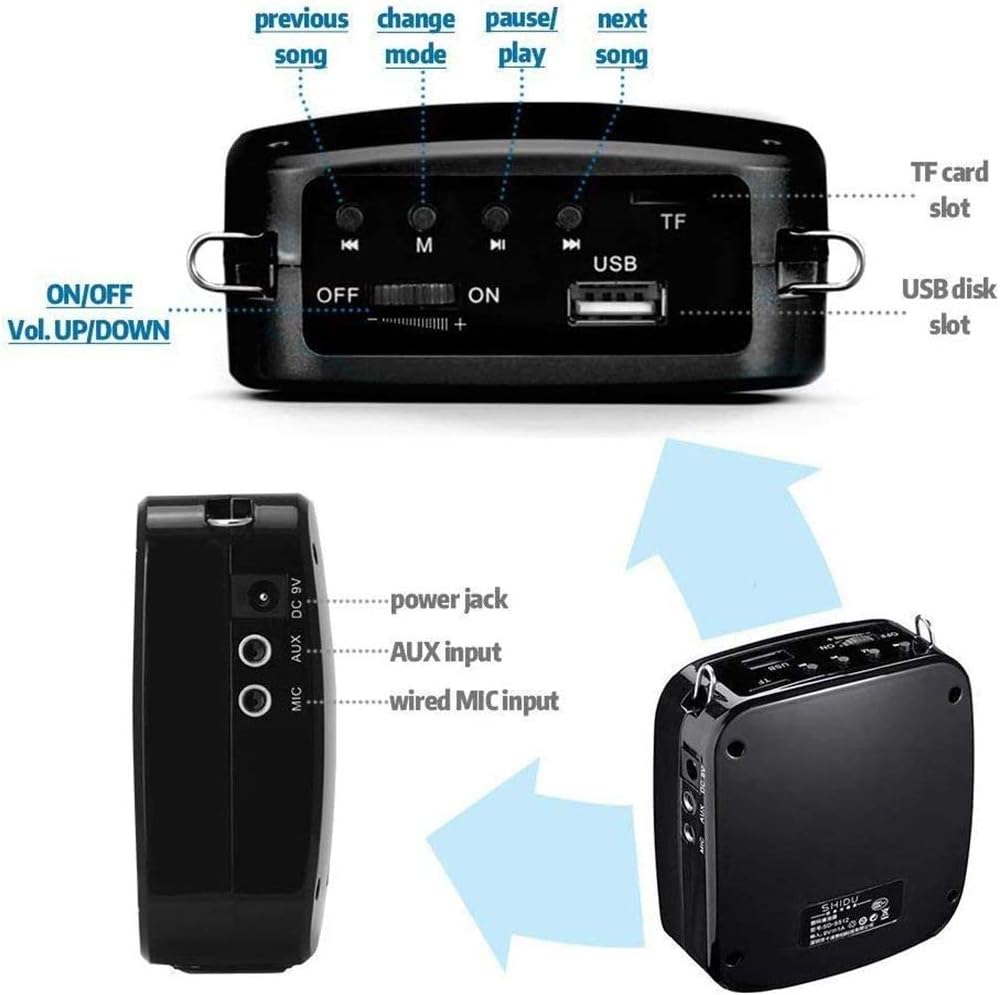
ചിത്രം 2: ഓവർview of SHIDU M600 controls and ports.
- ON/OFF / Volume UP/DOWN Switch: Powers the device on or off and adjusts the volume.
- Previous Song Button: Skips to the previous track in music mode.
- മോഡ് ബട്ടൺ (M): Switches between different playback modes (e.g., Microphone, USB, TF Card, AUX).
- പ്ലേ/താൽക്കാലികമായി നിർത്തുക ബട്ടൺ: ഓഡിയോ പ്ലേബാക്ക് പ്ലേ ചെയ്യുകയോ താൽക്കാലികമായി നിർത്തുകയോ ചെയ്യുന്നു.
- Next Song Button: Skips to the next track in music mode.
- ടിഎഫ് കാർഡ് സ്ലോട്ട്: Insert a TF (Micro SD) card for music playback.
- USB Disk Slot: Insert a USB flash drive for music playback.
- Power Jack (DC 5V): Connect the USB charging cable here.
- AUX ഇൻപുട്ട്: Connect external audio devices using the audio cable.
- Wired MIC Input: Connect the wired microphone headset here.
3.2. ഇൻഡിക്കേറ്റർ ലൈറ്റുകൾ

Figure 3: Explanation of SHIDU M600 indicator lights.
- ചുവന്ന വെളിച്ചം (ഖര): ഉപകരണം പൂർണ്ണമായും ചാർജ്ജ് ചെയ്തിട്ടുണ്ടെന്ന് സൂചിപ്പിക്കുന്നു.
- ചുവന്ന വെളിച്ചം (മിന്നുന്നു): Indicates the device is charging or has low power.
- Blue Light (Solid): Indicates the device is working (powered on).
- Blue Light (Flashing): Indicates music is playing.
- Yellow Light (Solid): Indicates the device is in Microphone mode.
4. സജ്ജീകരണം
4.1. ചാർജ് ചെയ്യുന്നു Ampജീവപര്യന്തം
- Connect the small end of the USB charging cable to the Power Jack (DC 5V) on the ampജീവൻ.
- Connect the large end of the USB charging cable to a standard USB power adapter (DC 5V, 500mAh-2A, not included) or a computer's USB port.
- The red indicator light will flash, indicating that the device is charging.
- Once fully charged (approximately 3-5 hours), the red indicator light will turn solid.
Note: For optimal battery life, fully charge the amplifier before first use.
4.2. Connecting the Microphone Headset
- Insert the 3.5mm jack of the wired microphone headset into the Wired MIC Input port on the ampജീവൻ.
- Position the microphone close to your mouth for clear voice pickup. The flexible gooseneck allows for easy adjustment.
5. പ്രവർത്തന നിർദ്ദേശങ്ങൾ
5.1. പവർ ഓൺ/ഓഫ്, വോളിയം നിയന്ത്രണം
- To power on, slide the ON/OFF switch to the "ON" position. The blue indicator light will turn solid, and the yellow light will illuminate for Microphone mode.
- പവർ ഓഫ് ചെയ്യാൻ, ഓൺ/ഓഫ് സ്വിച്ച് "ഓഫ്" സ്ഥാനത്തേക്ക് സ്ലൈഡ് ചെയ്യുക.
- Adjust the volume by sliding the ON/OFF / Volume UP/DOWN switch. Slide towards "+" to increase volume and towards "-" to decrease volume.
5.2. Microphone Mode
എപ്പോൾ amplifier is powered on with the microphone connected, it will automatically enter Microphone mode. The yellow indicator light will be solid. Speak into the microphone to ampനിങ്ങളുടെ ശബ്ദം ഉയർത്തുക.

Figure 4: The SHIDU M600 is capable of amplifying voice for audiences of up to 300 people.

ചിത്രം 5: ദി amplifier provides clear, high-fidelity sound with minimal distortion or feedback.
5.3. Music Playback (USB/TF Card/AUX)
The SHIDU M600 supports music playback from USB flash drives, TF (Micro SD) cards, and external devices via AUX input.

ചിത്രം 6: ദി amplifier supports various music playback options.
- USB/TF കാർഡ് പ്ലേബാക്ക്:
- Insert a USB flash drive into the USB Disk Slot or a TF card into the TF Card Slot.
- ദി amplifier will automatically detect the media and begin playing music. If not, press the മോഡ് (എം) button to switch to the correct mode.
- ഉപയോഗിക്കുക മുൻ ഗാനം, പ്ലേ/താൽക്കാലികമായി നിർത്തുക, ഒപ്പം അടുത്ത ഗാനം പ്ലേബാക്ക് നിയന്ത്രിക്കുന്നതിനുള്ള ബട്ടണുകൾ.
- ദീർഘനേരം അമർത്തുക മോഡ് (എം) button to loop the current song; long press again to undo.
- AUX Input Playback:
- Connect one end of the audio cable to the AUX Input port on the amplifier and the other end to the headphone jack of your external audio device (e.g., smartphone, MP3 player).
- അമർത്തുക മോഡ് (എം) വരെ ബട്ടൺ amplifier enters AUX mode.
- Control music playback from your external audio device.
6. പരിപാലനം
- വൃത്തിയാക്കൽ: Use a soft, dry cloth to clean the surface of the amplifier. Do not use harsh chemicals or abrasive cleaners.
- സംഭരണം: സംഭരിക്കുക ampനേരിട്ടുള്ള സൂര്യപ്രകാശത്തിൽ നിന്നും കടുത്ത താപനിലയിൽ നിന്നും അകലെ തണുത്തതും വരണ്ടതുമായ സ്ഥലത്ത് ലിഫയർ വയ്ക്കുക.
- ബാറ്ററി കെയർ: To prolong battery life, avoid fully discharging the battery frequently. If the device will not be used for an extended period, charge it to about 50% every three months.
- വാട്ടർ എക്സ്പോഷർ: ഈ ഉപകരണം വാട്ടർപ്രൂഫ് അല്ല. വെള്ളത്തിലോ ഉയർന്ന ആർദ്രതയിലോ സമ്പർക്കം ഒഴിവാക്കുക.
7. പ്രശ്നപരിഹാരം
| പ്രശ്നം | സാധ്യമായ കാരണം | പരിഹാരം |
|---|---|---|
| നിന്ന് ശബ്ദമില്ല ampജീവപര്യന്തം |
|
|
| വികലമായ ശബ്ദം അല്ലെങ്കിൽ ഫീഡ്ബാക്ക് |
|
|
| Cannot play music from USB/TF card |
|
|
| Amplifier not charging |
|
|
8 സ്പെസിഫിക്കേഷനുകൾ
| ഔട്ട്പുട്ട് പവർ | 15W |
| ബാറ്ററി ശേഷി | 1200mAh |
| ചാർജ് ചെയ്യുന്നു വോളിയംtage | DC 5V 500mAh |
| Working Time (Microphone Mode) | 8-12 hours (volume dependent) |
| പ്രവർത്തന സമയം (സംഗീത മോഡ്) | 6-8 hours (volume dependent) |
| ചാർജിംഗ് സമയം | 3-5 മണിക്കൂർ |
| ശബ്ദ കവറേജ് | 25,000 ചതുരശ്ര അടി വരെ. |
| ഉൽപ്പന്ന അളവുകൾ | 98 mm x 88 mm x 43 mm |
| ഭാരം | 0.36 കിലോഗ്രാം (360 ഗ്രാം) |
| മെറ്റീരിയൽ | പ്ലാസ്റ്റിക് |
| ഓഡിയോ ഇൻപുട്ട് | യുഎസ്ബി, ഓക്സ് |
| കണക്റ്റിവിറ്റി ടെക്നോളജി | വയർഡ് |
9. വാറൻ്റിയും പിന്തുണയും
9.1. വാറൻ്റി വിവരങ്ങൾ
The SHIDU M600 Portable Voice Ampലൈഫയർ ഒരു കൂടെ വരുന്നു ഒരു വർഷത്തെ വാറൻ്റി from SHIDU, covering manufacturing defects from the date of purchase.
വാറൻ്റി ക്ലെയിമുകൾക്കായി നിങ്ങളുടെ വാങ്ങിയതിൻ്റെ തെളിവ് സൂക്ഷിക്കുക.
9.2. ഉപഭോക്തൃ പിന്തുണ
For technical assistance, warranty claims, or further inquiries, please contact SHIDU customer support:
- നിർമ്മാതാവ്: Shenzhen SHIDU Digital Co., Ltd
- Webസൈറ്റ്: www.10shidu.com
- ഫോൺ: +86-755-2163 5866
- ഫാക്സ്: +86-755-2910 5099
- വിലാസം: Building A8, Zone 2, Xinhe Xinxing Industrial Park, Fuhai Street, Bao'an District, Shenzhen, China


