1. ഉൽപ്പന്നം കഴിഞ്ഞുview
This manual provides comprehensive instructions for the setup, operation, and maintenance of your Calvas Fetcus replacement remote control for Panasonic air conditioners. This remote is designed to provide seamless control over your compatible air conditioning unit, offering functions such as power, mode selection, temperature adjustment, fan speed control, and timer settings.
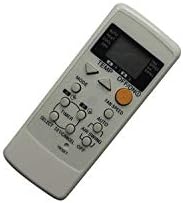
ചിത്രം 1: മുൻഭാഗം view of the Calvas Fetcus remote control.
2. സജ്ജീകരണം
2.1. ബാറ്ററി ഇൻസ്റ്റാളേഷൻ
The remote control requires batteries for operation. Please follow these steps to install or replace the batteries:
- റിമോട്ട് കൺട്രോളിൻ്റെ പിൻഭാഗത്ത് ബാറ്ററി കമ്പാർട്ട്മെൻ്റ് കവർ കണ്ടെത്തുക.
- കമ്പാർട്ട്മെന്റ് തുറക്കാൻ കവർ താഴേക്ക് സ്ലൈഡ് ചെയ്യുക അല്ലെങ്കിൽ ലാച്ച് (ഉണ്ടെങ്കിൽ) അമർത്തുക.
- Insert two new batteries of the appropriate type (e.g., AAA or AA, please check markings inside the compartment) into the compartment, ensuring the positive (+) and negative (-) terminals align correctly with the markings inside.
- സുരക്ഷിതമായി ക്ലിക്ക് ചെയ്യുന്നതുവരെ ബാറ്ററി കമ്പാർട്ട്മെന്റ് കവർ തിരികെ സ്ഥലത്തേക്ക് സ്ലൈഡുചെയ്ത് അടയ്ക്കുക.

ചിത്രം 2: റിമോട്ട് കൺട്രോളിന്റെ പിൻഭാഗത്തുള്ള ബാറ്ററി കമ്പാർട്ട്മെന്റ്.
2.2. പ്രാരംഭ ഉപയോഗം
Once batteries are installed, the remote control is ready for use. No programming is typically required for this replacement remote, as it is pre-programmed for compatible Panasonic air conditioner models. Simply point the remote control towards the air conditioner's receiver and press the desired function button.
3. പ്രവർത്തന നിർദ്ദേശങ്ങൾ
നിങ്ങളുടെ എയർ കണ്ടീഷണറിന്റെ ഒപ്റ്റിമൽ നിയന്ത്രണത്തിനായി ബട്ടണുകളും അവയുടെ പ്രവർത്തനങ്ങളും പരിചയപ്പെടുക.
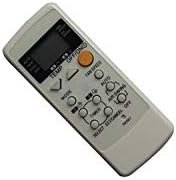
ചിത്രം 3: വിശദമായി view റിമോട്ട് കൺട്രോൾ ബട്ടണുകളുടെ.
3.1. ബട്ടൺ പ്രവർത്തനങ്ങൾ
- ഓൺ/ഓഫ് ബട്ടൺ: എയർ കണ്ടീഷണർ ഓൺ അല്ലെങ്കിൽ ഓഫ് ചെയ്യുന്നു.
- മോഡ് ബട്ടൺ: കൂൾ, ഹീറ്റ്, ഫാൻ, ഡ്രൈ, ഓട്ടോ തുടങ്ങിയ ഓപ്പറേറ്റിംഗ് മോഡുകളിലൂടെ സഞ്ചരിക്കുന്നു.
- TEMP ▲/▼ ബട്ടണുകൾ: ആവശ്യമുള്ള താപനില സജ്ജീകരണം കൂട്ടുകയോ കുറയ്ക്കുകയോ ചെയ്യുന്നു.
- ഫാൻ സ്പീഡ് ബട്ടൺ: Changes the fan speed (e.g., Low, Medium, High, Auto).
- AIR SWING Button: വായുവിന്റെ ദിശയ്ക്കായി ലംബമായ ലൂവർ ചലനം നിയന്ത്രിക്കുന്നു.
- ടൈമർ ബട്ടൺ: Initiates or adjusts the timer settings for scheduled operation.
- ഓട്ടോ ബട്ടൺ: Activates the automatic operating mode, where the unit selects the best mode and fan speed based on room temperature.
- റീസെറ്റ് ബട്ടൺ: Resets the remote control settings (usually a small recessed button requiring a pointed object).
3.2. അടിസ്ഥാന പ്രവർത്തനം
- ഓൺ/ഓഫ് ചെയ്യുന്നു: അമർത്തുക ഓൺ/ഓഫ് button once to turn the unit on, and again to turn it off.
- മോഡ് തിരഞ്ഞെടുക്കുന്നു: അമർത്തുക മോഡ് button repeatedly until the desired operating mode (e.g., Cool, Heat) is displayed on the remote's screen.
- താപനില ക്രമീകരിക്കൽ: ഉപയോഗിക്കുക TEMP ▲ or TEMP ▼ buttons to set your preferred temperature.
- ഫാൻ വേഗത ക്രമീകരിക്കുന്നു: അമർത്തുക ഫാൻ സ്പീഡ് button to cycle through available fan speeds.
4. പരിപാലനം
4.1. ബാറ്ററി മാറ്റിസ്ഥാപിക്കൽ
Replace batteries when the remote control's display becomes dim or when the remote no longer responds to button presses. Refer to Section 2.1 for detailed battery installation instructions. Always replace both batteries at the same time with new ones of the appropriate type.
4.2. വൃത്തിയാക്കൽ
റിമോട്ട് കൺട്രോൾ വൃത്തിയാക്കാൻ, മൃദുവായതും ഉണങ്ങിയതുമായ ഒരു തുണി ഉപയോഗിച്ച് അതിന്റെ പ്രതലം സൌമ്യമായി തുടയ്ക്കുക. കഠിനമായ അഴുക്കിന്, അല്പം ഡി.amp cloth can be used, followed immediately by a dry cloth. Do not use abrasive cleaners, solvents, or immerse the remote in water, as this can damage the electronic components.
4.3. സംഭരണം
If the remote control will not be used for an extended period, it is recommended to remove the batteries to prevent leakage and potential damage to the remote. Store the remote in a cool, dry place away from direct sunlight and extreme temperatures.
5. പ്രശ്നപരിഹാരം
| പ്രശ്നം | സാധ്യമായ കാരണം | പരിഹാരം |
|---|---|---|
| റിമോട്ട് കൺട്രോൾ പ്രവർത്തിക്കുന്നില്ല. | ഡെഡ് അല്ലെങ്കിൽ തെറ്റായി ഇൻസ്റ്റാൾ ചെയ്ത ബാറ്ററികൾ. | ബാറ്ററികൾ മാറ്റി പകരം വയ്ക്കുക, ശരിയായ പോളാരിറ്റി ഉറപ്പാക്കുക (+/-). |
| റിമോട്ട് കൺട്രോൾ ശ്രേണി മോശമാണ്. | Weak batteries; Obstruction between remote and AC unit; Remote not pointed directly at AC unit. | Replace batteries; Remove obstructions; Ensure direct line of sight to AC unit's receiver. |
| എയർ കണ്ടീഷണർ കമാൻഡുകളോട് പ്രതികരിക്കുന്നില്ല. | Remote control not compatible with AC unit; AC unit is off or unplugged; AC unit's receiver is faulty. | Verify compatibility with your specific Panasonic AC model; Check AC unit's power supply; Consult AC unit's manual or service technician. |
| റിമോട്ട് ഡിസ്പ്ലേ മങ്ങിയതോ ശൂന്യമോ ആണ്. | കുറഞ്ഞ ബാറ്ററി പവർ. | ബാറ്ററികൾ മാറ്റിസ്ഥാപിക്കുക. |
6 സ്പെസിഫിക്കേഷനുകൾ
| ഫീച്ചർ | വിശദാംശങ്ങൾ |
|---|---|
| ബ്രാൻഡ് | കഷണ്ടികൾ |
| മോഡൽ നമ്പർ | CLS-D41D8CD98F00B204E9800998ECF8427E |
| അനുയോജ്യമായ ഉപകരണങ്ങൾ | Panasonic Air Conditioners (CS-E9CKP, CS-E15CKP, CWA75C258, CWA75C377, CWA75C376) |
| കണക്റ്റിവിറ്റി ടെക്നോളജി | ഇൻഫ്രാറെഡ് (IR) |
| വയർലെസ് കമ്മ്യൂണിക്കേഷൻ | IR |
| ആവൃത്തി | 433 MHz |
| ചാനൽ | 1 |
| പിന്തുണയ്ക്കുന്ന ഉപകരണങ്ങളുടെ പരമാവധി എണ്ണം | 1 |
| ഇനത്തിൻ്റെ ഭാരം | 99.8 ഗ്രാം (ഏകദേശം) |
| മെറ്റീരിയൽ | മറ്റുള്ളവ |
| ഇനത്തിൻ്റെ പാക്കേജ് അളവ് | 1 |
| പ്രത്യേക സവിശേഷതകൾ | Infrared, Universal, Wireless |
| ബാറ്ററി വിവരണം | Lithium (Note: Typically uses AAA/AA. Please check remote's battery compartment for specific type.) |
7. വാറൻ്റി വിവരങ്ങൾ
ഈ ഉൽപ്പന്നം എ 90 ദിവസത്തെ വാറൻ്റി from the date of purchase. This warranty covers manufacturing defects and malfunctions under normal use. Please retain your proof of purchase for warranty claims. For specific terms and conditions, or to initiate a warranty claim, please contact your retailer or the manufacturer.
8. പിന്തുണ
For further assistance, troubleshooting not covered in this manual, or inquiries regarding your Calvas Fetcus remote control, please contact the seller or the manufacturer directly. Refer to your purchase documentation for contact details. You may also visit the product page on Amazon.ca for additional information or customer service options.
ഉൽപ്പന്ന ലിങ്ക്: https://www.amazon.ca/Calvas-RemoteControl-Panasonic-CS-E15CKP-Conditioner/dp/B07R6X7KZL


