1. ആമുഖം
This manual provides comprehensive instructions for the operation and maintenance of your Fetcus Universal Remote Control, designed for various Hitachi Air Conditioner models. Please read this manual thoroughly before using the remote control to ensure proper function and longevity.
This remote control is a direct replacement or compatible alternative for original Hitachi air conditioner remote models including RAS-D10EX, RAR-5E1, RAS-10XH1, RAR-5E2, RAR-5E3, RAR-5E4, RAR-5E5, RAR-5E6, and RAS-D14EX2.
2. ഉൽപ്പന്ന സവിശേഷതകൾ
- സാർവത്രിക അനുയോജ്യത: Designed to work with a wide range of Hitachi air conditioner models.
- ഇൻഫ്രാറെഡ് കണക്റ്റിവിറ്റി: Utilizes standard infrared signals for reliable communication with your AC unit.
- Dedicated AC Functions: Includes specific buttons for common air conditioner operations such as power, mode selection, temperature adjustment, fan speed, and more.
- കോംപാക്റ്റ് ഡിസൈൻ: Ergonomic and easy to handle.
- No App Support: Operates independently without the need for a smartphone application.
- ആവൃത്തി: Operates at 433 MHz for signal transmission.
3. സജ്ജീകരണം
3.1 ബാറ്ററി ഇൻസ്റ്റാളേഷൻ
The remote control requires appropriate batteries for operation. Follow these steps to install or replace batteries:
- റിമോട്ട് കൺട്രോളിന്റെ പിൻഭാഗത്ത് ബാറ്ററി കമ്പാർട്ട്മെന്റ് കണ്ടെത്തുക.
- ബാറ്ററി കമ്പാർട്ട്മെന്റ് കവർ താഴേക്ക് സ്ലൈഡ് ചെയ്യുക അല്ലെങ്കിൽ അത് തുറക്കാൻ ലാച്ച് അമർത്തുക.
- Insert new batteries, ensuring the positive (+) and negative (-) terminals align correctly with the markings inside the compartment. Typically, two AAA batteries are required, though specific battery type should be confirmed by checking the compartment markings.
- ബാറ്ററി കമ്പാർട്ട്മെന്റ് കവർ ശരിയായി ക്ലിക്കു ചെയ്യുന്നത് വരെ സുരക്ഷിതമായി അടയ്ക്കുക.

ചിത്രം 3.1: പിൻഭാഗം view of the Fetcus remote control with the battery compartment open, revealing the two battery slots and a label with battery safety warnings. This image illustrates the correct orientation for battery insertion.
പ്രധാനപ്പെട്ടത്: ചോർച്ചയും കേടുപാടുകളും തടയാൻ റിമോട്ട് കൺട്രോൾ ദീർഘനേരം ഉപയോഗിക്കുന്നില്ലെങ്കിൽ ബാറ്ററികൾ നീക്കം ചെയ്യുക.
4. പ്രവർത്തന നിർദ്ദേശങ്ങൾ
Familiarize yourself with the buttons on your remote control. The remote features a main display and various control buttons for your air conditioner.
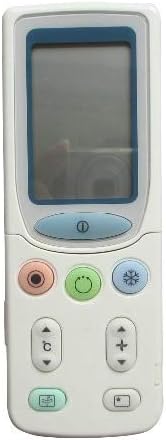
ചിത്രം 4.1: ഫ്രണ്ട് view of the Fetcus remote control, highlighting the LCD screen and the primary control buttons for power, mode, and temperature adjustment.
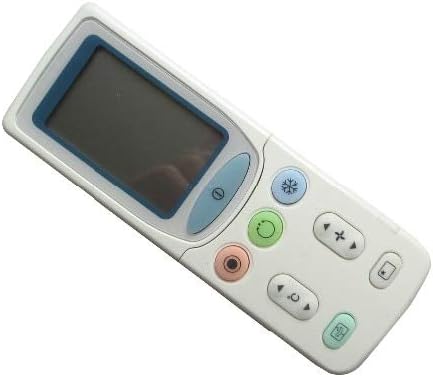
ചിത്രം 4.2: കോണാകൃതിയിലുള്ളത് view of the Fetcus remote control, showing the main display and primary function buttons including power, mode, and fan speed controls.
4.1 അടിസ്ഥാന പ്രവർത്തനങ്ങൾ
- പവർ ബട്ടൺ (① (ഓഡിയോ)): എയർകണ്ടീഷണർ ഓണാക്കാനോ ഓഫാക്കാനോ അമർത്തുക.
- മോഡ് ബട്ടൺ (↻): Press repeatedly to cycle through operating modes: Auto, Cool, Dry, Fan, Heat (if applicable to your AC unit).
- താപനില ക്രമീകരണ ബട്ടണുകൾ (+ / -): Press to increase or decrease the desired temperature setting.
- ഫാൻ സ്പീഡ് ബട്ടൺ (❄): Press to adjust the fan speed (e.g., Auto, Low, Medium, High).
4.2 വിപുലമായ പ്രവർത്തനങ്ങൾ (സ്ലൈഡിംഗ് കവറിനു കീഴിൽ)
Some advanced functions are accessible by sliding down the cover on the remote control. This reveals additional buttons for more specific controls.

ചിത്രം 4.3: കോണാകൃതിയിലുള്ളത് view of the Fetcus remote control with the sliding cover open, exposing additional advanced function buttons beneath the main display.
- സ്വിംഗ്/ലൂവർ നിയന്ത്രണം: Adjusts the direction of the airflow (vertical or horizontal swing).
- Timer/Sleep Mode: Sets a timer for the AC unit to turn on or off, or activates a sleep-friendly operating mode.
- C/F Switch (℃): സെൽഷ്യസിനും ഫാരൻഹീറ്റിനും ഇടയിലുള്ള താപനില ഡിസ്പ്ലേ ടോഗിൾ ചെയ്യുന്നു.
- റീസെറ്റ് ബട്ടൺ: Used to reset the remote control settings or clear certain functions. Consult your AC unit's manual for specific reset procedures if needed.
- Other Specific Buttons: Depending on your specific Hitachi AC model, other buttons may control functions like Quiet mode, Turbo mode, or Health functions. Refer to your AC unit's original manual for detailed explanations of these specific icons.
5. പരിപാലനം
- വൃത്തിയാക്കൽ: മൃദുവായതും ഉണങ്ങിയതുമായ തുണി ഉപയോഗിച്ച് റിമോട്ട് കൺട്രോൾ തുടയ്ക്കുക. ലിക്വിഡ് ക്ലീനറുകളോ അബ്രാസീവ് വസ്തുക്കളോ ഉപയോഗിക്കരുത്, കാരണം അവ ഉപരിതലത്തിനോ ആന്തരിക ഘടകങ്ങളോ കേടുവരുത്തും.
- ബാറ്ററി മാറ്റിസ്ഥാപിക്കൽ: Replace batteries when the remote's range decreases or the display becomes dim. Always replace all batteries at the same time with new ones of the same type.
- സംഭരണം: നേരിട്ടുള്ള സൂര്യപ്രകാശത്തിൽ നിന്നും ഉയർന്ന താപനിലയിൽ നിന്നും അകലെ തണുത്തതും വരണ്ടതുമായ സ്ഥലത്ത് റിമോട്ട് കൺട്രോൾ സൂക്ഷിക്കുക.
6. പ്രശ്നപരിഹാരം
| പ്രശ്നം | സാധ്യമായ കാരണം | പരിഹാരം |
|---|---|---|
| റിമോട്ട് പ്രതികരിക്കുന്നില്ല. | ഡെഡ് അല്ലെങ്കിൽ തെറ്റായി ഇൻസ്റ്റാൾ ചെയ്ത ബാറ്ററികൾ. | ബാറ്ററികൾ മാറ്റി പകരം വയ്ക്കുക, ശരിയായ പോളാരിറ്റി ഉറപ്പാക്കുക (+/-). |
| വിദൂര ദൂരം മോശമാണ്. | ദുർബലമായ ബാറ്ററികൾ; റിമോട്ടിനും എസി യൂണിറ്റിനും ഇടയിലുള്ള തടസ്സം. | Replace batteries. Ensure a clear line of sight to the AC unit's infrared receiver. |
| എസി യൂണിറ്റ് നിർദ്ദിഷ്ട പ്രവർത്തനങ്ങളോട് പ്രതികരിക്കുന്നില്ല. | Remote not fully compatible with all AC unit features; AC unit does not support the function. | Verify the function exists on your specific AC model. This remote is a universal replacement and may not support all obscure functions of every original remote. |
| ഡിസ്പ്ലേ മങ്ങിയതോ ശൂന്യമോ ആണ്. | കുറഞ്ഞ ബാറ്ററി പവർ. | ബാറ്ററികൾ മാറ്റിസ്ഥാപിക്കുക. |
7 സ്പെസിഫിക്കേഷനുകൾ
| ഫീച്ചർ | വിശദാംശങ്ങൾ |
|---|---|
| ബ്രാൻഡ് | കഷണ്ടികൾ |
| മോഡൽ നമ്പർ (ആന്തരികം) | CLS-D41D8CD98F00B204E9800998ECF8427E |
| അനുയോജ്യമായ ഉപകരണങ്ങൾ | Air Conditioner (Hitachi RAS-D10EX, RAR-5E1, RAS-10XH1, RAR-5E2, RAR-5E3, RAR-5E4, RAR-5E5, RAR-5E6, RAS-D14EX2) |
| കണക്റ്റിവിറ്റി ടെക്നോളജി | ഇൻഫ്രാറെഡ് |
| ആവൃത്തി | 433 MHz |
| പിന്തുണയ്ക്കുന്ന ഉപകരണങ്ങളുടെ പരമാവധി എണ്ണം | 1 |
| മെറ്റീരിയൽ | Other (Durable Plastic) |
| ബാറ്ററി വിവരണം | Lithium (Typically uses AAA batteries, please check compartment) |
| പ്രത്യേക സവിശേഷതകൾ | Universal, Wireless |
| ഇനത്തിൻ്റെ പാക്കേജ് അളവ് | 1 |
| ആദ്യ തീയതി ലഭ്യമാണ് | മെയ് 8, 2019 |
8. വാറൻ്റിയും പിന്തുണയും
This Fetcus Remote Control comes with a 90 ദിവസത്തെ വാറൻ്റി വാങ്ങിയ തീയതി മുതൽ. ഈ വാറന്റി നിർമ്മാണ വൈകല്യങ്ങൾ ഉൾക്കൊള്ളുകയും സാധാരണ ഉപയോഗത്തിൽ ഉൽപ്പന്നം ഉദ്ദേശിച്ച രീതിയിൽ പ്രവർത്തിക്കുന്നുവെന്ന് ഉറപ്പാക്കുകയും ചെയ്യുന്നു.
For warranty claims or technical support, please contact your retailer or the manufacturer with your purchase details. Please retain your proof of purchase for warranty validation.


