ആമുഖം
This manual provides detailed instructions for the proper use and maintenance of your Calvas AERMEC CRMC-A675JBEZ Air Conditioner Remote Control. Please read this manual thoroughly before operating the device to ensure optimal performance and longevity.
ഉൽപ്പന്നം കഴിഞ്ഞുview

ചിത്രം 1: ഫ്രണ്ട് view of the remote control, displaying the screen with current settings (temperature 26°C, time 6:00 AM) and primary control buttons.
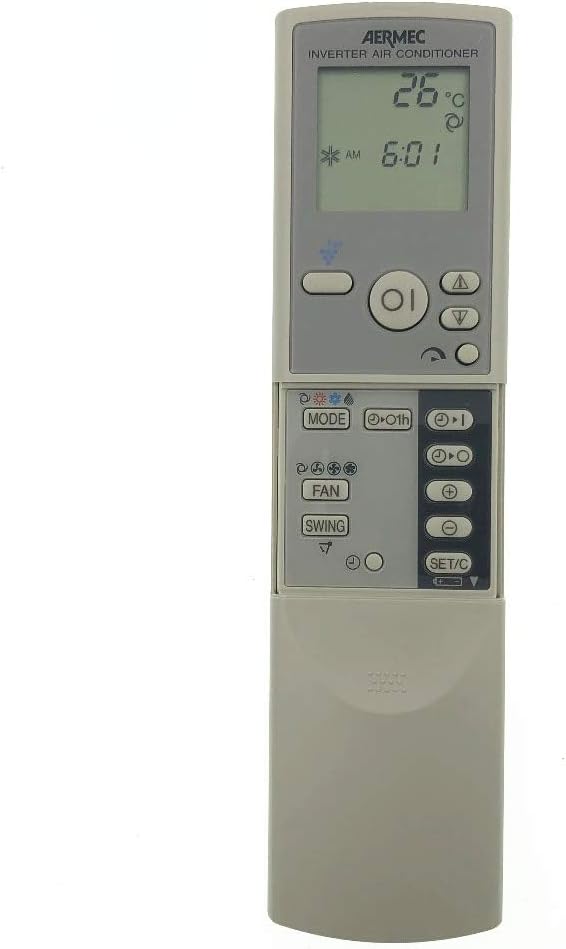
ചിത്രം 2: ഫ്രണ്ട് view of the remote control with the lower sliding cover open, exposing secondary function buttons such as MODE, FAN, SWING, and SET/C.

ചിത്രം 3: Angled perspective of the remote control with the sliding cover extended, providing a clear view of all accessible buttons and the display.

ചിത്രം 4: പിൻഭാഗം view of the remote control, indicating the model number CRMC-A675JBEZ and battery requirements (R03(AAA) 2PCS).
സജ്ജമാക്കുക
ബാറ്ററി ഇൻസ്റ്റാളേഷൻ
- റിമോട്ട് കൺട്രോളിന്റെ പിൻഭാഗത്ത് ബാറ്ററി കമ്പാർട്ട്മെന്റ് കണ്ടെത്തുക.
- ബാറ്ററി കവർ തുറക്കാൻ താഴേക്ക് സ്ലൈഡ് ചെയ്യുക.
- Insert two AAA (R03) batteries, ensuring the positive (+) and negative (-) ends align with the markings inside the compartment.
- സുരക്ഷിതമായി ക്ലിക്കുചെയ്യുന്നത് വരെ ബാറ്ററി കവർ തിരികെ സ്ഥലത്തേക്ക് സ്ലൈഡ് ചെയ്യുക.
പ്രധാനപ്പെട്ടത്: Do not mix old and new batteries. Do not mix alkaline, standard (carbon-zinc), or rechargeable (nickel-cadmium) batteries. Remove batteries if the remote will not be used for an extended period.
പ്രവർത്തന നിർദ്ദേശങ്ങൾ
The remote control features a clear LCD display and various buttons for controlling your AERMEC air conditioner. Familiarize yourself with the button layout as shown in the Product Overview വിഭാഗം.
അടിസ്ഥാന പ്രവർത്തനങ്ങൾ
- പവർ ബട്ടൺ (●): എയർകണ്ടീഷണർ ഓണാക്കാനോ ഓഫാക്കാനോ അമർത്തുക.
- താപനില ക്രമീകരണം (▲ / ▼): Use the up and down arrows to increase or decrease the desired temperature.
- മോഡ് ബട്ടൺ (മോഡ്): Press repeatedly to cycle through operating modes (e.g., Cool, Heat, Fan, Dry, Auto). The current mode will be displayed on the LCD.
- ഫാൻ സ്പീഡ് ബട്ടൺ (ഫാൻ): ഫാൻ വേഗത ക്രമീകരിക്കുന്നു (ഉദാ. ഓട്ടോ, ലോ, മീഡിയം, ഹൈ).
- സ്വിംഗ് ബട്ടൺ (സ്വിംഗ്): വായു വിതരണത്തിനായുള്ള ലംബമായ ലൂവർ ചലനം നിയന്ത്രിക്കുന്നു.
Advanced Functions (Under Sliding Cover)
Slide down the cover at the bottom of the remote to access additional settings.
- ടൈമർ ബട്ടണുകൾ (▲ / ▼ with clock icon): Used to set ON/OFF timers for the air conditioner. Refer to your air conditioner's main manual for specific timer programming instructions.
- SET/C Button: Typically used to confirm settings or switch between Celsius and Fahrenheit temperature display.
- മറ്റ് ബട്ടണുകൾ: Depending on your specific AERMEC air conditioner model, other buttons may include Sleep mode, Turbo, or Health functions. Consult your air conditioner's manual for their specific uses.
മെയിൻ്റനൻസ്
റിമോട്ട് കൺട്രോൾ വൃത്തിയാക്കുന്നു
- മൃദുവായതും ഉണങ്ങിയതുമായ തുണി ഉപയോഗിച്ച് റിമോട്ട് കൺട്രോളിന്റെ ഉപരിതലം തുടയ്ക്കുക.
- ദുശ്ശാഠ്യമുള്ള അഴുക്കിന്, ലഘുവായി ഡിampതുണിയിൽ വെള്ളവും നേരിയ ഡിറ്റർജന്റും ചേർത്ത് തുടയ്ക്കുക, എന്നിട്ട് ഉടൻ ഉണക്കുക.
- അബ്രാസീവ് ക്ലീനറുകൾ, ആൽക്കഹോൾ, അല്ലെങ്കിൽ നശിപ്പിക്കുന്ന ദ്രാവകങ്ങൾ എന്നിവ ഉപയോഗിക്കരുത്, കാരണം ഇവ റിമോട്ടിന്റെ ഉപരിതലത്തിനോ ആന്തരിക ഘടകങ്ങളോ കേടുവരുത്തും.
ബാറ്ററി മാറ്റിസ്ഥാപിക്കൽ
Replace batteries when the display becomes dim or the remote control's range decreases. Follow the battery installation steps in the "Setup" section.
ട്രബിൾഷൂട്ടിംഗ്
| പ്രശ്നം | സാധ്യമായ കാരണം | പരിഹാരം |
|---|---|---|
| റിമോട്ട് കൺട്രോൾ പ്രതികരിക്കുന്നില്ല. | ഡെഡ് അല്ലെങ്കിൽ തെറ്റായി ഇൻസ്റ്റാൾ ചെയ്ത ബാറ്ററികൾ. | ബാറ്ററികൾ പുതിയ AAA ബാറ്ററികൾ ഉപയോഗിച്ച് മാറ്റിസ്ഥാപിക്കുക, ശരിയായ പോളാരിറ്റി ഉറപ്പാക്കുക. |
| റിമോട്ട് കൺട്രോൾ ശ്രേണി മോശമാണ്. | ദുർബലമായ ബാറ്ററികൾ അല്ലെങ്കിൽ റിമോട്ടിനും എസി യൂണിറ്റിനും ഇടയിലുള്ള തടസ്സം. | ബാറ്ററികൾ മാറ്റിസ്ഥാപിക്കുക. എയർ കണ്ടീഷണറിന്റെ റിസീവറിൽ നിന്ന് വ്യക്തമായ കാഴ്ച ലഭിക്കുന്നുണ്ടെന്ന് ഉറപ്പാക്കുക. |
| എയർ കണ്ടീഷണർ കമാൻഡുകളോട് പ്രതികരിക്കുന്നില്ല. | Remote control not compatible or AC unit is off/unplugged. | Verify the remote is the correct model (CRMC-A675JBEZ) for your AERMEC unit. Check if the AC unit is powered on. |
സ്പെസിഫിക്കേഷനുകൾ
- മോഡൽ നമ്പർ: CRMC-A675JBEZ
- ബ്രാൻഡ്: കഷണ്ടികൾ
- അനുയോജ്യത: AERMEC Air Conditioners (specific models may vary, verify with your AC unit's manual)
- ആശയവിനിമയം: ഇൻഫ്രാറെഡ് (IR)
- ഊർജ്ജ സ്രോതസ്സ്: 2 x AAA (R03) Batteries
- മെറ്റീരിയൽ: Plastic (as indicated by "otro" in source, assuming common remote material)
- ഭാരം: ഏകദേശം 99.79 ഗ്രാം (ബാറ്ററികൾ ഇല്ലാതെ)
വാറൻ്റിയും പിന്തുണയും
This product is manufactured by Calvas. For specific warranty information or technical support, please refer to the documentation provided with your purchase or contact the seller directly. As a replacement remote, warranty terms may vary.
For further assistance, you may also consult the official AERMEC air conditioner user manual for detailed instructions on specific functions controlled by this remote.


