ആമുഖം
This manual provides detailed instructions for the setup, operation, and maintenance of your Homtime C1 Mini Snooze Alarm Clock. Please read this manual thoroughly before using the product to ensure proper function and longevity.

Image: The Homtime C1 Mini Alarm Clock, light blue in color, is shown on a decorative tray next to a small potted plant. The digital display shows the time 20:08.
ഉൽപ്പന്നം കഴിഞ്ഞുview
The Homtime C1 Mini is a compact digital alarm clock designed for convenience and functionality. It features a clear LCD display, dual USB charging ports for mobile devices, and a snooze function. Its design is suitable for various environments including bedrooms, offices, and for travel.
പ്രധാന സവിശേഷതകൾ:
- Digital Time Display
- സ്നൂസ് പ്രവർത്തനം
- ഡ്യുവൽ യുഎസ്ബി ചാർജിംഗ് പോർട്ടുകൾ
- Dimmable LCD Screen
- ഒതുക്കമുള്ളതും പോർട്ടബിൾ ഡിസൈൻ
പാക്കേജ് ഉള്ളടക്കം:
- Homtime C1 Mini Alarm Clock
- പവർ അഡാപ്റ്റർ
- ഉപയോക്തൃ മാനുവൽ (ഈ പ്രമാണം)
സജ്ജമാക്കുക
- പവർ കണക്ഷൻ: Connect the provided power adapter to the DC input port on the back of the alarm clock. Plug the adapter into a standard wall outlet. The display will illuminate.
- Battery Installation (Optional for backup): വൈദ്യുതി സമയത്ത് സമയവും അലാറം ക്രമീകരണ ബാക്കപ്പുംtages, install 3 AAA batteries (not included) into the battery compartment located on the bottom of the unit. Ensure correct polarity.
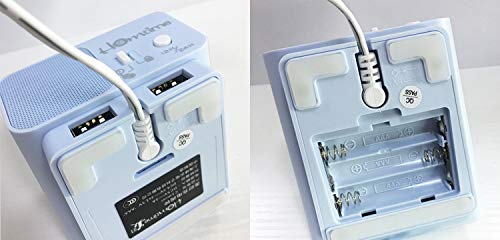
Image: A split image showing the bottom of the Homtime C1 Mini. The left side displays the rear with two USB charging ports and a power input. The right side shows the open battery compartment, designed for AAA batteries.
പ്രവർത്തന നിർദ്ദേശങ്ങൾ
1. സമയം ക്രമീകരിക്കുന്നു
- അമർത്തിപ്പിടിക്കുക "Time Set" button (usually located on the top or back) until the hour digits begin to flash.
- ഉപയോഗിക്കുക "+" or "-" buttons to adjust the hour. Pay attention to AM/PM indicators if present.
- അമർത്തുക "Time Set" മണിക്കൂർ സ്ഥിരീകരിക്കുന്നതിനും മിനിറ്റ് ക്രമീകരണത്തിലേക്ക് നീങ്ങുന്നതിനും വീണ്ടും ബട്ടൺ അമർത്തുക.
- ഉപയോഗിക്കുക "+" or "-" മിനിറ്റ് ക്രമീകരിക്കാൻ ബട്ടണുകൾ.
- അമർത്തുക "Time Set" സമയം ലാഭിക്കാൻ അവസാനമായി ഒരിക്കൽ കൂടി ബട്ടൺ അമർത്തുക.
2. അലാറം സജ്ജമാക്കുന്നു
- അമർത്തിപ്പിടിക്കുക "Alarm Set" അലാറം മണിക്കൂർ അക്കങ്ങൾ മിന്നിത്തുടങ്ങുന്നതുവരെ ബട്ടൺ അമർത്തുക.
- ഉപയോഗിക്കുക "+" or "-" അലാറം സമയം ക്രമീകരിക്കാനുള്ള ബട്ടണുകൾ.
- അമർത്തുക "Alarm Set" button again to confirm the alarm hour and move to alarm minute adjustment.
- ഉപയോഗിക്കുക "+" or "-" അലാറം മിനിറ്റ് ക്രമീകരിക്കാനുള്ള ബട്ടണുകൾ.
- അമർത്തുക "Alarm Set" button one last time to save the alarm setting.
- അലാറം സജീവമാക്കുന്നതിനും നിർജ്ജീവമാക്കുന്നതിനും, അമർത്തുക "Alarm On/Off" button (or a dedicated alarm icon button). An alarm icon will appear on the display when active.
3. സ്നൂസ് ഫംഗ്ഷൻ
When the alarm sounds, press the large button on the top of the clock (often labeled "സ്നൂസ്" or simply the main control button). The alarm will pause for approximately 9 minutes and then sound again. To turn off the alarm completely, press any other button or let it sound for its full duration.
4. തെളിച്ചം പ്രദർശിപ്പിക്കുക
The LCD screen has multiple brightness levels. Press the "Dimmer" button (or a dedicated light icon button) repeatedly to cycle through the available brightness settings (e.g., High, Medium, Low, Off).
5. യുഎസ്ബി ചാർജിംഗ് പോർട്ടുകൾ
The Homtime C1 Mini features dual USB charging ports on the back of the unit. These ports are designed to charge compatible mobile devices such as smartphones and tablets. Simply connect your device's USB charging cable to one of the ports. Charging will begin automatically.
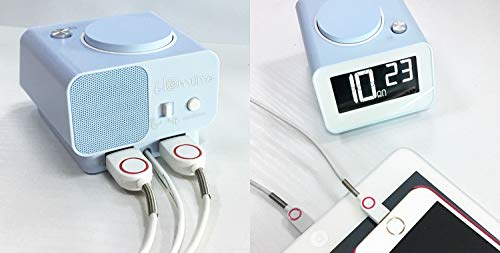
ചിത്രം: പിൻഭാഗം view of the Homtime C1 Mini alarm clock, showing two white USB charging cables plugged into its dual USB ports. This illustrates the charging functionality.
മെയിൻ്റനൻസ്
- വൃത്തിയാക്കൽ: Wipe the unit with a soft, dry cloth. Do not use abrasive cleaners or solvents, as they may damage the surface.
- ശക്തി: Ensure the power adapter is securely connected. Disconnect from power during extended periods of non-use.
- പരിസ്ഥിതി: Avoid placing the clock in direct sunlight, near heat sources, or in excessively humid environments.
ട്രബിൾഷൂട്ടിംഗ്
| പ്രശ്നം | സാധ്യമായ കാരണം | പരിഹാരം |
|---|---|---|
| ക്ലോക്ക് ഡിസ്പ്ലേ ശൂന്യമാണ്. | അധികാരമോ ശക്തിയോ ഇല്ലtage. | Check power adapter connection. If using battery backup, ensure batteries are installed correctly and are not depleted. |
| അലാറം മുഴങ്ങുന്നില്ല. | അലാറം സജീവമാക്കിയിട്ടില്ല അല്ലെങ്കിൽ തെറ്റായി സജ്ജീകരിച്ചിട്ടില്ല. | Ensure the alarm is turned ON (alarm icon visible). Verify the alarm time is set correctly. |
| യുഎസ്ബി ചാർജിംഗ് പ്രവർത്തിക്കുന്നില്ല. | കേബിൾ പ്രശ്നം അല്ലെങ്കിൽ ഉപകരണ പൊരുത്തക്കേട്. | Try a different USB cable. Ensure the device is compatible with USB charging. Check if the clock is powered on. |
| ഡിസ്പ്ലേ വളരെ തെളിച്ചമുള്ളതാണ്/മങ്ങിയതാണ്. | തെളിച്ച ക്രമീകരണം ക്രമീകരിക്കേണ്ടതുണ്ട്. | Press the "Dimmer" button to cycle through brightness levels. |
സ്പെസിഫിക്കേഷനുകൾ
- ബ്രാൻഡ്: ഹോംടൈം
- മോഡൽ: C1 Mini
- ഡിസ്പ്ലേ തരം: ഡിജിറ്റൽ എൽസിഡി
- ഊർജ്ജ സ്രോതസ്സ്: Electrical (AC Adapter)
- ബാറ്ററി ബാക്കപ്പ്: 3 x AAA ബാറ്ററികൾ (ഉൾപ്പെടുത്തിയിട്ടില്ല)
- പ്രത്യേക സവിശേഷതകൾ: Alarm, Dual USB Charging Ports, Dimmable Screen
- ഫ്രെയിം മെറ്റീരിയൽ: അക്രിലോണിട്രൈൽ ബ്യൂട്ടാഡീൻ സ്റ്റൈറീൻ, പ്ലാസ്റ്റിക്
- മൗണ്ടിംഗ് തരം: ടേബിൾടോപ്പ്
- മാതൃരാജ്യം: ചൈന
വാറൻ്റിയും പിന്തുണയും
For warranty information and customer support, please refer to the warranty card included with your product or visit the official Homtime webസൈറ്റ്. വാറൻ്റി ക്ലെയിമുകൾക്കായി നിങ്ങളുടെ വാങ്ങൽ രസീത് സൂക്ഷിക്കുക.
For further assistance, you may contact Homtime customer service through their official channels. Please have your model number (C1 Mini) and purchase details ready.


