1. ആമുഖം
This manual provides essential information for the safe and efficient installation, operation, and maintenance of the Allen-Bradley 1305-BA06A Adjustable Frequency AC Drive, Series C. Please read this manual thoroughly before attempting to install or operate the drive. Retain this manual for future reference.
2 സുരക്ഷാ വിവരങ്ങൾ
മുന്നറിയിപ്പ്: വൈദ്യുതാഘാത സാധ്യത. യോഗ്യതയുള്ള ഉദ്യോഗസ്ഥർ മാത്രമേ ഈ ഉപകരണം ഇൻസ്റ്റാൾ ചെയ്യുകയോ പ്രവർത്തിപ്പിക്കുകയോ സർവീസ് ചെയ്യുകയോ ചെയ്യാവൂ.
- Always disconnect and lock out power before working on the drive or connected equipment.
- ഡ്രൈവിന്റെയും മോട്ടോറിന്റെയും ശരിയായ ഗ്രൗണ്ടിംഗ് ഉറപ്പാക്കുക.
- വൈദ്യുതി പ്രയോഗിക്കുമ്പോൾ വൈദ്യുത ഘടകങ്ങളിൽ തൊടരുത്.
- പവർ പ്രയോഗിക്കുന്നതിന് മുമ്പ് എല്ലാ വയറിംഗ് കണക്ഷനുകളും സുരക്ഷിതവും കൃത്യവുമാണെന്ന് ഉറപ്പാക്കുക.
- എല്ലാ പ്രാദേശിക, ദേശീയ വൈദ്യുത കോഡുകളും നിരീക്ഷിക്കുക.
3. ഉൽപ്പന്നം കഴിഞ്ഞുview
The Allen-Bradley 1305-BA06A is an adjustable frequency AC drive designed for controlling the speed and torque of AC induction motors. It features a robust design suitable for industrial applications and includes a user-friendly interface with a touchscreen display for parameter adjustment and monitoring.

ചിത്രം 3.1: മുൻഭാഗം view of the Allen-Bradley 1305-BA06A AC Drive alongside its user manual.
The drive is engineered for reliable performance, offering precise motor control capabilities. Its compact form factor allows for integration into various control panels and systems.
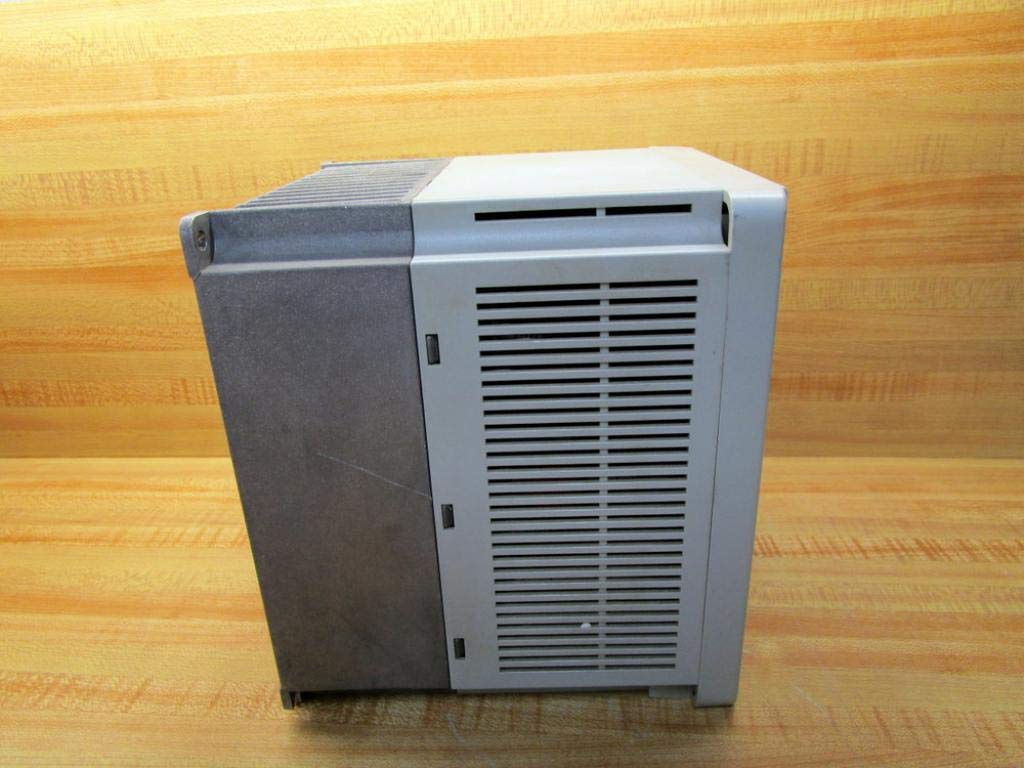
ചിത്രം 3.2: വശം view of the Allen-Bradley 1305-BA06A AC Drive, showing its ventilation design.
4. സജ്ജീകരണവും ഇൻസ്റ്റാളേഷനും
4.1 മൗണ്ടിംഗ്
Mount the drive vertically on a flat, stable surface, ensuring adequate clearance for ventilation. Avoid mounting in direct sunlight or near heat sources. Refer to the drive's dimensions for proper enclosure sizing.
4.2 വയറിംഗ്
All wiring must comply with local and national electrical codes. Use appropriate wire gauges for power and control circuits. Ensure all connections are tight to prevent loose contacts and potential hazards.
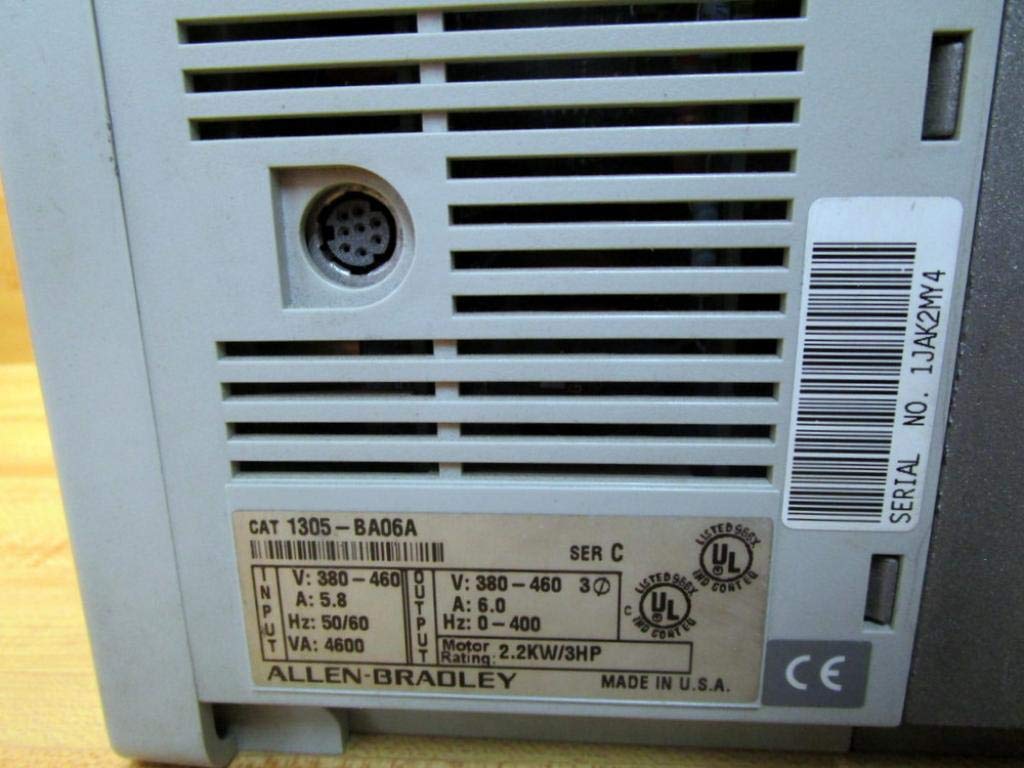
ചിത്രം 4.1: പിൻഭാഗം view of the drive, displaying the product label with input/output specifications and serial number.
4.2.1 പവർ കണക്ഷനുകൾ
- Connect the incoming AC power supply to the designated input terminals.
- മോട്ടോർ ലീഡുകൾ ഔട്ട്പുട്ട് ടെർമിനലുകളിലേക്ക് (U, V, W) ബന്ധിപ്പിക്കുക.
- Ensure proper grounding of the drive chassis and motor frame.
4.2.2 നിയന്ത്രണ കണക്ഷനുകൾ
Connect control signals (e.g., start/stop, speed reference) to the appropriate control terminals. The drive features a 9-pin female connection for control interface. Refer to the detailed wiring diagrams in the complete product documentation for specific terminal assignments.
5. പ്രവർത്തന നിർദ്ദേശങ്ങൾ
5.1 പവർ ഓൺ/ഓഫ്
- To power on, ensure all connections are secure, then apply main power to the drive. The display will illuminate.
- To power off, remove main power from the drive. Wait for the display to turn off completely before performing any service.
5.2 Basic Control Panel Operation
The drive features a control panel with a touchscreen display and dedicated buttons for basic functions:
- ഇഎസ്സി: Escape/Cancel button.
- വിൽക്കുക: Select/Enter button.
- ▲ / ▼: Up/Down arrow buttons for navigation and value adjustment.
- ജോഗ്: Jog function button.
- ആരംഭിക്കുക: മോട്ടോർ പ്രവർത്തനം ആരംഭിക്കുന്നു.
- നിർത്തുക: മോട്ടോർ പ്രവർത്തനം നിർത്തുന്നു.
Use the touchscreen or arrow buttons to navigate menus and adjust parameters. Refer to the drive's programming manual for detailed parameter settings and advanced functions.
6. പരിപാലനം
Regular maintenance ensures optimal performance and extends the lifespan of the drive. Always disconnect power before performing any maintenance.
6.1 പതിവ് പരിശോധന
- Inspect the drive for any signs of physical damage, loose connections, or discoloration.
- Check for dust accumulation on cooling fins and internal components.
6.2 വൃത്തിയാക്കൽ
Use compressed air to remove dust from the cooling fins and internal components. Do not use liquid cleaners directly on electrical parts. Ensure the drive is completely dry before reapplying power.

ചിത്രം 6.1: താഴെ view of the drive, highlighting the cooling fins for heat dissipation.
6.3 കൂളിംഗ് സിസ്റ്റം
Ensure that the drive's cooling system, including fans and heat sinks, remains unobstructed and clean. Proper airflow is critical for preventing overheating and maintaining performance.
7. പ്രശ്നപരിഹാരം
This section provides general guidance for common issues. For detailed troubleshooting, refer to the complete product manual or contact technical support.
- പവർ ഇല്ല/ഡിസ്പ്ലേ ഓഫാണ്: Check input power connections, fuses, and circuit breakers.
- മോട്ടോർ പ്രവർത്തിക്കുന്നില്ല: Verify start command, speed reference, and motor connections. Check for active fault codes on the display.
- ഓവർകറന്റ്/ഓവർവോൾtagഇ തെറ്റ്: Inspect motor and load for issues. Check input voltagഇ സ്ഥിരത.
- Overheat Fault: Ensure proper ventilation and clean cooling fins. Check ambient temperature.
If an error code appears on the display, record the code and consult the drive's programming manual for specific diagnostic steps.
8 സ്പെസിഫിക്കേഷനുകൾ
| പരാമീറ്റർ | മൂല്യം |
|---|---|
| മോഡൽ നമ്പർ | 1305-BA06A |
| പരമ്പര | C |
| ഇൻപുട്ട് വോളിയംtage | 380-460V AC |
| ഇൻപുട്ട് കറൻ്റ് | 5.8 എ |
| ഇൻപുട്ട് ഫ്രീക്വൻസി | 50/60 Hz |
| ഇൻപുട്ട് VA | 4600 വി.എ |
| Putട്ട്പുട്ട് വോളിയംtage | 380-460V AC |
| ഔട്ട്പുട്ട് കറൻ്റ് | 6.0 എ |
| Put ട്ട്പുട്ട് ആവൃത്തി ശ്രേണി | 0-400 Hz |
| മോട്ടോർ റേറ്റിംഗ് | 2.2 KW / 3 HP |
| കൺട്രോൾ കണക്ഷൻ | 9-പിൻ സ്ത്രീ |
| ഉൽപ്പന്ന അളവുകൾ | 7 x 7 x 7 ഇഞ്ച് |
| ഇനത്തിൻ്റെ ഭാരം | 8.9 പൗണ്ട് (4.04 കി.ഗ്രാം) |
| ഡിസ്പ്ലേ തരം | ടച്ച് സ്ക്രീൻ |
| നിർമ്മാതാവ് | അലൻ ബ്രാഡ്ലി |
9. വാറൻ്റിയും പിന്തുണയും
For information regarding product warranty, please refer to the original purchase documentation or contact your authorized Allen-Bradley distributor. Technical support can be obtained through Allen-Bradley's official channels or your product supplier.


