1. ആമുഖം
Thank you for choosing the EWEADN GX-50 USB Keyboard. This manual provides essential information for setting up, operating, and maintaining your new keyboard. Please read these instructions carefully to ensure optimal performance and longevity of your device.
2. പാക്കേജ് ഉള്ളടക്കം
പാക്കേജിൽ ഇനിപ്പറയുന്ന ഇനങ്ങൾ ഉണ്ടോ എന്ന് പരിശോധിക്കുക:
- EWEADN GX-50 USB Keyboard
- ഉപയോക്തൃ മാനുവൽ (ഈ പ്രമാണം)
3. ഉൽപ്പന്നം കഴിഞ്ഞുview
The EWEADN GX-50 is a full-sized 104-key USB keyboard designed for PC and laptop use. It features a standard QWERTY layout and USB connectivity for reliable performance. The keyboard also includes customizable backlighting for enhanced visibility and aesthetics.

ചിത്രം 3.1: EWEADN GX-50 USB Keyboard. This image displays the full 104-key layout of the keyboard in its standard white color, viewഒരു ചെറിയ കോണിൽ നിന്ന്.
3.1 പ്രധാന സവിശേഷതകൾ
- പൂർണ്ണ വലുപ്പത്തിലുള്ള ലേഔട്ട്: 104 keys, including a numeric keypad.
- USB കണക്റ്റിവിറ്റി: Plug-and-play functionality.
- ബാക്ക്ലൈറ്റിംഗ്: Integrated backlighting with multiple color options.
- മോടിയുള്ള ഡിസൈൻ: Constructed for everyday use.
4. സജ്ജീകരണ നിർദ്ദേശങ്ങൾ
Follow these steps to connect your EWEADN GX-50 USB Keyboard to your computer:
- കീബോർഡ് അൺപാക്ക് ചെയ്യുക: കീബോർഡ് അതിന്റെ പാക്കേജിംഗിൽ നിന്ന് ശ്രദ്ധാപൂർവ്വം നീക്കം ചെയ്യുക.
- ഒരു യുഎസ്ബി പോർട്ട് കണ്ടെത്തുക: Identify an available USB Type-A port on your PC or laptop.
- USB കേബിൾ ബന്ധിപ്പിക്കുക: Insert the USB connector of the keyboard cable firmly into the USB port on your computer.
- ഡ്രൈവർ ഇൻസ്റ്റാളേഷൻ: The operating system (e.g., Windows 10) will automatically detect and install the necessary drivers. This process may take a few moments.
- പ്രവർത്തനക്ഷമത പരിശോധിക്കുക: Once the drivers are installed, the keyboard is ready for use. Test by typing in a text editor or browser.
5. പ്രവർത്തന നിർദ്ദേശങ്ങൾ
5.1 അടിസ്ഥാന ടൈപ്പിംഗ്
The EWEADN GX-50 keyboard functions like a standard 104-key keyboard. Simply press the desired keys to input text or commands into your computer.
5.2 ഫംഗ്ഷൻ കീകൾ (F1-F12)
The function keys (F1 through F12) perform various tasks depending on the application or operating system. Some common uses include:
- F1: സഹായം
- F2: Rename (files/folders)
- F5: Refresh (web പേജുകൾ)
- F11: പൂർണ്ണ സ്ക്രീൻ മോഡ്
5.3 ബാക്ക്ലൈറ്റ് നിയന്ത്രണം
The GX-50 keyboard features integrated backlighting. Use the following key combinations to control the backlight:
- Fn + സ്ക്രോൾ ലോക്ക്: Toggles backlight on/off or cycles through lighting modes.
- Fn + Home/End: Adjusts backlight brightness (if supported).
- Fn + Page Up/Page Down: Changes backlight color or effect (if supported).
Refer to the visual examples below for different backlight appearances:
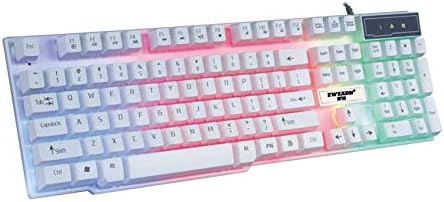
ചിത്രം 5.1: Keyboard with multi-color (RGB) backlighting activated. This image shows the keys illuminated with a spectrum of colors.
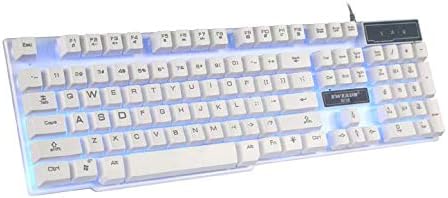
ചിത്രം 5.2: Keyboard with blue backlighting. The keys are illuminated with a solid blue color.

ചിത്രം 5.3: Keyboard with pink backlighting. The keys are illuminated with a solid pink color.
6. പരിപാലനവും പരിചരണവും
To ensure the longevity and proper functioning of your EWEADN GX-50 keyboard, follow these maintenance guidelines:
- വൃത്തിയാക്കൽ:
- വൃത്തിയാക്കുന്നതിനുമുമ്പ് നിങ്ങളുടെ കമ്പ്യൂട്ടറിൽ നിന്ന് കീബോർഡ് വിച്ഛേദിക്കുക.
- മൃദുവായ, ലിൻ്റ് രഹിത തുണി ഉപയോഗിക്കുകampകീക്യാപ്പുകളും പ്രതലവും തുടയ്ക്കാൻ വെള്ളമോ നേരിയ ക്ലീനിംഗ് ലായനിയോ ഉപയോഗിച്ച് നനയ്ക്കുക.
- കഠിനമായ രാസവസ്തുക്കൾ, അബ്രസീവ് ക്ലീനറുകൾ, അല്ലെങ്കിൽ ലായകങ്ങൾ എന്നിവ ഉപയോഗിക്കുന്നത് ഒഴിവാക്കുക.
- താക്കോലുകൾക്കിടയിൽ നിന്ന് പൊടിയും അവശിഷ്ടങ്ങളും നീക്കം ചെയ്യാൻ കംപ്രസ് ചെയ്ത വായു ഉപയോഗിക്കുക.
- സംഭരണം: നേരിട്ടുള്ള സൂര്യപ്രകാശവും കടുത്ത താപനിലയും ഏൽക്കാത്ത തണുത്തതും വരണ്ടതുമായ സ്ഥലത്ത് കീബോർഡ് സൂക്ഷിക്കുക.
- ചോർച്ച ഒഴിവാക്കുക: ആന്തരിക ഘടകങ്ങൾക്ക് കേടുപാടുകൾ സംഭവിക്കാതിരിക്കാൻ കീബോർഡിൽ നിന്ന് ദ്രാവകങ്ങൾ അകറ്റി നിർത്തുക.
7. പ്രശ്നപരിഹാരം
If you encounter issues with your EWEADN GX-50 keyboard, refer to the following common troubleshooting steps:
| പ്രശ്നം | സാധ്യമായ പരിഹാരം |
|---|---|
| കീബോർഡ് പ്രതികരിക്കുന്നില്ല. |
|
| ചില കീകൾ പ്രവർത്തിക്കുന്നില്ല. |
|
| Backlighting is not working or behaving incorrectly. |
|
If the problem persists after trying these solutions, please contact EWEADN customer support for further assistance.
8 സ്പെസിഫിക്കേഷനുകൾ
| ഫീച്ചർ | വിശദാംശങ്ങൾ |
|---|---|
| ബ്രാൻഡ് | Eweadn |
| മോഡൽ നമ്പർ | GX-50 |
| കണക്റ്റിവിറ്റി | യുഎസ്ബി വയർഡ് |
| കീകളുടെ എണ്ണം | 104 |
| കീബോർഡ് ഭാഷ | ഇംഗ്ലീഷ് |
| അനുയോജ്യമായ ഉപകരണങ്ങൾ | പിസി, ലാപ്ടോപ്പ് |
| ഓപ്പറേറ്റിംഗ് സിസ്റ്റം അനുയോജ്യത | Windows 10 (and generally compatible with other Windows versions, macOS, Linux) |
| നിറം | വെള്ള |
| ജല പ്രതിരോധ നില | വാട്ടർ റെസിസ്റ്റൻ്റ് അല്ല |
9. വാറൻ്റിയും പിന്തുണയും
EWEADN products are designed for reliability and performance. For warranty information, please refer to the warranty card included with your purchase or visit the official EWEADN website. If you require technical support or have questions not covered in this manual, please contact EWEADN customer service through their official channels.
വാറന്റി ക്ലെയിമുകൾക്കുള്ള വാങ്ങിയതിന്റെ തെളിവായി നിങ്ങളുടെ വാങ്ങൽ രസീത് സൂക്ഷിക്കുക.


