ആമുഖം
This user manual provides comprehensive instructions for the operation, maintenance, and troubleshooting of the AUTOPHIX 7910 Multi-System OBD2 Scanner. Designed specifically for BMW, Mini, and Rolls-Royce vehicles manufactured after 1996, this tool offers advanced diagnostic capabilities and service functions to assist in vehicle maintenance and repair.
ഉൽപ്പന്നം കഴിഞ്ഞുview
The AUTOPHIX 7910 is an enhanced diagnostic scanner tool equipped with a 2.8-inch LCD display and a user-friendly interface. It supports full system diagnostics and various special functions for compatible vehicles, as well as universal OBD2 functions for all OBD2 compliant vehicles.

Image: The AUTOPHIX 7910 diagnostic scanner, showing its orange and black casing, LCD screen with menu icons, and control buttons.

Image: Diagram illustrating the comprehensive full system scan capabilities of the AUTOPHIX 7910 for BMW vehicles, including brake lines, fuel pump, suspension, engine control, and more.

ചിത്രം: പൊട്ടിത്തെറിച്ച ഒരു view of a car highlighting various systems diagnosable by the AUTOPHIX 7910, such as TPMS, Battery, Oil Service, Engine, SAS, ABS, SRS, DPF, Air Conditioning, Injector Coding, and Transmission.
അനുയോജ്യത
The AUTOPHIX 7910 is primarily designed for BMW, Mini, and Rolls-Royce vehicles. It also supports universal OBD2 functions for most vehicles manufactured after 1996.

Image: Visual representation of compatible vehicle brands: BMW, MINI, and Rolls-Royce, with examples of different series models.
Detailed Compatibility List:

Image: Table detailing BMW 1-Series through 8-Series compatibility by chassis code and year range.

Image: Table detailing BMW X, Z, and I Series compatibility by chassis code and year range.

Image: Table detailing MINI and Rolls-Royce Series compatibility by chassis code and year range.
സജ്ജമാക്കുക
To begin using your AUTOPHIX 7910 scanner, ensure your vehicle's ignition is in the ON position (engine off or running, depending on the function). Locate the vehicle's OBD2 port, typically found under the dashboard on the driver's side. Connect the scanner's OBD2 cable to this port. The device will power on automatically.

ചിത്രം: രണ്ട് views of the AUTOPHIX 7910 scanner, highlighting its 2.8-inch LCD display, USB port, and 16-pin OBDII connector. It also shows the ESC button to cancel or return to the menu, and the OK button to confirm a selection.
പ്രവർത്തന നിർദ്ദേശങ്ങൾ
Basic Operations (Universal OBD2 Functions)
The AUTOPHIX 7910 provides standard OBD2 functions applicable to all OBD2 compliant vehicles. These functions include:
- കോഡുകൾ വായിക്കുക: Retrieves current, pending, and permanent diagnostic trouble codes (DTCs) from the vehicle's control modules.
- മായ്ക്കൽ കോഡുകൾ: വാഹനത്തിന്റെ മെമ്മറിയിൽ നിന്ന് ഡി.ടി.സികൾ മായ്ക്കുകയും മാൽഫങ്ഷൻ ഇൻഡിക്കേറ്റർ എൽ ഓഫാക്കുകയും ചെയ്യുന്നു.amp (MIL) after repairs.
- I/M സന്നദ്ധത: Checks the readiness of the emission monitoring systems to ensure the vehicle is ready for an emissions test.
- ഡാറ്റ സ്ട്രീം: Displays live data parameters from various sensors in text or graph format, providing real-time vehicle performance information.
- ഫ്രീസ് ഫ്രെയിം: Records a snapshot of vehicle operating conditions at the time a fault code was set.
- O2 സെൻസർ ടെസ്റ്റ്: O2 സെൻസർ മോണിറ്റർ പരിശോധനാ ഫലങ്ങൾ വീണ്ടെടുക്കുന്നു.
- ഓൺ-ബോർഡ് മോണിറ്റർ ടെസ്റ്റ്: തുടർച്ചയായി നിരീക്ഷിക്കപ്പെടാത്ത എമിഷനുമായി ബന്ധപ്പെട്ട പവർട്രെയിൻ ഘടകങ്ങളുടെയും സിസ്റ്റങ്ങളുടെയും ഫലങ്ങൾ വീണ്ടെടുക്കുന്നു.
- EVAP സിസ്റ്റം ടെസ്റ്റ്: Initiates a leak test for the vehicle's EVAP system.
- വാഹന വിവരം: Displays the vehicle identification number (VIN), calibration ID (CID), and calibration verification number (CVN).
- BAT പരിശോധന: Monitors the vehicle's 12V battery voltagഇ തത്സമയം.

Image: Screenshots demonstrating the Read Codes, Erase Codes, I/M Readiness, and Data Stream functions on the AUTOPHIX 7910 display.

Image: Screenshots demonstrating DTC lookup, Monitor Status display, EVAP System test initiation, and Vehicle Information display on the AUTOPHIX 7910.
Advanced Diagnostic Functions (BMW/Mini/Rolls-Royce)
For BMW, Mini, and Rolls-Royce vehicles, the AUTOPHIX 7910 offers in-depth diagnostics for various control modules:
- എഞ്ചിൻ സിസ്റ്റം: Reads and clears fault codes, displays live data for engine parameters, and helps identify issues related to engine performance and emissions.
- ട്രാൻസ്മിഷൻ സിസ്റ്റം: Diagnoses issues within the automatic transmission, reads and clears codes, and views live data related to transmission operation.
- SRS (Supplemental Restraint System): Diagnoses and resets SRS crash data, reads and erases airbag system error codes, and turns off the airbag warning light.
- ABS (ആന്റി-ലോക്ക് ബ്രേക്കിംഗ് സിസ്റ്റം): Accesses and performs diagnostics on ABS, reads and clears fault codes, and can assist with brake auto bleed procedures.
- SAS (Steering Angle Sensor): Performs steering angle sensor calibration to store the current steering wheel position as the straight-ahead position.
- A/C (Air Conditioner) System: Supports routine maintenance of air conditioning modules, including adaptation reset, compressor reset, and stepper motor initialization. Reads error codes and displays live data.
- ESP (Electronic Stability Program) System: Monitors vehicle driving conditions to prevent deviation from the desired trajectory, assisting in maintaining dynamic balance.
- മറ്റ് സിസ്റ്റങ്ങൾ: Includes diagnostics for DPF (Diesel Particulate Filter), BMS (Battery Management System), IMMO (Immobilizer), TPMS (Tire Pressure Monitoring System), EVAP (Evaporative Emission Control System), Suspension, Comfort Access, GEAR, Exhaust Gas, Drivetrain, Braking, Navigation, Amplifier, and IIHKA/IHKR.

ചിത്രം: കഴിഞ്ഞുview of various vehicle systems that the AUTOPHIX 7910 can diagnose, including Engine, Transmission, SRS, ABS, SAS, DPF Regeneration, BMS, Injector, IMMO, TPMS, EVAP, Suspension, Comfort Access, GEAR, ESP/EPS, Exhaust Gas, Drivetrain, Battery, Braking, Navigation, Amplifier, and IIHKA/IHKR.

Image: Visuals depicting the internal components of a transmission and an engine, illustrating the scanner's ability to diagnose these critical systems.

Image: Illustrations of an airbag deployment and a brake disc with caliper, representing the SRS (Supplemental Restraint System) and ABS (Anti-lock Braking System) diagnostic capabilities.

Image: Depictions of an electronic parking brake (EPB) button and a steering wheel, indicating the scanner's functions for EPB (Electronic Parking Brake) reset and SAS (Steering Angle Sensor) calibration.

Image: An illustration of a car's air conditioning control panel and a car navigating cones, representing the A/C (Air Conditioner) system and ESP (Electronic Stability Program) system diagnostic capabilities.
Maintenance Functions (BMW/Mini/Rolls-Royce)
The AUTOPHIX 7910 offers a range of service and maintenance functions:
- Battery Registration/Reset: Helps register a new battery with the vehicle's ECU to ensure proper charging and system function.
- ഓയിൽ റീസെറ്റ്: Resets the oil service light and calculates the next oil change interval after an oil change.
- EPB റീസെറ്റ്: Resets the electronic parking brake system after brake pad replacement.
- ഡിപിഎഫ് പുനരുജ്ജീവനം: Initiates forced regeneration of the Diesel Particulate Filter to clear accumulated soot.
- ഇൻജക്ടർ കോഡിംഗ്: Codes new injector numbers into the ECU after replacement.
- ETC Reset (Electronic Throttle Control): Resets the throttle body adaptations.
- TPMS റീസെറ്റ്: Resets the Tire Pressure Monitoring System after tire rotation or sensor replacement.
- Fuel Pump Reset: Resets the fuel pump system, typically after fuel pump replacement.
- CBS Reset (Condition Based Service): Resets various service indicators such as engine oil, spark plugs, front/rear brakes, coolant, diesel particulate filter, brake fluid, microfilter, vehicle inspection, exhaust emission inspection, and vehicle check.
- മറ്റ് പ്രവർത്തനങ്ങൾ: Includes TPMS Reset, Service Reset, ABS Bleeding, BAT Check, Bleeding Routine, Mix-Up Check, Throttle Adaptation, Fuel Pump Reset, ECU Reset, IQA Injector Code, CBS Functions, Interior Monitor, Voice Control, Transfer Case, and EGS Clear Adaptations.
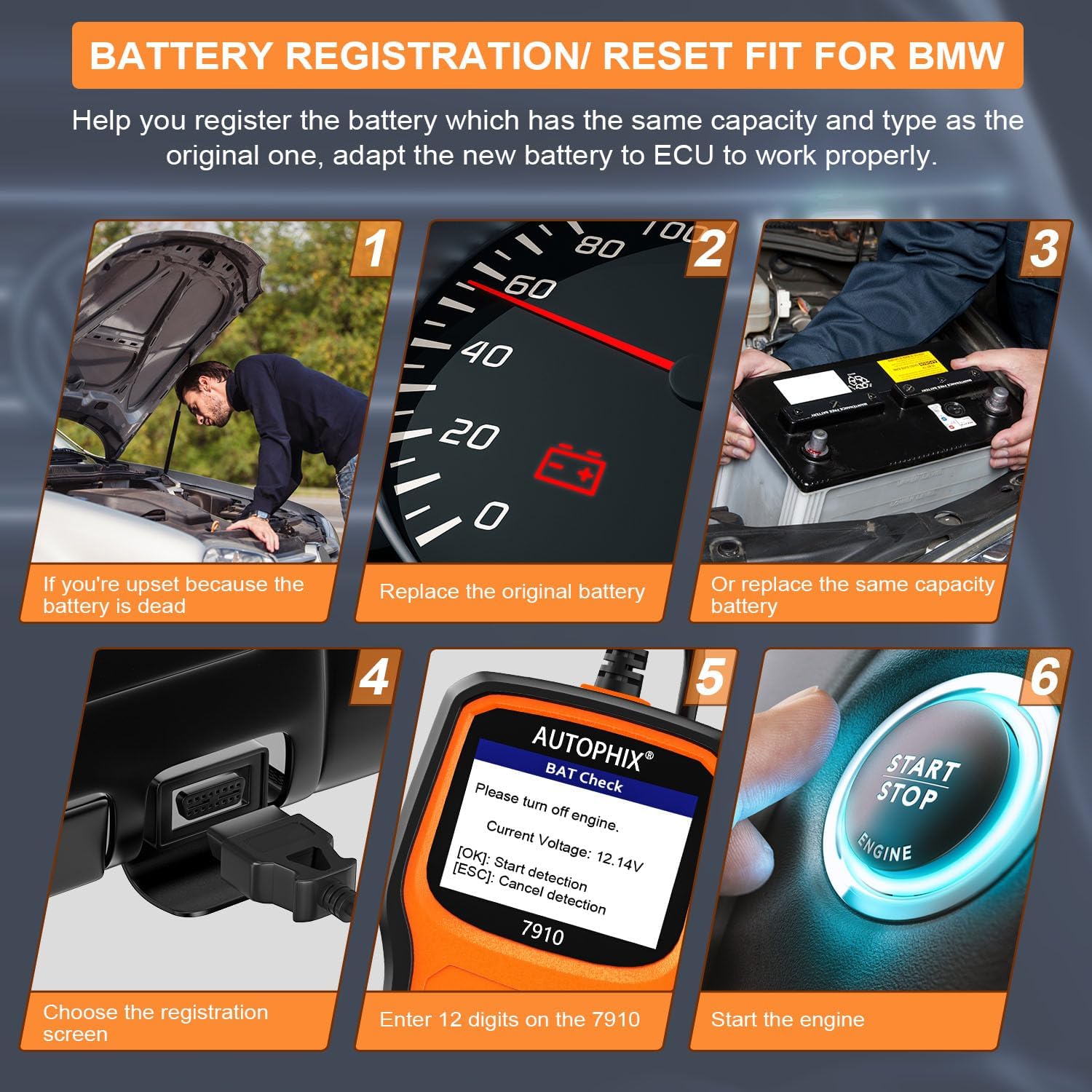
Image: A six-step visual guide demonstrating the battery registration process using the AUTOPHIX 7910, from replacing the battery to starting the engine after registration.

Image: An array of icons representing various maintenance functions available on the AUTOPHIX 7910, such as TPMS Reset, ETC Reset, Oil Reset, Service Reset, EPB Reset, Battery Management, ABS Reset, Fuel Pump Reset, ABS Bleeding, ECU Reset, BAT Check, Bleeding Routine, Mix-Up Check, Throttle Adaptation, DPF Regeneration, IQA Injector Code, CBS Functions, Interior Monitor, Voice Control, Transfer Case, and EGS Clear Adaptations.

Image: Visuals of a DPF system and fuel injectors, illustrating the DPF Regeneration and Injector Coding functions of the scanner.

Image: Depictions of a car wheel and a digital interface, representing the ETC (Electronic Throttle Control) Reset and TPMS (Tire Pressure Monitoring System) Reset functions.

Image: Illustrations of an engine with oil being poured and a fuel pump nozzle, representing the Oil Reset and Fuel Pump Reset functions.
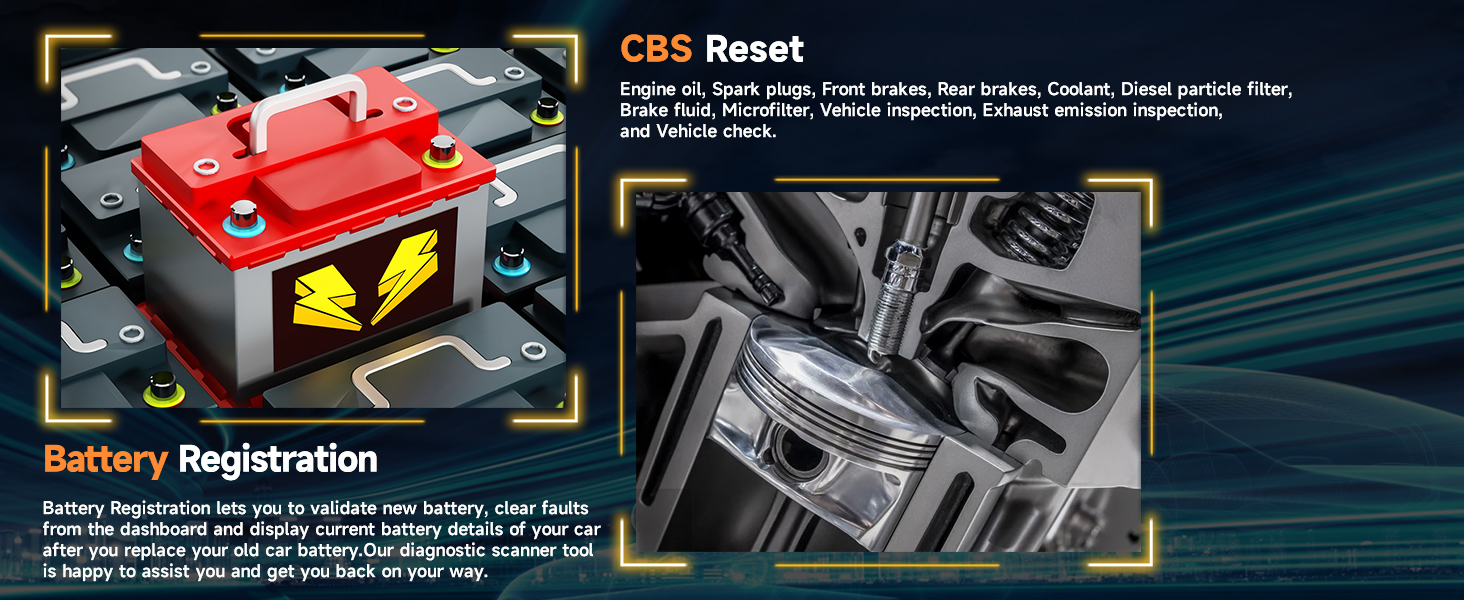
Image: Visuals of a car battery and spark plugs, representing the CBS (Condition Based Service) Reset and Battery Registration functions.
ട്രബിൾഷൂട്ടിംഗ്
If you encounter issues while using the AUTOPHIX 7910, consider the following common troubleshooting steps:
- ശക്തിയില്ല: വാഹനത്തിന്റെ OBD2 പോർട്ടിലേക്ക് OBD2 കേബിൾ സുരക്ഷിതമായി ബന്ധിപ്പിച്ചിട്ടുണ്ടെന്ന് ഉറപ്പാക്കുക. വാഹനത്തിന്റെ ബാറ്ററി വോളിയം പരിശോധിക്കുക.tage.
- ആശയവിനിമയ പിശക്: Verify the vehicle's ignition is ON. Ensure the vehicle is OBD2 compliant. Try connecting to a different vehicle to rule out scanner issues. Check for bent pins in the OBD2 connector.
- Screen Frozen/Unresponsive: Disconnect the scanner from the vehicle and reconnect it. If the issue persists, perform a factory reset if available in the tool's settings (refer to the on-screen menu for "Tool Setup").
- Incorrect Readings/Codes: Ensure the correct vehicle make, model, and year are selected if prompted. Verify the vehicle's condition and symptoms match the diagnostic results.
- Update Issues: Ensure your computer meets the system requirements (Windows 7 or higher). Use the official update software and a stable internet connection.
For persistent issues, refer to the "Feedback" option on the device or contact customer support.

Image: Screenshots showing the Feedback option for support, data recording and replay settings, language selection menu, and real-time battery data display on the AUTOPHIX 7910.
സ്പെസിഫിക്കേഷനുകൾ
| ഫീച്ചർ | വിശദാംശങ്ങൾ |
|---|---|
| ബ്രാൻഡ് | ഓട്ടോഫിക്സ് |
| മോഡൽ | ഓട്ടോഫിക്സ് 7910 |
| ഉൽപ്പന്ന അളവുകൾ | 4"L x 2.5"W x 9"H |
| ഇനത്തിൻ്റെ ഭാരം | 1.1 പൗണ്ട് |
| പ്രദർശിപ്പിക്കുക | 2.8" TFT 262K ട്രൂ കളർ LCD |
| Operating System (for software updates) | Windows 7 അല്ലെങ്കിൽ ഉയർന്നത് |
| പിന്തുണയ്ക്കുന്ന ഭാഷകൾ | English, German, French, Spanish, Russian, Italian, Portuguese, Finnish, Swedish, Danish, Norwegian |
| യു.പി.സി | 739810872070 |
ബോക്സിൽ എന്താണുള്ളത്
- 1 x AUTOPHIX 7910 Diagnostic Scanner Tool
വാറൻ്റിയും പിന്തുണയും
AUTOPHIX provides comprehensive support for its products:
- വാറൻ്റി: A 5-year warranty is provided for the AUTOPHIX 7910.
- സാങ്കേതിക സഹായം: 24/7 technical support is available to assist with any product-related inquiries or issues.
- ആജീവനാന്ത സൗജന്യ അപ്ഡേറ്റുകൾ: The device supports lifetime free software updates to ensure compatibility with new vehicle models and diagnostic functions.

Image: A graphic illustrating customer support, 5-year warranty, multi-language support, and wide vehicle coverage (200,000+ vehicles).
വീഡിയോകളെക്കുറിച്ചുള്ള പ്രധാന കുറിപ്പ്
No official product videos were provided in the product data. Therefore, no videos are embedded in this manual.


