1. ഓവർview
The Rollei Compactline Pocket Digital Camera is designed for ease of use and portability, allowing you to capture high-quality photos and videos on the go. Featuring a 50-megapixel sensor and 16x digital zoom, it delivers clear and vibrant images. Its compact design makes it an ideal companion for travel and everyday moments, ensuring you are always ready to capture memories in 2.7K video resolution.
2. ബോക്സിൽ എന്താണുള്ളത്?
Carefully unpack your Rollei Compactline Pocket Digital Camera and ensure all items are present. If any items are missing or damaged, please contact customer support.
- Rollei Compactline Pocket Camera
- ലിഥിയം-അയൺ ബാറ്ററി
- റിസ്റ്റ് സ്ട്രാപ്പ്
- യുഎസ്ബി-സി കേബിൾ
- ചുമക്കുന്ന സഞ്ചി
- ഉപയോക്തൃ മാനുവൽ

Image: Contents of the Rollei Compactline Pocket package, including the camera, battery, USB-C cable, wrist strap, and carrying pouch.
3. Camera Parts and Controls
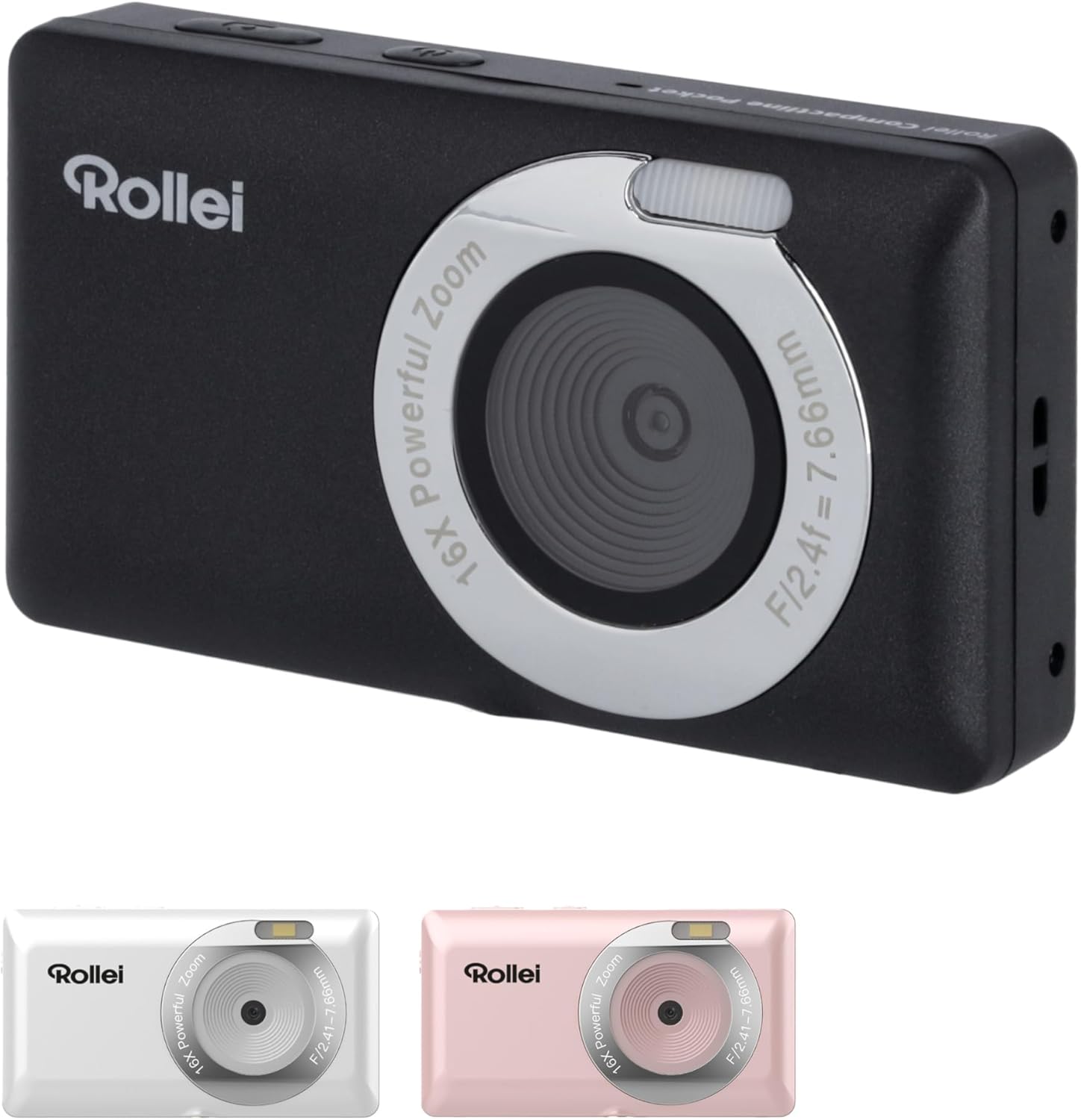
ഫ്രണ്ട് View

ചിത്രം: മുൻഭാഗം view of the Rollei Compactline Pocket camera, showing the lens, flash, and Rollei branding.
- ലെൻസ്: ചിത്രങ്ങളും വീഡിയോകളും പകർത്തുന്നു.
- ഫ്ലാഷ്: കുറഞ്ഞ വെളിച്ചത്തിൽ പ്രകാശം നൽകുന്നു.
- മൈക്രോഫോൺ: Records audio during video capture.
പിൻഭാഗം View
ചിത്രം: പിൻഭാഗം view of the Rollei Compactline Pocket camera, displaying the 2.4-inch IPS screen and control buttons.
- 2.4-ഇഞ്ച് IPS ഡിസ്പ്ലേ: വേണ്ടി viewing live images, playback, and menu navigation.
- പവർ ബട്ടൺ: ക്യാമറ ഓൺ അല്ലെങ്കിൽ ഓഫ് ചെയ്യുന്നു.
- ഷട്ടർ ബട്ടൺ: ഫോട്ടോകൾ എടുക്കുകയോ വീഡിയോ റെക്കോർഡിംഗ് ആരംഭിക്കുകയോ നിർത്തുകയോ ചെയ്യുന്നു.
- Zoom Buttons (W/T): Controls digital zoom (Wide/Telephoto).
- Directional Pad (Up/Down/Left/Right) with OK Button: മെനുകളിലൂടെ നാവിഗേറ്റ് ചെയ്ത് തിരഞ്ഞെടുപ്പുകൾ സ്ഥിരീകരിക്കുന്നു.
- മെനു ബട്ടൺ: ക്യാമറ ക്രമീകരണങ്ങൾ ആക്സസ് ചെയ്യുന്നു.
- DISP ബട്ടൺ: മാറ്റങ്ങൾ വിവരങ്ങൾ പ്രദർശിപ്പിക്കുന്നു.
- പ്ലേബാക്ക് ബട്ടൺ: പ്ലേബാക്ക് മോഡിലേക്ക് പ്രവേശിക്കുന്നു view ഫോട്ടോകളും വീഡിയോകളും.
4. സജ്ജീകരണം
4.1. ബാറ്ററി ഇൻസ്റ്റാളേഷൻ
- ക്യാമറയുടെ അടിയിൽ ബാറ്ററി കമ്പാർട്ട്മെന്റ് കവർ കണ്ടെത്തുക.
- കവർ തുറക്കാൻ ലാച്ച് സ്ലൈഡ് ചെയ്യുക.
- Insert the Lithium-ion battery according to the polarity indicators (+/-).
- സുരക്ഷിതമായി ക്ലിക്ക് ചെയ്യുന്നത് വരെ ബാറ്ററി കമ്പാർട്ട്മെന്റ് കവർ അടയ്ക്കുക.
4.2. മെമ്മറി കാർഡ് ഇൻസ്റ്റാളേഷൻ
A microSD card (not included) is required to store photos and videos.
- ബാറ്ററി കമ്പാർട്ട്മെൻ്റ് കവർ തുറക്കുക.
- Locate the microSD card slot.
- Insert the microSD card with the metal contacts facing down until it clicks into place.
- ബാറ്ററി കമ്പാർട്ട്മെൻ്റ് കവർ അടയ്ക്കുക.
4.3 ബാറ്ററി ചാർജ് ചെയ്യുന്നു
- Connect the small end of the USB-C cable to the camera's USB-C port.
- Connect the large end of the USB-C cable to a USB power adapter (not included) or a computer's USB port.
- ചാർജിംഗ് ഇൻഡിക്കേറ്റർ ലൈറ്റ് പ്രകാശിക്കും. ചാർജിംഗ് പൂർത്തിയാകുമ്പോൾ അത് ഓഫാകും അല്ലെങ്കിൽ നിറം മാറും.
5. ക്യാമറ പ്രവർത്തിപ്പിക്കുക
5.1. പവർ ഓൺ/ഓഫ്
- പവർ ഓണാക്കാൻ: സ്ക്രീൻ പ്രകാശിക്കുന്നത് വരെ പവർ ബട്ടൺ അമർത്തിപ്പിടിക്കുക.
- പവർ ഓഫ് ചെയ്യാൻ: സ്ക്രീൻ ഓഫാകും വരെ പവർ ബട്ടൺ അമർത്തിപ്പിടിക്കുക.
5.2. ഫോട്ടോ എടുക്കൽ
- Turn on the camera. It will typically start in photo mode.
- 2.4 ഇഞ്ച് IPS ഡിസ്പ്ലേ ഉപയോഗിച്ച് നിങ്ങളുടെ ഷോട്ട് ഫ്രെയിം ചെയ്യുക.
- Press the Shutter button halfway down to focus. The focus indicator will confirm when focus is achieved.
- Press the Shutter button fully down to capture the photo.
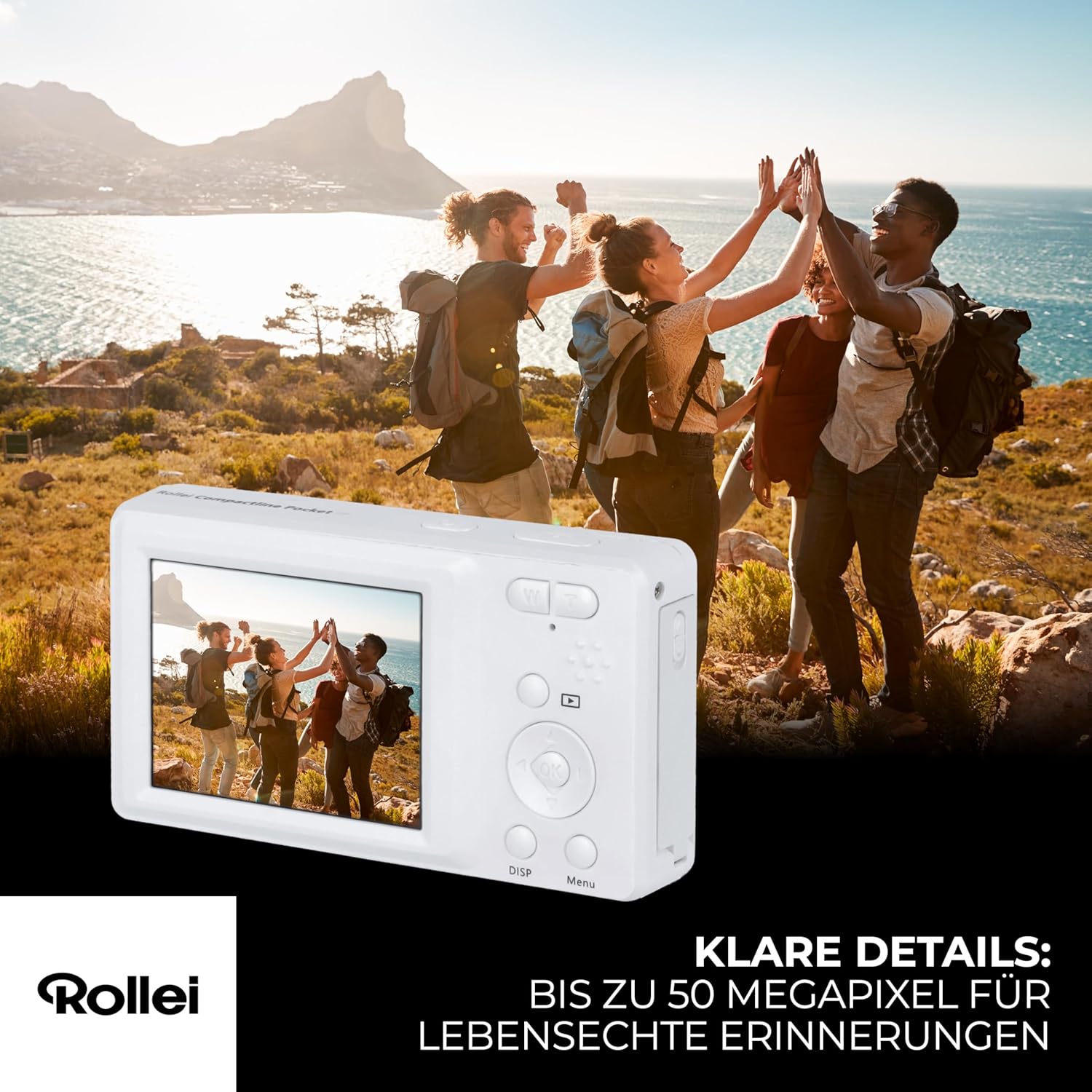
Image: A person holding the Rollei Compactline Pocket camera, demonstrating how to frame a shot for photography.
5.3. വീഡിയോകൾ റെക്കോർഡുചെയ്യുന്നു
- ക്യാമറ ഓണാക്കുക.
- Switch to video mode (refer to the camera's on-screen menu or a dedicated button if available).
- Frame your video.
- Press the Shutter button to start recording. A timer or indicator will appear on the screen.
- റെക്കോർഡിംഗ് നിർത്താൻ ഷട്ടർ ബട്ടൺ വീണ്ടും അമർത്തുക.

Image: The Rollei Compactline Pocket camera's screen showing a vibrant video scene of people enjoying a beach, illustrating video recording capability.
5.4. പ്ലേബാക്ക്
- Press the Playback button to enter playback mode.
- Use the Left/Right directional buttons to navigate through your photos and videos.
- ശരി ബട്ടൺ അമർത്തുക view a video or zoom into a photo.
- പ്ലേബാക്ക് മോഡിൽ നിന്ന് പുറത്തുകടക്കാൻ പ്ലേബാക്ക് ബട്ടൺ വീണ്ടും അമർത്തുക.
5.5. മെനു നാവിഗേഷൻ
- Press the Menu button to access camera settings.
- Use the Up/Down directional buttons to scroll through menu options.
- Use the Left/Right directional buttons to change settings within an option.
- ഒരു തിരഞ്ഞെടുപ്പ് സ്ഥിരീകരിക്കാൻ ശരി ബട്ടൺ അമർത്തുക.
- മെനുവിൽ നിന്ന് പുറത്തുകടക്കാൻ മെനു ബട്ടൺ വീണ്ടും അമർത്തുക.
5.6. ഒരു കമ്പ്യൂട്ടറിലേക്ക് ബന്ധിപ്പിക്കുന്നു
- ക്യാമറ ഓഫാണെന്ന് ഉറപ്പാക്കുക.
- Connect the camera to your computer using the provided USB-C cable.
- Power on the camera. It should appear as a removable disk drive on your computer.
- ഇപ്പോൾ നിങ്ങൾക്ക് നിങ്ങളുടെ കമ്പ്യൂട്ടറിലേക്ക് ഫോട്ടോകളും വീഡിയോകളും കൈമാറാൻ കഴിയും.
6. പരിപാലനം
- ലെൻസ് വൃത്തിയാക്കൽ: Use a soft, lint-free cloth specifically designed for camera lenses. Do not use harsh chemicals.
- ശരീരം വൃത്തിയാക്കൽ: മൃദുവായതും ഉണങ്ങിയതുമായ തുണി ഉപയോഗിച്ച് ക്യാമറ ബോഡി തുടയ്ക്കുക. കഠിനമായ അഴുക്കിന്, ചെറുതായി dampവെള്ളം കൊണ്ട് തുണി.
- സംഭരണം: നേരിട്ടുള്ള സൂര്യപ്രകാശത്തിൽ നിന്നും കടുത്ത താപനിലയിൽ നിന്നും അകന്ന് തണുത്തതും വരണ്ടതുമായ സ്ഥലത്ത് ക്യാമറ സൂക്ഷിക്കുക. കൂടുതൽ നേരം സൂക്ഷിച്ചാൽ ബാറ്ററി നീക്കം ചെയ്യുക.
- ജല പ്രതിരോധം: This camera is not waterproof. Avoid exposure to water or high humidity.
7. പ്രശ്നപരിഹാരം
Camera Will Not Turn On
- ബാറ്ററി ശരിയായി ചേർത്തിട്ടുണ്ടെന്നും പൂർണ്ണമായും ചാർജ്ജ് ചെയ്തിട്ടുണ്ടെന്നും ഉറപ്പാക്കുക.
- Try charging the battery for at least 30 minutes.
മോശം ഇമേജ് ക്വാളിറ്റി
- ലെൻസ് വൃത്തിയുള്ളതാണോയെന്നും അഴുക്കോ പൊടിയോ ഇല്ലെന്നും പരിശോധിക്കുക.
- Ensure there is adequate lighting for your shot.
- Avoid excessive digital zoom, which can reduce image clarity.
മെമ്മറി കാർഡ് പിശക്
- മെമ്മറി കാർഡ് ശരിയായി ചേർത്തിട്ടുണ്ടെന്ന് ഉറപ്പാക്കുക.
- Try formatting the memory card (this will erase all data, so back up first).
- Test with a different, compatible microSD card.
ബാറ്ററി ചാർജുചെയ്യുന്നില്ല
- Verify the USB-C cable is securely connected to both the camera and the power source.
- Try using a different USB power adapter or computer USB port.
- Ensure the battery is not damaged.
8 സ്പെസിഫിക്കേഷനുകൾ
| ഫീച്ചർ | സ്പെസിഫിക്കേഷൻ |
|---|---|
| ബ്രാൻഡ് | റോളി |
| മോഡലിൻ്റെ പേര് | കോംപാക്റ്റ്ലൈൻ പോക്കറ്റ് |
| മോഡൽ നമ്പർ | 10858 |
| ഫലപ്രദമായ സ്റ്റിൽ റെസല്യൂഷൻ | 52 മെഗാപിക്സലുകൾ |
| വീഡിയോ റെസല്യൂഷൻ | 2160p (2.7K) |
| ഡിജിറ്റൽ സൂം | 16x |
| ഒപ്റ്റിക്കൽ സൂം | 1x (Fixed Lens) |
| പ്രദർശിപ്പിക്കുക | 2.4 ഇഞ്ച് ഐപിഎസ് സ്ക്രീൻ |
| അപ്പേർച്ചർ | F2.8 |
| ഫോക്കൽ ലെങ്ത് | 16 മി.മീ |
| ISO ശ്രേണി | 100 മുതൽ 6400 വരെ |
| ഇമേജ് സ്റ്റെബിലൈസേഷൻ | അതെ |
| ബാറ്ററി തരം | ലിഥിയം-അയൺ |
| കണക്റ്റിവിറ്റി | USB |
| ഇനത്തിൻ്റെ ഭാരം | 100 ഗ്രാം |
| ഉൽപ്പന്ന അളവുകൾ (L x W x H) | 11 x 9 x 7 സെ.മീ |
| ജല പ്രതിരോധ നില | വാട്ടർപ്രൂഫ് അല്ല |
9. വാറൻ്റിയും പിന്തുണയും
വാറൻ്റി വിവരങ്ങൾ
The Rollei Compactline Pocket Digital Camera comes with a 24-Month Exchange Guarantee വാങ്ങിയ തീയതി മുതൽ. വാറന്റി ക്ലെയിമുകൾക്കായി നിങ്ങളുടെ വാങ്ങിയതിന്റെ തെളിവ് സൂക്ഷിക്കുക.
ഉപഭോക്തൃ പിന്തുണ
Our experts are available to assist you with any questions or issues you may encounter.
- ഫോൺ പിന്തുണ: +49 40 270 750 277
- പ്രവർത്തന സമയം: തിങ്കൾ മുതൽ വെള്ളി വരെ, രാവിലെ 10:00 മുതൽ വൈകുന്നേരം 4:00 വരെ (CET)


