ആമുഖം
This user manual provides detailed instructions for the installation, operation, and maintenance of your NEWCARE 4x2 HDMI Matrix Back-up Controller. Please read this manual thoroughly before using the product to ensure proper functionality and to prevent damage.
The NEWCARE 4x2 HDMI Matrix Back-up Controller is designed to provide seamless switching and distribution of HDMI signals from up to four input sources to two independent HDMI displays. It supports various resolutions and is ideal for home theater, conference rooms, and educational environments.
സുരക്ഷാ വിവരങ്ങൾ
- ഈ യൂണിറ്റ് വെള്ളം, ഈർപ്പം, അല്ലെങ്കിൽ അമിതമായ ഈർപ്പം എന്നിവയ്ക്ക് വിധേയമാക്കരുത്.
- അമിതമായി ചൂടാക്കുന്നത് തടയാൻ ഉപകരണത്തിന് ചുറ്റും ശരിയായ വായുസഞ്ചാരം ഉറപ്പാക്കുക.
- യൂണിറ്റിനൊപ്പം നൽകിയിട്ടുള്ള പവർ അഡാപ്റ്റർ മാത്രം ഉപയോഗിക്കുക.
- Do not attempt to repair or modify the unit yourself. Refer all servicing to qualified personnel.
- Keep the device away from sources of heat, direct sunlight, and strong magnetic fields.
- Clean the unit with a soft, dry cloth. Do not use liquid or aerosol cleaners.
പാക്കേജ് ഉള്ളടക്കം
പാക്കേജിലെ ഉള്ളടക്കങ്ങൾ ശ്രദ്ധാപൂർവ്വം പരിശോധിക്കുക. എന്തെങ്കിലും ഇനങ്ങൾ നഷ്ടപ്പെട്ടാലോ കേടുപാടുകൾ സംഭവിച്ചാലോ, ഉടൻ തന്നെ നിങ്ങളുടെ റീട്ടെയിലറെ ബന്ധപ്പെടുക.
- 1 x NEWCARE 4x2 HDMI Matrix Back-up Controller
- 1 x IR Remote Control (as shown in product images)
- 1 x 5V DC പവർ അഡാപ്റ്റർ
- 1 x ഉപയോക്തൃ മാനുവൽ (ഈ പ്രമാണം)
ഉൽപ്പന്നം കഴിഞ്ഞുview
The NEWCARE 4x2 HDMI Matrix Back-up Controller is a compact device designed for efficient HDMI signal management. Below are images illustrating the remote control, which is the primary interface for this back-up controller.

ചിത്രം 1: ഫ്രണ്ട് view of the NEWCARE 4x2 HDMI Matrix remote control. This image shows the layout of the buttons for selecting inputs for Output 1 and Output 2. There are four input buttons (IN1, IN2, IN3, IN4) for each output, clearly labeled.
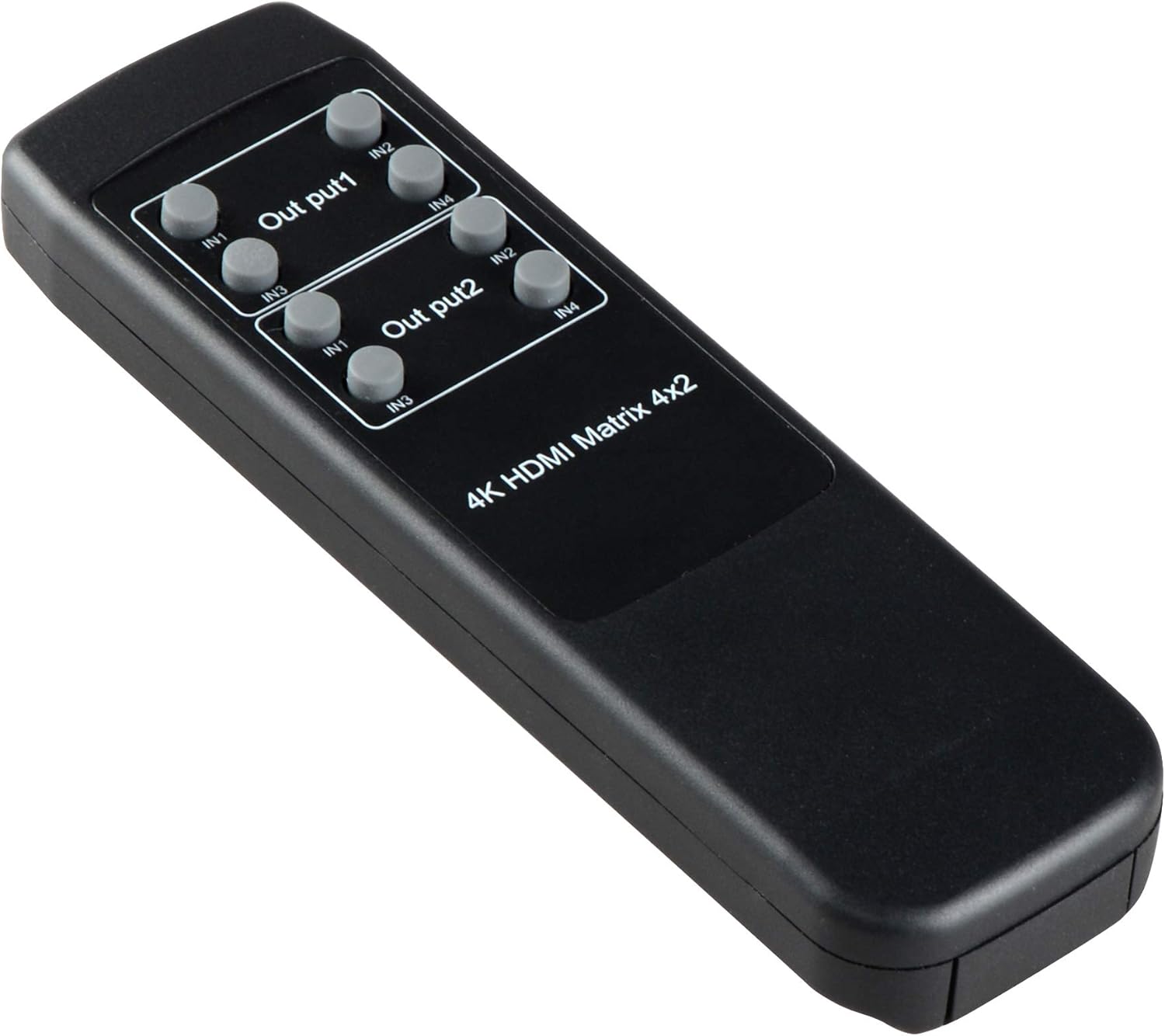
ചിത്രം 2: കോണാകൃതിയിലുള്ളത് view of the NEWCARE 4x2 HDMI Matrix remote control. This perspective highlights the ergonomic design of the remote, showing the slight curvature and button placement from a side angle.

ചിത്രം 3: മറ്റൊരു ആംഗിൾ view of the NEWCARE 4x2 HDMI Matrix remote control. This image provides a different side angle, further illustrating the physical dimensions and button accessibility.
വിദൂര നിയന്ത്രണ പ്രവർത്തനങ്ങൾ:
- Output 1 (OUT1) Buttons: Selects the input source (IN1, IN2, IN3, IN4) for the first HDMI output.
- Output 2 (OUT2) Buttons: Selects the input source (IN1, IN2, IN3, IN4) for the second HDMI output.
- The remote control allows for independent switching of inputs for each output.
സജ്ജമാക്കുക
- പവർ ഓഫ് ഡിവൈസുകൾ: Ensure all HDMI source devices (e.g., Blu-ray player, game console) and display devices (e.g., TV, projector) are powered off before making connections.
- HDMI ഉറവിടങ്ങൾ ബന്ധിപ്പിക്കുക: Connect your HDMI source devices to the HDMI IN ports (IN1, IN2, IN3, IN4) on the NEWCARE 4x2 HDMI Matrix.
- HDMI ഡിസ്പ്ലേകൾ ബന്ധിപ്പിക്കുക: Connect your HDMI display devices to the HDMI OUT ports (OUT1, OUT2) on the NEWCARE 4x2 HDMI Matrix.
- പവർ അഡാപ്റ്റർ ബന്ധിപ്പിക്കുക: Plug the 5V DC power adapter into the DC 5V port on the matrix and then into a power outlet.
- പവർ ഓൺ ഉപകരണങ്ങൾ: Power on the NEWCARE 4x2 HDMI Matrix, followed by your HDMI display devices, and then your HDMI source devices.
കുറിപ്പ്: It is recommended to use high-quality HDMI cables for optimal performance, especially for 4K resolutions.
പ്രവർത്തന നിർദ്ദേശങ്ങൾ
The NEWCARE 4x2 HDMI Matrix Back-up Controller is primarily operated using the included IR remote control.
- Selecting Input for Output 1: To switch the input source for the display connected to Output 1, press the corresponding IN1, IN2, IN3, or IN4 button under the "Output 1" section on the remote control.
- Selecting Input for Output 2: To switch the input source for the display connected to Output 2, press the corresponding IN1, IN2, IN3, or IN4 button under the "Output 2" section on the remote control.
- Each output can display a different input source simultaneously, or both outputs can display the same input source.
Ensure the remote control is pointed towards the IR receiver on the HDMI matrix unit for proper signal transmission.
മെയിൻ്റനൻസ്
- വൃത്തിയാക്കൽ: Use a soft, dry cloth to clean the surface of the unit. Do not use abrasive cleaners, solvents, or strong detergents, as they may damage the finish.
- സംഭരണം: If the unit is not in use for an extended period, disconnect it from the power outlet and store it in a cool, dry place.
- വെൻ്റിലേഷൻ: അമിതമായി ചൂടാകുന്നത് തടയാൻ യൂണിറ്റിലെ വെന്റിലേഷൻ ഓപ്പണിംഗുകൾ അടഞ്ഞിട്ടില്ലെന്ന് ഉറപ്പാക്കുക.
ട്രബിൾഷൂട്ടിംഗ്
| പ്രശ്നം | സാധ്യമായ കാരണം | പരിഹാരം |
|---|---|---|
| ഡിസ്പ്ലേയിൽ വീഡിയോ ഔട്ട്പുട്ട് ഇല്ല. |
|
|
| മോശം വീഡിയോ നിലവാരം അല്ലെങ്കിൽ മിന്നൽ. |
|
|
| റിമോട്ട് കൺട്രോൾ പ്രവർത്തിക്കുന്നില്ല. |
|
|
സ്പെസിഫിക്കേഷനുകൾ
| ഫീച്ചർ | വിശദാംശങ്ങൾ |
|---|---|
| മോഡൽ | B07RW2B1RK |
| ഇൻപുട്ടുകൾ | 4 x HDMI |
| ഔട്ട്പുട്ടുകൾ | 2 x HDMI |
| പിന്തുണയ്ക്കുന്ന പ്രമേയങ്ങൾ | Up to 4K (specific resolutions may vary based on connected devices) |
| നിയന്ത്രണ രീതി | IR റിമോട്ട് കൺട്രോൾ |
| വൈദ്യുതി വിതരണം | DC 5V (ഉൾപ്പെടുത്തിയ അഡാപ്റ്റർ വഴി) |
| പാക്കേജ് അളവുകൾ | 7 x 6.3 x 0.8 ഇഞ്ച് |
| ഇനത്തിൻ്റെ ഭാരം | 3.2 ഔൺസ് |
| നിർമ്മാതാവ് | ന്യൂകെയർ |
വാറൻ്റിയും പിന്തുണയും
NEWCARE products are designed and manufactured to the highest quality standards. This product comes with a standard manufacturer's warranty. For specific warranty terms and conditions, please refer to the warranty card included with your purchase or visit the official NEWCARE webസൈറ്റ്.
If you encounter any issues or have questions regarding your NEWCARE 4x2 HDMI Matrix Back-up Controller, please contact NEWCARE customer support. You can usually find contact information on the product packaging, the official webസൈറ്റ്, അല്ലെങ്കിൽ നിങ്ങളുടെ റീട്ടെയിലർ വഴി.
Please have your product model number (B07RW2B1RK) and purchase details ready when contacting support.