1. ആമുഖം
This manual provides comprehensive instructions for the Meetion K9420 RGB Custom Macro Pro Membrane Gaming Keyboard. Please read this manual carefully before using the product to ensure proper operation and to maximize your gaming and productivity experience. This keyboard features programmable RGB backlighting, custom macro keys, and multimedia shortcuts designed for enhanced user interaction.
2. സജ്ജീകരണം
2.1 പാക്കേജ് ഉള്ളടക്കം
- Meetion K9420 RGB Custom Macro Pro Membrane Gaming Keyboard
- ഉപയോക്തൃ മാനുവൽ (ഈ പ്രമാണം)
2.2 കീബോർഡ് ബന്ധിപ്പിക്കുന്നു
- Unpack the Meetion K9420 keyboard from its packaging.
- നിങ്ങളുടെ കമ്പ്യൂട്ടറിൽ ലഭ്യമായ USB പോർട്ട് കണ്ടെത്തുക.
- കീബോർഡിന്റെ USB കണക്റ്റർ USB പോർട്ടിലേക്ക് പ്ലഗ് ചെയ്യുക.
- Your operating system will automatically detect and install the necessary drivers. No additional driver installation is typically required for basic functionality.
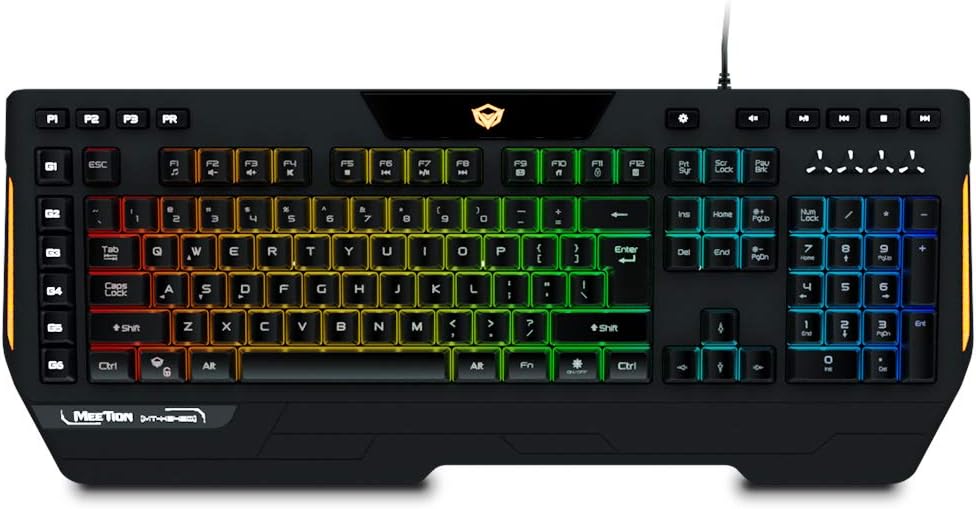
ചിത്രം 2.1: The Meetion K9420 RGB Custom Macro Pro Membrane Gaming Keyboard. This image displays the full layout of the keyboard, including the main alphanumeric keys, function keys, numeric keypad, and dedicated macro keys, all illuminated with RGB backlighting.
2.3 സോഫ്റ്റ്വെയർ ഇൻസ്റ്റാളേഷൻ (ഓപ്ഷണൽ)
For advanced customization, such as detailed RGB effects and macro programming, Meetion may provide dedicated software. Please visit the official Meetion website to check for and download the latest software for the K9420 model. Follow the on-screen instructions for installation.
3. പ്രവർത്തന നിർദ്ദേശങ്ങൾ
3.1 അടിസ്ഥാന കീ പ്രവർത്തനങ്ങൾ
The Meetion K9420 features a standard 104-key layout with additional dedicated keys for enhanced functionality.
- സ്റ്റാൻഡേർഡ് കീകൾ: Function as a typical keyboard for typing and general computer use.
- ആന്റി ഗോസ്റ്റിംഗ്: The keyboard supports full key anti-ghosting, ensuring that multiple simultaneous key presses are registered accurately, which is crucial for gaming.
- വിൻഡോസ് കീ ലോക്ക്: A dedicated key allows you to disable the Windows key to prevent accidental presses during gameplay.
ചിത്രം 3.1: കഴിഞ്ഞുview of the Meetion K9420's programmable features. This image highlights the palm rest, Windows key lock, anti-ghosting for 19 keys, 4 macro keys, 6 macro keys, multimedia keys, voice response backlight effect, arrow function change to WASD, and modern design elements.
3.2 RGB ബാക്ക്ലൈറ്റ് നിയന്ത്രണം
The keyboard features customizable RGB backlighting. Specific keys or key combinations are used to cycle through various lighting modes, adjust brightness, and change colors. Refer to the keyboard's dedicated software for advanced customization options.
3.3 മാക്രോ കീ പ്രോഗ്രാമിംഗ്
The K9420 includes dedicated macro keys (G1-G6) that can be programmed to execute complex commands or sequences of actions with a single press. Programming is typically done through the Meetion software. Follow the software's instructions to record and assign macros.
3.4 മൾട്ടിമീഡിയ കുറുക്കുവഴികൾ
The keyboard integrates 12 multimedia shortcuts, usually accessible via the 'Fn' key combined with the F1-F12 keys. These shortcuts allow quick control over media playback, volume, and other system functions.
3.5 എർഗണോമിക് ഡിസൈൻ
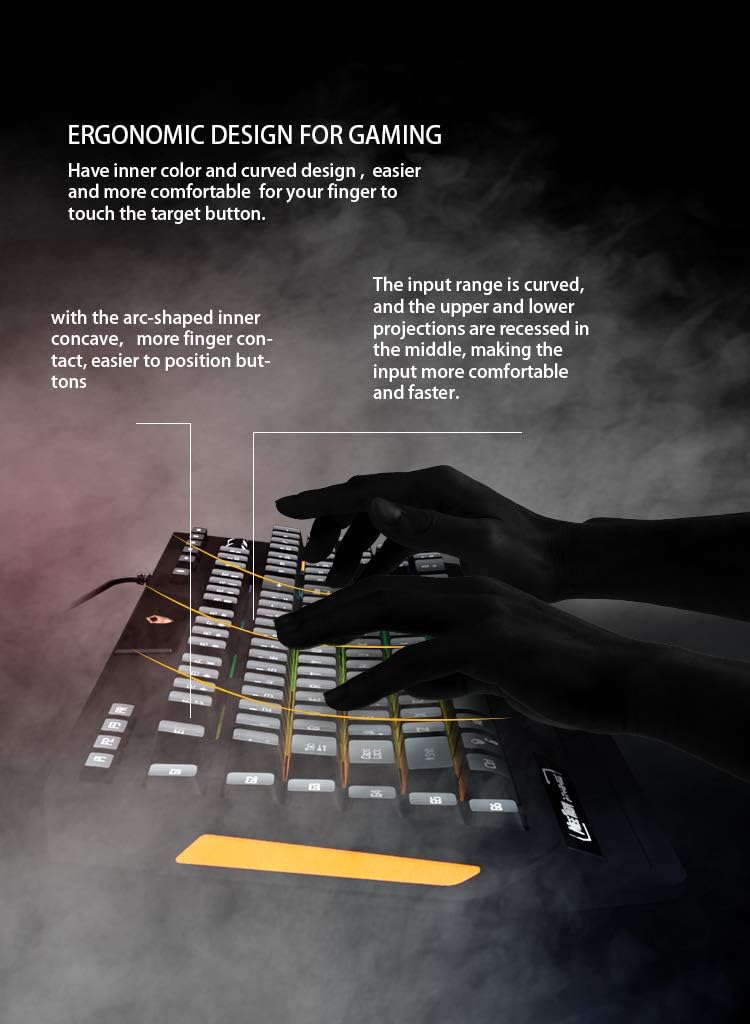
The keyboard is designed with an ergonomic structure, including a dedicated palm rest, to enhance comfort during extended use.
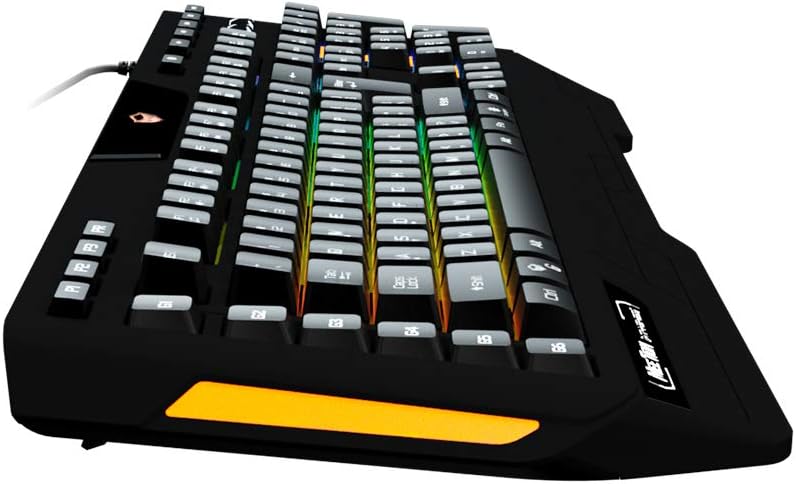
ചിത്രം 3.2: The dedicated palm rest of the Meetion K9420 keyboard. This feature is designed to provide comfortable support for the user's wrist, reducing strain during prolonged use.

ചിത്രം 3.3: Illustration of the ergonomic design of the Meetion K9420 keyboard. This image highlights the curved input range and recessed upper and lower projections, which contribute to a more comfortable and efficient typing experience.
4. പരിപാലനം
4.1 കീബോർഡ് വൃത്തിയാക്കൽ
- വൃത്തിയാക്കുന്നതിനുമുമ്പ് നിങ്ങളുടെ കമ്പ്യൂട്ടറിൽ നിന്ന് കീബോർഡ് വിച്ഛേദിക്കുക.
- Use a soft, dry cloth to wipe down the surface of the keyboard.
- ദുശ്ശാഠ്യമുള്ള അഴുക്കിന്, ലഘുവായി ഡിampവെള്ളം അല്ലെങ്കിൽ നേരിയതും ഉരച്ചിലുകളില്ലാത്തതുമായ ക്ലീനിംഗ് ലായനി ഉപയോഗിച്ച് തുണി തുടയ്ക്കുക. അമിതമായ ഈർപ്പം ഒഴിവാക്കുക.
- കീക്യാപ്പുകൾക്കിടയിൽ നിന്ന് പൊടിയും അവശിഷ്ടങ്ങളും നീക്കം ചെയ്യാൻ കംപ്രസ് ചെയ്ത വായു ഉപയോഗിക്കുക.
- കീബോർഡ് ഒരു ദ്രാവകത്തിലും മുക്കരുത്.
4.2 പൊതു പരിചരണം
- Avoid exposing the keyboard to extreme temperatures, direct sunlight, or high humidity.
- Do not drop or subject the keyboard to strong impacts.
- Keep liquids away from the keyboard to prevent damage.
5. പ്രശ്നപരിഹാരം
If you encounter issues with your Meetion K9420 keyboard, please refer to the following common solutions:
- കീബോർഡ് പ്രതികരിക്കുന്നില്ല: USB കേബിൾ കീബോർഡിലേക്കും കമ്പ്യൂട്ടറിലേക്കും സുരക്ഷിതമായി ബന്ധിപ്പിച്ചിട്ടുണ്ടെന്ന് ഉറപ്പാക്കുക. മറ്റൊരു USB പോർട്ട് പരീക്ഷിക്കുക. നിങ്ങളുടെ കമ്പ്യൂട്ടർ പുനരാരംഭിക്കുക.
- RGB ലൈറ്റിംഗ് പ്രവർത്തിക്കുന്നില്ല അല്ലെങ്കിൽ തെറ്റാണ്: Check if the lighting is enabled via the keyboard's dedicated key. If using software, ensure it is running and configured correctly.
- Macros not functioning: Verify that the macros are correctly programmed in the Meetion software. Ensure the software is running in the background if required for macro execution. Some reviews indicate potential software limitations with certain key combinations (e.g., Alt, Ctrl, Windows key).
- രജിസ്റ്റർ ചെയ്യാത്ത കീകൾ: Clean the affected keys to remove any debris. If the issue persists, it may indicate a hardware fault.
- സോഫ്റ്റ്വെയർ പ്രശ്നങ്ങൾ: If the Meetion software is not working correctly, try reinstalling it from the official Meetion webസൈറ്റ്. നിങ്ങളുടെ ഓപ്പറേറ്റിംഗ് സിസ്റ്റം കാലികമാണെന്ന് ഉറപ്പാക്കുക.
6 സ്പെസിഫിക്കേഷനുകൾ
The Meetion K9420 is a membrane gaming keyboard with the following key specifications:

ചിത്രം 6.1: പൊട്ടിത്തെറിച്ചു view diagram of the Meetion K9420's membrane mechanism. This illustration details the layers of the keyboard, including key caps, upper case, silicone membrane, top PCB layer, backlight layer, bottom PCB layer, metal plate, and bottom case, demonstrating its construction.
| ഫീച്ചർ | വിവരണം |
|---|---|
| മോഡൽ നമ്പർ | MT-K9420 |
| കണക്റ്റിവിറ്റി | USB |
| കീബോർഡ് തരം | മെംബ്രെൻ ഗെയിമിംഗ് കീബോർഡ് |
| ബാക്ക്ലൈറ്റ് | പ്രോഗ്രാം ചെയ്യാവുന്ന RGB |
| മാക്രോ കീകൾ | Dedicated, Programmable |
| ആൻ്റി-ഗോസ്റ്റിംഗ് | പൂർണ്ണ കീ ആന്റി-ഗോസ്റ്റിംഗ് |
| മൾട്ടിമീഡിയ കുറുക്കുവഴികൾ | 12 |
| പാം റെസ്റ്റ് | സംയോജിപ്പിച്ചത് |
| അളവുകൾ | ഏകദേശം 52.07 x 24.76 x 4.44 സെ.മീ |
| ഭാരം | ഏകദേശം 990 ഗ്രാം |
| അനുയോജ്യമായ ഉപകരണങ്ങൾ | പിസി & ലാപ്ടോപ്പ് |
7. വാറൻ്റിയും പിന്തുണയും
Meetion products typically come with a standard manufacturer's warranty. For specific warranty terms and conditions, please refer to the warranty card included with your product or visit the official Meetion website. For technical support, driver downloads, or further assistance, please contact Meetion customer service through their official channels.
ഉദ്യോഗസ്ഥൻ Webസൈറ്റ്: www.meetion.com (Please verify the exact URL for support and downloads)


