ഉൽപ്പന്നം കഴിഞ്ഞുview
The COMICA CVM-SPX-TC is a USB-C to 3.5mm audio adapter designed to connect external microphones and headphones to USB Type-C smartphones and tablets. It supports both 3.5mm TRS and TRRS microphones and features real-time monitoring capabilities.
പ്രധാന സവിശേഷതകൾ:
- USB-C to 3.5mm Mic Adapter: Enables connection of video microphones, lavalier microphones, and other microphones to Android smartphones or tablets via USB-C.
- Android Phone Compatibility: Universal compatibility with Samsung, Huawei, Google, and other USB Type-C smartphones, supporting both 3.5mm TRS and TRRS audio plugs.
- തത്സമയ നിരീക്ഷണം: Equipped with a Mic/Phone monitor switch button, allowing users to monitor recording effects in real-time.
- Clear Audio Transmission: Designed to maintain high audio quality during recording, enhancing video blogs and other audio capture.

Image: The COMICA CVM-SPX-TC adapter showing its USB Type-C connector and the 3.5mm microphone port, along with the Mic/Phone Audio Monitor Switch.
സജ്ജീകരണ ഗൈഡ്
- സ്മാർട്ട്ഫോണുമായി ബന്ധിപ്പിക്കുക: Insert the USB Type-C connector of the CVM-SPX-TC adapter into the USB-C port of your Android smartphone or tablet.
- മൈക്രോഫോൺ ബന്ധിപ്പിക്കുക: Plug your 3.5mm TRS or TRRS microphone into the 3.5mm microphone port on the adapter.
- ഹെഡ്ഫോണുകൾ ബന്ധിപ്പിക്കുക (ഓപ്ഷണൽ): If real-time monitoring is desired, plug your 3.5mm headphones into the designated headphone jack on the adapter.
- കണക്ഷൻ സ്ഥിരീകരിക്കുക: Ensure all connections are secure. The adapter may have an indicator light to confirm connection (refer to product for specific indicator behavior).
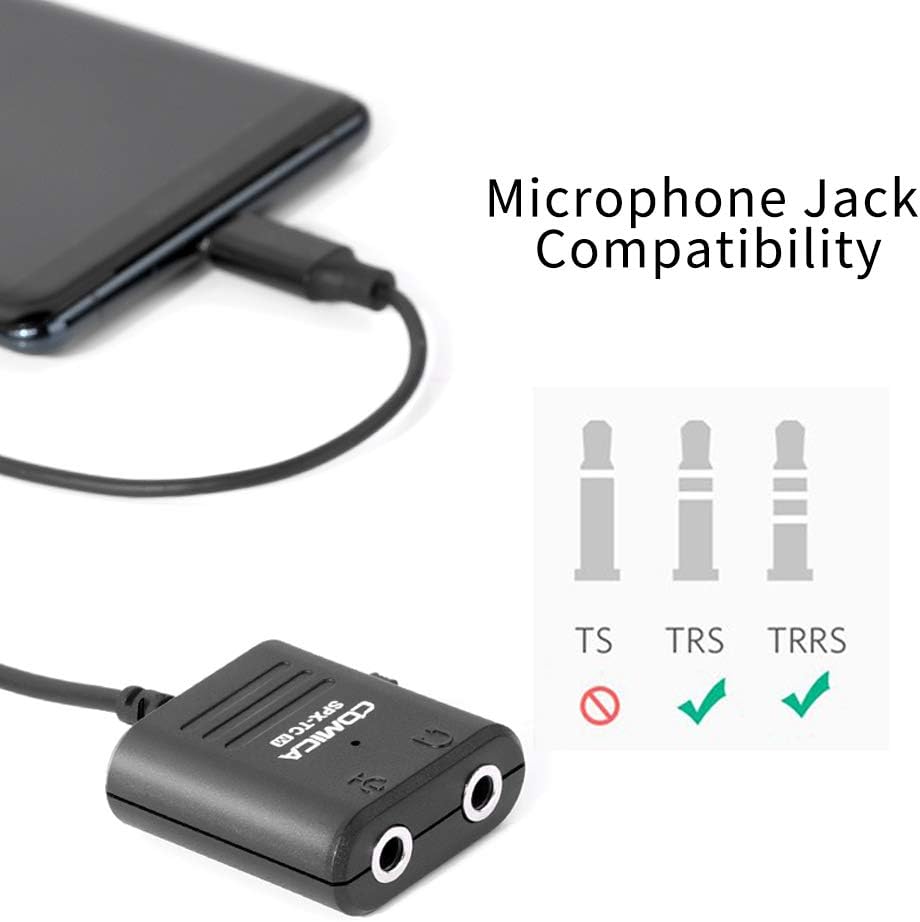
Image: The adapter connected to a smartphone, demonstrating compatibility with both TRS and TRRS microphone jacks. TS jacks are not supported.
പ്രവർത്തന നിർദ്ദേശങ്ങൾ
റെക്കോർഡിംഗ് ഓഡിയോ:
- Launch Recording App: Open your preferred audio or video recording application on your smartphone. For Android systems, if the default video app does not work, try a third-party video application.
- ഓഡിയോ ഇൻപുട്ട് തിരഞ്ഞെടുക്കുക: In your recording app settings, ensure the external microphone (via USB-C) is selected as the audio input source.
- റെക്കോർഡിംഗ് ആരംഭിക്കുക: Begin your audio or video recording.
തത്സമയ നിരീക്ഷണം:
- ഹെഡ്ഫോണുകൾ ബന്ധിപ്പിക്കുക: Ensure headphones are connected to the adapter's headphone jack.
- Use Monitor Switch: The CVM-SPX-TC features a Mic/Phone monitor switch.
- Switch to "Mic" position to monitor the audio input from your microphone.
- Switch to "Phone" position to monitor the audio output from your phone (e.g., playback).
- വോളിയം ക്രമീകരിക്കുക: Adjust the monitoring volume through your smartphone's volume controls.

Image: A user demonstrating real-time audio monitoring during video recording on a smartphone using the CVM-SPX-TC adapter and headphones.
Video: This video demonstrates the COMICA CVM-SPX-TC adapter, highlighting its use for simultaneous recording and listening. It clarifies that the product is for Samsung devices, not iPhones, and advises caution against bending the USB-C cable.
പരിചരണവും പരിപാലനവും
- വൃത്തിയാക്കൽ: Use a soft, dry cloth to clean the adapter. Avoid liquid cleaners or solvents.
- സംഭരണം: നേരിട്ടുള്ള സൂര്യപ്രകാശവും കടുത്ത താപനിലയും ഏൽക്കാത്ത ഒരു തണുത്തതും വരണ്ടതുമായ സ്ഥലത്ത് അഡാപ്റ്റർ സൂക്ഷിക്കുക.
- കേബിൾ കെയർ: ആന്തരിക വയറിന് കേടുപാടുകൾ സംഭവിക്കുന്നത് തടയാൻ USB-C കേബിളിൽ മൂർച്ചയുള്ള വളവുകളോ അമിതമായി വലിക്കലോ ഒഴിവാക്കുക.
- കണക്റ്റർ സംരക്ഷണം: Keep the USB-C and 3.5mm ports free from dust and debris. Use protective caps if available.
ട്രബിൾഷൂട്ടിംഗ്
| പ്രശ്നം | സാധ്യമായ കാരണം | പരിഹാരം |
|---|---|---|
| മൈക്രോഫോണിൽ നിന്ന് ഓഡിയോ ഇൻപുട്ട് ഇല്ല. |
|
|
| No real-time monitoring. |
|
|
| Adapter not recognized by phone. |
|
|
സ്പെസിഫിക്കേഷനുകൾ
- മോഡൽ: CVM-SPX-TC
- കണക്റ്റർ തരം: USB Type-C (Male) to 3.5mm (Female)
- അനുയോജ്യത: Android Smartphones and Tablets with USB Type-C port (e.g., Samsung, Huawei, Google). Supports 3.5mm TRS & TRRS microphones.
- പ്രവർത്തനക്ഷമത: Microphone input, headphone output, real-time monitoring (Mic/Phone switch).
- ഉൽപ്പന്ന അളവുകൾ: 5.11 x 3.14 x 0.59 ഇഞ്ച്
- ഇനത്തിൻ്റെ ഭാരം: 0.64 ഔൺസ്
- നിർമ്മാതാവ്: കോമിക്ക


