1. ആമുഖം
വാങ്ങിയതിന് നന്ദി.asing the Acme Cargo Metal Frame Desk and Hutch. This manual provides essential information for the safe assembly, proper use, and maintenance of your new furniture. Please read these instructions carefully before beginning assembly and retain this manual for future reference.
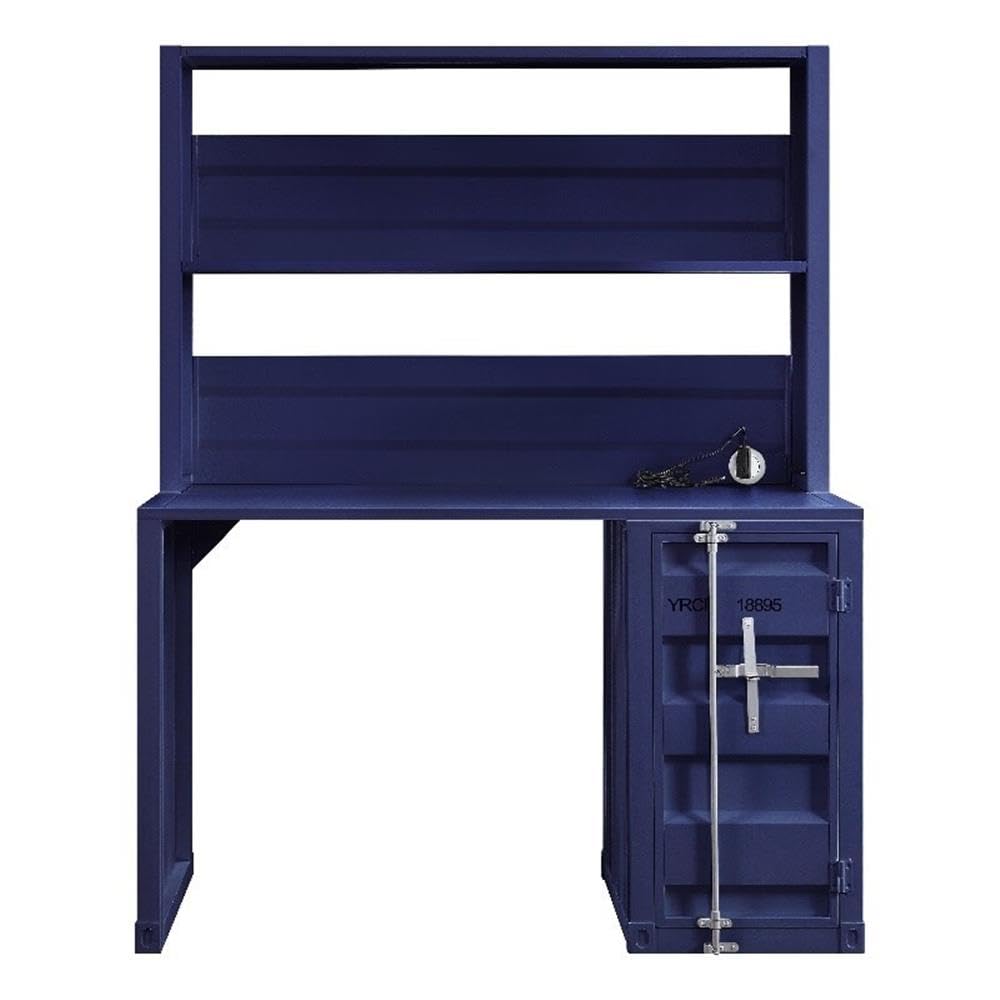
Figure 1: Fully assembled Acme Cargo Metal Frame Desk and Hutch.
The Acme Cargo Desk and Hutch features a robust metal frame design, offering a functional workspace with integrated storage. It includes a rectangular writing desk surface, an overhead hutch with open compartments, and a storage base with a door and internal shelving.
2 സുരക്ഷാ വിവരങ്ങൾ
മുന്നറിയിപ്പ്: ഈ സുരക്ഷാ നിർദ്ദേശങ്ങൾ പാലിക്കുന്നതിൽ പരാജയപ്പെടുന്നത് ഉൽപ്പന്നത്തിന് പരിക്കോ കേടുപാടുകളോ ഉണ്ടാക്കാം.
- പോറലുകൾ ഉണ്ടാകാതിരിക്കാൻ എല്ലായ്പ്പോഴും മൃദുവും വൃത്തിയുള്ളതുമായ ഒരു പ്രതലത്തിൽ ഉൽപ്പന്നം കൂട്ടിച്ചേർക്കുക.
- അസംബ്ലി ആരംഭിക്കുന്നതിന് മുമ്പ് എല്ലാ ഭാഗങ്ങളും ഉണ്ടെന്നും കേടുപാടുകൾ സംഭവിച്ചിട്ടില്ലെന്നും ഉറപ്പാക്കുക. ഏതെങ്കിലും ഭാഗങ്ങൾ നഷ്ടപ്പെട്ടാലോ കേടുപാടുകൾ സംഭവിച്ചാലോ അസംബ്ലിയുമായി മുന്നോട്ട് പോകരുത്.
- Assembly requires two adults. Do not attempt to assemble alone.
- കുട്ടികളിൽ നിന്നും വളർത്തുമൃഗങ്ങളിൽ നിന്നും ചെറിയ ഭാഗങ്ങളും പാക്കേജിംഗ് വസ്തുക്കളും അകറ്റി നിർത്തുക.
- Do not exceed the maximum weight capacity of 208 pounds (94 kg) for the desk surface.
- Do not climb on the desk or hutch.
- Place the desk on a level surface to prevent wobbling and instability.
- Regularly check and tighten all fasteners to ensure stability.
- If the product includes anti-tip hardware, it is highly recommended to install it to prevent tipping, especially in households with children.
3. പാക്കേജ് ഉള്ളടക്കം
Before assembly, verify that all components listed below are included in your package. If any parts are missing or damaged, please contact customer support immediately.
- Desk Frame (Left and Right Supports)
- ഡെസ്ക്ടോപ്പ് പാനൽ
- Hutch Frame (Top and Side Panels)
- Hutch Shelves (2)
- Storage Base Unit
- Storage Base Door
- Internal Storage Shelf (1)
- Hardware Pack (screws, bolts, cam locks, hinges, etc.)
- Assembly Tools (Hex Key, etc. - Note: Additional tools like a screwdriver may be required and are not included)
4. സജ്ജീകരണവും അസംബ്ലി നിർദ്ദേശങ്ങളും
Please follow these steps carefully. Assembly is recommended for two people.
ആവശ്യമായ ഉപകരണങ്ങൾ (ഉൾപ്പെടുത്തിയിട്ടില്ല):
- ഫിലിപ്സ് ഹെഡ് സ്ക്രൂഡ്രൈവർ
- റബ്ബർ മാലറ്റ് (ഓപ്ഷണൽ, സൗമ്യമായി ടാപ്പ് ചെയ്യുന്നതിന്)
അസംബ്ലി ഘട്ടങ്ങൾ:
- ഭാഗങ്ങൾ അൺപാക്ക് ചെയ്ത് തിരിച്ചറിയുക: Carefully remove all components from the packaging. Lay them out on a clean, soft surface (e.g., carpet or blanket) to prevent scratches. Identify each part using the provided parts list.
- Assemble Desk Base: Attach the left and right desk support frames to the desktop panel using the provided bolts and hex key. Ensure all connections are secure but do not overtighten initially.
- Assemble Storage Base: Attach the storage base unit to the right side of the desktop panel. Secure it with the appropriate fasteners.
- Install Storage Door: Attach the hinges to the storage base door and then to the storage base unit. Ensure the door opens and closes smoothly. Install the internal storage shelf as desired.
- Attach Hutch Frame: Position the hutch frame onto the back of the desktop panel, aligning the pre-drilled holes. Secure the hutch frame to the desktop and the rear of the desk supports using the designated fasteners.
- ഹച്ച് ഷെൽഫുകൾ ഇൻസ്റ്റാൾ ചെയ്യുക: Insert the two hutch shelves into the designated slots or attach them to the hutch frame using the provided hardware.
- അന്തിമ മുറുക്കൽ: Once all components are assembled, carefully move the desk to its desired location. On a level surface, gradually tighten all bolts and screws until secure. Do not overtighten.
- സ്ഥിരത പരിശോധന: Gently push and pull the desk to ensure it is stable and does not wobble. If wobbling occurs, recheck all connections and ensure the desk is on a level surface.

Figure 2: Storage base with door open, revealing internal shelf.
5. പ്രവർത്തന നിർദ്ദേശങ്ങൾ (ഉപയോഗം)
Your Acme Cargo Desk and Hutch is designed for versatile use in a home office, dorm, or bedroom.
- ഡെസ്ക് ഉപരിതലം: Use the main desk surface for your computer, writing, or other tasks. Ensure the weight distributed on the surface does not exceed 208 pounds (94 kg).
- Hutch Shelves: The open hutch shelves are ideal for storing books, decorative items, or small office supplies. Distribute weight evenly and avoid placing excessively heavy items on the upper shelves.
- സംഭരണ കേന്ദ്രം: The enclosed storage base with a door provides discreet storage for files, larger items, or personal belongings. The internal shelf can be used to organize items within the compartment.
- കേബിൾ മാനേജുമെന്റ്: While not explicitly designed with cable management features, you can use cable ties or adhesive clips (not included) to organize power cords and data cables behind the desk for a tidy workspace.
6. പരിപാലനം
ശരിയായ പരിചരണം നിങ്ങളുടെ മേശയുടെ ആയുസ്സും രൂപവും വർദ്ധിപ്പിക്കും.
- വൃത്തിയാക്കൽ: മൃദുവായ, ഡി ഉപയോഗിച്ച് ഉപരിതലങ്ങൾ തുടയ്ക്കുകamp cloth. Avoid abrasive cleaners, harsh chemicals, or solvents, as these can damage the painted finish. Dry immediately with a clean cloth.
- പതിവ് പരിശോധന: Periodically check all bolts, screws, and fasteners to ensure they remain tight. Retighten as necessary to maintain structural integrity and prevent wobbling.
- ഈർപ്പം ഒഴിവാക്കുക: Do not place hot items directly on the desk surface without protection. Wipe up spills immediately to prevent water damage or staining.
- സൂര്യപ്രകാശം എക്സ്പോഷർ: നേരിട്ടുള്ള സൂര്യപ്രകാശം ദീർഘനേരം എക്സ്പോഷർ ചെയ്യുന്നത് ഒഴിവാക്കുക, കാരണം ഇത് കാലക്രമേണ ഫിനിഷിന്റെ മങ്ങലിനോ നിറവ്യത്യാസത്തിനോ കാരണമാകും.
7. പ്രശ്നപരിഹാരം
| പ്രശ്നം | സാധ്യമായ കാരണം | പരിഹാരം |
|---|---|---|
| മേശ ഇളകുന്നു അല്ലെങ്കിൽ അസ്ഥിരമാണ്. | Uneven floor surface; loose fasteners; incorrect assembly. | Ensure the desk is on a level surface. Check and tighten all assembly fasteners. Review assembly steps to ensure correct installation. |
| Storage door does not close properly. | Hinges are misaligned or loose; obstruction. | Check hinge alignment and tighten screws. Ensure nothing is obstructing the door's path. |
| എത്തുമ്പോൾ ഭാഗങ്ങൾ വളഞ്ഞതോ കേടുപാടുകൾ സംഭവിച്ചതോ ആയി കാണപ്പെടുന്നു. | ഷിപ്പിംഗ് കേടുപാടുകൾ. | Do not proceed with assembly. Contact customer support immediately with photos of the damage for replacement parts or a return. |
| ഹാർഡ്വെയറോ ഘടകങ്ങളോ കാണുന്നില്ല. | പാക്കേജിംഗ് പിശക്. | Carefully check all packaging materials. If still missing, contact customer support for replacement parts. |
8 സ്പെസിഫിക്കേഷനുകൾ
| ഫീച്ചർ | വിശദാംശങ്ങൾ |
|---|---|
| ബ്രാൻഡ്: | Acme |
| മോഡൽ നമ്പർ: | എസി-37907 |
| ഉൽപ്പന്ന അളവുകൾ (D x W x H): | 24"D x 47"W x 60"H (61 സെ.മീ D x 119 സെ.മീ W x 152 സെ.മീ H) |
| ഇനത്തിൻ്റെ ഭാരം: | 104 പൗണ്ട് (47.2 കി.ഗ്രാം) |
| മെറ്റീരിയൽ: | Metal (Frame, Top, Base, Hutch) |
| നിറം: | നീല |
| ഫിനിഷ് തരം: | പെയിന്റ് ചെയ്ത ഫിനിഷ് |
| പരമാവധി ഭാരം ശുപാർശ: | 208 പൗണ്ട് (94 കി.ഗ്രാം) |
| ഷെൽഫുകളുടെ എണ്ണം: | 2 (Hutch) + 1 (Internal Storage) |
| കാബിനറ്റുകളുടെ എണ്ണം: | 1 |
| ആവശ്യമായ അസംബ്ലി: | അതെ |
| അസംബ്ലിക്കായി ശുപാർശ ചെയ്യുന്ന ആളുകളുടെ എണ്ണം: | 2 |

Figure 3: Product dimensions for the Acme Cargo Desk and Hutch.
9. വാറൻ്റി വിവരങ്ങൾ
This Acme Cargo Metal Frame Desk and Hutch is covered by a പരിമിത വാറൻ്റി from the manufacturer. The specific terms and duration of the warranty may vary. For detailed information regarding your product's warranty, including coverage, limitations, and how to make a claim, please refer to the official Acme Furniture webസൈറ്റ് അല്ലെങ്കിൽ അവരുടെ ഉപഭോക്തൃ സേവനവുമായി നേരിട്ട് ബന്ധപ്പെടുക.
ഏതെങ്കിലും വാറന്റി ക്ലെയിമുകൾക്കായി നിങ്ങളുടെ വാങ്ങിയതിന്റെ തെളിവ് സൂക്ഷിക്കുക.
10. ഉപഭോക്തൃ പിന്തുണ
If you have any questions, require assistance with assembly, or need to report missing or damaged parts, please contact Acme Furniture customer support:
- Webസൈറ്റ്: Visit the official Acme Furniture webപതിവുചോദ്യങ്ങൾ, ഉൽപ്പന്ന രജിസ്ട്രേഷൻ, കോൺടാക്റ്റ് ഫോമുകൾ എന്നിവയ്ക്കുള്ള സൈറ്റ്.
- ചില്ലറ വ്യാപാരി: If purchased from a retailer, you may also contact their customer service department for assistance.
When contacting support, please have your model number (AC-37907) and proof of purchase readily available.


