1. ആമുഖം
This manual provides detailed instructions for the DROK USB Buck Converter module. This DC-DC step-down module is designed to convert a higher input voltage (6-32V DC) to a stable 5V DC output, with Quick Charge 3.0 capabilities allowing for automatic voltage adjustment between 3-12V for compatible devices. It is suitable for various applications such as mobile phone charging, car charging systems, and DIY power supplies.
2. ഉൽപ്പന്ന സവിശേഷതകൾ
- ഇൻപുട്ട് വോളിയംtagഇ ശ്രേണി: DC 6V-32V
- Putട്ട്പുട്ട് വോളിയംtage: Default DC 5V; automatically adjusts to 3-12V when Quick Charge is triggered.
- ഔട്ട്പുട്ട് പവർ: പരമാവധി 24W.
- Quick Charge Protocols: Supports BC 1.2, QC 2.0/3.0, MTK PE 1.1/PE 2.0, SFCP.
- സംരക്ഷണ സവിശേഷതകൾ: Includes input over-voltagഇ സംരക്ഷണം, ഇൻപുട്ട് അണ്ടർ-വോളിയംtage protection, input over-current protection, output over-current protection, output short-circuit protection, and over-temperature protection.
- LED സൂചകം: Provides visual indication of the module's working status.
3 സ്പെസിഫിക്കേഷനുകൾ
| സ്പെസിഫിക്കേഷൻ | മൂല്യം |
|---|---|
| ഇൻപുട്ട് വോളിയംtage | DC 6-32 Volts |
| Putട്ട്പുട്ട് വോളിയംtage | Default 5 Volts (3-12V with QC) |
| ഔട്ട്പുട്ട് പവർ | 24W പരമാവധി |
| ഇനം മോഡൽ നമ്പർ | ക്സനുമ്ക്സച |
| ഇനത്തിൻ്റെ ഭാരം | 1.23 ഔൺസ് |
| പാക്കേജ് അളവുകൾ | 5.7 x 3 x 1.7 ഇഞ്ച് |
4. സജ്ജീകരണം
Before connecting the module, ensure your power source is within the specified input voltage range (DC 6-32V). Observe proper polarity when making connections.
4.1 വയറിംഗ് കണക്ഷനുകൾ
The module features screw terminals for input power and a standard USB-A port for output.
- Input+: Connect the positive (+) terminal of your DC power source here.
- ഇൻപുട്ട്-: Connect the negative (-) terminal of your DC power source here.
- USB ഔട്ട്പുട്ട്: Connect your USB charging cable to this port.
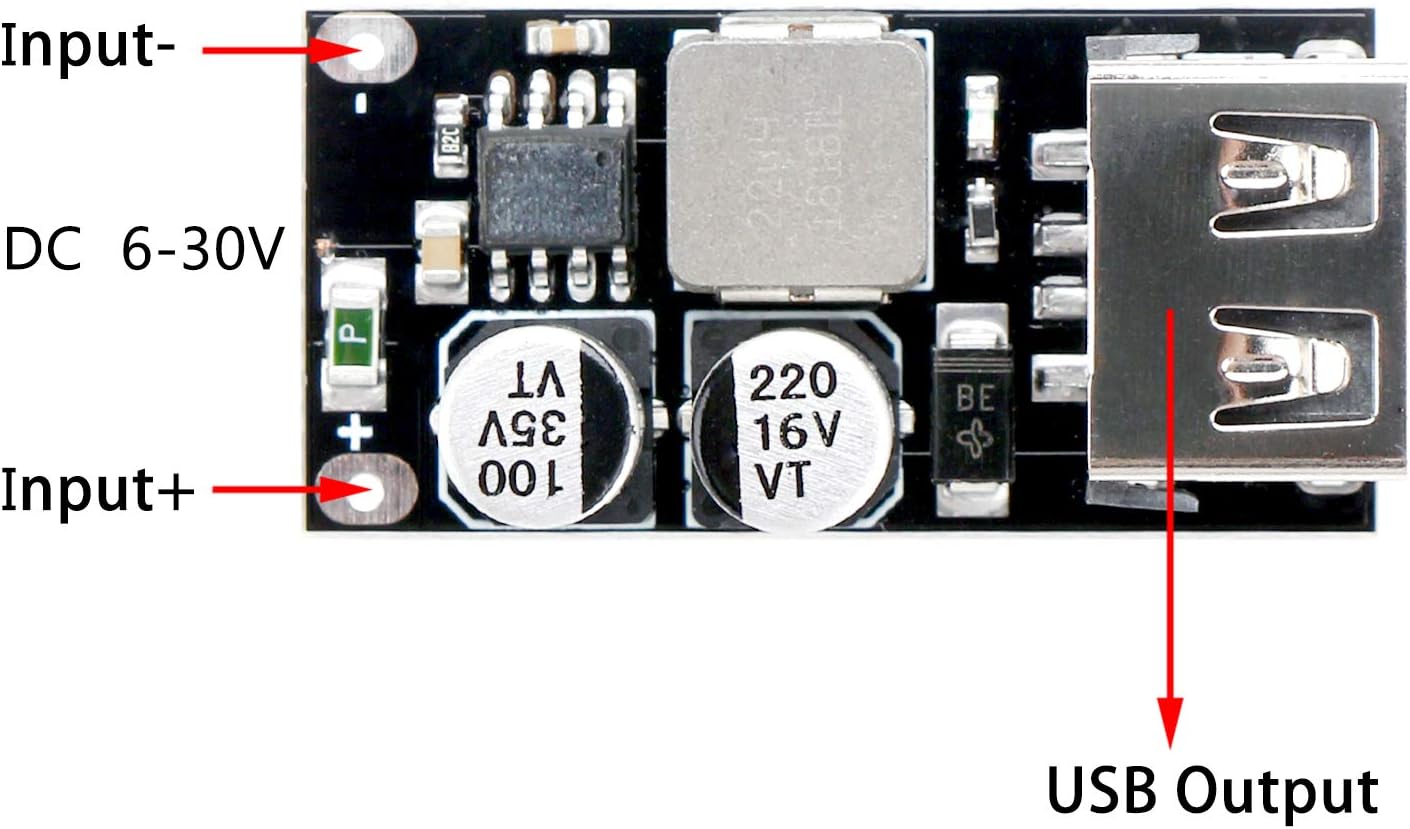
ചിത്രം: മുകളിൽ നിന്ന് താഴേക്ക് view of the DROK USB Buck Converter module, clearly indicating the 'Input+' and 'Input-' screw terminals on the left, and the 'USB Output' port on the right. The module also shows two capacitors and an inductor.

ചിത്രം: ആംഗിൾഡ് view of the DROK USB Buck Converter module with key dimensions labeled: 35mm length, 8.5mm height, and 17mm width. This provides a clear understanding of the module's compact size.
5. പ്രവർത്തന നിർദ്ദേശങ്ങൾ
Once the module is correctly wired to a DC power source, it is ready for operation.
- പവർ ഓൺ: Apply DC power within the 6-32V range to the input terminals. The blue LED indicator on the module will illuminate, signifying it is active.
- ഉപകരണം ബന്ധിപ്പിക്കുക: Plug your USB-compatible device (e.g., smartphone, tablet) into the USB output port using an appropriate charging cable.
- ക്വിക്ക് ചാർജ് പ്രവർത്തനം: If your connected device supports Quick Charge (QC 2.0/3.0, MTK PE 1.1/PE 2.0, SFCP), the module will automatically negotiate and adjust its output voltage between 3V and 12V to optimize charging speed. For devices without Quick Charge support, the output will default to 5V.
Video: This video demonstrates the DROK USB Buck Converter in operation, showing a smartphone being charged. It highlights the automatic fast charge feature and the module's built-in protection mechanisms against over/under voltage, over current, and short circuits.
6. പരിപാലനം
The DROK USB Buck Converter is designed for reliable operation with minimal maintenance. To ensure longevity and optimal performance:
- Keep the module in a dry environment, away from moisture and corrosive substances.
- തീവ്രമായ താപനിലയിലോ നേരിട്ടുള്ള സൂര്യപ്രകാശത്തിലോ മൊഡ്യൂളിനെ തുറന്നുകാട്ടുന്നത് ഒഴിവാക്കുക.
- Periodically inspect connections for tightness and ensure no debris accumulates on the circuit board.
- Do not attempt to modify the module, as this may void the warranty and pose safety risks.
7. പ്രശ്നപരിഹാരം
If you encounter issues with your DROK USB Buck Converter, refer to the following troubleshooting steps:
- No Output/LED Off:
- Verify that the input power source is connected correctly and providing voltage within the 6-32V DC range.
- Check the polarity of the input connections (Input+ to positive, Input- to negative).
- Ensure the power source is active and supplying sufficient current.
- Device Not Fast Charging:
- Confirm that your device and charging cable support one of the Quick Charge protocols (QC 2.0/3.0, MTK PE 1.1/PE 2.0, SFCP).
- Some devices may require specific cables for fast charging. Try a different cable.
- Protection Features Triggered (LED blinking or output cut off):
- ഓവർ/അണ്ടർ വോളിയംtagഇ സംരക്ഷണം: ഇൻപുട്ട് വോള്യം ആണെങ്കിൽtage exceeds 32V or drops below 6V, the module will activate protection. Adjust the input voltage to be within the specified range (as shown in the video from 0:15 to 0:44).
- നിലവിലെ പരിരക്ഷണം: If the output current exceeds the maximum limit (e.g., 24W), the module will protect itself. Reduce the load on the USB output (as shown in the video from 0:45 to 0:59).
- ഷോർട്ട് സർക്യൂട്ട് സംരക്ഷണം: A direct short on the output will trigger protection. Remove the short circuit immediately (as shown in the video from 0:45 to 0:59).
- താപനില സംരക്ഷണം: Prolonged operation under heavy load or in a high ambient temperature may cause the module to overheat and trigger protection. Allow the module to cool down and ensure adequate ventilation (as shown in the video from 1:00 to 1:03).
8 സുരക്ഷാ വിവരങ്ങൾ
Please read and understand the following safety precautions before using the DROK USB Buck Converter:
- നിർദ്ദിഷ്ട ഇൻപുട്ട് വോള്യം കവിയരുത്tage range of DC 6-32V. Exceeding this range can damage the module and connected devices.
- Ensure correct polarity when connecting input power. Incorrect polarity can cause irreversible damage.
- Avoid short-circuiting the output terminals. The module has short-circuit protection, but repeated or prolonged short circuits can reduce its lifespan.
- Operate the module in a well-ventilated area to prevent overheating, especially under heavy loads.
- Keep the module away from children and pets.
- If the module shows signs of damage, discontinue use immediately.
9. വാറൻ്റിയും പിന്തുണയും
DROK products are designed for quality and reliability. This product is covered by a one-year warranty from the date of purchase against defects in materials and workmanship. If you experience any issues or require technical assistance, please contact DROK customer support through the retailer where the product was purchased or visit the official DROK webബന്ധപ്പെടാനുള്ള വിവരങ്ങൾക്കുള്ള സൈറ്റ്.
വാറൻ്റി ക്ലെയിമുകൾക്കായി നിങ്ങളുടെ വാങ്ങിയതിൻ്റെ തെളിവ് സൂക്ഷിക്കുക.


