ആമുഖം
This manual provides detailed instructions for the setup, operation, and maintenance of your Sunbuck TAV-339BT Wireless Karaoke Bluetooth Power Amplifier System. This 2-channel stereo amplifier is designed for home audio and karaoke applications, featuring Bluetooth connectivity, USB/SD card playback, FM radio, and dual microphone inputs. Please read this manual thoroughly before using the product to ensure proper operation and to prevent damage.

ചിത്രം 1: മുൻഭാഗം view of the Sunbuck TAV-339BT amplifier. This image displays the main unit with its various controls and inputs on the front panel, including the power switch, microphone inputs, volume knobs, and digital display.
സുരക്ഷാ വിവരങ്ങൾ
- ഊർജ്ജ സ്രോതസ്സ്: ബന്ധിപ്പിക്കുക amplifier only to the specified power supply (AC 110V or DC 12V 5A). Ensure the voltage matches the requirements before plugging in.
- വെൻ്റിലേഷൻ: വെന്റിലേഷൻ തുറസ്സുകൾ തടയരുത്. അമിതമായി ചൂടാകുന്നത് തടയാൻ യൂണിറ്റിന് ചുറ്റും മതിയായ വായുസഞ്ചാരം ഉറപ്പാക്കുക.
- ജലവും ഈർപ്പവും: Do not expose the unit to rain, moisture, or dripping/splashing liquids. Do not place objects filled with liquids, such as vases, on the apparatus.
- താപ സ്രോതസ്സുകൾ: റേഡിയേറ്ററുകൾ, ഹീറ്റ് രജിസ്റ്ററുകൾ, സ്റ്റൗകൾ അല്ലെങ്കിൽ മറ്റ് ഉപകരണങ്ങൾ (ഉൾപ്പെടെ) പോലുള്ള താപ സ്രോതസ്സുകളിൽ നിന്ന് യൂണിറ്റ് അകറ്റി നിർത്തുക. ampലൈഫയറുകൾ) ചൂട് ഉത്പാദിപ്പിക്കുന്നത്.
- വൃത്തിയാക്കൽ: വൃത്തിയാക്കുന്നതിന് മുമ്പ് പവർ ഔട്ട്ലെറ്റിൽ നിന്ന് യൂണിറ്റ് പ്ലഗ് അൺപ്ലഗ് ചെയ്യുക. വൃത്തിയാക്കാൻ ഉണങ്ങിയ തുണി ഉപയോഗിക്കുക.
- സേവനം: ഈ ഉൽപ്പന്നം സ്വയം സേവിക്കാൻ ശ്രമിക്കരുത്. യോഗ്യതയുള്ള സേവന ഉദ്യോഗസ്ഥർക്ക് എല്ലാ സേവനങ്ങളും റഫർ ചെയ്യുക.
- കുട്ടികൾ: Keep the unit and its accessories out of reach of children.
പാക്കേജ് ഉള്ളടക്കം
പാക്കേജിൽ ഇനിപ്പറയുന്ന ഇനങ്ങൾ ഉണ്ടോ എന്ന് പരിശോധിക്കുക:
- 1 x Sunbuck TAV-339BT Ampലൈഫയർ (110V)
- 1 x റിമോട്ട് കൺട്രോൾ
- 1 x ഉപയോക്തൃ മാനുവൽ
ഉൽപ്പന്ന സവിശേഷതകൾ
- Compact and powerful 2-channel stereo ampലൈഫയർ സിസ്റ്റം.
- Integrated Bluetooth for wireless audio streaming from compatible devices (smartphones, tablets, PCs).
- Supports USB flash drive and SD memory card playback.
- Built-in FM radio tuner.
- Dual 1/4-inch microphone input jacks for karaoke functions.
- RCA (L/R) audio input for external devices.
- Front panel controls for master volume, bass, treble, microphone volume, echo, and microphone bass/treble.
- Traditional VU meter display.
- സൗകര്യപ്രദമായ പ്രവർത്തനത്തിനായി ഒരു റിമോട്ട് കൺട്രോൾ ഉൾപ്പെടുന്നു.
ഫ്രണ്ട് പാനൽ ഓവർview
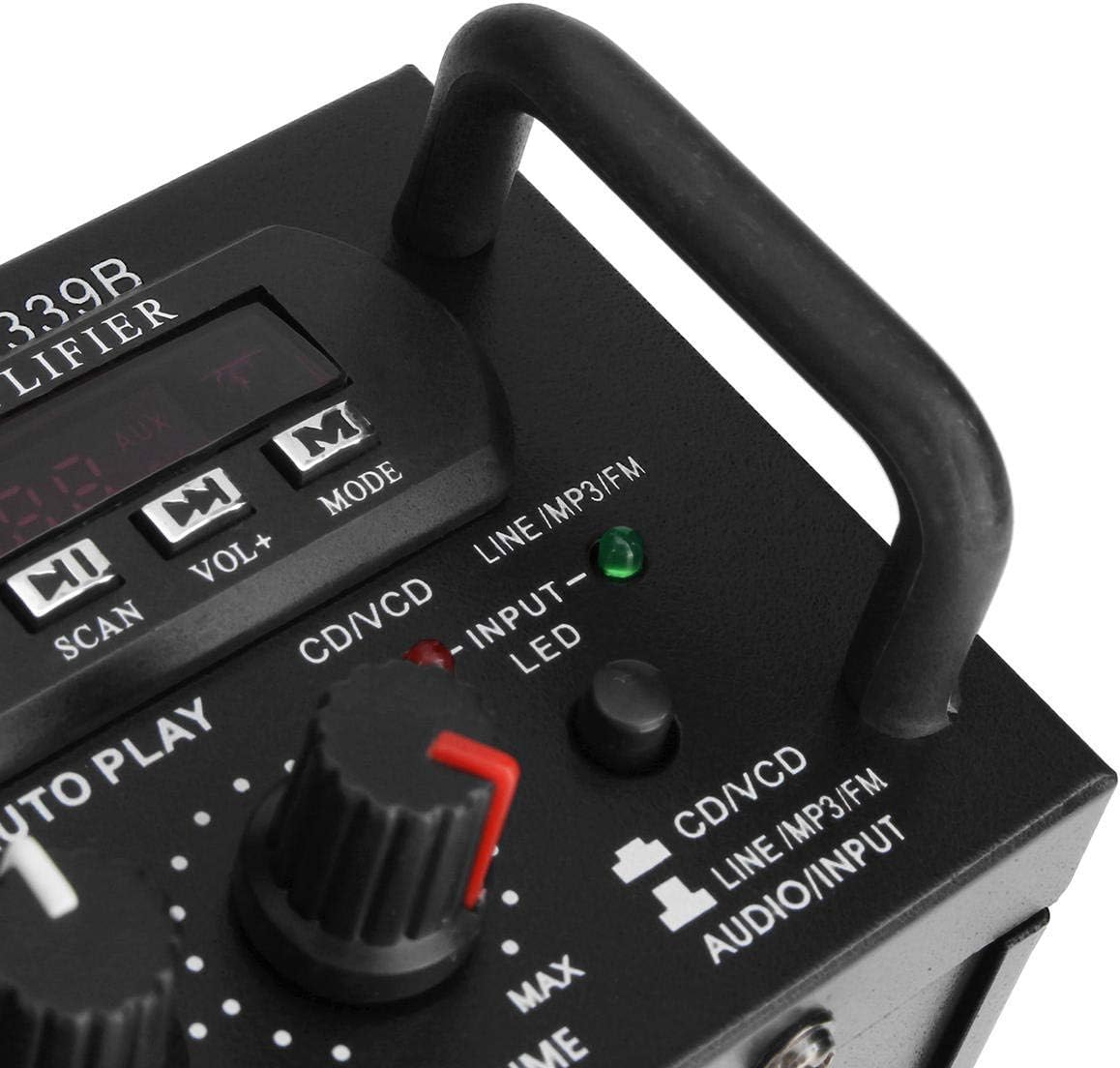
ചിത്രം 2: വിശദമായി view യുടെ amplifier's front panel, highlighting the various knobs, buttons, and input ports.
- വൈദ്യുതി സ്വിച്ച്: തിരിയുന്നു ampലൈഫ് ഓൺ അല്ലെങ്കിൽ ഓഫ്.
- ECHO Control: മൈക്രോഫോണുകൾക്കുള്ള എക്കോ ഇഫക്റ്റ് ക്രമീകരിക്കുന്നു.
- MIC1/MIC2 Input: 1/4-inch jacks for connecting microphones.
- M.BASS/M.TREBLE: Adjusts bass and treble for microphone input.
- MIC/VOL: Adjusts the volume level for microphones.
- VU മീറ്റർ: ഓഡിയോ ഔട്ട്പുട്ട് ലെവൽ പ്രദർശിപ്പിക്കുന്നു.
- USB/SD Card Slot: For connecting USB flash drives or SD memory cards.
- ഡിജിറ്റൽ ഡിസ്പ്ലേ: നിലവിലെ മോഡ്, ട്രാക്ക് നമ്പർ അല്ലെങ്കിൽ എഫ്എം ഫ്രീക്വൻസി കാണിക്കുന്നു.
- Control Buttons (SCAN, VOL-, VOL+, MODE): For navigating USB/SD/FM functions.
- BASS/TREBLE: Adjusts the main audio bass and treble levels.
- വ്യാപ്തം: Master volume control for all audio sources.
- ഇൻപുട്ട് സെലക്ടർ: Cycles through input sources (CD/VCD, LINE, MP3/FM, Bluetooth).
- INPUT LED Indicators: Lights up to show the currently selected input source.
പിൻ പാനൽ ഓവർview

ചിത്രം 3: പിൻഭാഗം view യുടെ amplifier, showing the various input and output terminals for connecting speakers and audio sources.
- INPUT (CD/VCD, LINE): RCA (L/R) audio input jacks for connecting external audio sources like CD/DVD players, TVs, or other line-level devices.
- സ്പീക്കർ സിസ്റ്റം: Spring clip terminals for connecting passive speakers. Ensure correct polarity (+ to + and - to -).
- POWER DC 12V INPUT: DC power input for 12V power supply (e.g., car battery, not included).
- AC 110V 60Hz: AC power input for standard household power.
- എഫ്എം ആന്റിന: Connector for the included FM antenna.
റിമോട്ട് കൺട്രോൾ ഓവർview
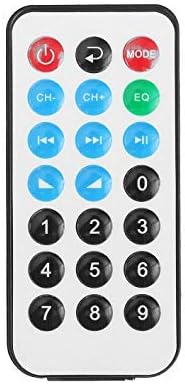
ചിത്രം 4: റിമോട്ട് കൺട്രോൾ ബട്ടണുകളുടെ ലേഔട്ട്.
The remote control allows for convenient operation of the amplifier's functions from a distance. It typically includes buttons for power, mode selection, volume adjustment, track navigation (for USB/SD), and FM radio controls.
റിമോട്ട് കൺട്രോളിനുള്ള ബാറ്ററി ഇൻസ്റ്റാളേഷൻ

Figure 5: Step-by-step guide for installing the CR2025 lithium battery into the remote control.
The remote control requires a CR2025 lithium battery (3V). To install or replace the battery:
- റിമോട്ട് കൺട്രോളിന്റെ പിൻഭാഗത്ത് ബാറ്ററി കമ്പാർട്ട്മെന്റ് കണ്ടെത്തുക.
- Push the small tab to release the battery tray.
- ബാറ്ററി ട്രേ സ്ലൈഡ് ചെയ്യുക.
- പോസിറ്റീവ് (+) വശം മുകളിലേക്ക് അഭിമുഖീകരിക്കുന്ന തരത്തിൽ CR2025 ബാറ്ററി തിരുകുക.
- Slide the battery tray back into the remote until it clicks into place.
സജ്ജമാക്കുക
1 സ്പീക്കർ കണക്ഷൻ
Connect your passive speakers to the "SPEAKER SYSTEM" terminals on the rear panel. Ensure that the positive (+) terminal of the amplifier connects to the positive (+) terminal of the speaker, and the negative (-) terminal of the amplifier connects to the negative (-) terminal of the speaker. Incorrect polarity can affect sound quality.
2. ഓഡിയോ ഇൻപുട്ട് കണക്ഷൻ
- RCA Inputs (CD/VCD, LINE): Use RCA cables to connect external audio sources (e.g., CD player, DVD player, TV audio output) to the corresponding "INPUT" jacks on the rear panel.
- USB/SD കാർഡ്: Insert a USB flash drive or SD memory card into the respective slot on the front panel.
- ബ്ലൂടൂത്ത്: No physical connection is needed for Bluetooth. Refer to the "Operating Instructions" section for pairing.
3. മൈക്രോഫോൺ കണക്ഷൻ
Connect up to two 1/4-inch microphones to the "MIC1" and "MIC2" input jacks on the front panel for karaoke use.
4. എഫ്എം ആന്റിന കണക്ഷൻ
Connect the included FM antenna to the FM antenna terminal on the rear panel for improved radio reception.
5. പവർ കണക്ഷൻ
Connect the power cord to the AC 110V 60Hz input on the rear panel and then plug it into a standard wall outlet. Alternatively, for DC operation, connect a 12V DC power source (not included) to the "POWER DC 12V INPUT" terminals.
പ്രവർത്തന നിർദ്ദേശങ്ങൾ
1. പവർ ഓൺ/ഓഫ്
Press the "POWER" switch on the front panel to turn the amplifier on or off. The digital display will illuminate when the unit is powered on.
2. ഉറവിടം തിരഞ്ഞെടുക്കൽ
Press the "INPUT" button on the front panel or the "MODE" button on the remote control to cycle through available input sources: CD/VCD, LINE, MP3/FM, and Bluetooth. The corresponding LED indicator on the front panel will light up.
3. ബ്ലൂടൂത്ത് പ്രവർത്തനം
- Select "Bluetooth" as the input source using the "INPUT" or "MODE" button. The digital display will show "BLUE" or a similar indicator.
- Enable Bluetooth on your mobile device (smartphone, tablet, PC).
- ഇതിനായി തിരയുക available Bluetooth devices and select "TAV-339BT" or "Sunbuck" from the list.
- Once paired, you can stream audio wirelessly from your device to the ampജീവൻ.
4. യുഎസ്ബി/എസ്ഡി കാർഡ് പ്ലേബാക്ക്
- MP3 ഓഡിയോ അടങ്ങിയ ഒരു USB ഫ്ലാഷ് ഡ്രൈവ് അല്ലെങ്കിൽ SD കാർഡ് ഇടുക. files into the respective slot on the front panel.
- Select "MP3/FM" as the input source. The amplifier will automatically detect and begin playing audio files.
- Use the "SCAN", "VOL-", "VOL+" buttons on the front panel or the corresponding buttons on the remote control to navigate tracks (play/pause, next/previous).
5. എഫ്എം റേഡിയോ പ്രവർത്തനം
- Ensure the FM antenna is connected.
- Select "MP3/FM" as the input source.
- Press the "SCAN" button to automatically scan and store available FM radio stations.
- Use the "VOL-" and "VOL+" buttons (or remote control) to manually tune or select stored stations.
6. കരോക്കെ ഫംഗ്ഷൻ
- Connect microphones to the "MIC1" and "MIC2" jacks.
- Adjust the "MIC/VOL" knob to control the microphone volume.
- Use the "ECHO" knob to add an echo effect to the vocals.
- Adjust "M.BASS" and "M.TREBLE" to fine-tune the microphone's tone.
7. ശബ്ദ, ടോൺ നിയന്ത്രണം
- വ്യാപ്തം: Use the large "VOLUME" knob on the front panel to adjust the overall output volume.
- BASS/TREBLE: Use the "BASS" and "TREBLE" knobs to adjust the low and high frequencies of the main audio output.
മെയിൻ്റനൻസ്
- വൃത്തിയാക്കൽ: Disconnect the power before cleaning. Use a soft, dry cloth to wipe the exterior of the unit. Do not use liquid cleaners or aerosol cleaners.
- വെൻ്റിലേഷൻ: Ensure that the ventilation openings are clear of dust and debris to maintain proper cooling.
- സംഭരണം: യൂണിറ്റ് ദീർഘനേരം സൂക്ഷിക്കുകയാണെങ്കിൽ, വൈദ്യുതി വിതരണത്തിൽ നിന്ന് അത് വിച്ഛേദിച്ച് തണുത്തതും വരണ്ടതുമായ സ്ഥലത്ത് സൂക്ഷിക്കുക.
ട്രബിൾഷൂട്ടിംഗ്
| പ്രശ്നം | സാധ്യമായ കാരണം | പരിഹാരം |
|---|---|---|
| ശക്തിയില്ല | Power cord not connected; Power switch off; No power from outlet. | Ensure power cord is securely connected. Turn the POWER switch on. Check the power outlet with another device. |
| ശബ്ദ ഔട്ട്പുട്ട് ഇല്ല | Incorrect input source selected; Speaker wires loose or incorrectly connected; Volume too low; Mute activated (if applicable). | Select the correct input source. Check speaker connections and polarity. Increase the VOLUME. Ensure no mute function is active. |
| ബ്ലൂടൂത്ത് കണക്റ്റ് ചെയ്യുന്നില്ല | Amplifier not in Bluetooth mode; Device too far; Device already connected to another amplifier; Bluetooth on device is off. | Select Bluetooth input on the amplifier. Move device closer. Disconnect from other devices. Enable Bluetooth on your device. |
| USB/SD കാർഡ് പ്ലേ ചെയ്യുന്നില്ല | Incorrect input source; Files not in supported format (MP3); USB/SD card corrupted or empty. | Select MP3/FM input. Ensure files are MP3 format. Try another USB/SD card. |
| റിമോട്ട് കൺട്രോൾ പ്രവർത്തിക്കുന്നില്ല | Battery depleted or incorrectly installed; Obstruction between remote and amplifier; Remote sensor blocked. | Replace battery (CR2025) and ensure correct polarity. Remove any obstructions. Ensure the remote sensor on the amplifier is clear. |
സ്പെസിഫിക്കേഷനുകൾ
| ഫീച്ചർ | വിശദാംശങ്ങൾ |
|---|---|
| മോഡൽ | TAV-339BT |
| റേറ്റുചെയ്ത ഇംപെഡൻസ് | 4 മുതൽ 8 വരെ ഓംസ് |
| ആർഎംഎസ് പവർ putട്ട്പുട്ട് | 200W + 200W (Recommended for speaker boxes with speakers less than 8") |
| Peak Music Power Output (P.M.P.O) | 300W + 300W (ആകെ 600W) |
| വൈദ്യുതി വിതരണം | AC: 110V 60Hz or DC: 12V 5A |
| ചാനലുകൾ | 2 ചാനലുകൾ |
| ഓഡിയോ ഇൻപുട്ട് | Multi-channel signal input (RCA L/R), USB, SD, Bluetooth |
| മൈക്രോഫോൺ ഇൻപുട്ട് | Dual 1/4-inch Jack |
| കണക്റ്റിവിറ്റി ടെക്നോളജി | ബ്ലൂടൂത്ത്, യുഎസ്ബി, ആർസിഎ |
| വയർലെസ് തരം | Bluetooth, Infrared (for remote) |
| ഉൽപ്പന്ന അളവുകൾ (L x W x H) | 25.4 x 20.32 x 7.01 സെ.മീ (10 x 8 x 2.76 ഇഞ്ച്) |
| ഉൽപ്പന്ന ഭാരം | 2.72 കി.ഗ്രാം (6 പൗണ്ട്) |
| അനുയോജ്യമായ ഉപകരണങ്ങൾ | Headphones, Laptops, Smartphones |
വാറൻ്റിയും പിന്തുണയും
വാറന്റി വിവരങ്ങൾക്കോ സാങ്കേതിക പിന്തുണയ്ക്കോ, വാങ്ങുന്ന സമയത്ത് നൽകിയിട്ടുള്ള ഡോക്യുമെന്റേഷൻ പരിശോധിക്കുകയോ നിങ്ങളുടെ റീട്ടെയിലറെ ബന്ധപ്പെടുകയോ ചെയ്യുക. വാറന്റി ക്ലെയിമുകൾക്കായി നിങ്ങളുടെ വാങ്ങിയതിന്റെ തെളിവ് സൂക്ഷിക്കുക.


