ആമുഖം
Thank you for choosing the NEDIS Wi-Fi Smart Fan Heater. This manual provides essential information for the safe and efficient operation of your new device. Please read these instructions carefully before use and retain them for future reference. Proper use and maintenance will ensure optimal performance and longevity of the product.
സുരക്ഷാ നിർദ്ദേശങ്ങൾ
തീ, വൈദ്യുതാഘാതം അല്ലെങ്കിൽ പരിക്ക് എന്നിവ കുറയ്ക്കുന്നതിന്, എല്ലായ്പ്പോഴും ഈ അടിസ്ഥാന സുരക്ഷാ മുൻകരുതലുകൾ പാലിക്കുക:
- ഈ ഹീറ്റർ ഉപയോഗിക്കുന്നതിന് മുമ്പ് എല്ലാ നിർദ്ദേശങ്ങളും വായിക്കുക.
- ബാത്ത്, ഷവർ, നീന്തൽക്കുളം എന്നിവയുടെ തൊട്ടടുത്ത ചുറ്റുപാടുകളിൽ ഈ ഹീറ്റർ ഉപയോഗിക്കരുത്.
- ഹീറ്റർ മൂടിവയ്ക്കരുത്. ഹീറ്റർ മൂടിവയ്ക്കുന്നത് അമിത ചൂടിനും തീപിടുത്തത്തിനും കാരണമാകും.
- Keep combustible materials such as furniture, pillows, bedding, papers, clothes, and curtains at least 1 meter (3 feet) from the front of the heater and keep them away from the sides and rear.
- ഉപയോഗിക്കാത്തപ്പോൾ എപ്പോഴും ഹീറ്റർ അൺപ്ലഗ് ചെയ്യുക.
- കേടായ ചരട് അല്ലെങ്കിൽ പ്ലഗ് ഉപയോഗിച്ച് അല്ലെങ്കിൽ ഹീറ്റർ തകരാറുകൾക്ക് ശേഷം, ഉപേക്ഷിക്കുകയോ ഏതെങ്കിലും വിധത്തിൽ കേടുപാടുകൾ സംഭവിക്കുകയോ ചെയ്യരുത്.
- പരവതാനിയുടെ കീഴിൽ ചരട് ഓടരുത്. ത്രോ റഗ്ഗുകൾ, റണ്ണറുകൾ അല്ലെങ്കിൽ സമാനമായ കവറുകൾ എന്നിവ ഉപയോഗിച്ച് ചരട് മൂടരുത്. ട്രാഫിക് ഏരിയയിൽ നിന്നും അത് മുകളിലേക്ക് കയറാത്ത ഇടങ്ങളിൽ നിന്നും ചരട് ക്രമീകരിക്കുക.
- കുട്ടികൾ അല്ലെങ്കിൽ അസാധുവായവർ അല്ലെങ്കിൽ സമീപത്ത് ഏതെങ്കിലും ഹീറ്റർ ഉപയോഗിക്കുമ്പോൾ, ഹീറ്റർ പ്രവർത്തിക്കുകയും ശ്രദ്ധിക്കാതെ കിടക്കുകയും ചെയ്യുമ്പോഴെല്ലാം അതീവ ജാഗ്രത ആവശ്യമാണ്.
- This heater is equipped with a tip-over protection switch that automatically shuts off the heater if it is accidentally knocked over.
- ഹീറ്റർ ഒരു സ്ഥിരതയുള്ള, നിരപ്പായ പ്രതലത്തിൽ സ്ഥാപിച്ചിട്ടുണ്ടെന്ന് ഉറപ്പാക്കുക.
- ഇൻഡോർ ഉപയോഗത്തിന് മാത്രം.
ഉൽപ്പന്നം കഴിഞ്ഞുview
Familiarize yourself with the main components of your NEDIS Wi-Fi Smart Fan Heater.
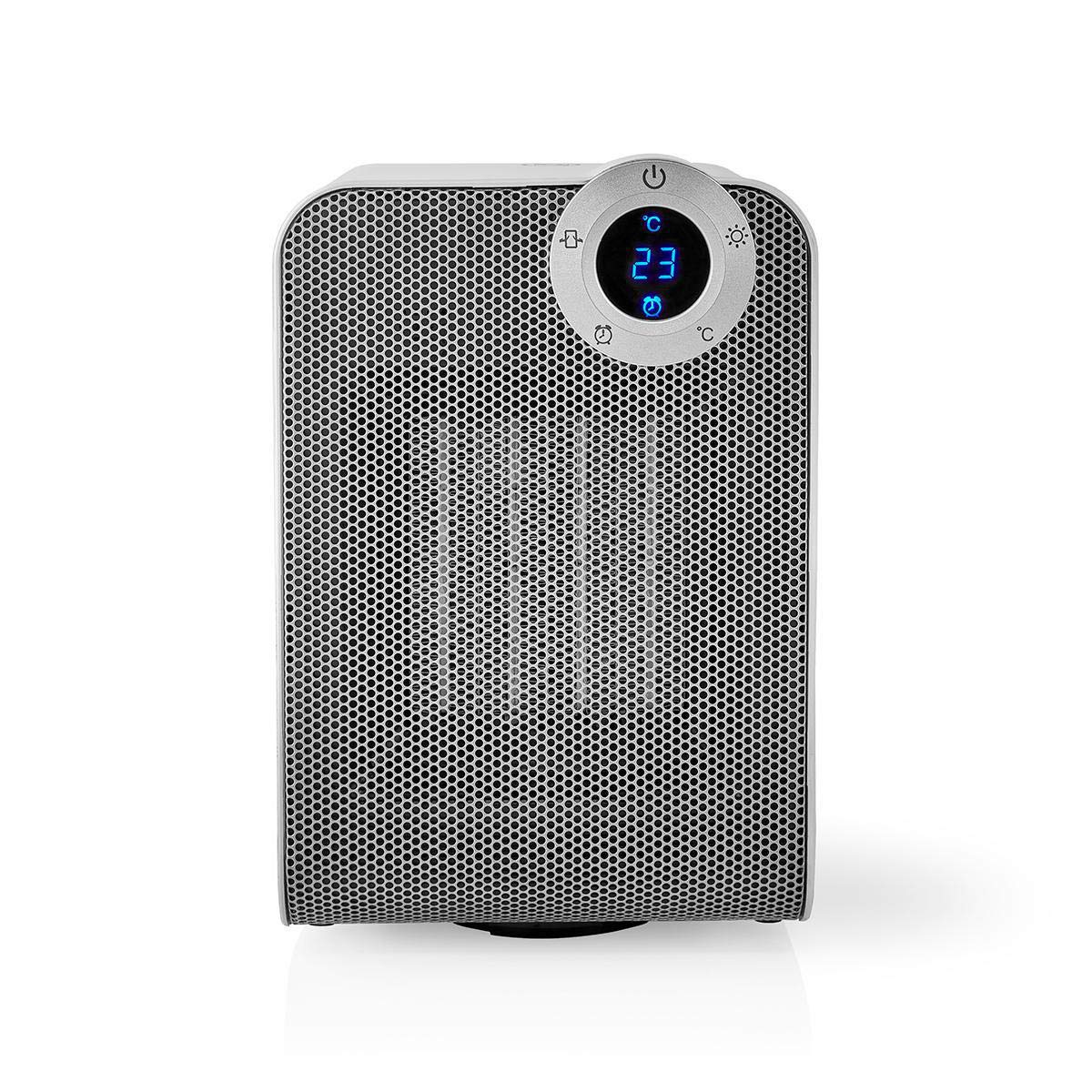
The front panel features a digital display that shows the current temperature and settings. Surrounding the display are touch-sensitive buttons for power, mode selection, oscillation, and timer functions.

The rear of the heater includes the main power switch (often a rocker switch) and the air intake grille. Ensure this area is not obstructed for proper airflow.

The compact design of the heater allows for easy placement in various indoor settings.
സജ്ജമാക്കുക
അൺപാക്ക് ചെയ്യുന്നു
- ഹീറ്റർ അതിന്റെ പാക്കേജിംഗിൽ നിന്ന് ശ്രദ്ധാപൂർവ്വം നീക്കം ചെയ്യുക.
- ഗതാഗത സമയത്ത് എന്തെങ്കിലും കേടുപാടുകൾ സംഭവിച്ചിട്ടുണ്ടോയെന്ന് പരിശോധിക്കുക. കേടുപാടുകൾ സംഭവിച്ചിട്ടുണ്ടെങ്കിൽ, പ്രവർത്തിപ്പിക്കരുത്, ഉപഭോക്തൃ പിന്തുണയുമായി ബന്ധപ്പെടുക.
- ഭാവിയിലെ സംഭരണത്തിനോ ഗതാഗതത്തിനോ വേണ്ടി പാക്കേജിംഗ് സൂക്ഷിക്കുക.
പ്ലേസ്മെൻ്റ്
- ഹീറ്റർ ഒരു ഉറച്ച, ലെവൽ പ്രതലത്തിൽ സ്ഥാപിക്കുക.
- Ensure there is at least 1 meter (3 feet) of clear space around the heater to allow for proper air circulation and to prevent fire hazards.
- Do not place the heater near curtains, drapes, or other loose fabrics that could block the air intake or outlet.
- പവർ കോർഡ് പിഞ്ച് ചെയ്തിട്ടില്ലെന്നും ഭാരമുള്ള വസ്തുക്കൾക്കടിയിൽ വച്ചിട്ടില്ലെന്നും ഉറപ്പാക്കുക.
പ്രാരംഭ പവർ ഓൺ
- Plug the heater into a suitable electrical outlet (220-240V AC, 50/60Hz).
- Flip the main power switch on the back of the unit to the 'ON' position.
- The digital display on the front will illuminate, indicating the heater is in standby mode.
Wi-Fi Connection & App Setup
The NEDIS Wi-Fi Smart Fan Heater can be controlled via the Nedis SmartLife app, offering advanced features and remote control.
- ഡൗൺലോഡ് ചെയ്യുക നെഡിസ് സ്മാർട്ട് ലൈഫ് ആപ്പ് സ്റ്റോറിൽ (iOS) നിന്നോ ഗൂഗിൾ പ്ലേ സ്റ്റോറിൽ (ആൻഡ്രോയിഡ്) നിന്നോ ഉള്ള ആപ്പ്.
- ഒരു പുതിയ അക്കൗണ്ടിനായി രജിസ്റ്റർ ചെയ്യുക അല്ലെങ്കിൽ നിങ്ങൾക്ക് ഇതിനകം ഒന്ന് ഉണ്ടെങ്കിൽ ലോഗിൻ ചെയ്യുക.
- നിങ്ങളുടെ സ്മാർട്ട്ഫോൺ 2.4 GHz Wi-Fi നെറ്റ്വർക്കിലേക്ക് കണക്റ്റ് ചെയ്തിട്ടുണ്ടെന്ന് ഉറപ്പാക്കുക.
- ആപ്പിൽ, പുതിയൊരു ഉപകരണം ചേർക്കാൻ '+' ഐക്കണിൽ ടാപ്പ് ചെയ്യുക.
- Follow the on-screen instructions in the app to connect your heater to your Wi-Fi network. This usually involves putting the heater into pairing mode (refer to the app for specific instructions, often by pressing and holding a button on the heater).
- Once connected, you can control the heater from anywhere using the app.
പ്രവർത്തന നിർദ്ദേശങ്ങൾ
മാനുവൽ നിയന്ത്രണം
The heater can be operated directly using the touch buttons on the front panel:
- പവർ ബട്ടൺ: ഹീറ്റർ ഓണാക്കാനോ ഓഫാക്കാനോ അമർത്തുക.
- മോഡ് ബട്ടൺ: Cycle through heating modes (e.g., High Heat 1800W, Low Heat 900W, Fan Only).
- താപനില ക്രമീകരണം: Use the '+' and '-' buttons (or similar) to set the desired temperature. The heater will operate at 1800W for rapid heating and automatically switch to 900W once the set temperature is approached.
- ഓസിലേഷൻ ബട്ടൺ: Press to activate or deactivate the horizontal oscillation feature, distributing heat across a wider area.
- ടൈമർ ബട്ടൺ: Set a timer for the heater to automatically turn off after a specified duration.
സ്മാർട്ട് ലൈഫ് ആപ്പ് നിയന്ത്രണം
Once connected to the Nedis SmartLife app, you can access advanced control features:
- റിമോട്ട് പവർ ഓൺ/ഓഫ്: എവിടെനിന്നും ഹീറ്റർ നിയന്ത്രിക്കുക.
- താപനില ക്രമീകരണം: Precisely set and monitor the room temperature.
- മോഡ് തിരഞ്ഞെടുക്കൽ: Choose between different heating levels or fan-only mode.
- ആന്ദോളന നിയന്ത്രണം: ആന്ദോളന സവിശേഷത ഓൺ അല്ലെങ്കിൽ ഓഫ് ചെയ്യുക.
- ഷെഡ്യൂളിംഗ്: Create custom heating schedules for different times of the day or week.
- ടൈമർ പ്രവർത്തനം: Set a countdown timer for automatic shutdown.
ശബ്ദ നിയന്ത്രണം
The heater supports voice control through popular smart assistants. To enable this, link your Nedis SmartLife account with your preferred voice assistant (Google Home or Amazon Alexa) via their respective apps. Once linked, you can use voice commands such as:
- "Hey Google, turn on the heater."
- "Alexa, set the heater to 22 degrees."
- "Hey Google, turn off the heater."
മെയിൻ്റനൻസ്
വൃത്തിയാക്കൽ
പതിവായി വൃത്തിയാക്കുന്നത് ഹീറ്ററിന്റെ കാര്യക്ഷമത നിലനിർത്താനും അതിന്റെ ആയുസ്സ് വർദ്ധിപ്പിക്കാനും സഹായിക്കുന്നു.
- വൃത്തിയാക്കുന്നതിന് മുമ്പ് എല്ലായ്പ്പോഴും ഹീറ്റർ അൺപ്ലഗ് ചെയ്ത് പൂർണ്ണമായും തണുക്കാൻ അനുവദിക്കുക.
- ഒരു മൃദുവായ, ഡി ഉപയോഗിച്ച് ബാഹ്യ പ്രതലങ്ങൾ തുടയ്ക്കുകamp തുണി. ഉരച്ചിലുകളുള്ള ക്ലീനറുകളോ ലായകങ്ങളോ ഉപയോഗിക്കരുത്.
- Use a vacuum cleaner with a brush attachment to remove dust from the air intake and outlet grilles.
- ഹീറ്ററിന്റെ ഉള്ളിലേക്ക് വെള്ളം കയറുന്നില്ലെന്ന് ഉറപ്പാക്കുക.
സംഭരണം
ദീർഘകാലത്തേക്ക് ഉപയോഗിക്കാത്തപ്പോൾ:
- Unplug the heater and clean it as described above.
- Store the heater in its original packaging or a suitable box to protect it from dust and damage.
- Keep it in a cool, dry place, away from direct sunlight and moisture.
ട്രബിൾഷൂട്ടിംഗ്
നിങ്ങളുടെ ഹീറ്ററിൽ പ്രശ്നങ്ങൾ നേരിടുകയാണെങ്കിൽ, ഇനിപ്പറയുന്ന പൊതുവായ പ്രശ്നങ്ങളും പരിഹാരങ്ങളും പരിശോധിക്കുക:
| പ്രശ്നം | സാധ്യമായ കാരണം | പരിഹാരം |
|---|---|---|
| ഹീറ്റർ ഓണാക്കുന്നില്ല. | No power, main switch off, tip-over switch activated. | Check power outlet, ensure main switch is ON, place heater upright on a stable surface. |
| ചൂട് ഔട്ട്പുട്ട് ഇല്ല. | Incorrect mode, thermostat setting too low. | Select a heating mode (High/Low), increase the thermostat setting above the current room temperature. |
| വൈഫൈ കണക്ഷൻ പരാജയപ്പെടുന്നു. | തെറ്റായ വൈഫൈ പാസ്വേഡ്, 5GHz നെറ്റ്വർക്ക്, റൂട്ടറിൽ നിന്നുള്ള ദൂരം. | Verify Wi-Fi password, ensure you are on a 2.4GHz network, move heater closer to the router, try re-pairing. |
| ഹീറ്റർ അപ്രതീക്ഷിതമായി ഓഫാകുന്നു. | Overheating protection, tip-over protection, timer activated. | Ensure heater is not covered, clear obstructions, place upright, check timer settings. Allow to cool before restarting. |
സ്പെസിഫിക്കേഷനുകൾ
| ഫീച്ചർ | സ്പെസിഫിക്കേഷൻ |
|---|---|
| മോഡൽ നമ്പർ | WIFIFNH20CWT |
| പവർ ഉറവിടം | കോർഡഡ് ഇലക്ട്രിക് |
| പവർ ഔട്ട്പുട്ട് | 1800W (ഉയർന്നത്), 900W (കുറഞ്ഞത്) |
| ചൂടാക്കൽ രീതി | സംവഹനം |
| അളവുകൾ (L x W x H) | 16.5 x 14.5 x 25 സെ.മീ |
| ഇനത്തിൻ്റെ ഭാരം | 1.8 കി.ഗ്രാം |
| നിറം | വെള്ള / വെള്ളി |
| പ്രത്യേക സവിശേഷതകൾ | On/Off Timer, Oscillation, Tip-over Protection, Thermostat, Wi-Fi, App Control, Voice Control (Alexa, Google Home) |
| ഇൻസ്റ്റലേഷൻ തരം | ഫ്ലോർ മൗണ്ട് |
| ശുപാർശ ചെയ്യുന്ന ഉപയോഗം | Indoor, Home, Study Room |
| ബാറ്ററികൾ ആവശ്യമാണ് | ഇല്ല |
വാറൻ്റിയും പിന്തുണയും
Your NEDIS Wi-Fi Smart Fan Heater is covered by a manufacturer's warranty. Please refer to the warranty card included with your purchase for specific terms and conditions, including the warranty period and coverage details.
For technical support, troubleshooting assistance, or warranty claims, please contact NEDIS customer service. Contact information can typically be found on the product packaging, the NEDIS webസൈറ്റ്, അല്ലെങ്കിൽ നിങ്ങളുടെ വാങ്ങൽ രസീത്.