ആമുഖം
The Traceable Excursion-Trac Data Logger Thermometer is designed for precise temperature monitoring and data recording. This device simultaneously displays current, minimum, and maximum temperatures, and features a rolling memory for extensive data storage. It is equipped with a submersible probe and offers customizable alarm functions to ensure critical temperature conditions are maintained and recorded.
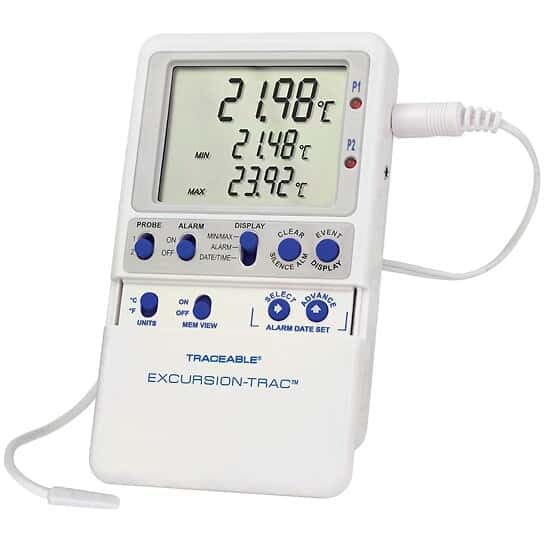
Image: The Traceable Excursion-Trac Data Logger Thermometer, showing its digital display and connected bullet probe.
പാക്കേജ് ഉള്ളടക്കം
പായ്ക്ക് അൺപാക്ക് ചെയ്യുമ്പോൾ എല്ലാ ഇനങ്ങളും ഉണ്ടെന്ന് ഉറപ്പാക്കുക:
- Traceable Excursion-Trac Data Logger Thermometer Unit
- Bullet Probe with 10-ft (3-m) Cable
- USB ഫ്ലാഷ് ഡ്രൈവ്
- Flip-Open Stand
- Hook-and-Loop Strips
- Magnetic Strips
- Wall-Mount Receptacle
- ബാറ്ററികൾ (മുൻകൂട്ടി ഇൻസ്റ്റാൾ ചെയ്തതോ വേറിട്ടതോ)
- NIST-Traceable Calibration Certificate with Data
സജ്ജമാക്കുക
- ബാറ്ററി ഇൻസ്റ്റാളേഷൻ: If batteries are not pre-installed, open the battery compartment on the back of the unit and insert the specified batteries, observing correct polarity.
- അന്വേഷണ കണക്ഷൻ: Connect the bullet probe cable to the designated port on the thermometer unit. Ensure a secure connection.
- പ്രാരംഭ പ്ലേസ്മെൻ്റ്: Position the thermometer unit using the flip-open stand for a benchtop, or utilize the hook-and-loop strips, magnetic strips, or wall-mount receptacle for secure placement. The 10-ft (3-m) submersible micro-cable allows the probe to be placed in the desired monitoring location, even permitting doors to close over the cable.
- പവർ ഓൺ: Press the power button (if available) or ensure the unit is active. The display should illuminate, showing current temperature readings.
പ്രവർത്തന നിർദ്ദേശങ്ങൾ
അടിസ്ഥാന പ്രവർത്തനം
- ഡിസ്പ്ലേ: The LCD simultaneously shows the current temperature, minimum recorded temperature (MIN), and maximum recorded temperature (MAX).
- യൂണിറ്റുകൾ: Use the 'UNITS' button to toggle between Celsius (°C) and Fahrenheit (°F) temperature scales.
- മെമ്മറി View: The 'MEM VIEW' function allows review സംഭരിച്ച ഡാറ്റയുടെ.
ഡാറ്റ ലോഗിംഗ്
- The device features rolling memory, capable of retaining the most recent 525,600 temperature observations.
- ഡാറ്റ കൈമാറ്റം: To transfer recorded data, insert the provided USB flash drive into the unit's USB port. The data will be saved as a CSV file, accessible on any computer without special software.
- ക്ലിയർ മെമ്മറി: After downloading data and alarm events, the memory can be cleared to continue recording new data. Refer to the device's specific buttons (e.g., 'CLEAR') for this function.
അലാറം പ്രവർത്തനങ്ങൾ
- The thermometer allows setting limits for and storing up to 10 unique alarm events.
- അലാറങ്ങൾ സജ്ജീകരിക്കുക: Use the 'ALARM' and 'SELECT/ADVANCE' buttons to set desired high and low temperature alarm thresholds.
- Smart-Alarm Function: The Smart-Alarm provides both visual and audible alerts. It continues to alert even if conditions return to the normal temperature range, ensuring that any excursion is noted.
- നിശബ്ദ അലാറം: An 'ALARM SILENCE' button is available to temporarily mute audible alerts.
മെയിൻ്റനൻസ്
- വൃത്തിയാക്കൽ: പരസ്യം ഉപയോഗിച്ച് യൂണിറ്റ് വൃത്തിയാക്കുകamp cloth. Do not submerge the main unit in water. The bullet probe is submersible and can be cleaned as needed.
- ബാറ്ററി മാറ്റിസ്ഥാപിക്കൽ: When the battery indicator appears or the unit fails to power on, replace the batteries. Refer to the battery compartment for the correct battery type.
- പ്രോബ് കെയർ: Handle the probe and its cable with care to prevent damage. Avoid sharp bends or excessive pulling on the cable.
ട്രബിൾഷൂട്ടിംഗ്
| ഇഷ്യൂ | സാധ്യമായ കാരണം | പരിഹാരം |
|---|---|---|
| Unit does not power on or display is blank. | ഡെഡ് അല്ലെങ്കിൽ തെറ്റായി ഇൻസ്റ്റാൾ ചെയ്ത ബാറ്ററികൾ. | ബാറ്ററികൾ മാറ്റി സ്ഥാപിക്കുക, ശരിയായ പോളാരിറ്റി ഉറപ്പാക്കുക. |
| കൃത്യമല്ലാത്ത താപനില റീഡിംഗുകൾ. | Probe not properly connected or damaged. | Ensure probe is securely connected. Inspect probe and cable for visible damage. |
| Data not transferring to USB drive. | USB drive not properly inserted or full. | Re-insert USB drive. Ensure the drive has sufficient space. Try a different USB drive if available. |
| Alarm not sounding or not clearing. | Alarm settings incorrect or alarm silenced. | Verify alarm thresholds. Check if the alarm has been manually silenced. |
സ്പെസിഫിക്കേഷനുകൾ
| ഫീച്ചർ | വിശദാംശങ്ങൾ |
|---|---|
| മോഡൽ നമ്പർ | Excursion-Trac |
| താപനില പരിധി | –58 to 158 Degrees Fahrenheit (-50 to 70 Degrees Celsius) |
| റെസലൂഷൻ | 0.01 ഡിഗ്രി |
| കൃത്യത | 0.25 ഡിഗ്രി സെൽഷ്യസ് |
| ഡാറ്റ ലോഗിംഗ് ശേഷി | 525,600 temperature observations (rolling memory) |
| കണക്റ്റിവിറ്റി | USB (for CSV data transfer) |
| ഡിസ്പ്ലേ തരം | എൽസിഡി |
| പ്രത്യേക ഫീച്ചർ | Alarm (Smart-Alarm function) |
| അന്വേഷണ തരം | Bullet Probe, Submersible, 10-ft (3-m) cable |
| മെറ്റീരിയൽ | പ്ലാസ്റ്റിക് |
| ഉൽപ്പന്ന പരിപാലനം | വൃത്തിയാക്കുക |
| സർട്ടിഫിക്കേഷൻ | NIST-ട്രേസബിൾ കാലിബ്രേഷൻ |
പിന്തുണയും വാറൻ്റിയും
For technical assistance, product inquiries, or warranty information, please contact the manufacturer, Cole-Parmer, or visit their official website. Specific warranty details were not provided in the product data.
നിർമ്മാതാവ്: കോൾ-പാർമർ
ബ്രാൻഡ്: ട്രേസബിൾ
ഓൺലൈൻ പിന്തുണ: www.coleparmer.com


