1. ആമുഖം
The TP-Link Deco E4 is a Whole Home Mesh Wi-Fi System designed to provide seamless wireless coverage throughout your home. This system eliminates Wi-Fi dead zones by creating a unified network, allowing devices to switch between Deco units without signal interruption. The Deco E4 (3-Pack) offers extensive coverage and supports multiple devices for a stable and fast internet experience.
പ്രധാന സവിശേഷതകളിൽ ഇവ ഉൾപ്പെടുന്നു:
- മെഷ് വൈഫൈ: Delivers a fast, stable, and seamless Wi-Fi connection up to 1167Mbps.
- തടസ്സമില്ലാത്ത റോമിംഗ്: Connected devices switch between Deco units without signal loss.
- Scalable Coverage: Easily expand coverage by adding more Deco units. Compatible with other Deco models.
- രക്ഷാകർതൃ നിയന്ത്രണം: Efficient settings for managing internet access for children.
- സേവനത്തിൻ്റെ ഗുണനിലവാരം (QoS): Prioritize applications to maintain fluidity even with network congestion.
- വോയ്സ് കമാൻഡുകൾ: Compatible with Amazon Alexa for convenient control.
- Deco App: Simplifies configuration and management of your network.
2. സജ്ജീകരണ ഗൈഡ്
Setting up your TP-Link Deco E4 system is designed to be straightforward using the Deco mobile application. Follow these steps for initial installation:
- സിസ്റ്റം അൺപാക്ക് ചെയ്യുക: Carefully remove all components from the packaging. The Deco E4 (3-Pack) includes three Deco E4 units, a power adapter for each unit, an Ethernet cable, and a Quick Installation Guide.
- ഡെക്കോ ആപ്പ് ഡൗൺലോഡ് ചെയ്യുക: ഇതിനായി തിരയുക "TP-Link Deco" in the App Store (iOS) or Google Play Store (Android) and download the application.
- ആദ്യത്തെ ഡെക്കോ യൂണിറ്റ് ബന്ധിപ്പിക്കുക:
- നിങ്ങളുടെ മോഡം പവർ ഓഫ് ചെയ്യുക.
- നൽകിയിരിക്കുന്ന ഇഥർനെറ്റ് കേബിൾ ഉപയോഗിച്ച് നിങ്ങളുടെ മോഡത്തിലേക്ക് ഒരു ഡെക്കോ യൂണിറ്റ് ബന്ധിപ്പിക്കുക.
- Power on your modem, then power on the Deco unit. Wait for the Deco unit's LED to pulse blue.
- ഡെക്കോ ആപ്പ് സമാരംഭിക്കുക: Open the Deco app on your smartphone or tablet. Log in with your TP-Link ID or sign up if you don't have one.
- ഇൻ-ആപ്പ് നിർദ്ദേശങ്ങൾ പാലിക്കുക: The app will guide you through the process of creating your Deco network, including setting up a Wi-Fi name and password.
- അധിക ഡെക്കോ യൂണിറ്റുകൾ ചേർക്കുക: Once the first Deco unit is set up, the app will prompt you to add the remaining units. Place them strategically around your home for optimal coverage. Power them on and wait for their LEDs to pulse blue, then follow the app's instructions to add them to your network.

Image: Three Deco E4 units, illustrating their compact design and rear ports for power and Ethernet connections, essential for initial setup.

Image: The Deco app interface, demonstrating its capabilities for managing multiple Deco units, checking connected devices, and accessing network settings.
3. പ്രവർത്തന നിർദ്ദേശങ്ങൾ
Once your Deco E4 system is set up, you can manage and optimize your home network using the TP-Link Deco app. The system is designed for ease of use and provides advanced features for a superior Wi-Fi experience.
3.1 Network Management via Deco App
The Deco app serves as your central control panel for the entire mesh system:
- View ബന്ധിപ്പിച്ച ഉപകരണങ്ങൾ: See all devices connected to your Deco network. You can identify them, assign them to profiles, and prioritize their internet access.
- രക്ഷാകർതൃ നിയന്ത്രണങ്ങൾ: പ്രോ സജ്ജീകരിക്കുകfiles for family members, filter content, set time limits, and pause internet access for specific devices.
- QoS (സേവന നിലവാരം): Prioritize bandwidth for specific activities (e.g., gaming, streaming) or devices to ensure smooth performance.
- അതിഥി നെറ്റ്വർക്ക്: നിങ്ങളുടെ പ്രധാന നെറ്റ്വർക്ക് സുരക്ഷിതമായി നിലനിർത്തുന്നതിനായി അതിഥികൾക്കായി ഒരു പ്രത്യേക വൈഫൈ നെറ്റ്വർക്ക് സൃഷ്ടിക്കുക.
- Monthly Reports: ഒരു ഓവർ നേടൂview of network usage, security threats, and connected devices.
3.2 Seamless Roaming and Coverage
The Deco E4 system provides a single Wi-Fi network name (SSID) across all units. Your devices will automatically connect to the Deco unit with the strongest signal as you move around your home, ensuring an uninterrupted connection. The system is designed to eliminate Wi-Fi dead zones, covering up to 4,000 sq ft (370 m²) with a 3-pack.
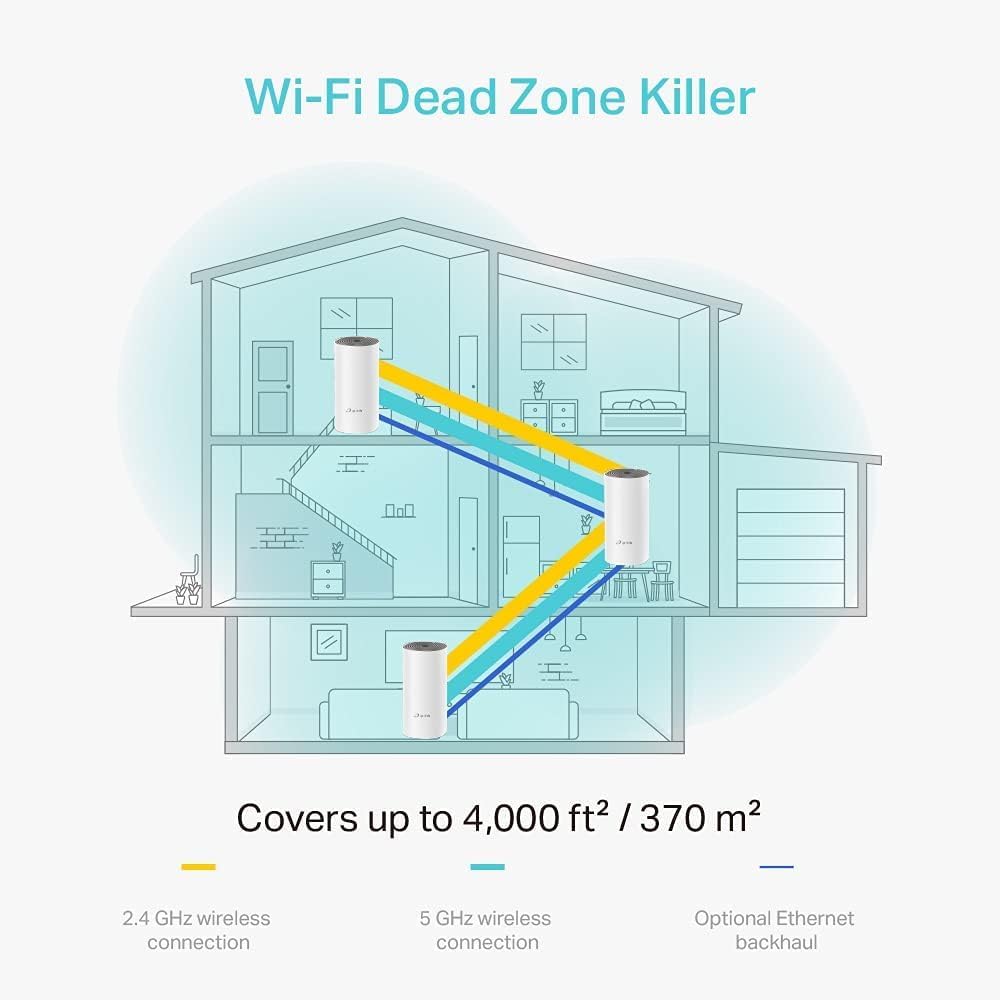
Image: A visual representation of the Deco E4 system eliminating Wi-Fi dead zones across a multi-story home, utilizing both 2.4 GHz and 5 GHz wireless connections, and optional Ethernet backhaul.
3.3 Device Capacity
The Deco E4 system supports connections for up to 100 devices simultaneously, making it suitable for homes with numerous smart devices, laptops, smartphones, and tablets. It handles various activities including high-speed downloading, 720P/1080P/4K streaming, web browsing, smart home device management, and IP camera streaming.

Image: Infographic detailing the Deco E4's capacity to connect up to 100 devices across its 5 GHz and 2.4 GHz bands, supporting diverse internet activities.
3.4 Compatibility with Other Deco Models
The Deco E4 is compatible with other Deco models, allowing you to create a flexible and expandable mesh network tailored to your specific needs. This ensures that you can mix and match different Deco units to optimize coverage and performance.

Image: A network diagram illustrating how different TP-Link Deco models can work together to form a comprehensive mesh Wi-Fi system.
4. പരിപാലനം
To ensure optimal performance and longevity of your TP-Link Deco E4 system, consider the following maintenance tips:
- ഫേംവെയർ അപ്ഡേറ്റുകൾ: Regularly check for and install firmware updates via the Deco app. Updates often include performance improvements, security enhancements, and new features.
- ശാരീരിക ശുദ്ധീകരണം: Keep the Deco units clean and free from dust. Use a soft, dry cloth to wipe the surfaces. Avoid using liquid cleaners or abrasive materials.
- വെൻ്റിലേഷൻ: Ensure that the Deco units are placed in well-ventilated areas. Do not cover the ventilation holes, as this can lead to overheating and reduced performance.
- ഒപ്റ്റിമൽ പ്ലേസ്മെൻ്റ്: ആനുകാലികമായി റീview the placement of your Deco units using the app's signal strength indicators to ensure they are providing the best possible coverage.
- പുനരാരംഭിക്കുന്നു: If you experience minor network issues, a simple restart of your Deco units (unplugging and replugging them after a minute) can often resolve the problem.
5. പ്രശ്നപരിഹാരം
If you encounter issues with your Deco E4 system, try the following troubleshooting steps:
5.1 ഇന്റർനെറ്റ് കണക്ഷൻ ഇല്ല
- മോഡം പരിശോധിക്കുക: നിങ്ങളുടെ മോഡം ശരിയായി പ്രവർത്തിക്കുന്നുണ്ടെന്നും സജീവ ഇന്റർനെറ്റ് കണക്ഷൻ ഉണ്ടെന്നും ഉറപ്പാക്കുക.
- കേബിൾ കണക്ഷനുകൾ: Verify that the Ethernet cable connecting the main Deco unit to your modem is securely plugged in.
- ഉപകരണങ്ങൾ പുനരാരംഭിക്കുക: Power cycle your modem and all Deco units. Wait a few minutes for them to restart and re-establish connections.
- Deco App Diagnostics: Use the Deco app to run network diagnostics. It can often identify and suggest solutions for common connectivity problems.
5.2 ദുർബലമായ വൈ-ഫൈ സിഗ്നൽ അല്ലെങ്കിൽ ഡെഡ് സോണുകൾ
- Relocate Deco Units: Adjust the placement of your Deco units. Ensure they are not too far apart and are free from obstructions like thick walls or large metal objects.
- കൂടുതൽ യൂണിറ്റുകൾ ചേർക്കുക: If coverage is still insufficient, consider adding another Deco unit to expand your mesh network. The Deco E4 is compatible with other Deco models.
- ഇടപെടൽ പരിശോധിക്കുക: Other electronic devices (e.g., microwaves, cordless phones) can interfere with Wi-Fi signals. Try moving Deco units away from such devices.
5.3 Devices Not Connecting to Deco
- Verify Wi-Fi Password: നിങ്ങൾ ശരിയായ വൈഫൈ പാസ്വേഡാണോ നൽകുന്നതെന്ന് രണ്ടുതവണ പരിശോധിക്കുക.
- ഉപകരണം പുനരാരംഭിക്കുക: കണക്റ്റുചെയ്യുന്നതിൽ പ്രശ്നമുള്ള ഉപകരണം പുനരാരംഭിക്കുക.
- നെറ്റ്വർക്ക് മറക്കുക: On your device, "forget" the Wi-Fi network and then try to reconnect.
- Check MAC Filtering: Ensure that MAC filtering is not enabled on your Deco system, or if it is, that your device's MAC address is whitelisted. This can be managed through the Deco app.
6 സ്പെസിഫിക്കേഷനുകൾ
| ഫീച്ചർ | വിശദാംശങ്ങൾ |
|---|---|
| ബ്രാൻഡ് | ടിപി-ലിങ്ക് |
| മോഡലിൻ്റെ പേര് | DECO E4 |
| വയർലെസ് സ്റ്റാൻഡേർഡ് | 802.11ac |
| ഫ്രീക്വൻസി ബാൻഡ് ക്ലാസ് | ഡ്യുവൽ-ബാൻഡ് (2.4 GHz & 5 GHz) |
| ഡാറ്റ കൈമാറ്റ നിരക്ക് | 1200 Megabits Per Second (AC1200) |
| Maximum Upstream Data Transfer Rate | സെക്കൻഡിൽ 600 മെഗാബൈറ്റുകൾ |
| ലാൻ പോർട്ട് ബാൻഡ്വിഡ്ത്ത് | 1000 Mbps |
| തുറമുഖങ്ങളുടെ എണ്ണം | 2 (per Deco unit) |
| സുരക്ഷാ പ്രോട്ടോക്കോൾ | WPA2, WPA3 |
| നിയന്ത്രണ രീതി | App (TP-Link Deco App) |
| ആൻ്റിന തരം | ആന്തരികം |
| കവറേജ് (3-പായ്ക്ക്) | Up to 4,000 sq ft / 370 m² |
| അനുയോജ്യമായ ഉപകരണങ്ങൾ | ലാപ്ടോപ്പ്, സ്മാർട്ട്ഫോൺ, ടാബ്ലെറ്റ് |
| സ്മാർട്ട് ഹോം അനുയോജ്യത | ആമസോൺ അലക്സാ അനുയോജ്യമാണ് |
| ഇനത്തിൻ്റെ ഭാരം | 1.3 Kilograms (for the system) |
| ഇനത്തിന്റെ അളവുകൾ (L x W x H) | 14.17"L x 6.3"W x 9.45"H (പാക്കേജിംഗ് അളവുകൾ) |
7. വാറൻ്റി വിവരങ്ങൾ
The TP-Link AC1200 Mesh WiFi System Deco E4 (3-Pack) comes with a 3 വർഷത്തെ വാറൻ്റി. സാധാരണ ഉപയോഗത്തിലുള്ള മെറ്റീരിയലുകളിലെയും ജോലികളിലെയും വൈകല്യങ്ങൾ ഈ വാറന്റി ഉൾക്കൊള്ളുന്നു.
For detailed terms and conditions of the warranty, including specific coverage, limitations, and how to make a claim, please refer to the official TP-Link website or the warranty card included with your product. Keep your proof of purchase for warranty service.

Image: The product packaging for the Deco E4 system, clearly indicating the 3-year warranty period.
8. പിന്തുണ
For further assistance, technical support, or to access additional resources for your TP-Link Deco E4 Mesh WiFi System, please utilize the following options:
- TP-Link Deco App: The app provides in-app support, FAQs, and diagnostic tools.
- Official TP-Link Webസൈറ്റ്: ഔദ്യോഗിക ടിപി-ലിങ്ക് പിന്തുണ സന്ദർശിക്കുക website for comprehensive FAQs, troubleshooting guides, firmware downloads, and contact information for customer service. You can typically find this by searching for "TP-Link support" online.
- ഓൺലൈൻ കമ്മ്യൂണിറ്റി ഫോറങ്ങൾ: Engage with other TP-Link users and experts on official or unofficial forums for community-driven support.
Always refer to the latest information available on the official TP-Link channels for the most accurate and up-to-date support.